

Picture a service page that’s been stuck on page two for months. The content is solid. It has a handful of decent backlinks. The site loads fast. Then someone finally opens a crawl report and looks at the internal links pointing to it, and every single one says “learn more.” Dozens of links, and not one of them tells Google what the page is actually about.
That little label on a link is called anchor text, and Google has been reading it since before the company had a real office. It’s one of the oldest signals in search, and honestly one of the most misused. Some people ignore it completely and wonder why their best pages feel invisible. Others go the opposite way, stuffing the same money keyword into every link they can get, and then wonder why their rankings fall off a cliff after a core update.
The truth sits somewhere in the middle, and it’s not complicated once you see how Google actually uses those words. So this guide starts from zero. What a link really is under the hood, why search engines care about the words on it, the different types you’ll run into, how internal links and backlinks follow different rules, how to keep your link profile looking natural, and how to audit and fix your own site. By the end, you’ll be able to look at any link and know whether it’s helping you or quietly working against you.
Key Takeaways
- The clickable words in a link tell both readers and Google what the destination page is about.
- Google uses those words for relevance, but it also uses repetitive keyword patterns to spot link spam.
- Internal links and backlinks play by different rules. You control one, other people control the other.
- There’s no magic percentage formula. Benchmark against pages already ranking for your keyword.
- Descriptive, natural, varied wording beats keyword stuffing every time.
- Audit internal links first. They’re the only ones you can fix in five minutes.
What Is Anchor Text?
Before getting into rankings, penalties, or ratios, you need the basics locked in. Everything else in this guide builds on this one idea, so it’s worth taking slowly.
Anchor text is the visible, clickable words in a hyperlink. Those words tell readers and search engines what they should expect to find after the click.
That’s it. No mystery. The tricky part isn’t the definition. It’s understanding how much weight a few words can carry when Google sees them across hundreds or thousands of links.
The Simplest Way to Picture It
Think of a link as a door. The URL is the room behind the door. The clickable words are the sign hanging on it.
If the sign says “Kitchen,” you walk in expecting a kitchen. If it says “Click here,” you have no idea what’s behind it. And if it says “Kitchen” but opens into a storage closet, you feel tricked. Google reacts the same way.
Here’s a simple sentence to make it concrete:
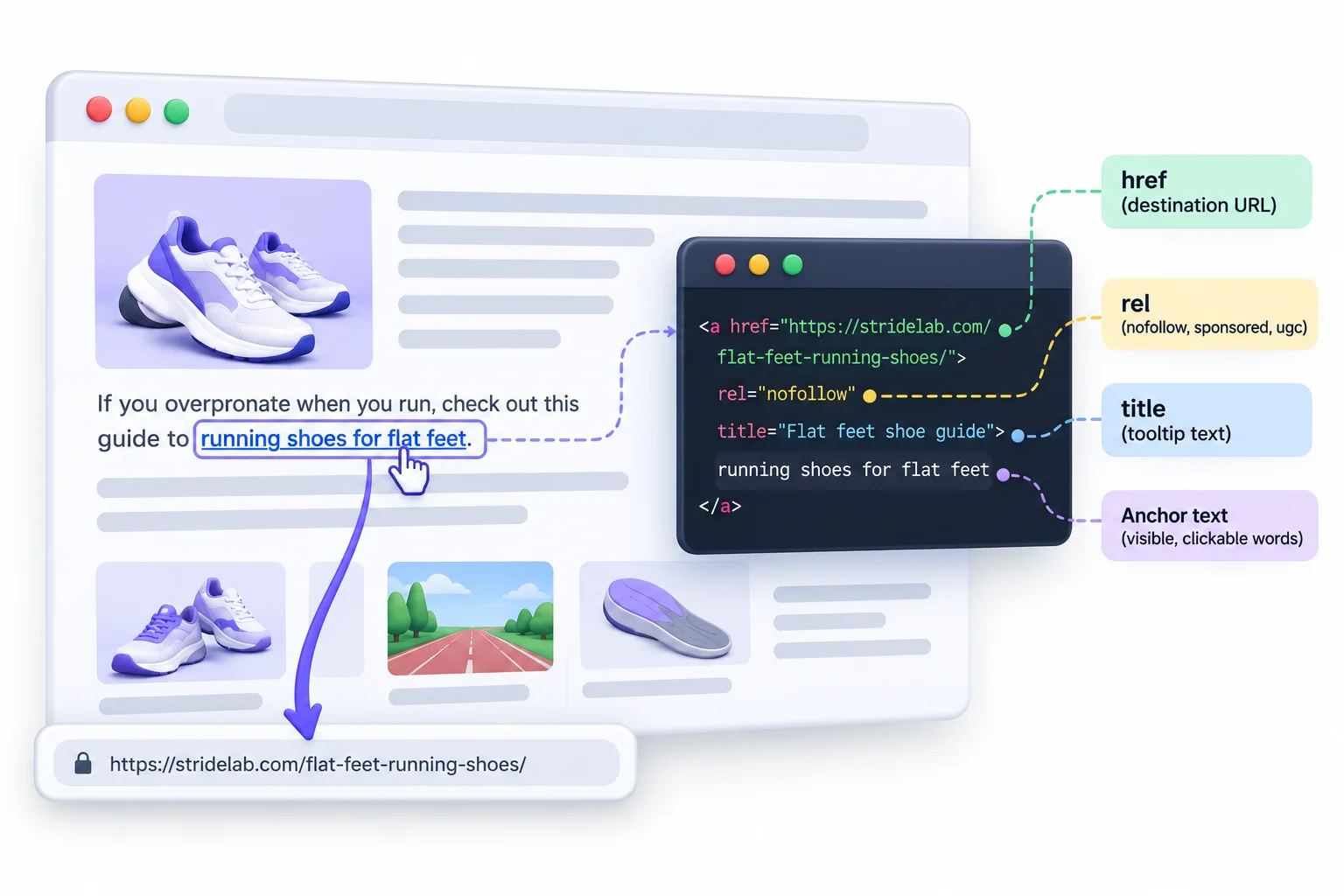
“If you overpronate when you run, check out this guide to running shoes for flat feet.”
In that sentence, “running shoes for flat feet” is the clickable part. A reader knows exactly what they’ll get. So does Google.
Throughout this guide, the examples use one made-up running shoe brand called StrideLab, with a target page about running shoes for flat feet. Same brand, same page, every time. That way you can compare examples side by side without getting lost.
What a Link Looks Like Behind the Scenes
On the screen, a link is just blue underlined words. Underneath, it’s a small piece of HTML. Here’s what the StrideLab link looks like in code:
<a href="https://stridelab.com/flat-feet-running-shoes/" rel="nofollow" title="Flat feet shoe guide">running shoes for flat feet</a>
Looks messy, but each piece has one job. Here’s the breakdown:
| Part | Example | What it does |
|---|---|---|
<a> element |
<a ...> |
Creates the link. Google says it can generally only crawl links built with an <a> element that has an href |
href |
href="https://stridelab.com/..." |
The destination URL |
| The clickable words | running shoes for flat feet |
What the reader sees and what Google reads as the label |
rel |
rel="nofollow" |
Qualifies the link: nofollow, sponsored, or ugc |
title |
title="Flat feet shoe guide" |
Shows a tooltip on hover. Google can use it as a fallback when the link has no visible words |
alt (inside an image) |
<img alt="running shoes for flat feet"> |
Acts as the link’s label when an image is the clickable element |
A couple of things worth flagging here:
- If a developer builds a “link” using something like
<span onclick="...">instead of a proper<a href>, Google may not crawl it at all. It works for humans clicking around. It doesn’t reliably work for search engines. - The
relattribute doesn’t change what the words say. It changes how Google treats the link itself. More on that later.
Link Text, Anchor, Hyperlink: Clearing Up the Terminology
SEO people throw these terms around like everyone already knows them. Beginners get confused, and fair enough, because some of them mean nearly the same thing.
| Term | What it means |
|---|---|
| Anchor text | The visible, clickable words in a link |
| Link text | Same thing. Google uses both names interchangeably in its documentation |
| Hyperlink (or link) | The whole clickable connection from one page to another |
| Anchor element | The <a> HTML tag that creates the link |
| Backlink | A link from another website pointing to yours |
| Internal link | A link from one page on your site to another page on your site |
| Outbound link | A link from your site pointing to a different website |
So when someone says “check your anchors,” they mean “look at the words used in your links.” When they say “check your backlink anchors,” they mean the words other sites used when linking to you.
Where Anchors Show Up on a Page
Links aren’t only in blog paragraphs. They’re everywhere on a page, and not all of them give Google the same amount of context. Google has never published how much weight each placement gets. But common sense goes a long way here: a link inside a relevant paragraph has a whole sentence of context around it, while the same words in a footer that appears on 3,000 pages look like boilerplate.
| Placement | Typical wording | How much context it gives |
|---|---|---|
| In-content (body text) | “our guide to running shoes for flat feet” | High. Surrounded by a relevant sentence and paragraph |
| Navigation menu | “Men’s Shoes,” “Running” | Moderate. Short labels, repeated on every page |
| Footer | “Shipping,” “Contact,” “Size Guide” | Low. Sitewide and usually generic |
| Sidebar | “Popular guides,” “Related posts” | Moderate. Depends on how relevant the widget is |
| Breadcrumbs | “Home > Running > Flat Feet” | Structural. Helps Google understand hierarchy |
| Buttons and CTAs | “Shop now,” “Get a quote” | Usually low. Action words, not topic words |
| Image links | Whatever the image’s alt text says | Depends entirely on the alt text |
Beginner Tip: Hover over any link in your browser and look at the bottom-left corner of the window. The words you hovered over are the anchor. The URL that pops up is the destination. Do this on a few sites and the whole concept clicks in about thirty seconds.
Why Search Engines Pay Attention to Link Words
This section answers the “why should I care” question. Google didn’t randomly decide to read link words one day. It was baked into how Google worked from the start, and the history explains almost every rule you’ll hear today.
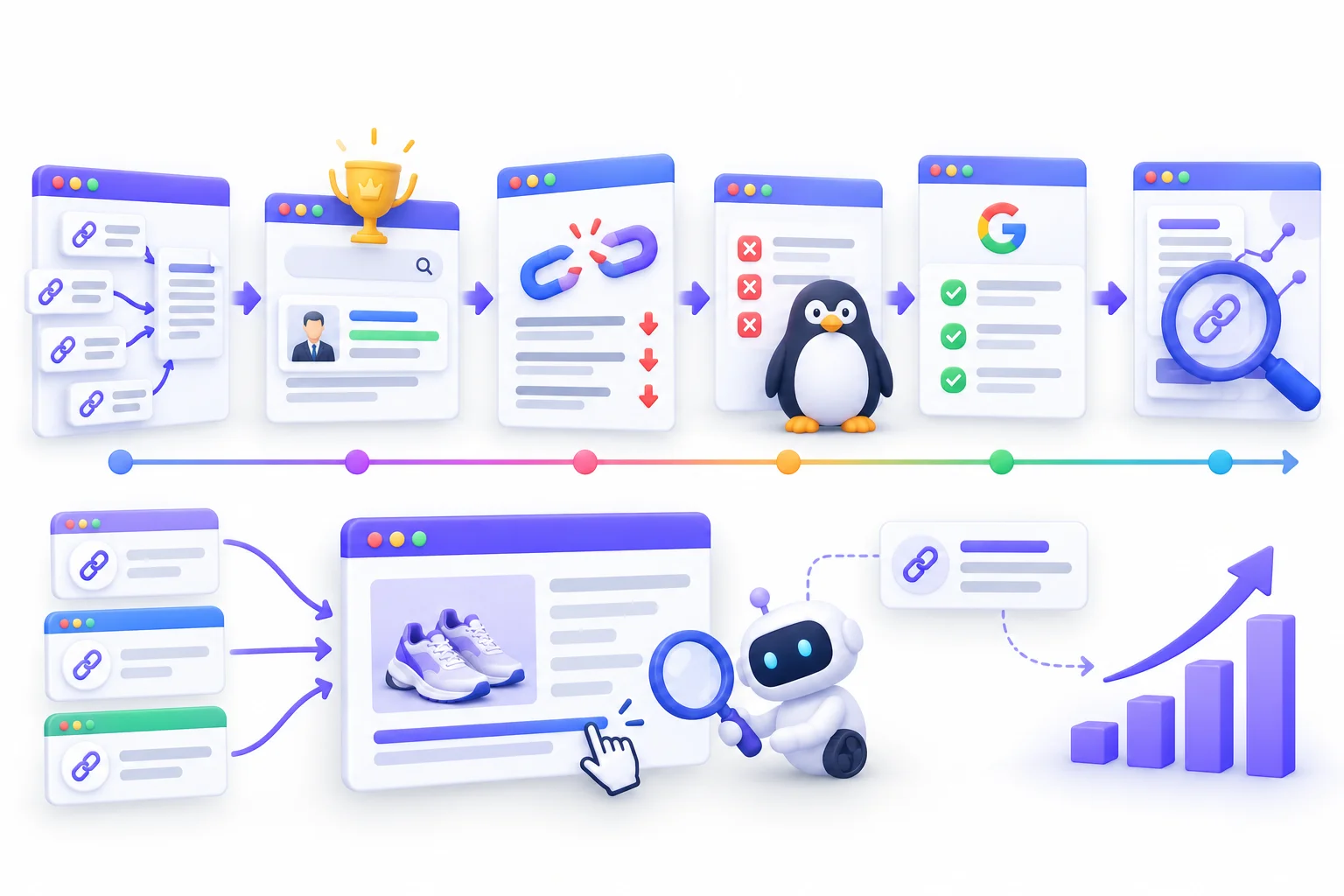
Here’s the short version. Early on, link words were a goldmine for relevance. Then SEOs figured that out and abused it. Then Google cracked down. Every modern best practice comes from that cycle.
A Short History, From PageRank to Penguin
| Year | Event | Why it matters for link words |
|---|---|---|
| 1998 | Sergey Brin and Larry Page publish their Stanford paper describing Google | They explained that link words often describe a page better than the page describes itself, and let Google index pages it can’t crawl |
| Early 2000s | “Google bombing” goes mainstream | Coordinated links proved a page could rank for words it never used |
| 2007 | Google changes its algorithm to defuse most Google bombs | First big public sign Google would fight link word manipulation |
| April 2012 | Penguin update launches | Targeted manipulative link profiles, including keyword-stuffed links |
| September 2016 | Penguin 4.0 becomes part of the core algorithm | Runs in real time and devalues spammy links instead of demoting entire sites |
| 2022 | Google publishes expanded “Link best practices” documentation | First detailed official guidance on writing good link text |
| May 2024 | Internal Google API documentation leaks | Shows anchor-related attributes exist inside Google’s systems |
Let’s walk through the parts that matter.
- The original paper. In “The Anatomy of a Large-Scale Hypertextual Web Search Engine,” Brin and Page explained why they attached link words to the page being linked to, not just the page the link sat on. Their reasoning was simple: the people linking to a page often describe it more accurately than the page itself does. It also let Google “understand” things it couldn’t read directly, like images and programs. So yeah, link words were a ranking idea from literally day one.
- Google bombing. The most famous example: so many people linked the phrase “miserable failure” to George W. Bush’s official biography page that it ranked number one for that search. The biography obviously didn’t contain those words. Same thing happened with Adobe’s Acrobat Reader download page ranking for “click here,” because millions of sites wrote “click here to download Acrobat Reader.” Funny, but it proved a point. Link words alone could push a page to the top.
- Penguin, 2012. This is where the party ended. Penguin went after sites with spammy, manipulative link profiles, and keyword-stuffed backlinks were a big part of that. Lots of sites that had built thousands of exact-match links watched their traffic collapse overnight.
- Penguin 4.0, 2016. Google folded Penguin into the core algorithm, made it run continuously, and changed how it handled spam. Instead of punishing a whole site, it mostly started ignoring the bad links. That shift matters a lot, and it comes up again in the recovery section.
What Google Officially Recommends Today
Look, a lot of SEO advice is guesswork. This part isn’t. Google’s Search Central documentation spells out how it wants links built, and it’s surprisingly practical.
Google says good link text should be descriptive, reasonably concise, and relevant to both the page it’s on and the page it points to. It also says, pretty much in plain words, that if you feel like you’re forcing keywords into a link, you’ve gone too far.
Here’s the rest of what Google recommends, summed up:
- Put the link words inside a crawlable
<a>element with anhrefattribute. - Don’t leave links empty. If there are no visible words, Google can fall back on the
titleattribute, but that’s a backup, not a plan. - When an image is the link, Google uses the image’s
alttext as the label. So write real alt text. - If JavaScript inserts your link words, use the URL Inspection tool in Search Console to confirm the words actually show up in the rendered HTML.
- Don’t chain links right next to each other. Readers can’t tell them apart, and each link loses the surrounding text that explains it.
- Every page you care about should get a link from at least one other page on your site.
- Use
rel="sponsored"orrel="nofollow"on any link you were paid for in some way.
None of this is fancy. That’s kind of the point. Google wants links to work for people first.
What the 2024 Leak Hinted At
In May 2024, a large set of internal Google API documentation from its Content Warehouse became public. SEOs spent weeks digging through thousands of attribute names, trying to figure out what Google tracks.
A few of those attributes related directly to links and the words on them. One that got a lot of attention was named anchorMismatchDemotion. There were also fields tied to anchor spam.
So what does that actually tell you? Two things, and only two:
- Google tracks whether the words on a link match the page it points to. A mismatch looks like something Google may demote.
- Google keeps specific records related to spammy link word patterns.
What it doesn’t tell you: how much any of this counts, whether every attribute is still in use, or how they’re combined. Google itself warned people against drawing conclusions from out-of-context or outdated documentation. Fair warning. But the names alone line up perfectly with Google’s public advice: match your words to the destination, and don’t spam.
Key Insight: Google has always treated link words as a second opinion. The page says what it’s about. The links pointing to it either back that up or contradict it. When both agree, Google gets confident. When they don’t, something looks off.
How Link Words Influence Rankings
This is the heart of the guide, the “how does it affect rankings” half of the question. Most articles just say “yes, it’s a ranking factor” and move on. Not helpful. The effect actually breaks down into four separate signals, and each one works differently.
Some of these signals help you rank. One of them can hurt you. And the context around the link plays a role too. Let’s go through each.
Signal 1, Relevance
The most basic job of link words is telling Google what the destination page covers.
Say 30 different running blogs link to StrideLab’s flat feet page. They use words like “shoes for flat-footed runners,” “flat feet running shoes,” “trainers with good arch support,” and “StrideLab’s overpronation guide.” None of them are identical, but they all point in the same direction. Google gets a consistent, believable picture: this page is about running shoes for people with flat feet.
That consistency is what builds relevance. Not one perfect keyword repeated 30 times. Thirty different people describing the same thing in their own words.
- Relevance gets stronger when link words from many sources agree on the topic.
- It gets weaker when the words are vague (“this site,” “here”) or point to the wrong topic.
- It works on top of the page’s own content. Link words confirm the topic. They don’t replace good content.
Signal 2, Ranking for Terms Not on the Page
Here’s where it gets interesting. Link words can help a page rank for searches the page doesn’t even mention.
The Google bombing era proved it. The Bush biography never said “miserable failure.” Adobe’s download page wasn’t about “click here.” Both ranked anyway, purely because of the words other people used in their links.
Google has since put safeguards in place, so you can’t pull that trick today. But the underlying mechanism still exists in a softer form. If lots of sites link to StrideLab’s page using “overpronation shoes,” that page can pick up relevance for “overpronation shoes” even if the page mostly says “flat feet.”
- This is why natural variety in backlinks is actually useful. Every variation adds a related term Google can connect to the page.
- It’s also why fully generic links (“click here”) are a missed opportunity. They add no extra terms at all.
Signal 3, Spam and Manipulation Detection
So here’s the flip side. The same signal that helps you can also flag you.
Real people don’t all use the same words when they link to something. If StrideLab had 200 linking domains and 140 of them said exactly “buy running shoes online,” that’s not how humans talk. That’s how link schemes look.
Google’s own link spam policies call out patterns like this directly. They list things like large-scale guest posting campaigns stuffed with keyword-rich links, keyword-heavy links hidden inside widgets, and links spread across the footers or templates of many sites. All three are basically “same keyword, everywhere, on purpose.”
- One exact-match backlink? Totally normal.
- Hundreds of them from unrelated sites, all saying the same money phrase? That’s a footprint.
- After Penguin 4.0, Google mostly ignores those links. So the best case is they stop helping. The worse case, if it’s blatant, is a manual action.
Signal 4, Crawl Paths and Topic Structure
This one is mostly about internal links, and honestly it gets overlooked a lot.
When you link between your own pages, the words you choose help Google understand how your content fits together. If your blog posts about plantar fasciitis, arch pain, and overpronation all link to the flat feet shoe page with descriptive words, Google can see the whole cluster. That page becomes the obvious hub for the topic.
- Descriptive internal links help Google map topic clusters.
- They help Google find pages in the first place. A page with zero internal links (an orphan page) is easy for Google to miss or undervalue.
- They help readers move through your site, which is good for them and good for you.
The Words Around the Link Matter Too
Link words don’t float on their own. Google reads them inside a sentence, inside a paragraph, inside a page about some topic.
How do we know Google cares about surrounding text? Its own documentation says don’t chain links together, because each link loses the text around it. You don’t warn people about losing something unless it’s being used.
That means a link that says “this guide” can still pass some meaning if it sits in a paragraph clearly about flat feet and running shoes. It’s not as strong as descriptive words, but it’s not zero either.
- Write the sentence first, then decide which part becomes the link.
- A strong surrounding sentence can make up for slightly shorter link words.
- A page about something completely unrelated linking with a keyword phrase looks odd, no matter how good the words are.
Does Only the First Link Count?
This is a theory you’ll run into on SEO forums. The idea: if one page links to the same URL twice, Google only counts the words on the first link and ignores the second.
SEO testers have run experiments on this since the late 2000s, and many of them observed exactly that behavior. But Google has never confirmed it as a rule, and test results from years ago don’t automatically hold today.
So what do you do with an unconfirmed theory? Treat it as a cheap insurance policy:
- Make the first link to any page on a given page the most descriptive one.
- Be careful with navigation menus. Your nav often contains the first link to a page in the code, which might be a short label like “Shoes.”
- Don’t obsess over it. Writing good link words everywhere covers you either way.
Here’s how the four signals stack up side by side:
| Signal | What Google learns | What helps | What hurts |
|---|---|---|---|
| Relevance | What the target page is about | Descriptive, on-topic words | Vague or mismatched words |
| Off-page terms | Extra searches the page can rank for | Natural variety from real sites | The same money keyword over and over |
| Spam detection | Whether the links look earned | A diverse, organic link profile | Exact-match patterns at scale |
| Site structure | How your pages relate to each other | Consistent, descriptive internal links | Orphan pages and “click here” everywhere |
And a few myths worth killing right now:
| Myth | Reality |
|---|---|
| More exact-match links always mean higher rankings | Past a natural point, they look like a link scheme and get ignored or worse |
| Generic links like “read more” are worthless | They’re weaker, but they still pass a link and some context from the sentence around them |
| Internal links get penalized just like backlinks | Google’s link spam examples are about links between sites, not your own navigation and content links |
| There’s one perfect ratio for every site | Healthy link profiles vary a lot by niche, brand, and page type |
Strategy Note: Think of link words as confirmation, not persuasion. They work best when they confirm what your page already clearly covers. Trying to use them to convince Google your page is about something it isn’t is exactly what Google spent the last decade shutting down.
The 10 Types of Anchor Text (With Examples)
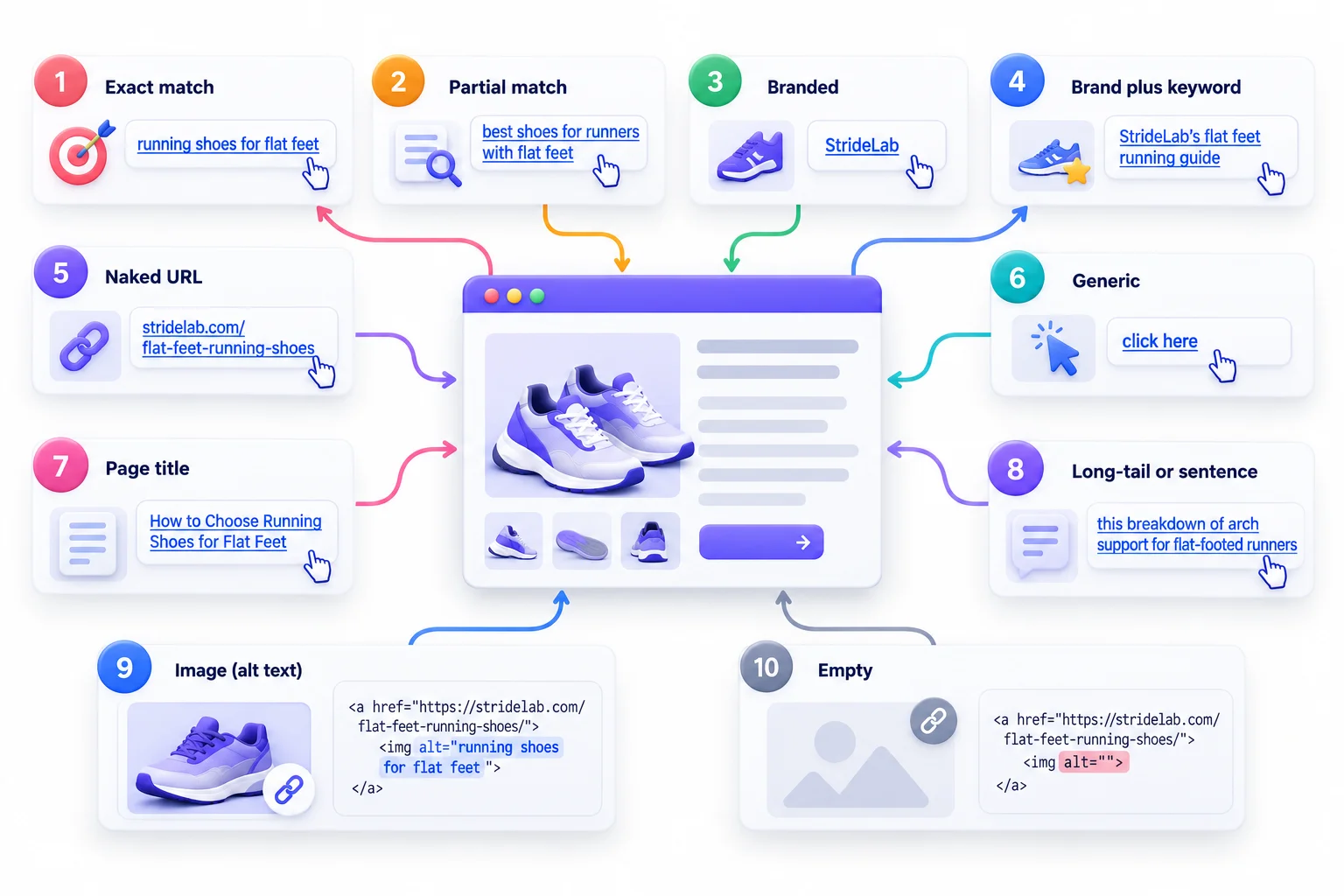
Every SEO tool sorts link words into categories, and they don’t all use the same names. That’s confusing for beginners. So this section uses one consistent set of 10 types, all built on the same StrideLab example.
Why bother learning types at all? Because the type tells you the risk. An exact-match backlink and a branded backlink can point to the same page, but Google reads them very differently. Once you can name the type, you can judge any link in a second.
Here’s the full picture in one table:
| # | Type | Example | Risk level | Best used for |
|---|---|---|---|---|
| 1 | Exact match | running shoes for flat feet | High on backlinks, low on internal links | Selective internal links |
| 2 | Partial match | best shoes for runners with flat feet | Low to medium | Most contextual links |
| 3 | Branded | StrideLab | Very low | Homepage links, PR, mentions |
| 4 | Brand plus keyword | StrideLab’s flat feet running guide | Low | Guest posts, citations |
| 5 | Naked URL | stridelab.com/flat-feet-running-shoes | Very low | References, directories |
| 6 | Generic | click here, read more | Low risk, low value | Sparingly, mostly CTAs |
| 7 | Page title | How to Choose Running Shoes for Flat Feet | Low | Roundups and resource pages |
| 8 | Long-tail or sentence | this breakdown of arch support for flat-footed runners | Low | Editorial, natural links |
| 9 | Image (alt text) | alt=”running shoes for flat feet” | Depends on the alt text | Linked images and banners |
| 10 | Empty | An image link with no alt text | No risk, but a wasted link | Fix it wherever you find it |
Now let’s go through each one properly.
Exact Match
The link words match your target keyword exactly. If StrideLab wants to rank for “running shoes for flat feet,” an exact-match link uses precisely those words.
This is the type that got sites hammered in 2012. On backlinks, a few exact matches are normal, because some people genuinely describe a page that way. Hundreds of them look manufactured.
- Use it: on internal links where it reads naturally, like a blog post sentence that already talks about running shoes for flat feet.
- Avoid it: as the default wording in guest posts, paid placements, or any link you’re asking someone else to create.
Partial Match
The link includes your keyword, or part of it, mixed with other words. “Best shoes for runners with flat feet” or “flat feet shoe recommendations” are both partial matches.
This is the workhorse type. It gives Google a clear topic signal without looking robotic, because this is how real people actually write.
- Use it: for most contextual links, internal and external.
- Watch for: variations that are so close to exact match they’re basically the same phrase with “best” glued on every time.
Branded
The link words are just your brand name. “StrideLab.” Nothing else.
Branded links are the most natural thing in the world. When people mention a company, they say its name. That’s why healthy backlink profiles usually lean heavily branded, especially for homepages.
- Use it: for homepage links, press mentions, partner pages, and anywhere people are talking about your company rather than a specific topic.
- Limit: branded links don’t say much about a specific inner page’s topic, so they help authority more than topical relevance.
Brand Plus Keyword
Your brand name combined with a topic phrase. “StrideLab’s flat feet running guide” or “the StrideLab overpronation shoe list.”
This is a nice middle ground. It reads naturally, carries some topic relevance, and the brand name makes it look like a genuine reference rather than an SEO play.
- Use it: in guest posts, citations, and partner content where you have some say in the wording.
- Don’t: turn it into a formula where every link reads “StrideLab best running shoes for flat feet buy now.”
Naked URL
The link words are the URL itself. “stridelab.com/flat-feet-running-shoes” or just “stridelab.com.”
People use these all the time in citations, forum posts, directories, and social bios. They look completely natural and carry almost no risk.
- Use it: in references, resource lists, and directory listings.
- Limit: a URL with clear words in the slug passes a little topic info. A URL like
stridelab.com/p?id=4417passes basically nothing.
Generic
Link words that could point anywhere. “Click here,” “read more,” “this page,” “learn more,” “website.”
Generic links aren’t dangerous. They’re just lazy. They give readers and Google no clue about the destination. They’re also a real problem for screen reader users, which comes up in the best practices section.
- Use it: sparingly, mostly on buttons and calls to action where the surrounding design makes the destination obvious.
- Avoid: using them as your standard internal link wording. That’s how pages end up like the one in the intro of this guide.
Page or Post Title
The link words are the exact title of the destination page. “How to Choose Running Shoes for Flat Feet.”
These show up constantly in roundups, curated lists, and “further reading” sections. They’re natural, descriptive, and often contain keywords without looking forced, because the title already does.
- Use it: in resource pages, roundups, and internal “related posts” sections.
- Bonus: if your titles are well written, this type gives you relevance for free.
Long-Tail and Sentence Anchors
Longer link words, sometimes half a sentence. “This breakdown of arch support for flat-footed runners” or “what a podiatrist actually looks for in a running shoe.”
These read the most like natural writing, and they carry a lot of descriptive detail. Editors and journalists use them a lot.
- Use it: in editorial content, internal links in long articles, and anywhere a short phrase would sound clunky.
- Watch for: going too long. If half the paragraph is blue, it’s hard to read.
Image Links and Alt Text
When an image is wrapped in a link, there are no visible words. So Google reads the image’s alt attribute as the label instead. Google confirms this in its own documentation.
That means a banner image linking to StrideLab’s flat feet page with alt="running shoes for flat feet" acts like a link with those words.
- Use it: by writing alt text that describes the image and fits the destination.
- Don’t: stuff a list of keywords into alt text. It’s meant to describe the image for people who can’t see it.
Empty Links
A link with no visible words and no alt text. Usually it’s an image link where nobody filled in the alt attribute, or an icon link with nothing behind it.
Google can sometimes fall back on the title attribute if one exists. But most empty links have nothing at all, so Google just sees a link pointing somewhere with zero description.
- Fix it: by adding alt text to linked images and visible or screen-reader text to icon links.
- Why bother: it’s free relevance you’re throwing away, and it’s an accessibility failure too.
Pro Tip: Related-term link words, like synonyms and topic-adjacent phrases (“arch support trainers,” “overpronation shoes”), are often the safest way to add relevance. You get topic signals without repeating the exact keyword for the hundredth time.
Internal Links vs Backlinks, Two Different Rulebooks
A lot of guides throw internal links and backlinks into the same pot and hand out one set of rules. That’s a mistake. They work differently, Google treats them differently, and the risks are completely different.
Once you see why, most of the confusion around “how many keyword links is too many” just disappears.
Why One Is in Your Control and the Other Isn’t
Internal links live on your own site. You write the words. You pick the destination. You can change them any time.
Backlinks live on other people’s sites. They pick the words. That’s exactly why Google values them. A backlink is supposed to be someone else’s independent opinion about your page.
So think about it from Google’s side. When you describe your own page with a keyword, that’s expected. It’s your site. When dozens of supposedly independent websites all describe your page with the same keyword, that starts looking less like independent opinions and more like someone coordinating them.
- Internal links: you control them, so Google expects them to be descriptive.
- Backlinks: you don’t control them, so Google expects them to be messy and varied.
- When backlinks look too tidy, that’s the red flag.
Rules for Internal Link Wording
With internal links, you’ve got a lot more freedom. Nearly every example in Google’s link spam policies involves links between different sites, not a site linking to its own pages. That doesn’t mean anything goes, though.
- Be descriptive. Keyword-relevant internal links are fine and helpful. “Running shoes for flat feet” pointing to that page is just good labeling.
- Vary your wording. If 40 blog posts link to the same page, they don’t all need identical words. Mix exact, partial, and title variations.
- One phrase, one page. Don’t use the same link words to point to two different URLs. If “flat feet shoes” links to a blog post in one article and a category page in another, Google gets mixed signals about which page owns that topic.
- Prioritize body links. Nav and footer links are useful, but links inside relevant paragraphs carry way more context.
- Link from related content. A post about marathon training linking to the flat feet page makes sense. A post about company holiday hours doesn’t.
Rules for Backlink Wording
With backlinks, you influence the words at best. Through guest posts, PR, partnerships, and outreach, you might suggest wording. But most links you earn naturally, people will word however they like.
- Let branded and natural variations dominate. That’s what earned links look like.
- Never request exact-match wording at scale. Google’s spam policies specifically list large-scale guest posting campaigns with keyword-rich links.
- If you do suggest wording, suggest brand plus topic or a page title. “StrideLab’s guide to flat feet shoes” is believable. “Cheap running shoes for flat feet” in every guest post is not.
- Watch for sitewide links. A keyword link in the footer of a partner’s site repeats across every page. Google’s policies call out widely distributed footer and template links by name.
Here’s the full comparison:
| Factor | Internal links | Backlinks |
|---|---|---|
| Who controls the words | You | The linking site |
| Exact-match tolerance | Higher | Low |
| Main purpose | Structure, relevance, crawling | Authority, trust, relevance |
| Main risk | Confusing or competing pages for the same phrase | Over-optimization and link scheme signals |
| How to fix problems | Edit the link yourself | Ask for changes, dilute with natural links, or disavow |
Warning: Asking a site to use specific keyword-rich wording in exchange for money, free products, or any kind of payment can fall under Google’s link spam policies. Google says paid links should carry
rel="sponsored"orrel="nofollow". If a link was paid for, label it.
How to Balance Your Link Profile Without Chasing Fake Ratios
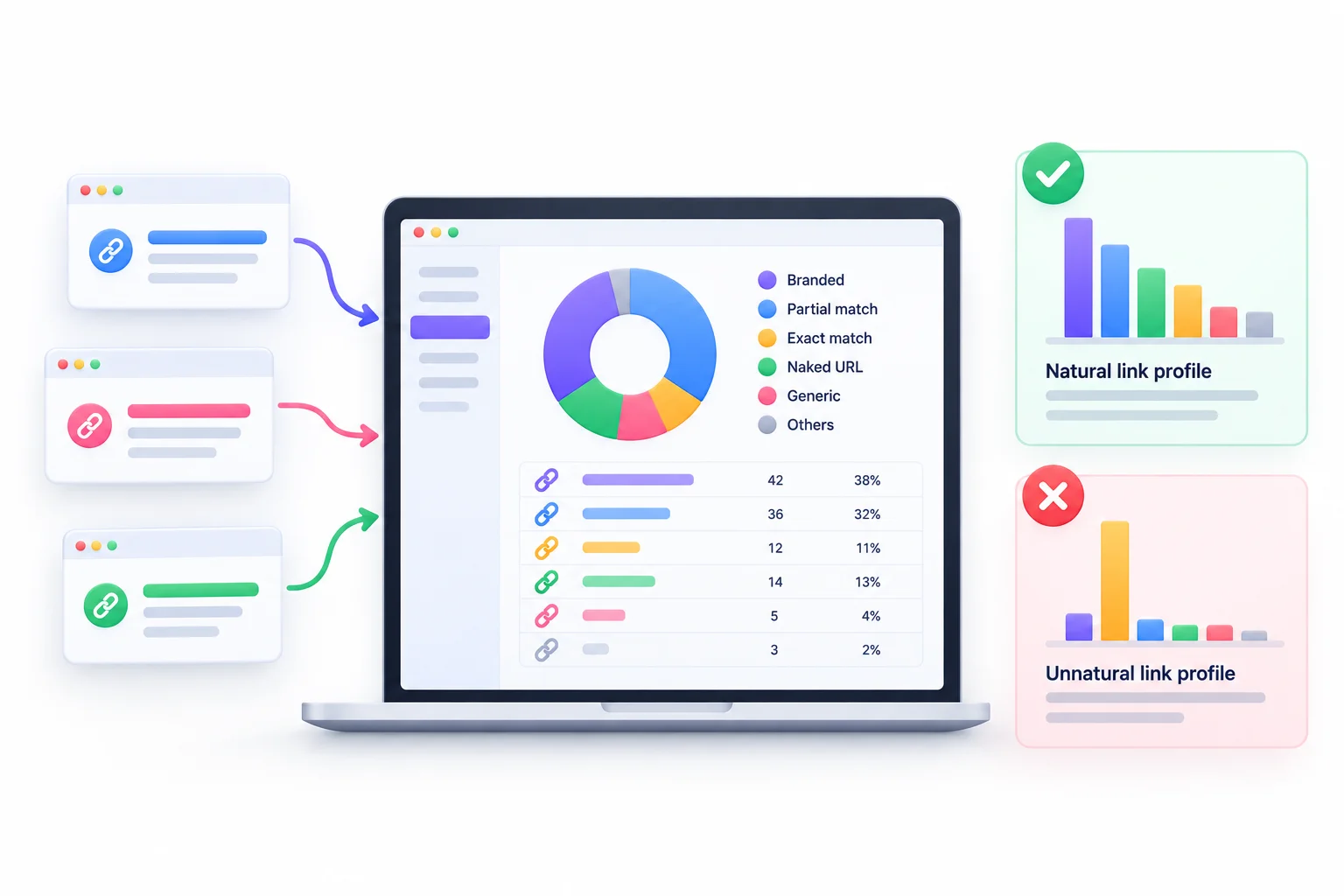
If you’ve searched this topic before, you’ve probably seen tables telling you exactly what percentage of your links should be branded, exact match, and so on. Some of them sound very confident. Things like “keep branded at 70% and exact match under 1%.”
Here’s the problem. Google has never published any target ratios. Those numbers are someone’s opinion, sometimes based on a study, sometimes based on nothing. This section shows a better way to figure out what “natural” looks like for your specific situation.
Why Universal Percentage Formulas Don’t Work
Think about two very different sites.
A local bakery’s homepage probably gets mostly branded links and naked URLs. People write “Sunrise Bakery” or the web address. A software comparison page might get tons of partial-match and title links, because bloggers link to it with words like “this CRM comparison.” Both profiles are totally natural. They just look nothing alike.
That’s why one formula can’t fit everyone. What’s normal depends on:
- Your niche. Some industries naturally attract more descriptive links than others.
- Your brand strength. Big brands get more branded links. New sites get fewer.
- The page type. Homepages get branded links. Blog posts and guides get title and partial-match links.
- Your competition. If every top-ranking page has a certain pattern, that pattern is what Google sees as normal for that search.
Chasing a made-up number can actually push you into an unnatural profile. If your niche naturally has more descriptive links and you force in branded ones to hit 70%, you’re manipulating in the other direction.
How to Benchmark Against Pages That Already Rank
So instead of copying someone’s table, look at what’s already working for your exact keyword. The pages ranking in the top spots show you what Google currently accepts as normal.
Here’s how to do it:
- Pick your target keyword. For StrideLab, that’s “running shoes for flat feet.”
- Pull the top 3 to 5 ranking pages. Skip giant sites like Amazon if they don’t resemble yours. Pick pages similar in type and size.
- Export each page’s backlink anchors. Use a backlink tool like Ahrefs or Semrush. Look at the specific page, not the whole domain.
- Sort every link into the 10 types. A spreadsheet works fine. Some tools do a rough version automatically.
- Average the results. Work out the rough share of each type across all the competitors.
- Compare to your own page. If competitors average a big chunk of partial-match links and yours are all branded, that’s a gap. If yours are heavy on exact match and theirs aren’t, that’s a warning.
- Close gaps naturally. Earn links with content, outreach, and PR. Don’t go buy 50 links to fix a percentage.
A simple template to track this:
| Competitor page | Branded % | Partial % | Exact % | URL % | Generic % | Other % |
|---|---|---|---|---|---|---|
| Competitor 1 | ||||||
| Competitor 2 | ||||||
| Competitor 3 | ||||||
| Average | ||||||
| Your page |
This takes maybe an hour. And it gives you something no generic article can: the actual pattern for your keyword, right now.
A Starting-Point Mix for New Sites
Brand new sites often don’t have enough links to benchmark against yet. Fair enough. Here’s a general picture of what natural tends to look like. This is a starting reference, not a rule, and there are deliberately no percentages here because any exact number would be made up.
| Link type | Homepage | Inner pages (guides, blogs, products) |
|---|---|---|
| Branded | Most of your links | A solid share |
| Naked URL | A good share | Some |
| Brand plus keyword | Some | Some |
| Page title | Rare | A good share |
| Partial match | Small share | A good share |
| Exact match | Rare | Small share |
| Generic | Some | Some |
The logic is simple. People link to homepages when they mention your company, so they use your name or URL. People link to inner pages when they reference specific content, so they describe the content or use its title.
Warning Signs of an Unnatural Profile
Some patterns jump out right away when you look at a backlink report. If you see any of these, it’s worth digging in:
- A sudden spike of identical words. Twenty new links in one month all saying “buy running shoes online.”
- Links in unrelated languages or topics. A running shoe site getting links from casino blogs with keyword-stuffed words.
- Sitewide footer links with money keywords. One partner site linking from the footer of all 5,000 of its pages with “best running shoes.”
- Lots of exact matches from low-quality sites. Thin blogs that exist only to sell links.
- Almost no branded links. If nobody ever links to you by name, that’s strange for a real business.
Strategy: Earn links with content worth citing, and the mix usually takes care of itself. Nobody has to tell journalists to vary their wording. Manufactured links are almost always where profiles go wrong.
How to Write Good Link Text, 12 Best Practices
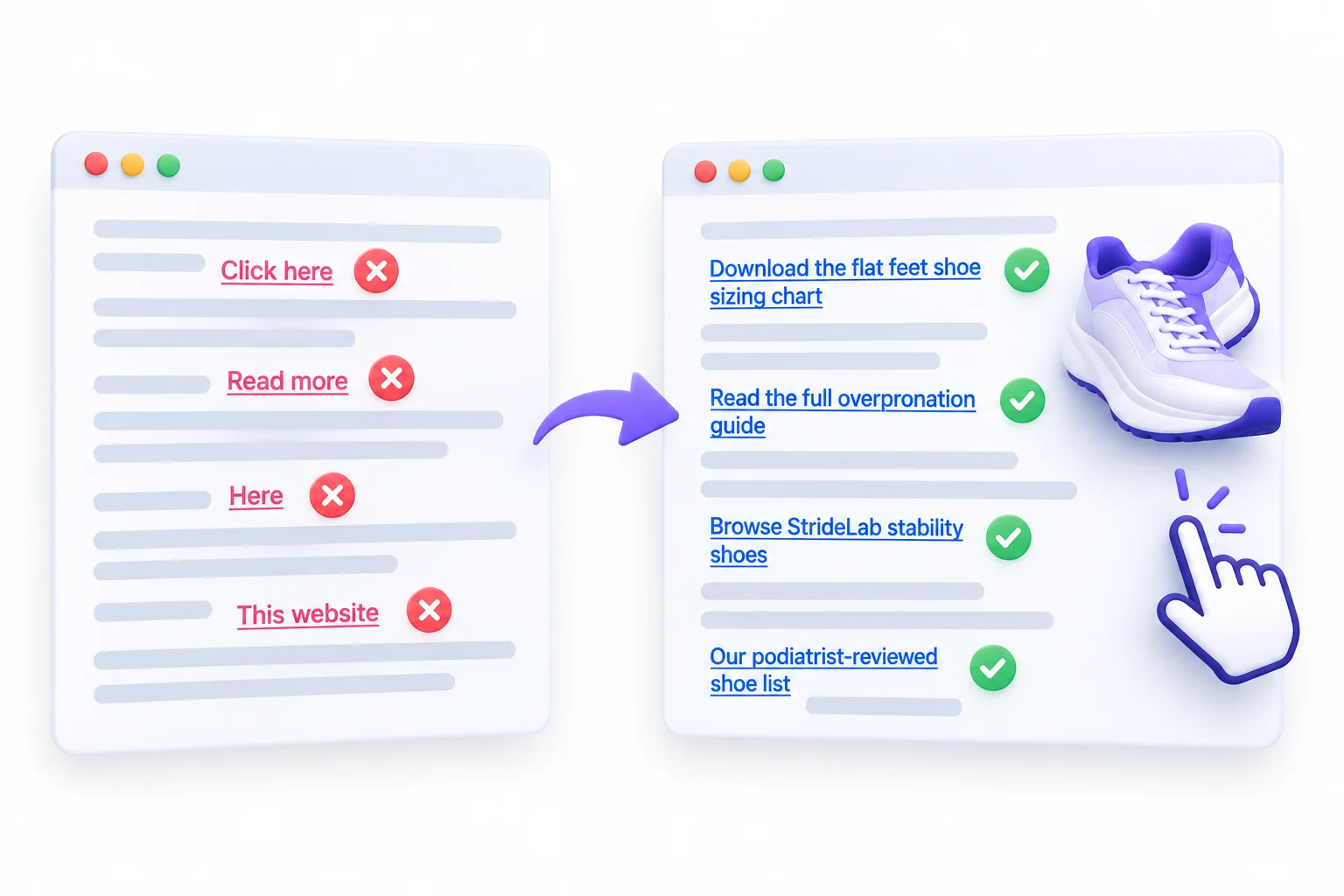
Everything so far explains how Google reads links. This section is the practical part: how to actually write them, whether you’re adding internal links to a blog post or suggesting wording for a guest post.
Each practice comes with a quick example using StrideLab. None of these are complicated. Most of them come down to “write for the reader and Google follows.”
Describe the Destination, Not the Action
Link words should say what’s on the other side, not what you want the reader to do. “Click,” “go,” and “see” describe actions. They say nothing about the page.
- Weak: “Click here to see our shoes.”
- Better: “Browse our running shoes for flat feet.”
The second version tells everyone exactly what they’ll get.
Keep It Concise (Usually 2 to 6 Words)
Google’s guidance says “reasonably concise” and doesn’t give a word count. In practice, most good links land somewhere around 2 to 6 words. That’s a habit, not a rule.
Short enough to scan. Long enough to describe. If you’re linking half a paragraph, trim it down to the part that actually names the topic.
- Too long: “if you want to find the best running shoes for flat feet that podiatrists recommend in 2026, read this”
- Better: “running shoes podiatrists recommend for flat feet”
Match the Intent of the Target Page
The words should match what the page actually offers. If the page is a beginner’s guide, don’t call it “advanced strategies.” If it’s a product category, don’t label it like a how-to article.
- Mismatched: “complete guide to flat feet” linking to a product category page with 20 shoes and no guide.
- Matched: “shop flat feet running shoes” linking to that same category page.
Mismatches annoy readers. And remember that leaked anchorMismatchDemotion attribute. Google seems to notice too.
Make It Read Naturally in the Sentence
Write the sentence like a normal person first. Then pick which words become the link. Never build a sentence around a keyword you want to link.
- Forced: “For running shoes flat feet best options, StrideLab has them.”
- Natural: “StrideLab tested a dozen pairs to find the best running shoes for flat feet.”
If you’d stumble saying it out loud, rewrite it.
Vary Wording Across Links to the Same Page
If 30 blog posts on your site link to the flat feet page, don’t use the same exact words 30 times. Mix it up based on what each sentence is about.
- “running shoes for flat feet”
- “our flat feet shoe guide”
- “shoes built for overpronation”
- “How to Choose Running Shoes for Flat Feet”
Each variation adds a slightly different related term, and the whole thing looks like normal writing.
Avoid “Click Here” as a Habit
One “click here” on a sign-up button won’t hurt anyone. But when “click here” or “read more” becomes your default internal link style, you’re throwing away relevance on every single link.
- Habit: “To learn about arch support, click here.”
- Fix: “Here’s how arch support actually works in a running shoe.”
Don’t Chain Links Back to Back
Google specifically warns against this. When three links sit right next to each other, readers can’t tell where one ends and the next begins, and each link loses the surrounding text that explains it.
- Chained: “Check out our [trail shoes] [road shoes] [flat feet shoes].”
- Better: Separate them into their own sentences, each with a bit of context.
Use the Surrounding Sentence for Context
The sentence around the link adds meaning. So write sentences that support the link instead of making the link do all the work.
- Thin: “More info [here].”
- Rich: “Runners with flat feet usually need more medial support, which is why [this flat feet shoe guide] focuses on stability models.”
Even if the link words were short, that sentence tells Google exactly what the page covers.
Link From Topically Related Pages
Where a link sits matters as much as what it says. A link from a page about running injuries to the flat feet shoe page makes complete sense. A link from your shipping policy page, not so much.
- Link between pages that share a topic.
- Build clusters: several related posts all pointing to one hub page.
- Don’t force links into unrelated content just to add more.
Write Descriptive Alt Text for Image Links
Google reads alt text as the label for image links. So every linked image needs alt text that describes the image and makes sense for the destination.
- Empty:
<img src="banner.jpg" alt=""> - Stuffed:
alt="running shoes flat feet best shoes buy shoes cheap" - Good:
alt="StrideLab stability running shoe for flat feet"
Make Sure Links Are Crawlable (JavaScript and Rendering)
Your link words only count if Google can actually see them. Google says it can generally only crawl links that use an <a> element with an href attribute.
- Ask developers to use real
<a href="...">links, not clickable<div>or<span>elements. - If a JavaScript framework inserts link words after the page loads, test the page with the URL Inspection tool in Search Console and check the rendered HTML.
- This matters a lot on sites built with React, Next.js, and similar frameworks, where developers sometimes handle navigation with scripts instead of plain links.
Write for Accessibility Too
This is the one almost nobody mentions, and it’s a big deal. The Web Content Accessibility Guidelines include a success criterion called 2.4.4 Link Purpose (In Context), at Level A, the most basic conformance level. It says the purpose of every link should be clear from its words, or from the words plus their context.
Here’s why it matters in practice. Screen reader users often pull up a list of every link on a page to navigate quickly. Picture that list: “read more, read more, read more, click here, learn more.” Completely useless.
- Write link words that make sense out of context whenever you can.
- If a design requires a short “Read more” button, add screen-reader text that names the destination.
- Good news: accessible link text and SEO-friendly link text are basically the same thing.
Here’s a quick before and after across common situations:
| Weak link text | Improved version | Why it’s better |
|---|---|---|
| click here | download the flat feet shoe sizing chart | Names the actual destination |
| read more | read the full overpronation guide | Tells readers and Google the topic |
| this website | StrideLab’s running shoe reviews | Adds brand and topic |
| best running shoes flat feet cheap buy | budget running shoes for flat feet | Reads like a human wrote it |
| here | our podiatrist-reviewed shoe list | Specific and trustworthy |
| learn more about our products and services and shoes | browse StrideLab stability shoes | Shorter, clearer, focused |
Quick Test: Read only the linked words out loud, with no sentence around them. If a stranger couldn’t guess where the link goes, rewrite it.
Common Mistakes That Hold Rankings Back
Most link text problems aren’t dramatic. Nobody wakes up to a penalty because of one bad link. It’s usually a slow pile-up of small mistakes that keep good pages from ranking where they should.
The good news: almost all of these are fixable in an afternoon, especially the internal ones. Here’s the list.
| Mistake | Why it hurts | How to fix it |
|---|---|---|
| Overusing exact match on backlinks | Looks like a link scheme. Google may ignore the links or, in blatant cases, take manual action | Shift toward branded, title, and partial-match wording in any links you influence |
| Same words pointing to different pages | Google can’t tell which page owns the topic, so both may underperform | Pick one page per topic and point those words only there |
| Generic words on all internal links | Wastes relevance on every link and fails accessibility | Rewrite internal links with descriptive words |
| Misleading words | Words promise one thing, page delivers another. Readers bounce and Google sees a mismatch | Match words to what the page actually offers |
| Keyword-stuffed footer or sidebar links | Sitewide repetition of money keywords looks manipulative | Use plain, user-friendly labels in templates |
| Empty image links or missing alt text | Google gets a link with no description at all | Add descriptive alt text to every linked image |
| Linking to broken or redirected URLs | Broken links dead-end readers. Redirect chains slow crawling | Update links to point straight at the final live URL |
| Link words inserted by JavaScript that never render | Google may not see the words, or the link, at all | Use real <a href> links and check rendered HTML with URL Inspection |
| Over-linking in one paragraph | Too many links dilute focus and annoy readers | Keep links where they genuinely help, usually one or two per paragraph at most |
If you only fix one thing from this table, fix the generic internal links. It’s the most common problem, it’s 100% in your control, and you’ll see the difference across the whole site.
Choosing the Right Anchor, a Decision Framework
Knowing the 10 types is useful. Knowing which one to use in a specific situation is what actually matters day to day. Most guides skip this part entirely.
So here’s a practical framework. Find your situation in the table, and you’ll know what kind of wording fits.
| Scenario | Recommended type | Example |
|---|---|---|
| Blog post linking to your own service or product page | Partial match or exact match (if it reads naturally) | “our running shoes for flat feet” |
| Linking out to a source or study | Descriptive partial match or title | “a gait study from the university’s sports lab” |
| Guest post author bio | Branded or naked URL | “StrideLab” or “stridelab.com” |
| Guest post in-content link | Brand plus keyword, title, or long-tail | “StrideLab’s guide to choosing flat feet shoes” |
| PR or news mention | Branded (that’s what journalists use anyway) | “StrideLab” |
| Resource or roundup page | Page title | “How to Choose Running Shoes for Flat Feet” |
| Navigation menu | Short, clear category label | “Flat Feet Shoes” |
| Banner or image link | Image with descriptive alt text | alt="StrideLab flat feet running shoe collection" |
| Ecommerce category links | Plain category name | “Stability Running Shoes” |
If you’re not sure, run through these questions in order:
- Is it an internal link? If yes, descriptive and keyword-relevant wording is fine. Go to question 3.
- Is it a backlink you’re influencing? If yes, lean branded, brand plus keyword, or title. Avoid exact match.
- Is the link inside body content? If yes, use partial match or long-tail wording that fits the sentence. If it’s in a menu or template, use a short, clear label.
- Does the sentence already contain the exact keyword? If yes, link that phrase only if it reads naturally. Otherwise, link a related phrase.
- Is it an image? If yes, write descriptive alt text that matches the destination.
- Was money or a product exchanged? If yes, add
rel="sponsored"orrel="nofollow", no matter what the words say.
After a few weeks of using this, you won’t need the table anymore. It becomes instinct.
How to Audit Your Link Text Step by Step
Knowing the rules is one thing. Knowing what’s actually happening on your site is another. An audit shows you both sides: the words other sites use to link to you, and the words you use to link to yourself.
You don’t need expensive tools to start. Google gives you a free version of the most important data. Paid tools just make it faster and more detailed.
Tools You Can Use
| Tool | What it shows | Free or paid |
|---|---|---|
| Google Search Console (Links report) | “Top linking text” from external sites, plus top linked pages and internal link counts | Free |
| Ahrefs (Anchors report) | Backlink words for any page or domain, including competitors | Paid. Ahrefs Webmaster Tools gives free data for sites you verify |
| Semrush (Backlink Analytics, Anchors tab) | Backlink words with referring domain counts | Paid, with limited free access |
| Screaming Frog SEO Spider | Every internal link on your site with its words, source, and destination | Free up to 500 URLs, paid beyond that |
Search Console only shows your own site. Ahrefs and Semrush can show competitors too, which you need for the benchmarking method from earlier.
Auditing Your Backlinks
Start with the links you don’t control, so you know if there’s a problem worth worrying about.
- Export your backlink words. Use Search Console’s “Top linking text” for a free overview, or the Anchors report in Ahrefs or Semrush for more detail.
- Sort them into the 10 types. Spreadsheet, filters, done.
- Look for spikes. Did a bunch of identical keyword links appear in one month? Check the referring domains.
- Check the sources. Are keyword-heavy links coming from relevant sites or from spammy blogs and link farms?
- Flag irrelevant words. Links with words about casinos, pills, or anything unrelated to your business often point to negative SEO or old spam.
- Compare against competitors. Use the benchmarking method to see if your mix is way off from what’s ranking.
Auditing Internal Links
This is where you’ll usually find the quickest wins, because you can fix everything yourself.
- Crawl your site. Run Screaming Frog (or a similar crawler) over your whole site.
- Export all inlinks. In Screaming Frog, the bulk export for all inlinks gives you every internal link with its words, source page, and destination.
- Filter for generic words. Search for “click here,” “read more,” “learn more,” “here,” and “this.” Each one is a candidate for a rewrite.
- Find duplicate words pointing to different URLs. Sort by link words, then check if the same phrase points to more than one destination.
- Find orphan pages. Pages with zero internal links pointing to them need links added.
- Find empty links. Image links with missing alt text and icon links with no words.
- Check your most important pages. Do your key service, product, or pillar pages get enough descriptive internal links from related content?
Audit Checklist
Copy this list and run through it every few months, or after any big site change:
- Exported backlink words from Search Console or a backlink tool
- Sorted backlink words into types
- Checked for sudden spikes of identical keyword links
- Reviewed referring domains behind keyword-heavy links
- Flagged irrelevant or spammy link words
- Benchmarked against top-ranking competitor pages
- Crawled the full site for internal links
- Replaced generic internal link words on key pages
- Fixed duplicate words pointing to different URLs
- Added internal links to orphan pages
- Added alt text to all linked images
- Confirmed JavaScript-inserted links render in the URL Inspection tool
Agency Tip: Run an internal link audit after every site migration or redesign. New templates have a sneaky habit of swapping descriptive links for generic “View more” buttons, and nobody notices until rankings start slipping.
Recovering From Over-Optimized Anchors
Maybe your audit turned up a problem. Lots of exact-match backlinks from an old SEO campaign, keyword-stuffed footer links, that kind of thing. Don’t panic. This section walks through how to tell how serious it is and what to do, in the right order.
The order matters. Plenty of sites have made things worse by jumping straight to the most drastic fix.
Devaluation vs Manual Action
There are two very different situations, and you need to know which one you’re in.
Algorithmic devaluation is the common one. Since Penguin 4.0 in 2016, Google’s systems mostly just ignore spammy links instead of punishing your whole site. You won’t get a notice. The links simply stop helping. If those links were propping up your rankings, you might see a gradual decline as they lose value.
A manual action is when a human reviewer at Google decides your site violates its spam policies. This one you’ll know about, because it shows up in the Manual Actions report in Search Console. For link problems, it’s usually labeled “Unnatural links to your site.”
- Check the Manual Actions report first. It takes ten seconds.
- No manual action? You’re almost certainly dealing with devaluation, which is far less serious.
- Got a manual action? You’ll need to clean up and submit a reconsideration request.
The Right Fix Order
Work from the easiest and safest fix to the most drastic one:
- Fix every internal link you control. Swap repetitive keyword wording for natural variations. Clean up sitewide footer and sidebar links. This costs nothing and carries zero risk.
- Ask site owners to edit or remove problem links. If you built links through guest posts or partnerships, contact the sites and ask them to change the wording to your brand name or page title, or add
rel="sponsored"if the link was paid. - Earn new, natural links. Fresh links from real sites, with natural wording, dilute the unnatural pattern over time. Content, PR, and genuine outreach all help.
- Disavow only as a last resort. Google’s disavow tool tells Google to ignore specific links. Google says most sites don’t need it. Use it if you have a manual action, or if you’re confident you have a significant number of spammy, artificial links that could lead to one.
Warning: Disavowing good links by mistake can hurt more than the problem you were trying to fix. If you’re not sure a link is harmful, leave it alone. The disavow tool is a scalpel, not a broom.
Link Text in the Age of AI Search
Search doesn’t look like ten blue links anymore. Google’s AI Overviews summarize answers right in the results, and AI chat tools pull information from across the web. So does any of this link stuff still matter?
Yeah, it does. Google has said the same SEO best practices apply to its AI features, and there are no special extra requirements to show up in them. Clear, crawlable, descriptive links are part of those basics.
Here’s the practical reasoning, kept honest about what’s known and what’s not:
- Descriptive links make relationships explicit. When your internal links clearly say “flat feet running shoes” and point to the right page, any system reading your site gets a clear map of which page covers which topic. Vague links leave that map blank.
- Topic clusters get clearer. A pillar page with descriptive internal links from a dozen related posts makes it obvious which page is your main resource on a subject. That’s the kind of page that tends to get cited as a source.
- Entities get clearer. Brand plus topic wording (“StrideLab’s flat feet guide”) ties your brand to a subject, which helps any system that tries to understand who’s an authority on what.
- The fundamentals haven’t changed. Nobody outside these companies knows exactly how AI systems weigh link words. Anyone claiming precise numbers is guessing. What’s clear is that the same habits that help regular rankings also make your content easier for machines to understand.
So don’t chase special “AI link tactics.” Write descriptive links, build clear topic clusters, and keep everything crawlable. That covers traditional search and AI search at the same time.
Good vs Bad Link Text Across Industries
The StrideLab examples make the concepts easy to follow. But link text looks different depending on what you sell and who you’re talking to. Here’s how good and bad wording plays out across a few common industries.
| Industry | Bad example | Good example | Why the good one works |
|---|---|---|---|
| SaaS | “click here for more” | “compare our project management plans” | Names the page and what readers can do there |
| Ecommerce | “best cheap shoes buy online sale” | “women’s trail running shoes” | Matches the category page, reads like a real label |
| Local service business | “plumber plumber city plumbing services” | “emergency pipe repair in your area” | Specific service, no keyword stuffing |
| B2B manufacturing or solar | “learn more” | “technical specs for our bifacial solar modules” | Gives buyers and Google the exact product topic |
| News or publishing | “this article” | “our investigation into rising rent prices” | Tells readers exactly which story they’ll open |
Look at what the good examples have in common. Every one of them matches the intent of the destination page. A buyer comparing plans wants a comparison page. A procurement engineer wants specs. A reader following a news story wants that story. The industry changes, but the rule doesn’t: describe what’s actually behind the link, in words the reader would naturally use.
Conclusion
Strip away all the jargon and this whole topic comes down to one idea. The words on a link are a promise about what’s on the other side. When the promise is clear and honest, readers trust it and Google trusts it. When it’s vague, people ignore it. When it’s manipulated, Google eventually catches on, and it’s been catching on since 2012.
So you don’t need a secret formula or a magic ratio. You need descriptive wording that fits the destination, natural variety across your links, a clear structure between your own pages, and a link profile that looks like real people talking about you. That’s what has held up through Penguin, through real-time spam systems, and now through AI-driven search.
If you’re wondering where to start, start with your internal links. They’re the only ones fully in your control, and most sites have dozens of “click here” and “read more” links quietly wasting their best pages. Crawl your site, find the generic links pointing to your most important pages, and rewrite them with clear, honest anchor text. It’s an afternoon of work, and it’s often the fastest SEO win you’ll get all year. And if you’d rather have someone else handle the full backlink and internal link audit, that’s exactly what a good SEO audit is for.
Frequently Asked Questions
These are the questions that come up most often when people start paying attention to link wording. Short answers, no fluff.
Is link text still a ranking factor in 2026?
Yes. Google’s documentation still says link text helps it understand the page being linked to, and its spam policies still go after keyword-stuffed link patterns. Both of those only make sense if the words are being used. What changed over the years is how Google uses them. Natural, descriptive wording helps. Manipulated, repetitive wording gets ignored or flagged.
How long should a link’s clickable text be?
Google says “reasonably concise” and leaves it there. In practice, 2 to 6 words covers most good links. The real test is clarity: can someone tell where the link goes from the words alone? If yes, the length is fine. If the link takes up half a sentence, trim it to the part that names the topic.
Can internal links get a site penalized?
It’s very unlikely. Nearly all of Google’s link spam examples involve links between different sites, not a site linking to its own pages. Descriptive, keyword-relevant internal links are normal and helpful. The bigger internal risks are practical ones, like using the same words for two different pages or stuffing keyword links into sitewide footers.
Do nofollow links pass any value through their wording?
Since 2019, Google treats nofollow, sponsored, and ugc as hints rather than strict rules. That means Google may choose to use some signals from those links, but it doesn’t guarantee anything. Don’t build a strategy around nofollow links passing value. Still, write good wording on them, because they bring real visitors either way.
What’s the difference between link text and alt text?
Link text is the visible clickable words in a text link. Alt text is a description of an image, written in the image’s alt attribute for people who can’t see it. When an image is wrapped in a link, Google uses the alt text as the link’s label. So for image links, alt text does both jobs at once.
Should every link use the target keyword?
Nope. On internal links, using the keyword sometimes is fine, but varying the wording looks more natural and adds related terms. On backlinks, keyword-heavy wording on every link is exactly the pattern Google’s spam systems look for. Mix in branded, title, partial-match, and natural sentence links.
How many exact-match links are too many?
There’s no official number, and anyone giving you a fixed percentage is guessing. The better answer comes from benchmarking: look at the top-ranking pages for your keyword and see how much exact match they have. If your page has far more than they do, you’re likely over the line for your niche.
Can changing internal link wording improve rankings?
It can help, especially when your current internal links are generic. Swapping “click here” for descriptive wording gives Google clearer signals about what each page covers. Just keep expectations realistic. Better link wording helps a page that already deserves to rank. It won’t rescue thin content.