

Picture a Shopify store selling cotton kurtas. Last month, 10,000 people landed on it. About 300 bought something. That’s a 3% conversion rate, which is honestly pretty decent for an Indian D2C store. But look at the other side of that number. 9,700 people scrolled, tapped a few products, maybe even dropped a ₹1,499 kurta into the cart, and then left. A WhatsApp message came in. The train reached the station. The kid needed dinner. Whatever it was, they never came back, and every rupee spent getting them there went with them.
That’s the exact problem retargeting ads were built to fix. Retargeting ads are ads shown to people who have already visited your website, opened your app, watched your video, or engaged with your page, but didn’t finish the thing you wanted them to do. Instead of paying again to find strangers, you pay to talk to people who already know you exist. They’ve seen your products. They’ve got a rough idea of your prices. Some of them were one tap away from buying.
Here’s the thing most beginners get wrong. They treat retargeting as a trick, like a magic button that doubles sales. Nope. It’s a follow-up system, and it works the way a good salesperson works in a physical shop. They don’t chase you down the street, but they do say hello when you walk back in. This guide walks through how retargeting ads actually work behind the scenes, which types you can run, how to set them up on Meta and Google, what to spend, which mistakes burn money, and how to tell whether any of it is working. If you’re new to paid traffic in general, it helps to understand the wider digital marketing funnel first, because retargeting only makes sense once you see where it sits.
Fair warning: some of this will be less exciting than the hype. Retargeting won’t rescue a bad product page, a slow site, or an offer nobody wants. What it will do, when it’s set up properly, is squeeze more value out of traffic you already paid for. For most small businesses, that’s one of the cheapest wins available.
What You Will Learn in This Guide
Before getting into the details, here’s a quick map of where this guide goes. Each point below gets its own section, so you can read straight through or jump to the part you need right now. Beginners should read in order, because each section builds on the last one.
- What retargeting ads are, why people leave without buying, and how retargeting differs from remarketing.
- How pixels, cookies, and audiences work behind the scenes, and why privacy changes matter.
- The main types of retargeting ads: website, dynamic product, social engagement, video, email list, and search.
- A step-by-step setup process for Meta Ads and Google Ads, including exclusions and audience windows.
- How to write ad copy and pick creative that fits the exact moment a visitor left your site.
- How much to budget, how often to show ads, and when to stop showing them.
- The most common retargeting mistakes that waste money, and how to avoid every one of them.
- Which metrics actually tell you whether retargeting ads are working, and which ones flatter you.
What Are Retargeting Ads and Why Do They Work?
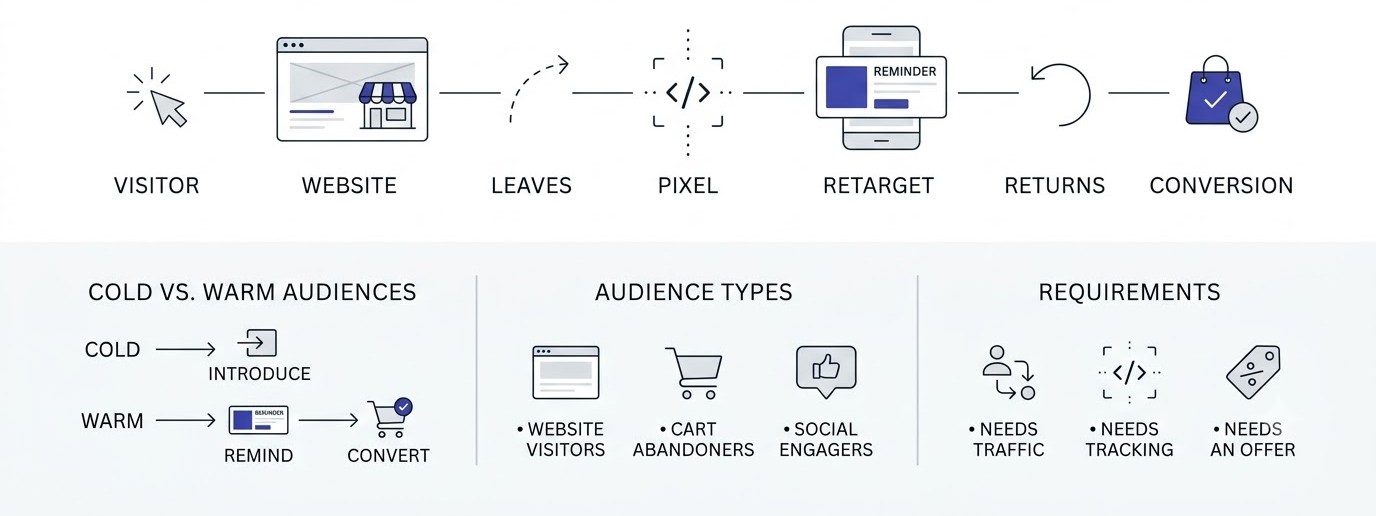
Retargeting ads work because they talk to people who’ve already shown interest, which makes them far more likely to respond than cold strangers. This section covers the basic idea, the psychology of why visitors leave, the confusing naming around remarketing, and where these ads appear. It also covers what retargeting can’t do, which matters just as much.
Retargeting Ads in Plain English
Retargeting ads are paid ads that follow up with people who’ve already interacted with your business online. A small piece of tracking code on your site marks a visitor, and an ad platform like Meta or Google then shows that person your ads later on Instagram, YouTube, news sites, or apps.
Think of it like a shop owner who remembers your face. You came in on Saturday, looked at a leather bag for ten minutes, and left. On Monday, the same shop sends you a note about that exact bag. That’s retargeting. It isn’t spying on you personally. The platform sees an anonymous browser ID, not your name, and the advertiser sees only aggregate numbers like clicks and sales.
The reason it performs better than cold advertising is simple. Cold audiences have never heard of you. Retargeted audiences have, which means you skip the awkward introduction and go straight to the reminder, the offer, or the answer to whatever question stopped them.
Why Most Visitors Leave Without Buying
Most visitors leave because buying is rarely the first thing on their mind. The Baymard Institute, which has tracked checkout behavior for years, puts average cart abandonment at roughly 70%. Seven out of ten people who add something to a cart still walk away.
The reasons are boring and human. Shipping costs show up late. The site asks for an account. The person is comparing three tabs. The salary hasn’t hit yet. A phone call interrupts them. Very few visitors leave because they hate the product.
That’s actually good news. Most of these reasons are temporary, which means a timely reminder can land at exactly the right moment. A visitor who left because of a surprise ₹99 shipping fee needs a different message than someone who left because they’re waiting for payday. Understanding why people leave is what lets you write retargeting ads that feel helpful instead of annoying.
Retargeting vs Remarketing: The Naming Mess
Retargeting and remarketing get mixed up constantly, and the confusion is mostly historical. Retargeting usually means showing ads to past visitors using cookies and pixels. Remarketing usually means re-engaging people through email, using a contact list you collected.
Google muddied this by calling its entire ad-based product “remarketing,” even though it works through cookies and ad IDs. Meta, on the other hand, just says “custom audiences” and doesn’t pick either word. So when someone says remarketing, check whether they mean email or ads.
Don’t lose sleep over it. In practice, most marketers use both words for the same thing: bringing back people who already know you. What matters is the mechanism underneath. Is it a pixel audience, an email list, or an engagement audience? That distinction changes your setup, your costs, and your results far more than the vocabulary does.
Where Retargeting Ads Show Up
Retargeting ads can appear almost anywhere people spend time online, depending on which platform you run them through. On Meta, they show up in Facebook and Instagram feeds, Stories, and Reels. On Google, they run across Gmail, YouTube, Search, and millions of partner websites and apps in the Google Display Network.
Other places count too. LinkedIn runs retargeting for B2B audiences, which gets expensive but works for high-ticket services. Pinterest, Snapchat, X, and Reddit all offer pixel-based audiences. Even connected TV platforms now let advertisers retarget households based on web visits.
For most small businesses, though, Meta and Google cover about 90% of what’s worth doing. Start there. Adding a third or fourth platform before the first two are working is a classic way to spread a small budget so thin that nothing produces enough data to learn from.
What Retargeting Ads Cannot Fix
Retargeting can’t fix a weak offer, a confusing website, or a product people don’t want. If a visitor left because your page loaded in nine seconds or your reviews looked fake, a reminder ad just drags them back to the same problem.
It also can’t create demand from nothing. Retargeting needs traffic first. If only 200 people visit your site a month, the retargeting pool is tiny, and platforms won’t have enough data to optimize. In that case, put money into getting traffic and fixing your site before worrying about follow-ups.
One more honest limit: retargeting often gets credit for sales that would have happened anyway. Someone ready to buy might click your retargeting ad on the way to checkout, but they were already coming back. That’s why measuring it properly, which comes later in this guide, matters so much.
Who Should Use Retargeting Ads and Who Should Wait
Retargeting ads suit any business that has a website or social following with steady traffic and a clear action to ask for, like a purchase, a booking, a demo request, or a course enrolment. E-commerce stores are the obvious fit, but coaching classes, real estate agents, software companies, and clinics get good results too.
Wait if you have almost no traffic. A site with 400 visitors a month will produce audiences of a few dozen people, and neither Meta nor Google will deliver ads to a list that small. Wait too if your checkout is broken, your product pages are thin, or you haven’t confirmed that people actually want what you sell.
A decent test is this. Can you point to 2,000 or more monthly visitors, a working pixel, and at least a handful of sales or leads every week? If yes, start. If not, spend the next month on traffic and on fixing the obvious leaks. Retargeting rewards businesses that already have the basics running, and it punishes the ones hoping it will cover for missing basics.
How Retargeting Ads Work Behind the Scenes
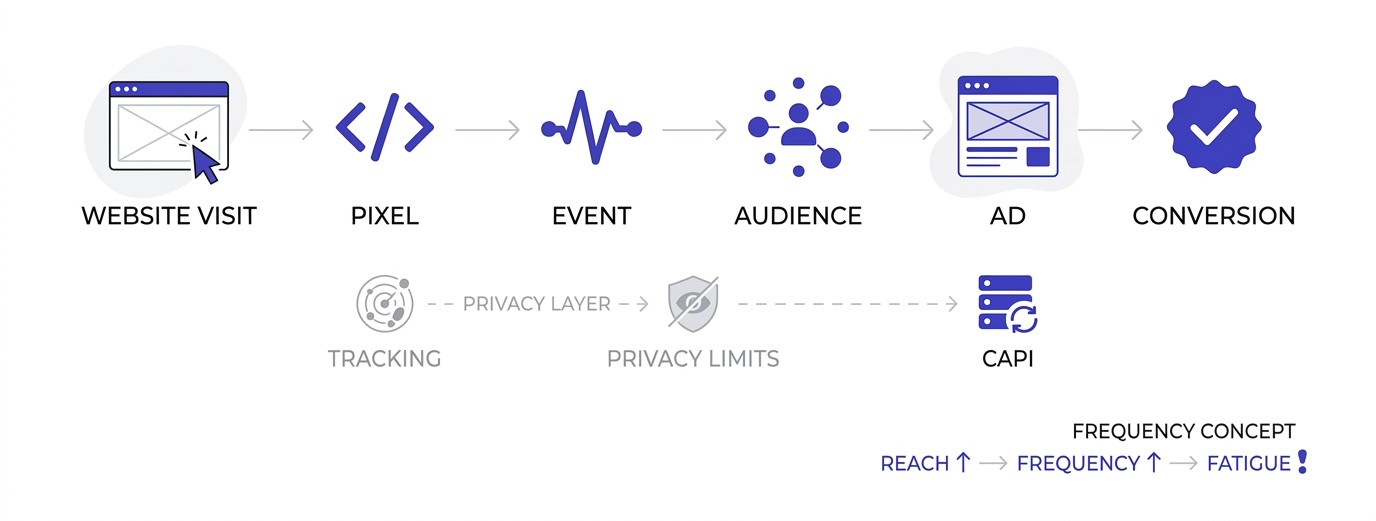
Retargeting ads work through a chain of small technical steps: a tracking tag fires, an audience list updates, an auction runs, and an ad appears. Knowing this chain helps you fix problems when numbers look strange. This section walks through each link, including the privacy changes that shook the whole system up.
Pixels, Tags, and Cookies
A pixel is a small snippet of JavaScript code placed on your website that reports visitor actions back to an ad platform. The Meta Pixel and the Google tag are the two most common. When someone loads a page, the code fires and says, in effect, “this browser just viewed this product.”
Cookies are tiny files stored in the visitor’s browser that help the platform recognize that same browser later. If the person is logged into Facebook or Google in that browser, the platform can often connect the visit to an actual account, which is how the right ad reaches the right person on a different site or app.
Setting this up correctly depends partly on how your site and analytics are installed. If you’re not comfortable with code, the basics of analytics and tag setup are worth learning, because a misplaced pixel is the number one reason retargeting audiences end up empty or wrong.
Building Audiences from Events
Audiences get built from events, which are specific actions the pixel records. Standard Meta events include ViewContent, AddToCart, InitiateCheckout, and Purchase. Google uses similar signals through its tag and Google Analytics 4 events.
Here’s why events matter more than page visits. Someone who reached your homepage and left in four seconds is a very different prospect from someone who added three items to a cart. If you lump them together into one “all visitors” audience, you’ll show the same ad to both, and the cart person will find it oddly generic.
A better approach is to build layers. One audience for product viewers, a smaller one for cart adders, and a smaller one still for people who started checkout. Each layer gets its own message and its own budget. The deeper someone got, the more directly the ad can ask for the sale.
The Auction and Why Retargeting Ads Often Cost Less
Every time an ad slot opens on a page, the platform runs a split-second auction. It weighs your bid, the predicted chance that this person will click or convert, and the quality of your ad. The highest total value wins.
Retargeting ads tend to do well in these auctions because the predicted chance of action is higher for people who already know you. Higher predicted response means the platform can charge less for the same impression. That’s why cost per click is often lower on retargeting than on cold prospecting, though the exact gap changes by industry and season.
Don’t take that as a guarantee, though. Small audiences can get expensive when the platform can only show your ad to a few hundred people. And when many competitors chase the same shoppers during sale periods like Diwali or Big Billion Days, costs jump everywhere. Watch your numbers weekly instead of assuming retargeting is always cheap.
Privacy, Consent, and the Cookie Problem
Retargeting has been weakened by privacy changes, and ignoring that wastes money. Apple’s App Tracking Transparency, launched with iOS 14.5 in April 2021, let iPhone users opt out of cross-app tracking, and a large share did. Safari and Firefox also block or shorten the life of third-party cookies by default.
Google spent years announcing that Chrome would drop third-party cookies, then backed off that plan. But with Safari and Firefox already restrictive, plus users browsing with ad blockers, a meaningful slice of your visitors simply can’t be tracked by a pixel alone.
India’s Digital Personal Data Protection Act adds consent expectations on top of this, so a clear cookie banner and a privacy policy that mentions advertising aren’t optional extras anymore. The practical result: retargeting pools are smaller than raw website traffic suggests, and tracking is less complete than it was five years ago. Plan for that instead of being surprised by it.
Server-Side Tracking and the Conversions API
Server-side tracking sends event data from your server straight to the ad platform, instead of relying only on the visitor’s browser. Meta calls its version the Conversions API (often shortened to CAPI), and Google has its own server-side tagging and enhanced conversions.
Why bother? Because browser-based pixels miss events when cookies are blocked or the page closes before the tag finishes loading. A server-side connection recovers a chunk of those lost events, which gives the platform better data and gives you bigger, more accurate audiences.
For most Shopify and WooCommerce stores, this is easier than it sounds. Shopify’s Facebook and Instagram sales channel can switch on the Conversions API with a few clicks, and plugins exist for WordPress. Whatever method you use, send the same event from both the pixel and the server with a matching event ID so Meta can deduplicate them. Without that, purchases get counted twice and your numbers look better than reality.
Frequency, Reach, and the Learning Phase
Every retargeting campaign goes through a learning phase, which is the early stretch where the platform tests who responds and adjusts delivery. On Meta, an ad set usually needs around 50 optimization events in a week to leave that phase. Until then, costs bounce around and results look unreliable.
Reach and frequency work together here. Reach is the number of different people who saw your ad. Frequency is the average number of times each one saw it. In a small retargeting pool, reach hits its ceiling quickly, and after that every extra rupee only pushes frequency higher, which means the same people see the same ad again and again.
That’s why retargeting budgets should be sized to the audience, not to your ambition. A pool of 2,000 people doesn’t need ₹2,000 a day. It needs enough to reach most of them a few times each week, and then it needs fresh visitors coming in at the top. If frequency climbs past five or six in a week while sales stay flat, the budget is too big for the pool.
Types of Retargeting Ads You Can Run
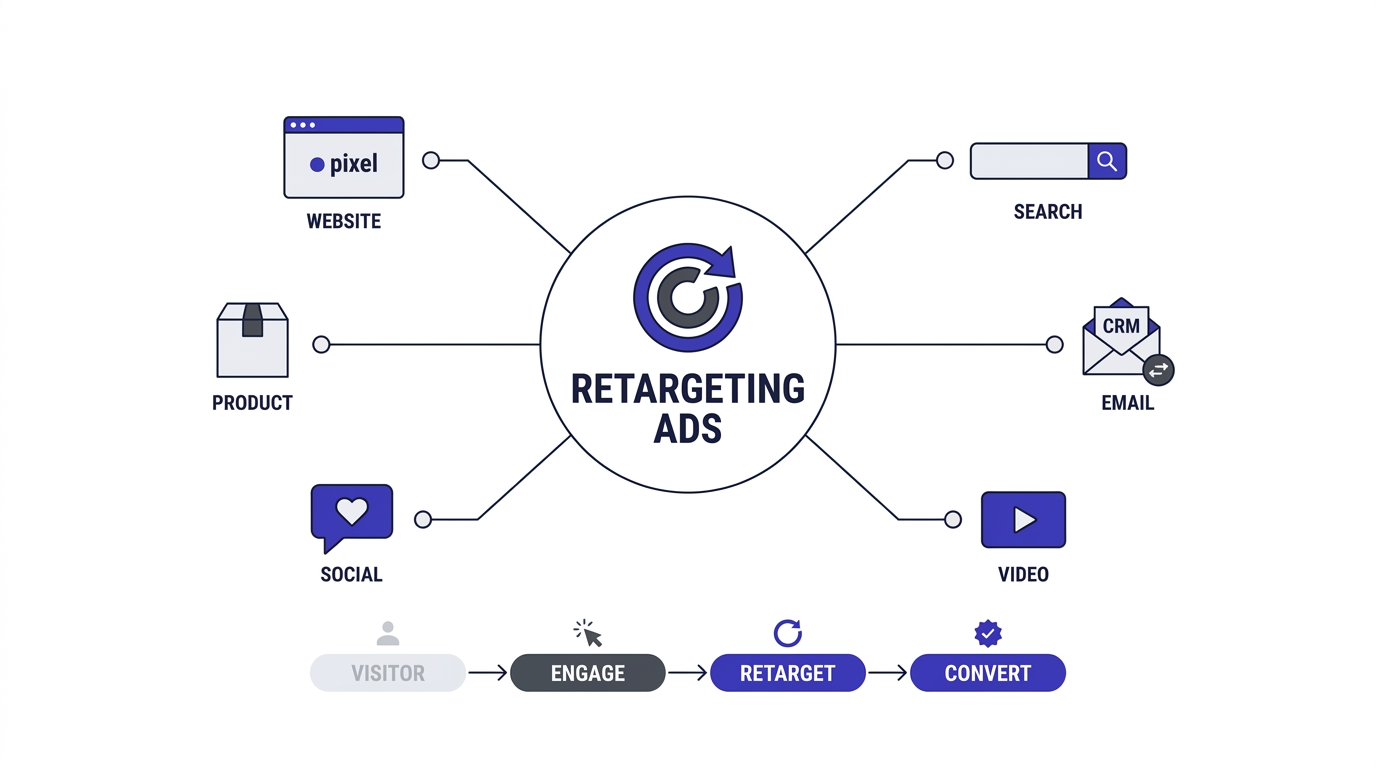
There isn’t just one kind of retargeting ad. Each type depends on what data you use to build the audience, and each suits a different business situation. This section covers six types, from basic website retargeting to email list matching, so you can pick the ones that fit your product and your budget.
Pixel-Based Website Retargeting
Pixel-based website retargeting shows ads to people who visited specific pages on your site, and it’s the most common starting point. You tell the platform which pages or events define the audience, and the pixel keeps the list updated automatically.
A local coaching institute, for example, could build one audience from people who visited the course fee page, and another from anyone who started but didn’t finish the enquiry form. The fee page group is warm but price-sensitive. The form group is nearly ready. They need different ads.
The most common mistake here is building one giant “all website visitors for 180 days” audience and calling it a day. It’s easy, and it’s also lazy. Segment by page type and by recency. Visitors from the last three days respond very differently from visitors who last showed up three months ago.
Dynamic Product Retargeting
Dynamic product retargeting automatically shows each visitor the exact products they viewed or added to cart. It runs from a product catalog (a feed of your items with names, prices, images, and links) connected to your pixel. Meta’s version is now called Advantage+ catalog ads, and Google runs it through Merchant Center feeds and Performance Max or dynamic remarketing.
If you sell more than about 20 products, this type is close to a must. Nobody has time to build 200 individual ads. The platform assembles each ad on the fly, so the person who looked at a blue backpack sees that blue backpack, with the current price, a day later on Instagram.
Where this goes wrong is a messy feed. Wrong prices, out-of-stock items, blurry images, and missing product IDs all create ads that embarrass your brand. Audit the catalog weekly. A feed that syncs automatically but hasn’t been checked for months is a quiet money leak.
Social Engagement Retargeting
Social engagement retargeting targets people who interacted with your content on the platform itself, not your website. On Meta, that includes people who liked or commented on posts, messaged your page, saved a post, or followed your Instagram account. You can pull these audiences for up to 365 days.
This type is especially good for service businesses, coaches, and creators who don’t have much website traffic yet. A fitness coach with 5,000 Instagram followers but a tiny site can still run ads to everyone who engaged with their reels in the last 90 days.
Quality varies a lot, though. Someone who sent you a DM is a much stronger prospect than someone who double-tapped a meme-style post. Build separate audiences for high-intent actions, like messages and saves, instead of throwing every like and comment into one bucket. Otherwise the platform optimizes toward casual scrollers who’ll never pay.
Video Viewer Retargeting
Video viewer retargeting builds audiences from people who watched a set percentage of your videos. On Meta you can choose viewers who watched 25%, 50%, 75%, or 95% of a video, or who watched for a set number of seconds. On YouTube through Google Ads, you can retarget anyone who viewed, subscribed to, or interacted with your channel.
It’s useful because video does the introduction work cheaply. A two-minute explainer about your product, shown to cold audiences, costs maybe a few rupees per view. The people who watch most of it have told you something valuable: they’re interested.
A good play is a sequence. Show a short video to a wide audience, then retarget the 50% or more viewers with a testimonial or an offer. Someone who watched 90 seconds of your founder explaining the product has spent more attention on you than most website visitors ever do. Treat them accordingly.
Email List and CRM Retargeting
Email list retargeting, also called customer match, lets you upload a list of emails or phone numbers so the platform can find those same people on its network. Meta calls it a customer list custom audience, and Google calls it Customer Match. The platforms hash the data before matching, which means raw emails aren’t exposed.
This works best for two groups: past customers and email subscribers who haven’t bought yet. You can show past buyers a new product launch or a refill reminder. You can show cold subscribers a first-purchase offer, which reinforces whatever they’re already getting in their inbox.
If you’re building that list from scratch, pairing ads with solid email marketing habits helps a lot, because the two channels back each other up. One practical note: match rates are never 100%. Expect somewhere around 40% to 70% of your list to match, depending on how many people used the same email for their social accounts.
Search Retargeting (RLSA)
Search retargeting, formally called Remarketing Lists for Search Ads (RLSA), lets you change how you bid on Google Search for people who’ve visited before. If a past visitor types a keyword into Google, you can bid higher, show a different ad, or target keywords you’d normally skip as too broad.
Here’s a simple example. A ₹40,000 online data analytics course might avoid the broad keyword “data analytics” because it attracts too many students looking for free tutorials. But for people who already visited the course page, that same keyword becomes worth bidding on, since they’ve shown real interest.
Check list size requirements before planning around this. At the time of writing, Google generally wants at least 1,000 active users on a list for Search campaigns and 100 for Display, and those numbers can change. If your list is too small, build it first through display or social retargeting, then layer in search.
Combining Retargeting Ads Into One Funnel
Once a couple of types are running well, they can feed each other. A short brand video on Instagram creates a pool of viewers. Those viewers get a testimonial ad. Anyone who clicks that ad and visits the site lands in your website audience, and anyone who adds to cart there moves into the dynamic product campaign.
Picture a Bengaluru skincare brand doing this. A 30-second reel introduces the founder and the ingredient story. Viewers who watched half or more see a review carousel a few days later. Those who visit the site but don’t buy see the exact product they looked at. Buyers move to an email-based refill reminder. Every step answers a different question.
The risk is overlap. Without exclusions, one person can sit in four audiences and see four different ads on the same day. Set clear rules for who belongs where, always push the deepest-intent audience to the front, and look at the audience overlap tool in Meta Ads Manager now and then to catch problems early.
Which Type of Retargeting Ads to Start With
Start with the type that matches the data you already have, because it’s the one you can launch this week. A store with a working pixel and a product catalog should begin with dynamic product retargeting. A creator with an active Instagram but a thin website should begin with social engagement audiences.
Don’t try all six at once. Each type needs its own audience, its own creative, and its own budget, and spreading ₹500 a day across six campaigns leaves each one too weak to learn anything. Pick one, run it for three or four weeks, and read the results before adding a second.
A sensible order for most small businesses looks like this: website retargeting first, then dynamic product ads if you sell physical goods, then customer list audiences once you have a few hundred buyers or subscribers, then video and search later. Each layer builds on the one before it, and the earlier layers are cheaper to set up and easier to measure honestly.
How to Set Up Retargeting Ads Step by Step
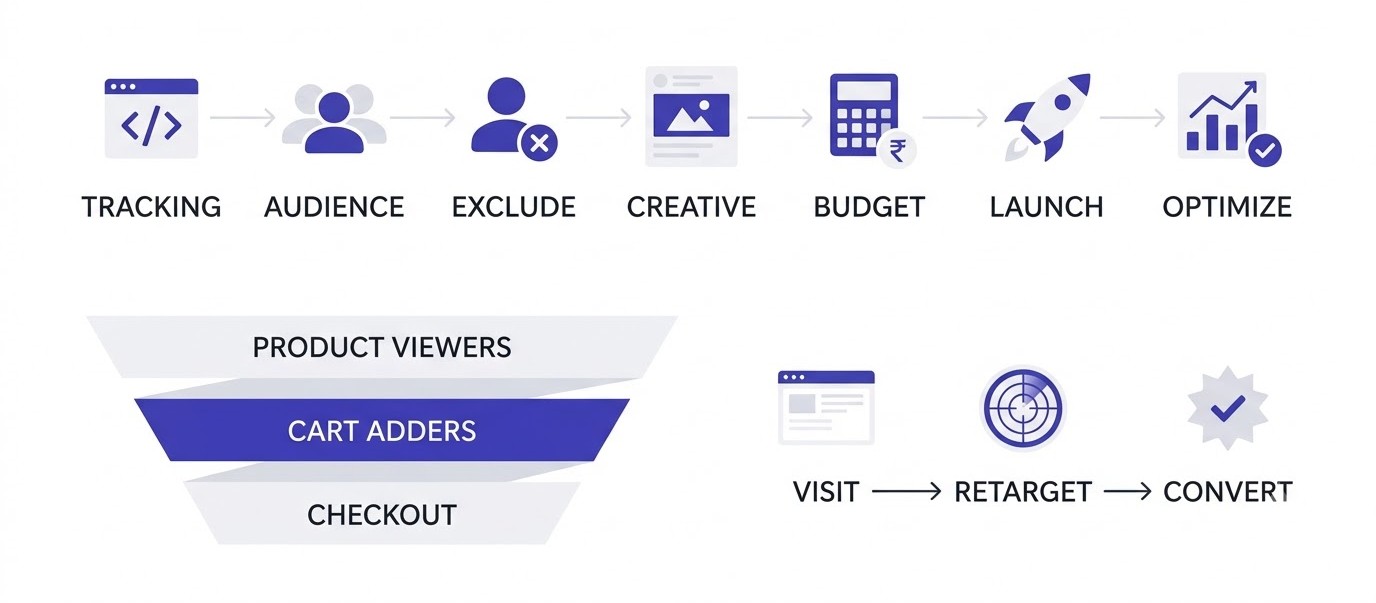
Setting up retargeting ads takes about an afternoon if your tracking is clean, and about a week if it isn’t. This section walks through the full process in the order you should do it: tracking, audiences, exclusions, creative, budget, and launch. Skipping steps is how people end up with expensive, confusing campaigns.
Step 1: Install Tracking and Test It
Start by installing the Meta Pixel and the Google tag on every page of your site, then confirm they actually fire. Use the free Meta Pixel Helper and Google Tag Assistant browser extensions. Visit your product page, add something to cart, and check whether each event shows up with the right name.
Test inside Meta Events Manager’s Test Events tab too, because it shows what the platform actually receives, not just what your browser sends. If you see a Purchase event firing when someone only adds to cart, your audiences will be polluted from day one.
Don’t skip this. Bad tracking is the silent killer here. A pixel that fires twice, fires on the wrong page, or passes the wrong value will quietly feed bad data into every audience you build. Spend an hour testing now, or spend weeks later wondering why results look strange.
Step 2: Define Your Audiences and Time Windows
Next, decide which groups you want to reach and how far back to look. A sensible starting structure uses three tiers: product viewers from the last 30 days, cart adders from the last 14 days, and checkout starters from the last 7 days. Shorter windows for deeper intent.
Why shorter windows for people closer to buying? Because buying intent fades fast. Someone who added to cart yesterday is a hot lead. Someone who added to cart four months ago has probably bought elsewhere or forgotten you. Showing them an urgent “Still thinking?” ad feels off.
Meta lets website audiences go up to 180 days, and Google allows up to 540 days. Longer windows give you bigger audiences, which helps small sites, but they also mix warm and cold people. If your site gets under 5,000 visitors a month, you may need to stretch windows just to meet platform minimums, around 100 people for Meta and Google Display lists.
Step 3: Exclude Buyers and Overlapping Audiences
Exclusions are what separate a smart setup from an embarrassing one. Always exclude people who’ve already purchased, at least for the window where they wouldn’t need the product again. Nothing irritates a customer faster than seeing ads for the thing they bought last week.
Also exclude overlapping audiences between your ad sets. If a visitor is in both the “product viewers” and “cart adders” audiences, they might see ads from both, which is wasteful and confusing. Set your deeper-intent audience as an exclusion in the broader ad set. Cart adders get excluded from product viewers, checkout starters from cart adders.
In Meta Ads Manager, this lives under the audience section of each ad set, in the exclude field. In Google Ads, it’s under the audience segments with the exclusion setting. It takes five minutes and saves real money. Plenty of accounts burn a third of their retargeting spend on people who already bought.
Step 4: Write Ads and Pick Creative for Each Stage
Match the message to the moment the visitor left. Product viewers need a reminder and a reason. Cart adders need friction removed: free shipping, easy returns, COD options (which matter a lot in India), or a short delivery estimate. Checkout starters may just need reassurance about payment security.
Keep the copy human. “Still thinking about the olive linen shirt? Free returns for 7 days, and it ships tomorrow” works better than “Don’t miss out on our amazing deals!” The first one answers a likely worry. The second one is noise.
For creative, use real product photos, short videos of the item in use, or customer reviews. A screenshot of a 5-star review with a photo often beats a polished studio ad, because it feels like proof instead of promotion. Rotate at least three to four different ads per ad set so you can see what people respond to and swap out tired ones.
Step 5: Set Budget, Bidding, and Frequency
Retargeting doesn’t need a huge budget, but it needs enough to exit the learning phase. On Meta, an ad set generally needs around 50 optimization events per week to stabilize, which is hard on tiny budgets. A common starting point for a small store is ₹300 to ₹500 per day, split across two or three ad sets.
For bidding, begin with the platform’s default “lowest cost” approach and optimize for Purchase. If you don’t have enough sales volume for that, optimize for Add to Cart or Initiate Checkout temporarily, then move down the funnel as data builds up.
Frequency is the number of times one person sees your ad. Keep it in check. As a rough rule, aim for around two to five impressions per person per week. Beyond that, people start ignoring or resenting the ad. Meta shows frequency in the reporting columns, and Google Ads lets you set frequency caps directly on Display and YouTube campaigns.
Step 6: Launch, Wait, and Read the Early Signals
Launch with a clear checklist: tracking tested, exclusions set, ads approved, budgets entered. Then leave it alone for at least five to seven days. Changing things daily resets the learning process and makes it impossible to tell what worked.
When reviewing early results, look at three simple things first. Is the audience actually receiving impressions? Is frequency sensible? Are clicks landing on the right page with a working pixel? Don’t judge ROAS in the first 48 hours, since small numbers swing wildly.
After a week or two, compare ad sets and ads. Pause clear losers and move budget toward winners, but make changes gradually. Increasing a budget by more than 20% at once can shake an ad set out of its stable delivery. Slow adjustments feel boring, and yeah, they work better.
Landing Pages That Finish the Job
The ad’s job is to get someone back. The landing page’s job is to close. Plenty of retargeting campaigns fail at this handoff, because the ad shows a specific kurta and the click drops the visitor on a generic homepage with 40 other products. Send people to the exact product page, or straight to the cart if they already added something.
Check the page on a phone first, since most Indian shoppers will see it there. Does it load in under three seconds on a mid-range Android on 4G? Is the Buy button visible without scrolling? Are delivery time and return policy easy to spot? Fix those before spending another rupee on ads.
For lead businesses, match the page to the ad. If the ad promises a free demo, the page should show a short form and a demo booking button, not a ten-section company story. Fewer fields, clearer promise, one button. Every extra step you add costs you a share of the people you just paid to bring back.
A Simple Three-Tier Campaign Structure
A clean retargeting account has three ad sets, one per intent level. Tier one is product viewers from the last 30 days, minus cart adders and buyers. Tier two is cart adders from the last 14 days, minus buyers. Tier three is checkout starters from the last 7 days, minus buyers. That’s the whole structure.
Each tier gets its own message. Tier one gets a gentle reminder with social proof, like reviews or a best-seller badge. Tier two gets the friction-removers: free shipping, easy returns, cash on delivery. Tier three gets a direct nudge, maybe a small, time-limited incentive if your margins allow it.
Budget should lean toward the deeper tiers, since those people convert most easily. A split of around 20% to tier one, 40% to tier two, and 40% to tier three is a fair starting guess, but adjust it after two weeks of data. Keep the campaign names plain, like “RT – Cart 14d,” so anyone opening the account can understand it in ten seconds.
Retargeting Ads Mistakes to Avoid and How to Measure Results
Most retargeting problems come from a handful of repeated mistakes, and most disappointing results come from measuring the wrong things. This section covers the errors that waste money, the metrics that matter, and a worked example you can compare against your own numbers.
Chasing People Who Already Bought
Showing ads to existing customers for the product they just bought is the most common and most irritating mistake. It usually happens because the purchase event wasn’t tracked properly or no exclusion was set. The customer ends up annoyed, and you pay for wasted impressions.
Fix it at the source. Make sure your Purchase event fires on the order confirmation page, then build a purchasers audience and exclude it from every acquisition and retargeting campaign. Review it monthly, because site updates often break tracking without anyone noticing.
Don’t treat buyers as useless audiences, though. After a sensible gap, they’re your best prospects for related products, refills, or upgrades. A buyer of a ₹899 face wash is far more likely to buy a moisturizer from the same brand than a stranger is. Just show them something new, not the same item again.
Burning Out Your Audience with Ad Fatigue
Ad fatigue happens when the same people see the same ad too many times and stop responding. Signs include rising frequency, falling click-through rate, and climbing cost per result. Often it creeps up slowly over a few weeks before anyone notices.
Retargeting audiences are small by nature, so fatigue hits faster than in cold campaigns. A pool of 4,000 people can be saturated within two weeks if the budget is high. Rotate creative every two to three weeks, and refresh the offer or angle instead of just changing the image.
Also set a membership window that ends. Someone who hasn’t engaged in 60 days probably isn’t coming back through an ad, and every impression on them is partly wasted. Let them drop off the list naturally and give that budget to fresher visitors.
Running Audiences That Are Too Small
Tiny audiences cause strange delivery problems. If your list has only 150 people, the platform can’t learn much, costs spike, and a few clicks change your averages dramatically. Meta and Google also won’t serve ads below certain list sizes.
The fix is to combine audiences sensibly. Merge all product viewers across categories, extend your window to 60 or 90 days, or add engagement audiences from Instagram and YouTube. Bigger pools give the algorithm room to work.
If even that fails, the honest answer is that your site needs more traffic. Retargeting can’t do much with nothing. Spend a few weeks driving visitors through content, social posts, or prospecting ads, then come back. Plenty of people try to launch retargeting at 300 monthly visitors, get weak results, and conclude it doesn’t work, when the real issue is volume.
Giving Retargeting Too Much Credit
Retargeting often looks amazing in dashboards because it targets people who were already close to buying. A 10x return on ad spend sounds great, but it may include purchases that would have happened anyway. This is called an attribution problem, and it’s the most misunderstood part of retargeting.
Platforms usually count a sale if someone clicked or even just viewed your ad within a window, like 7 days after clicking or 1 day after viewing on Meta. A shopper who sees your ad while scrolling, then types your URL directly and buys, may still get counted.
The cleaner way to know is an incrementality test. Meta’s Conversion Lift and Google’s conversion lift studies hold back a random group from seeing ads, then compare buying rates. Smaller businesses can do a rough version: pause retargeting for two weeks and watch total sales, not just reported sales. If total sales barely move, retargeting wasn’t adding much.
Metrics That Actually Matter
Pick a few metrics and read them honestly. For retargeting ads, the most useful are cost per purchase, return on ad spend, conversion rate from ad click, frequency, and click-through rate. Look at them by audience tier, not just the campaign total.
Blended numbers can hide problems. A retargeting campaign with a 6x ROAS might be mostly made of checkout starters who convert easily, while your product viewer ad set quietly loses money. Splitting results by tier shows where the real value sits.
Also check your site analytics, not just ad platforms. In Google Analytics 4, compare conversion rates and revenue for retargeting traffic against other sources. If the ad platform claims 100 sales but GA4 shows 40 from the same campaigns, treat the truth as somewhere in between, and use the lower number for conservative planning.
A Realistic Walkthrough with Numbers
Take that kurta store from the start of this guide. It gets 10,000 visitors a month and 300 orders at ₹1,400 average order value, which is ₹4.2 lakh in monthly revenue. It sets up three retargeting ad sets with ₹400 per day combined, so about ₹12,000 a month.
Say retargeting reaches around 3,500 of those 9,700 non-buyers and drives 90 extra orders, though only 60 are truly incremental based on a lift test. That’s ₹84,000 in extra revenue for ₹12,000 in spend, around a 7x return on genuinely new sales. Not bad at all, and numbers like these are realistic for a clean setup.
Notice that those figures are illustrative, not a promise. Yours could be lower or higher depending on margins, product type, and site quality. Real examples with before and after data are covered in more detail in the case studies section of the Learn hub, which is worth reading to calibrate your expectations.
Testing Ideas Worth Running
Once the basics are stable, testing is where retargeting gets better month after month. Change one thing at a time so you know what caused the difference. Test the offer first (free shipping versus 10% off), then the creative format (static image versus short video), then the copy angle (reassurance versus urgency).
Audience windows deserve a test too. Run a 7-day cart audience against a 14-day one, and see whether the longer window brings extra sales at a similar cost or just dilutes performance. Another useful test is sequencing: show a testimonial first, then an offer three days later, and compare it against showing the offer immediately.
Keep a simple log with the date, what changed, and the result. Without notes, you’ll repeat old tests and forget what already failed. After a few months, that log becomes the most valuable thing in the account, because it’s built from your own customers’ behavior instead of generic advice.
Retargeting Ads for Leads, Courses, and Services
Retargeting isn’t only for online shops. Businesses that sell through enquiries, like coaching classes, interior designers, or B2B software firms, can run it too, but the goal changes. Instead of a purchase, the ad pushes toward a call, a demo, or a form fill.
The audiences look different as well. Build one from visitors to the pricing or fees page, one from people who started a form but didn’t submit it, and one from people who watched most of an explainer video. Ads for these groups should answer the questions that stop people from enquiring: what does it cost, what happens on the first call, who else has done this.
Sales cycles are longer here, so use longer windows, often 60 to 90 days. Also track lead quality, not just lead count. A retargeting campaign that brings 40 cheap leads who never answer the phone is worse than one that brings 8 serious ones. Ask your sales team which leads came from which campaign, and judge the ads by that.
Your Retargeting Ads Plan: What to Do Next
A 30-Day Launch Checklist
A month is enough time to go from nothing to a working retargeting setup, as long as each week has one clear job. Week one is tracking: install the Meta Pixel and Google tag, test every event, and turn on server-side tracking if your platform makes it easy.
Week two is structure. Build your three audience tiers, set exclusions for buyers, and connect your product catalog if you sell physical goods. Write three or four ad variations for each tier, using real photos and honest copy. Check everything twice before launch, since fixing mistakes mid-campaign resets learning.
Weeks three and four are about watching, not fiddling. Launch, leave the budgets alone for a week, then review cost per purchase, frequency, and click-through rate by tier. Pause clear losers, refresh tired creative, and write down what you learned. At day 30, run a short pause test to see whether sales hold up without ads. That single test tells you more than any dashboard.
Conclusion
Retargeting ads work best when they’re simple, tidy, and honest about their limits. Start with clean tracking, build three audience tiers by intent, exclude buyers, write ads that answer the real reason people left, and read your results with a skeptical eye. Everything fancy comes after those basics.
Here’s the one action to take this week: open Meta Events Manager and Google Tag Assistant, and confirm your key events fire correctly on your own site. If that passes, build a 14-day cart adders audience and run a single small campaign against it. That’s all. You’ll learn more from one real campaign than from ten more articles.
Frequently Asked Questions
What are retargeting ads?
Retargeting ads are paid ads shown to people who have already visited your website, used your app, or engaged with your content but haven’t completed a desired action like buying. A tracking pixel records the visit, and the ad platform later shows that person your ads on sites, apps, and social feeds.
How do retargeting ads work?
A tracking tag on your site records visitor actions, such as viewing a product or adding to cart, and sends them to Meta or Google. The platform places those users in audiences. Later, when they browse other sites or apps, an auction decides whether your ad appears. Winning ads reach them with a tailored message.
Are retargeting ads worth it for small businesses?
Yes, if your site already gets steady traffic, usually a few thousand visitors a month or more. Retargeting uses visitors you’ve already paid for, so it tends to be one of the cheapest ways to win extra sales. With very little traffic, though, audiences stay too small and results become unreliable.
What is the difference between retargeting and remarketing?
Retargeting usually refers to ads shown through cookies and pixels to past visitors. Remarketing often refers to re-engaging people via email using a contact list. Google uses the word remarketing for its ad product, so the terms overlap. Always check whether someone means paid ads or email follow-up.
How much do retargeting ads cost?
Cost depends on your platform, country, industry, and audience size. Many small Indian stores start at ₹300 to ₹500 per day. Cost per click is often lower than cold advertising, but small audiences and sale-season competition can raise it. Test with a small budget and judge by cost per purchase, not clicks.
How long should I retarget someone?
It depends on how long your buying cycle is. For low-priced products, 7 to 30 days often covers it. For expensive items or services, 60 to 180 days may make sense. Use shorter windows for high-intent actions like cart additions and longer ones for casual page viewers.
How often should retargeting ads be shown?
A rough guideline is two to five impressions per person per week. Frequency above that tends to cause fatigue and lower response. Check the frequency column in Meta Ads Manager, or set frequency caps in Google Ads for Display and YouTube. Rotate creative every few weeks to keep ads fresh.
Do retargeting ads still work after iOS 14.5 and cookie changes?
Yes, but less completely. Apple’s App Tracking Transparency and browser cookie limits shrink audiences and reduce tracking accuracy. Server-side tracking, such as Meta’s Conversions API, recovers part of the lost data. First-party data like customer email lists also helps because it doesn’t rely on cookies.
Is retargeting better than prospecting ads?
Neither is better on its own, because they do different jobs. Prospecting finds new people, and retargeting brings back people who already know you. Retargeting alone runs out of audience, and prospecting alone wastes the interest you’ve already earned. A balanced account usually spends more on prospecting and a smaller share on retargeting.
Why are my retargeting ads not getting impressions?
The most common causes are audiences below minimum size, broken pixel events, overly narrow exclusions, or low bids and budgets. Check Events Manager to confirm events fire, make sure your audience has at least 100 people, and widen the time window. Also check that the ad set isn’t stuck in review or learning limited.
Can I run retargeting ads without a website?
Yes. You can retarget people who engaged with your Instagram or Facebook page, watched your videos, filled out lead forms, or messaged you. You can also upload customer email lists. These audiences don’t need a website or pixel, which makes them useful for creators, coaches, and local service businesses.
Do retargeting ads annoy customers?
They can, when they’re sloppy. Ads that follow people for months, show products they already bought, or repeat the same creative dozens of times feel creepy. Set sensible frequency limits, exclude buyers, rotate creative, and write ads that actually help. Done properly, most people barely notice them.
What is a good ROAS for retargeting ads?
There’s no single number, since margins differ. Retargeting often shows a higher return on ad spend than cold campaigns, sometimes 4x to 10x or more in dashboards, but part of that is sales that would have happened anyway. Work out your break-even ROAS from margin, then confirm real impact with a lift test or pause test.