

Picture a bakery owner in Pune who puts ₹500 a day into Google Ads because a cousin said it “just works.” Ten days later, ₹5,000 is gone. There were 180 clicks, two phone calls, and one of them was a wrong number. Nobody sold a single cake.
That story plays out thousands of times every day, and it almost never means Google cheated anyone. It means the person pressed “launch” before understanding the machine. This guide, How Google Ads Works: A Beginner’s Guide, exists to fix exactly that. You will see what happens in the half second between someone typing a search and your ad appearing, why a competitor can pay less than you and still rank higher, and where your money actually goes.
Here is the thing most tutorials skip. Google Ads is not a slot machine where a bigger budget means better results. It is an auction with rules, and those rules reward advertisers who are relevant, not advertisers who are rich. A tiny local shop with a sharp ad and a clean landing page can beat a national brand on a specific search. That is not luck. It is how the system is built.
So we are going to go slowly. Every term gets explained the first time it shows up. You will learn what campaigns, ad groups and keywords really are, how bidding strategies behave once you switch them on, how to set up your first campaign without wasting a week of budget, and how to read the numbers afterwards without panicking. If you have never opened a Google Ads account, this is written for you. If you opened one, burned some money and closed the tab angrily, this is written for you even more.
What You Will Learn in This Guide
Before diving in, here is a quick map of the road ahead. The guide is long on purpose, because a short guide on Google Ads usually means a guide that skips the parts where beginners lose money. Skim this list, then read the sections in order, since each one builds on the last.
- What Google Ads is, where your ads can appear, and the different ways Google charges you
- How the ad auction works, including Ad Rank, Quality Score and why the highest bid does not always win
- How an account is organised into campaigns, ad groups, keywords and ads, and how match types change who sees your ad
- How bidding strategies and budgets work, and what you really pay per click
- A step-by-step first campaign setup, including conversion tracking, which most beginners skip
- How to read your metrics, find wasted spend and avoid the mistakes that drain new accounts
- Answers to twelve questions beginners ask again and again
TL;DR
Short on time? Read these six points and you will already know more than most people who run ads for a living. Then come back for the details, because every one of these points has a catch that the sections below explain properly.
- Google Ads is an auction that runs every time someone searches, and your Ad Rank (bid multiplied by ad quality, plus context) decides whether you show and where.
- You usually pay only when someone clicks, and the price you pay is often lower than your maximum bid.
- Quality Score, scored from 1 to 10, is Google’s rating of how relevant your keyword, ad and landing page are to the search.
- An account has four layers: campaign, ad group, keywords and ads. Keeping each ad group tightly themed is what keeps costs down.
- Without conversion tracking, you are guessing. Set it up before spending a rupee.
- Check the Search Terms report every week and add negative keywords, or irrelevant clicks will quietly eat your budget.
How Google Ads Works: A Beginner’s Guide to the Basics
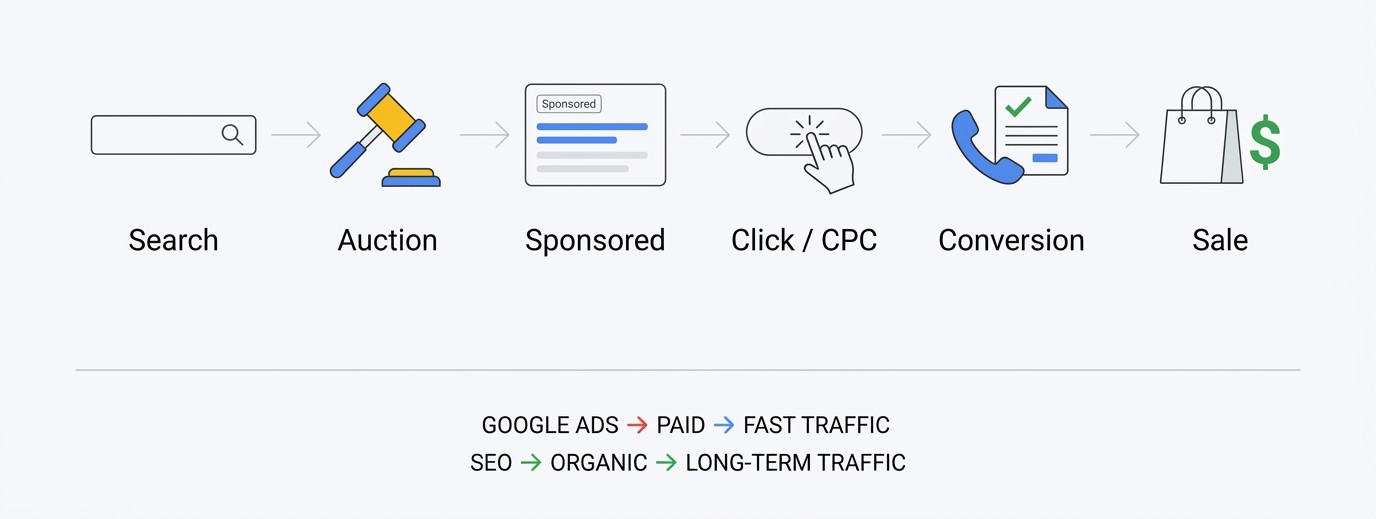
Google Ads is Google’s paid advertising platform. You choose where your ad can appear, who should see it and how much you are willing to pay, and Google shows your ad to people who match. You are charged based on actions such as clicks. This section covers the foundation: what the platform is, where ads appear and how the billing works.
What Google Ads Actually Is (and What It Is Not)
Google Ads is an online auction platform where businesses pay to put ads in front of people at the exact moment those people are searching, browsing or watching something related to what the business sells. It started in 2000 as AdWords and was renamed Google Ads in 2018. The name changed, but the core idea did not.
What it is not: a magic traffic tap, and not a replacement for a decent product. If someone clicks your ad for “waterproof running shoes” and lands on a page that sells formal sandals, no amount of budget fixes that. Google Ads only moves people to your door faster. What happens when they walk in is still your job.
One more thing that confuses beginners. Google Ads is separate from Google Analytics, Google Business Profile and Google Search Console. They all talk to each other, but each is its own tool with its own login settings. You will connect some of them later, so do not worry about the overlap yet.
Where Your Ads Can Show Up
Your ads do not only appear on the Google search results page. The main places are the Search Network (text ads above and below organic results, marked “Sponsored”), the Display Network (banner-style ads across millions of websites and apps), YouTube (video ads before, during or beside videos) and Google Shopping (product listings with an image and price).
Newer campaign types mix several of these. Performance Max, for example, runs your ads across Search, YouTube, Display, Gmail, Maps and Discover from one campaign, and Google’s automation decides the placement. Demand Gen is aimed at visual, discovery-style placements such as YouTube and Gmail.
For a total beginner, the honest advice is to start with Search. A person typing “wedding photographer in Bhubaneswar” has already told you what they want. Display and video are about catching attention, which is a harder job and a more expensive lesson when you are new.
Pay-Per-Click and the Other Ways Google Charges You
Most beginners will use pay-per-click (PPC), also called cost-per-click (CPC). You set a maximum bid, and you are charged only when someone clicks your ad. If your ad appears 10,000 times and nobody clicks, you pay nothing for those impressions. That is the main reason Search ads feel low-risk to start with.
There are other models. Cost-per-thousand-impressions (CPM) charges you for every 1,000 times your ad is shown, which is common on Display and awareness campaigns. Cost-per-view (CPV) is used on some YouTube video ads, where you pay when someone watches or interacts. Some campaigns can also be set to optimise for conversions, though you are still billed through clicks or impressions.
Here is what trips people up: a click is not a customer. If your average click costs ₹18 and only 1 in 25 clickers buys, each sale costs you around ₹450 in ad spend alone. Whether that is good or terrible depends entirely on your profit per sale. Always do that maths before you set a budget.
A Walk-Through: From One Search to One Sale
Let’s follow a single search all the way through. A man in Bhubaneswar has a leaking tap at 9 pm and types “plumber near me” on his phone. Google runs the auction. Three plumbers qualify. The one with the sharpest ad, a nearby location and a landing page that loads fast takes the top slot, with the label “Sponsored” over it.
He taps the ad. The plumber pays, say, ₹40 for that click. The landing page shows a phone number, a promise of arrival within 60 minutes and a few reviews. He taps the number and calls. That call is a conversion, and if conversion tracking is on, Google records it against the exact keyword and ad that produced it.
Now the plumber can see something useful: this keyword, at this hour, costs ₹40 and brings a call about one time in six. Multiply that over a month and you have real business data, not guesses. That loop of search, click, call and record is the whole platform in miniature.
Google Ads vs SEO: Which One Should You Start With?
SEO (search engine optimisation) is the work of earning free, organic rankings. Google Ads is paying for placement. Ads give you traffic within hours but stop the moment you stop paying. SEO takes months to build but keeps sending visitors without a per-click fee. Neither one is better in general. They solve different timing problems.
A practical rule: if you need leads this month, start with ads. If you have a longer runway, do both, and use your ad data to learn which keywords actually convert, then build SEO content around those exact phrases. Paid search is basically a fast, expensive keyword research tool. If you want the organic side explained from scratch, the SEO guides on admeducation.com cover it step by step.
The mistake people make is treating them as rivals. A business that ranks organically and also runs an ad for the same keyword often gets more total clicks than either alone. Test it on your own brand name first, because those clicks tend to be cheap.
A Beginner’s Guide to the Auction and Ad Rank
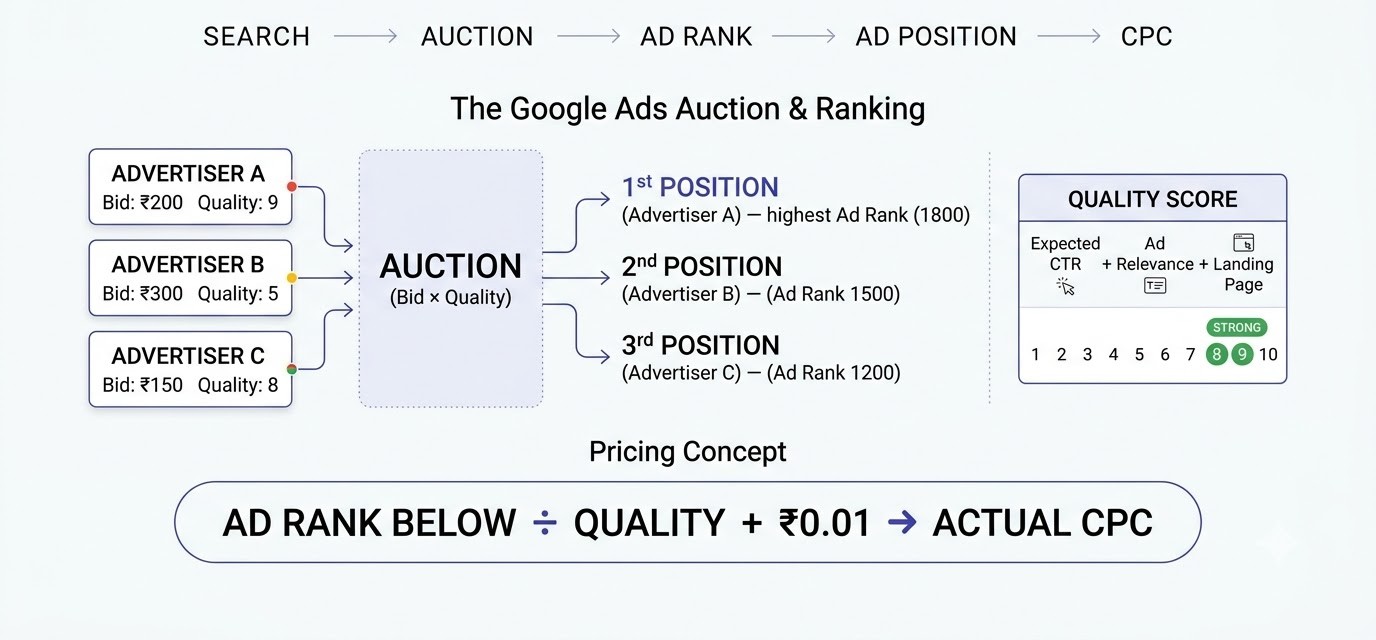
Every time someone searches on Google, an auction runs in a fraction of a second. Google compares every eligible advertiser, scores them, and picks who appears and in what order. This section breaks that auction into plain pieces: the steps, the score called Ad Rank, Quality Score, and how the price you pay gets calculated.
What Happens in the Half Second After Someone Searches
Someone types “buy running shoes online” and hits enter. Google first checks which advertisers have keywords that match that search. Then it throws those advertisers into an auction, scores each one in real time, sorts them, and fills the ad slots on the results page. All of it finishes before the page finishes loading.
Notice that the auction is not held once a day or once a week. It runs for every single search, and the result can be different each time. Your ad might show first for one person on their phone in the evening and not show at all for someone else searching the same words at noon from another city.
That is why Google Ads numbers feel jumpy at first. Impressions, positions and costs shift daily because the competitors, the searcher’s device, location and time of day keep changing. A single bad day tells you almost nothing. A bad two weeks tells you something is wrong.
Ad Rank: The Score That Decides Everything
Ad Rank is the score Google gives your ad in each auction. It is built from your bid, the quality of your ad and landing page, the minimum thresholds Google sets for showing ads at all, the competitiveness of that specific auction, the context of the search (like device and location), and the expected impact of your assets such as sitelinks and call buttons.
The simple version is bid multiplied by quality. A bigger bid helps. A better ad and a more relevant landing page help just as much, sometimes more. The highest Ad Rank takes the top spot, the next one takes the second, and so on down the page.
Ads that fall below the thresholds do not show at all, no matter how much you bid. This catches beginners out, because the dashboard says “eligible” and yet impressions sit at zero. Usually the cause is a keyword that Google considers a poor match for your page, or a budget and bid too low to clear the bar.
Quality Score and Its Three Parts
Quality Score is a rating from 1 to 10 that Google shows next to each keyword in your account. It is a diagnostic, a quick way for Google to tell you how relevant it thinks your setup is. It is built from three things: expected click-through rate, ad relevance, and landing page experience. Each one shows as “Below average,” “Average” or “Above average.”
Expected click-through rate is Google’s guess at how likely people are to click your ad for that keyword. Ad relevance asks whether your ad text actually matches what the person searched. Landing page experience looks at whether the page is useful, loads quickly, works on mobile, and delivers on the promise made in the ad.
One honest caveat. Google has said Quality Score itself is not plugged directly into each auction. The real-time signals behind it are. Still, it is the best readable summary you get, and keywords scoring 3 or 4 almost always cost more per click than keywords scoring 8 or 9. Treat anything under 5 as a sign to fix the ad group, not to raise the bid.
Why the Highest Bidder Does Not Always Win
Here is a simplified example with made-up numbers. Advertiser A bids ₹50 per click with an ad quality score of 10. Advertiser B bids ₹100 but has a sloppy ad and a slow landing page, so quality comes to 4. Multiply it out: A scores 500, B scores 400. A wins the top spot while bidding half as much.
Real auctions use more signals than two numbers, so treat this as a teaching model, not a calculator. But the pattern is real. Advertisers who write ads that mirror the search and who send traffic to a page built for that exact need regularly win positions against bigger budgets.
This is the single most encouraging fact for beginners. You are not locked out because a big brand has deeper pockets. A bakery in Pune, a coaching institute in Bhubaneswar or a three-person SaaS startup can win specific searches by being the most relevant answer. Relevance is the cheapest advantage in paid search.
How Google Decides What You Actually Pay
You do not pay your maximum bid. In a standard auction, you pay just enough to hold your position. The rough formula: the Ad Rank of the advertiser below you, divided by your quality, plus ₹0.01. Back to our example: B scored 400, A has quality 10, so A pays 400 divided by 10, plus 0.01, which is ₹40.01. Not ₹50.
That is why the number shown in your report as “Avg. CPC” is almost always lower than your max bid. It is also why improving your quality lowers your costs without touching your bid at all. If A’s quality rises, the divisor rises, and the price drops.
Another point that confuses people: the price changes every auction. If a new competitor enters and bids aggressively, the Ad Rank below you goes up and your cost per click goes up with it, even though you did nothing. Watch your costs weekly and compare against the previous four weeks, not yesterday.
How Google Ads Works Inside Your Account: Campaigns, Ad Groups, Keywords and Ads
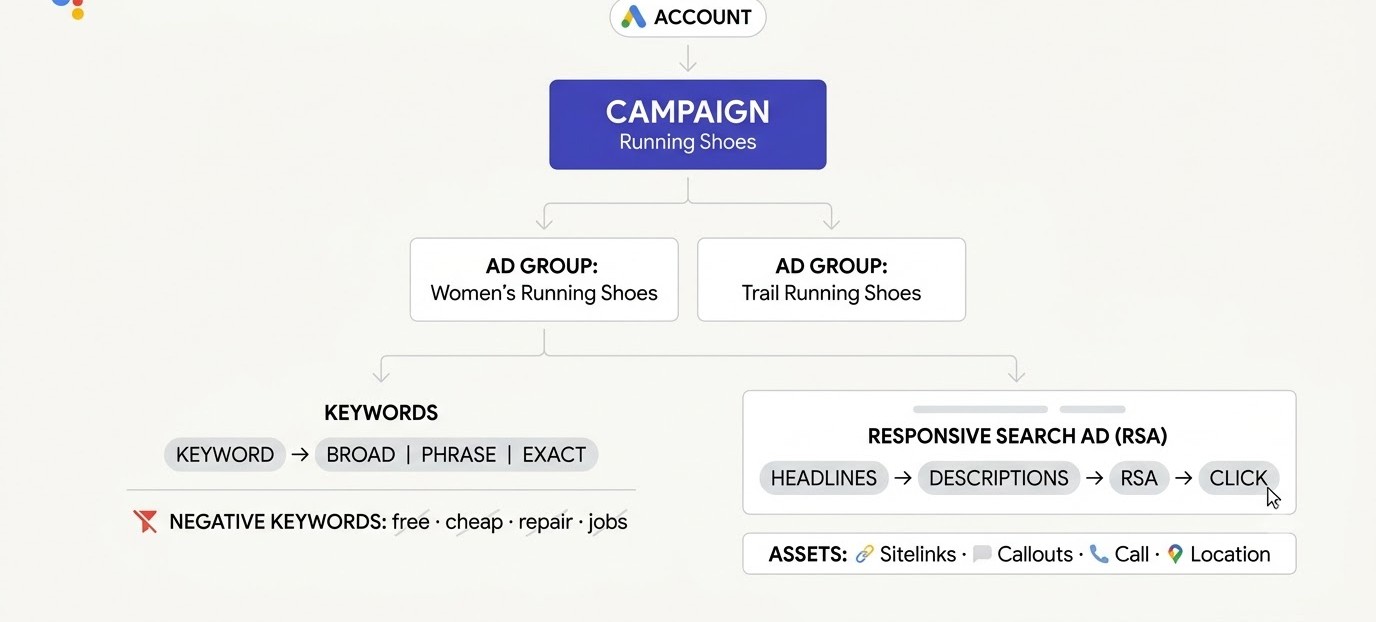
Open a fresh Google Ads account and the first screen feels like a spaceship dashboard. It is easier than it looks. Everything sits inside four layers, and once you understand how they nest, the whole account makes sense. This section walks through each layer, how keywords are matched, and how to write ads people click.
The Four-Layer Structure of an Account
An account holds campaigns. Each campaign holds ad groups. Each ad group holds keywords and ads. That is the full tree. The campaign is where you set the budget, location, language and bidding strategy. The ad group is where you group closely related keywords. Keywords and ads sit inside the ad group.
Think of a shoe shop. The campaign is “Running Shoes.” Inside it, one ad group is “Women’s Running Shoes” and another is “Trail Running Shoes.” The women’s ad group has keywords like “women’s running shoes” and ads that say “Women’s Running Shoes, Free Delivery.” The trail ad group gets its own keywords and its own ads.
The mistake nearly every beginner makes is dumping 40 keywords into one ad group with two generic ads. Then the ad cannot match any search closely, Quality Score slides, and costs go up. Aim for tight ad groups with roughly 5 to 15 closely related keywords. If the keywords would not fit in the same headline, split them.
Keywords and Match Types, Explained With Real Searches
A keyword is the word or phrase you want your ad to show for. The match type tells Google how loosely to interpret it. There are three. Broad match shows your ad for searches related to your keyword, even without the same words. Phrase match shows it when the search includes the meaning of your phrase in order. Exact match is the tightest, covering searches with the same meaning as your keyword.
Take the keyword “running shoes for women.” In exact match, it targets that meaning almost precisely. In phrase match, a search like “best running shoes for women with flat feet” could trigger it. In broad match, a search like “ladies sports footwear” might trigger it, because Google judges the intent as related.
Broad match paired with automated bidding can work well once an account has conversion data. For a beginner with no data, though, it is a quick way to attract random searches. Start with phrase and exact, watch the real searches that trigger your ads, and open things up later.
Negative Keywords: The Cheapest Fix in Google Ads
Negative keywords tell Google which searches you do not want your ad to show for. If you sell premium running shoes, add “free,” “cheap,” “second hand” and “repair” as negatives. Without them, you pay for clicks from people who were never going to buy.
To find them, open the Search Terms report (Campaigns, then Insights and reports, then Search terms). It lists the actual searches that triggered your ads and clicked through. Read it like a diary. The first week usually shows a handful of embarrassing surprises, like a bakery ad showing for “bakery job vacancy.”
Add negatives at the ad group, campaign or account level depending on how broad the exclusion should be. Do this every week for the first two months. It is dull work, and it is also usually the fastest way to cut wasted spend by 10 to 30 percent in a new account.
Writing Responsive Search Ads That Get Clicked
The standard Search ad today is the responsive search ad (RSA). You supply up to 15 headlines (30 characters each) and up to 4 descriptions (90 characters each), and Google mixes them to find combinations that perform. You will not see a fixed ad. You see many combinations assembled for different searchers.
Give Google real variety. Include your main keyword in at least a few headlines. Add a benefit (“Free Delivery in 2 Days”), a proof point (“4.8 Rated by 3,200 Customers”), and a clear call to action (“Book a Free Trial Today”). Headlines that repeat the same idea in slightly different words give the system nothing to test.
Use pinning sparingly. Pinning forces a headline into a fixed position and cuts down how many combinations Google can try. Pin only what truly must show, like a legal disclaimer. Everything else, let the system test, then review the asset performance ratings after a few weeks.
How Many Campaigns Does a Beginner Really Need?
Fewer than you think. One Search campaign for your core service, with two to four ad groups, is plenty to start. Add a second campaign only when there is a clear reason, such as a different budget, a different location or a separate product line that you want to control independently.
Why does that matter? Budgets and bidding strategies are set at the campaign level. If you stuff three unrelated services into one campaign, the best performer can end up starved of budget while the weakest one soaks it up. Splitting campaigns by goal lets you feed money where it earns most.
Resist the urge to copy what an agency screenshot shows, with twenty campaigns and fifty ad groups. That structure suits a large account with years of data. A new account with one campaign and a clean theme is easier to read, easier to fix and much cheaper to learn on.
Assets: Sitelinks, Callouts, Calls and More
Assets (formerly called extensions) are extra bits of information added to your ad. Sitelinks add extra links under your main ad, for example “Pricing” or “Contact Us.” Callouts add short phrases like “24/7 Support.” Call assets add a phone number. Location assets show your address and a map link.
They matter for two reasons. They make your ad physically bigger, which pushes competitors down and gets more attention. And Google counts the expected impact of assets as part of Ad Rank, so a good set of assets can improve your position without raising your bid.
Add at least four sitelinks, four callouts and a call or lead form asset if they fit your business. Check that every sitelink lands on a real, relevant page. Linking a sitelink to a generic homepage wastes the click and drags landing page experience down.
Bidding, Budgets and What You Actually Pay
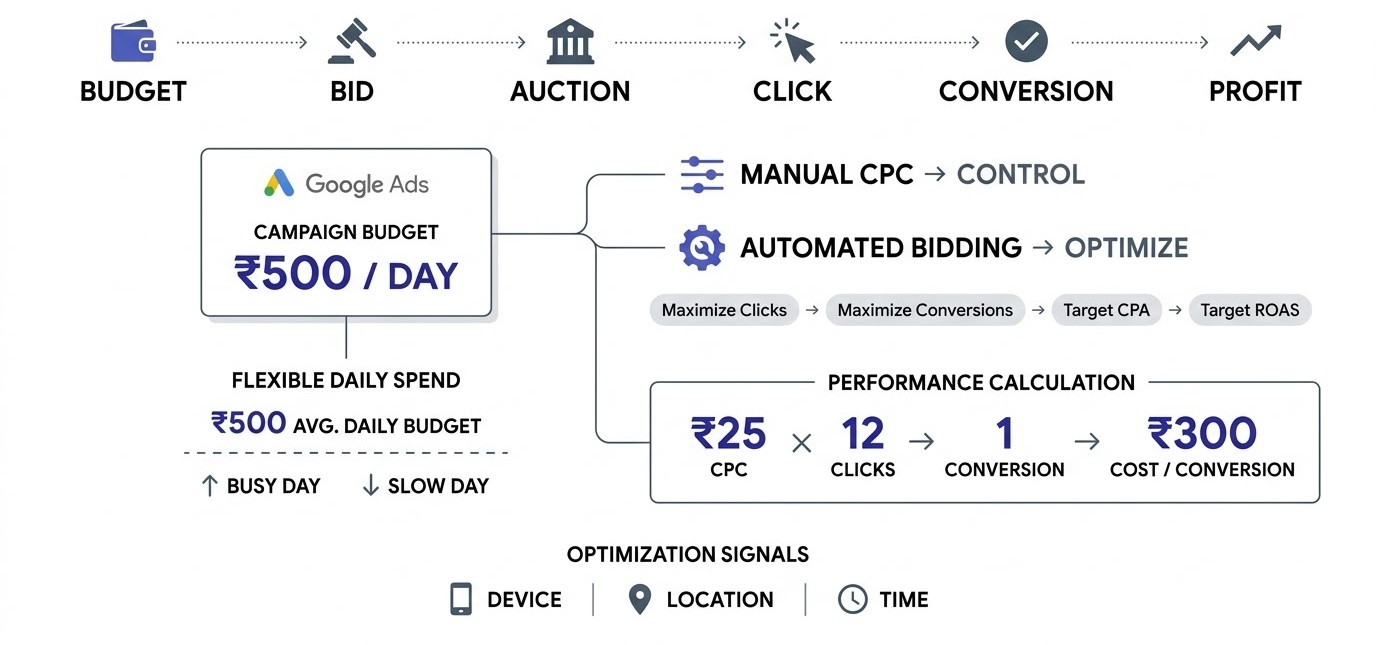
Bidding and budgets are where most beginners either relax too much or panic. Google gives you a lot of automation here, and some of it is genuinely useful, but you need to know what each setting actually does with your money. This section covers bid strategies, how the daily budget behaves, and a realistic first-month plan.
Manual CPC vs Automated Bidding
With manual CPC, you set the maximum price per click yourself, at the keyword or ad group level. You stay in control, and you can see exactly how each change moves your costs. With automated bidding, you give Google a goal and it adjusts bids for every single auction using signals like device, location, time of day and the person’s past behaviour.
For a brand-new account with zero conversions, manual CPC or Maximize Clicks keeps things simple and predictable for a short time. Automated strategies that chase conversions need data to learn from. Without any conversions on record, they are basically guessing, and guessing with your money is expensive.
Once you have at least a couple of dozen conversions in a month, move to automation. Google’s systems read thousands of signals per auction, and no human can match that in real time. The trick is to switch when the machine has something to learn from, not on day one out of fear of “doing it wrong.”
The Main Bidding Strategies in Plain English
Maximize Clicks tries to get as many clicks as possible within your budget. It is not a Smart Bidding strategy, and it does not care whether clickers buy. Maximize Conversions tries to get the most conversions (sales, sign-ups, calls) within budget. Target CPA aims for conversions at a cost per action you pick, such as ₹300 per lead.
Maximize Conversion Value aims for the highest total sale value, which suits online stores with different product prices. Target ROAS (return on ad spend) aims for a specific revenue-to-spend ratio, for example 400 percent, meaning ₹4 back for every ₹1 spent. Target ROAS and Target CPA both need solid conversion history to behave well.
A simple path for most beginners: start with Maximize Clicks for a week or two to gather traffic data, then move to Maximize Conversions once tracking works, then add a Target CPA after you know your real cost per lead. Skip Target ROAS until you have steady sales numbers to feed it.
How the Daily Budget Really Works
You set an average daily budget per campaign. Google may spend up to twice that amount on a single day when it sees strong opportunities, and then spend less on slower days. Over a month, you will never be charged more than your daily budget multiplied by 30.4, the average number of days in a month.
So with a ₹500 daily budget, one busy Tuesday might cost ₹900, and a quiet Sunday might cost ₹250. The month would not exceed ₹15,200. That is useful to know before your phone buzzes with a “you spent ₹980 today” alert and you assume something broke.
Budget also affects whether your ad shows at all. If a campaign has “Limited by budget” status, it means the money runs out before the day ends and you miss searches. Check that label. If it is limited and the campaign is profitable, raise the budget. If it is limited and unprofitable, fix the campaign first.
A Realistic Budget for Your First Month
Here is the maths most guides skip. Suppose you run a physiotherapy clinic and a new patient is worth ₹3,000 in lifetime profit. You can afford to pay up to ₹1,000 to get one. If your average click costs ₹25 and about 1 in 12 visitors books an appointment, one booking costs about ₹300 in ads. That works.
Now flip it. If a click costs ₹90 (common in competitive services like lawyers or loans) and conversion is 1 in 40, a booking costs ₹3,600. You lose money on every patient. Same platform, same effort, completely different outcome, because the numbers behind it differ.
For a first month, plan to spend enough to collect real data. As a rough guide, you want at least 100 to 200 clicks on your main keywords to see patterns. At ₹25 per click, that is ₹2,500 to ₹5,000. Treat that first chunk as tuition. Learning on ₹300 a day for ten days beats guessing on ₹3,000 a day.
The Learning Period and Why You Should Not Touch Things
When you launch a new automated campaign or change a bid strategy, Google puts it into a learning period. During this time the system experiments with bids and audiences to find what works. It usually lasts around a week or two, depending on how much traffic and conversion data comes in.
Beginners often make the worst move here: they see two bad days, panic, change the bid, edit the ads and swap the keywords. Each big change can restart the learning clock. The campaign never settles, and the numbers never become readable. It is like pulling up a plant every morning to check the roots.
Give it at least seven days between major edits. Small things are fine, like adding negative keywords. Big things, like switching strategy, resetting targets or changing the budget by more than 20 percent, wait. If you want to understand where paid ads fit beside content, email and social, the digital marketing learning hub lays out the full picture.
Device, Location and Time Adjustments
Once a campaign has a few weeks of data, check how it performs by device, location and hour of the day. Under Insights and reports you will find breakdowns that show where the money goes. It is common to find that mobile brings most of the calls while desktop brings most of the form fills.
If one segment clearly wastes money, you can adjust bids for it. For example, if tablets spend ₹1,200 a month with zero conversions, you can lower bids for them. If your clinic gets most bookings between 8 am and 1 pm, you can raise bids in that window and lower them at night.
Be careful with automated strategies, since some bid adjustments are ignored when Smart Bidding already handles those signals. Also wait for enough data before you cut anything. Ten clicks from one city proves nothing, and a segment that looks weak after a weekend might be your best one on weekdays.
How Google Ads Works: A Beginner’s Guide to Setting Up Your First Campaign
Theory is fine, but at some point you have to click “New campaign.” This section walks through the setup in the order that saves money: goal and profit maths first, then keywords, tracking, settings, ads and your first week. Do the steps in order, because skipping one usually costs you later.
Step 1: Decide the One Goal and Do the Profit Maths
Pick one goal for the campaign: phone calls, form fills, online sales or store visits. Google will offer a menu of goals when you click “New campaign,” and the choice changes what the system optimises for. Pick a goal that matches the one action that actually earns you money.
Then write down three numbers: what a customer is worth to you in profit, how much you can pay to win one, and the likely cost per click for your keywords. If a plumber in Bhubaneswar earns ₹800 per call-out and about half of enquiries convert, paying ₹150 per enquiry is fine and paying ₹500 is not.
This step takes ten minutes, and almost nobody does it. Skipping it is the reason people say “Google Ads doesn’t work.” Often the ads worked fine. The business simply could not afford the customers it was buying.
Step 2: Research Keywords With Keyword Planner
Google’s Keyword Planner lives under Tools in your account. Type in a few phrases related to your service, and it returns ideas along with average monthly searches, competition level and an estimated range for the top-of-page bid. That range tells you whether your budget can survive in that market.
Look for keywords with clear buying intent. “Emergency plumber near me” is a person with water on the floor. “How do pipes work” is a student. The first is worth paying for. The second is not. Prefer specific phrases of three to five words, since they usually cost less and convert better.
Cross-check with the live results. Search your keyword in an incognito window and see who is already advertising. If the first four ads are all national chains, ask whether you can compete. Free keyword and marketing tools on admeducation.com can also help you sort and clean a keyword list quickly.
Step 3: Set Up Conversion Tracking Before Anything Else
Conversion tracking tells Google which clicks led to something valuable, such as a purchase, a form submission or a call. Without it, you only see clicks and costs, and you cannot tell which keywords make money. Smart Bidding also depends on this data, so skipping it cripples the automation.
You set it up in the Goals section of Google Ads. Create a conversion action, then install the Google tag on your site, either by pasting the code or using Google Tag Manager. If you use WordPress or Shopify, plugins and built-in integrations handle most of it. You can also import conversions from Google Analytics 4.
Test it before launch. Submit your own form, or buy something with a test order, and confirm the conversion appears in the account (it can take a few hours). If the technical side feels intimidating, the web development learning section walks through tag setup and analytics basics in plain steps.
Step 4: Build the Campaign Settings
Choose “Search” as the campaign type and be careful with the default network settings. Google often ticks the Search Partners and Display Network boxes by default. For a first campaign, untick the Display Network expansion so your Search budget stays on Search. You can test partners later once you have clean data.
Set your locations with care. Choose “Presence: People in or regularly in your targeted locations” instead of “Presence or interest,” otherwise people merely interested in your location, like someone in Delhi reading about Bhubaneswar, can trigger your ad. Pick the language your customers actually search in, which may include English and Hindi or Odia.
If you take calls, use ad scheduling so ads only run when someone can answer. A clinic that is closed on Sunday has no business paying for Sunday clicks. Add your negative keyword list at this stage too, using terms such as “free,” “jobs,” “course” or “DIY” that fit your business.
Step 5: Write the Ads, Add Assets and Run the Pre-Launch Check
Now write the ads. Keep it close to what people search. If the keyword is “emergency plumber Bhubaneswar,” at least one headline should say exactly that. Add proof, an offer and a clear next step. Then add assets: sitelinks, callouts and a call asset if phone leads matter. Review the ad strength rating, but do not obsess over “Excellent.”
Before launching, run a short checklist. Is conversion tracking firing? Does every ad link to a page that matches the keywords, and does that page load in under three seconds on mobile? Is the budget what you can lose? Are negative keywords added? Is the billing method set? Is the correct location chosen?
Then press publish. Google reviews ads before they run, usually within a day. Disapprovals are common for first-time accounts, often for things like exaggerated claims or restricted content. Read the policy message, fix the wording and resubmit. It is annoying but rarely a real problem.
Your First Seven Days After Launch
Day one: check that ads are approved and showing. Look for impressions and clicks. If impressions are zero after 24 hours, check budget, bids, status and keyword approval. Day two and three: open the Search Terms report and add negative keywords for anything irrelevant. Do not touch bids yet. Two days of data is noise.
Day four to five: look at click-through rate and cost per click by keyword. A keyword with plenty of clicks and a CTR under 1 percent usually has an ad relevance problem. Rewrite the ad. Day six and seven: check conversions. If you have clicks but zero conversions, test the landing page by visiting it on a phone yourself.
At the end of the week, write down what you learned and what you will change. Keep a simple log with the date, the change and the reason. Three months from now, that log will save you from repeating mistakes you have already paid to discover.
How Google Ads Works After Launch: Metrics, Mistakes and What to Fix First
A campaign that is live is only half the job. The other half is reading what the numbers say and fixing the right thing in the right order. This section covers the metrics worth watching, how to diagnose each kind of problem, the mistakes that drain new accounts, and when to scale up or shut things down.
The Metrics That Actually Matter
Start with impressions (how often your ad was shown) and clicks (how often it was clicked). Divide clicks by impressions and you get click-through rate (CTR). Average CPC is your typical cost per click. Conversion rate is conversions divided by clicks. Cost per conversion (CPA) is your total spend divided by conversions. Those five numbers tell most of the story.
Add impression share to that list. It shows what percentage of the available searches your ad actually appeared for. If impression share is 30 percent and the lost share is due to budget, you are missing 70 percent of a market you already know converts. If the loss is due to rank, you have a quality or bid problem.
Ignore vanity numbers like total impressions without context. A million impressions with a 0.2 percent CTR is a relevance problem, not a success. Judge every campaign by cost per conversion against what a customer is worth to you. Everything else is a clue about why that number looks the way it does.
Diagnosing Low Impressions, Low Clicks and Low Conversions
If impressions are low, the ad is not getting into auctions or is losing them. Check keyword status for “low search volume,” confirm the budget and bids are enough, and review whether your match types are too narrow. Broaden carefully, adding phrase match or related keywords, and make sure the location and schedule are not strangling reach.
If impressions are fine but clicks are low, the ad is not convincing. Rewrite headlines to mirror the search, add a number or an offer, and check that your assets are active. A CTR below 2 percent on a Search campaign usually means the ad and keyword do not line up. Splitting the ad group into tighter themes often fixes it.
If clicks are fine but conversions are low, look at the landing page and the tracking. Open the page on a phone with a slow connection. Does the form work? Is the phone number tappable? Does the headline repeat what the ad promised? Then check that conversion tracking fires properly, because a broken tag can make a profitable campaign look dead.
The Mistakes That Drain New Accounts
The usual suspects are depressingly consistent. Launching with default network settings and paying for Display clicks no one asked for. Putting every keyword in one ad group. Skipping conversion tracking. Sending all traffic to the homepage instead of a page built for the search. Ignoring mobile, where more than half of clicks often come from.
Another favourite: using broad match keywords with Maximize Clicks and no negatives. That combination can burn through ₹5,000 in a couple of days on searches like “free,” “jobs” and “how to.” Equally common is running Performance Max with no conversion data and no creative variety, then wondering why nothing sells.
Then there is impatience. Changing five settings a day, pausing campaigns after 48 hours and judging by a single click. The people who do well in Google Ads are not geniuses. They check the Search Terms report every week, change one thing at a time and keep notes. It is boring, and it works.
Why Google’s Recommendations Need a Second Look
Inside your account you will see an optimization score and a list of recommendations such as “raise your budget,” “add more keywords” or “switch to broad match.” Google builds these to improve performance, but they also tend to increase spend. Some are sensible. Many are not right for your situation.
Treat each recommendation as a suggestion to evaluate, not a to-do list. Adding responsive search ad headlines or fixing disapproved ads is usually a good idea. Raising your budget by 40 percent before your tracking is proven is not. Also check your auto-apply settings, and turn off any you did not choose on purpose.
A score of 100 percent does not mean the account is profitable. It means you accepted the suggestions. Profit lives in cost per conversion and in the quality of your leads. Use the score as a prompt to look at something, and never as a target to hit.
When to Scale Up and When to Stop
Scale when cost per conversion sits comfortably below what a customer is worth, the campaign is limited by budget, and results have been steady for at least two to three weeks. Raise the budget by about 20 percent at a time and give it a week before the next change. Sudden jumps unsettle the system.
Stop or rebuild when a campaign has spent two to three times your target CPA with no conversions, and you have already checked tracking, landing page and search terms. That is not bad luck. Either the offer does not match the keywords or the market is too expensive for your margins. Pause it, learn from the data and try a different angle.
Sometimes the honest answer is that Google Ads is the wrong channel for now. A business with razor-thin margins in an expensive category, like loans or legal services, may find organic search, referrals or social more affordable. Knowing when to walk away is also a skill, and an underrated one.
Three Myths That Cost Beginners Money
Myth one: a higher position always means better results. Not true. The top slot gets the most clicks, but it also costs the most, and many advertisers earn better returns from positions two or three at a lower price. Judge position by cost per conversion, never by pride.
Myth two: more keywords mean more customers. In practice, a hundred loosely related keywords usually means a hundred ways to attract the wrong person. Twenty well-chosen keywords with matching ads often beat them, since each ad can speak directly to the search it answers.
Myth three: Google Ads stops working if you pause it and restart it. Pausing does not wreck anything permanently, though automated campaigns may need a short relearning period. What actually hurts is leaving a campaign running untouched for months while competitors, prices and search habits quietly change around it.
Conclusion
How Google Ads works comes down to one idea: it is an auction that rewards relevance, so your job is to be the most useful answer to a specific search at a price that still leaves you with profit. Learn the auction, structure your account tightly, track conversions from day one, and read your Search Terms report weekly. That covers most of what separates profitable beginners from the ones who give up after a month.
Your next step is small and concrete. Open a new Google Ads account (or the one you abandoned), do the profit maths from Step 1, and build one tightly themed campaign with a daily budget you can afford to lose. Run it for two weeks without panic edits.
Frequently Asked Questions
Here are the questions beginners ask most often, answered directly. Each answer stands on its own, so you can jump to the one you need without reading the rest of the guide first.
How does Google Ads work for beginners?
Google Ads works through an auction that runs every time someone searches. You pick keywords, write ads and set a bid and budget. When a search matches your keywords, Google scores your ad on bid, quality and context. The highest scores win the ad spots. You usually pay only when someone clicks your ad, and the price depends on competition and your ad quality.
How much does Google Ads cost?
There is no minimum spend. You set a daily budget, and you pay per click, per thousand impressions or per view, depending on the campaign type. Search clicks in India often range from about ₹5 to ₹100 or more, depending on the industry. A small local business can start with ₹300 to ₹500 per day. Competitive fields like finance and law cost much more per click.
Do you pay when someone only sees your ad?
On most Search campaigns, no. You pay when someone clicks, so impressions alone are free. Some campaigns, mainly Display and awareness types, charge per thousand impressions (CPM). Video campaigns may charge when a person views or interacts with the video. The billing model is shown in your campaign settings, so check it before you launch.
What is Quality Score and why does it matter?
Quality Score is a 1 to 10 rating Google gives each keyword, based on expected click-through rate, ad relevance and landing page experience. A higher score usually means lower costs and better ad positions. It works as a diagnostic: a score under 5 tells you the keyword, ad and landing page are not lining up. Fix those before raising bids.
How long does it take for Google Ads to work?
Ads can show within a day, once Google approves them. But reliable results take longer. Expect two to four weeks to collect enough data to judge a campaign, and often two to three months to get costs down through negative keywords, better ads and landing page tests. Smart Bidding strategies also need a learning period of about one to two weeks.
What is the difference between Google Ads and SEO?
Google Ads is paid: you bid for placement, get traffic quickly and stop getting it when you stop paying. SEO is organic: you earn rankings through content and site quality, which takes months but keeps working without a per-click fee. Many businesses use both, using ad data to learn which keywords convert and then building organic content around them.
What is a good click-through rate for Google Ads?
It varies a lot by industry and keyword intent. Search campaigns often see CTRs somewhere around 3 to 6 percent, while Display campaigns are usually well under 1 percent. Branded keywords tend to get much higher rates. Rather than chasing a universal benchmark, compare your CTR against your own past results and against similar ad groups in the same account.
Can I run Google Ads with a small budget?
Yes. Many local businesses start at ₹300 to ₹500 a day. The trick is to stay narrow: choose a small location, a few exact or phrase match keywords with clear intent, and one tightly themed ad group. A small budget spread across too many keywords gives too little data on any of them to learn from.
Is Google Ads worth it for small businesses?
It can be, when the numbers work. If a customer is worth ₹3,000 in profit and you can win one for ₹500 in ad spend, it pays for itself many times over. It is not worth it when margins are thin or clicks cost more than a sale earns. Do the profit maths first, then test with a small budget.
What are negative keywords in Google Ads?
Negative keywords are words or phrases that stop your ad from showing for certain searches. If you sell premium sofas, adding “free,” “cheap” and “repair” as negatives keeps your ad away from people unlikely to buy. You find new negatives in the Search Terms report. Adding them weekly is one of the fastest ways to cut wasted spend.
What is Performance Max and should a beginner use it?
Performance Max is a campaign type that runs your ads across Search, YouTube, Display, Gmail, Maps and Discover from one setup, using Google’s automation to choose placements. It works best with solid conversion data and strong creative. A beginner with no tracking history usually learns more, and wastes less, by starting with a standard Search campaign first.
Why are my Google Ads getting clicks but no sales?
The usual causes are a landing page that does not match the ad, slow loading on mobile, broken or missing conversion tracking, irrelevant search terms or an offer that does not appeal. Check the Search Terms report first, then visit your own landing page on a phone. If the page is fine and tracking works, test a different offer or price.
How does Google decide which ad shows first?
Google ranks ads by Ad Rank, which combines your bid, the quality of your ad and landing page, minimum thresholds, the competitiveness of the auction, the search context and the expected impact of your assets. The ad with the highest Ad Rank takes the top position. That is why a lower bid with a more relevant ad can beat a higher bid.
Can competitors click my ads to waste my budget?
It can happen, but Google runs systems to detect and filter invalid clicks, and it credits your account for clicks it identifies as invalid. Some still slip through. Watch for odd spikes in clicks with zero conversions, check your placement and IP reports, and report suspicious activity. For most small advertisers, irrelevant searches waste far more money than rivals do.