

Most businesses don’t have an email marketing strategy. They have a Mailchimp account, a newsletter that goes out whenever somebody remembers, and a nagging feeling that email should be doing more than it is. Picture a shop owner in Pune who sends one big blast at Diwali, watches 14 people open it, and decides email is dead. It isn’t dead. The plan was never there.
Here is what usually happens instead. Someone reads that email returns around $36 for every $1 spent (that’s the long-running estimate Litmus has published), signs up for a tool, uploads a messy spreadsheet of contacts, writes a long promotional email, and hits send. Then nothing. No sales, a handful of unsubscribes, maybe one angry reply. So the whole channel gets written off after a single try, when the real issue was skipping every step that comes before the send button.
A proper email marketing strategy is just a set of decisions made in the right order. Who are you writing to? What do you want them to do? How do they get on your list? What do they hear first, second, and fifth? How do you know it’s working? Answer those in sequence and email turns from a guessing game into the most predictable channel you own, because nobody can change an algorithm between you and your subscriber’s inbox.
This guide walks through the whole thing step by step, from picking a goal with an actual number attached to building automations, fixing deliverability, and reading your reports without fooling yourself. It’s written for beginners, students and small business owners, so every term gets explained the first time it shows up. Nothing is skipped on the assumption that you already know it.
What You Will Learn in This Guide
- What an email marketing strategy really is, and why most small businesses never build one before they start sending.
- How to set one measurable goal, so every email you write has a job instead of just filling a calendar slot.
- How to define your audience using real data from your store, your website analytics and your customer conversations.
- How to choose an email service provider that matches your business model, budget and technical comfort level.
- How to grow a list of people who actually want your emails, using lead magnets, forms and honest consent practices.
- How to build a welcome series, a content calendar, and the three automations that earn money while you sleep.
- How to write subject lines, body copy and calls to action that get opened, read and clicked.
- How to measure results properly, fix deliverability problems, run A/B tests, and follow a 90-day roadmap.
TL;DR
- An email marketing strategy is a written plan covering goal, audience, list growth, content, automation and measurement, built before you send.
- Pick one goal with a number and a deadline, like 400 new subscribers or 25 repeat orders in 60 days.
- Segment from day one, even if it’s just “new subscriber” versus “customer”, because one message to everyone performs worst.
- Set up SPF, DKIM and DMARC before your first campaign, and keep spam complaints under 0.1%.
- Judge success by clicks, conversions and revenue per recipient, not open rate, since Apple’s Mail Privacy Protection inflates opens.
Why Every Business Needs an Email Marketing Strategy Before Sending a Single Email
Sending emails without a plan is like opening a shop without deciding what you sell. This section covers what an email marketing strategy actually contains, why email still beats most channels for return, and which early mistakes quietly sink campaigns before they even start.
What an Email Marketing Strategy Actually Is
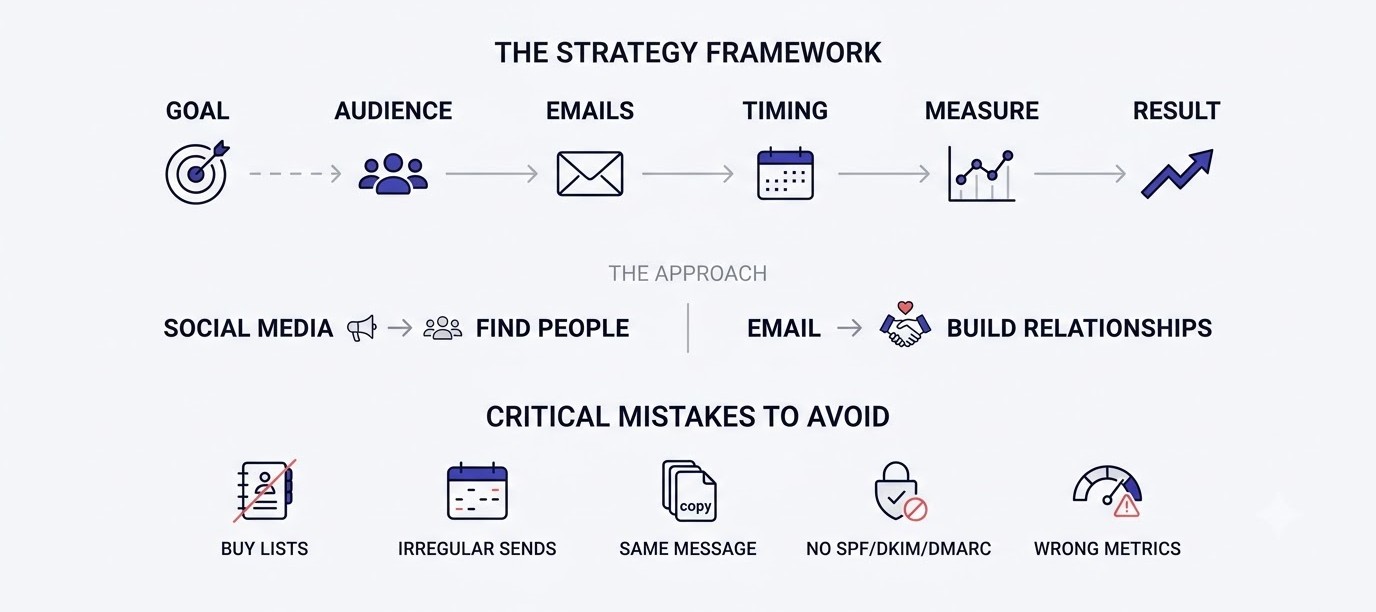
An email marketing strategy is a written plan that connects a business goal to the emails you send, the people who receive them, and the numbers you’ll use to judge the result. It answers six questions: why are we emailing, who are we emailing, how do they join, what do they receive, when do they receive it, and how do we measure it.
Look at what it isn’t. It’s not a content calendar, though a calendar sits inside it. It’s not your tool choice, and it’s definitely not a subject line formula. People mix these up constantly. A calendar tells you what goes out on Tuesday. A strategy tells you why Tuesday’s email exists at all and what should change in the business because of it.
A useful test: can you explain your plan on one page? If it takes a slide deck, it’s probably a mess. Most small teams do well with a single document listing the goal, the audience segments, the three or four automated flows, the weekly send rhythm, and the five numbers they’ll check every month.
Why Email Still Beats Social Media for Most Small Businesses
Email wins because you own the list. Instagram can drop your reach by 40% overnight with an algorithm change, and you can’t do a thing about it. Your email list doesn’t care. Export it, move it to another tool, send from a different platform tomorrow. Nobody sits between you and the subscriber except the inbox provider’s spam filter.
Then there’s intent. Someone who typed their address into your form made a small decision to hear from you. Someone who scrolled past your reel made no decision at all. That difference shows up in conversion rates, and it’s why a list of 2,000 engaged subscribers often outsells a social following of 20,000.
None of this means ignoring social. It means using social to feed the list. A beginner who builds their email list properly treats Instagram and Google as places to find people and email as the place to build the relationship. That split is the backbone of nearly every healthy small business marketing setup.
The Numbers That Make Email Worth the Effort
Start with the $36 per $1 figure from Litmus. Treat it as a ceiling for well-run programs, not a promise. What matters more is the shape of the economics: after the tool subscription and your time, each extra email costs close to nothing. A Mailchimp or Brevo plan at a few thousand contacts runs somewhere between free and a few thousand rupees a month, and that same list can drive thousands in sales.
Take a simple example. A store with 3,000 subscribers sends one campaign a week. Say 2% of recipients click and 3% of those buy a Rs 1,200 product. That’s 60 clicks, about 2 orders, roughly Rs 2,400 per send. Small. Now add a welcome flow and an abandoned cart flow converting even modestly, and the numbers stack up fast because flows run every day without extra work.
The point isn’t to promise riches. It’s to show why a small, well-built program usually pays for itself within a quarter, while a sloppy one burns time and gets blamed on “the channel”.
Early Mistakes That Sink an Email Marketing Strategy
Five mistakes show up again and again. First, buying or scraping a list. Those contacts never asked to hear from you, so they mark you as spam, and that damages your sender reputation for months. Second, sending irregularly, which means subscribers forget who you are and ignore the next message.
Third, treating every subscriber the same. A first-time visitor and a customer who has ordered four times need completely different emails. Fourth, skipping the technical setup. Without SPF, DKIM and DMARC records, many emails land in spam no matter how good they are. Fifth, measuring the wrong thing, usually open rate, and celebrating a number that doesn’t mean what it used to.
The fix for all five is the same: build the plan first. The rest of this guide goes through each step in the order you’d actually do them, so you won’t have to patch problems later.
Step 1 and 2: Set Goals and Know Your Audience for Your Email Marketing Strategy
Every strong email marketing strategy begins with two answers: what result you want and who you’re talking to. This part shows how to turn vague hopes into measurable goals, build audience profiles from real data, audit what you already have, and pick the right tool.
Pick One Measurable Goal With a Deadline
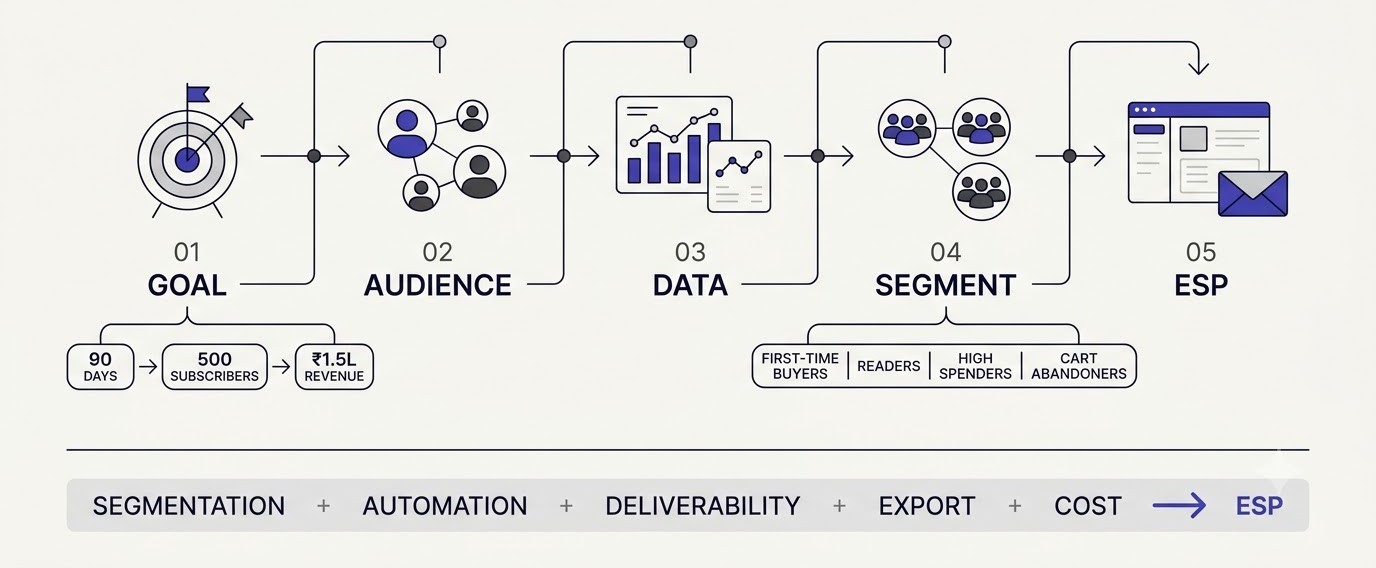
“Grow our email marketing” isn’t a goal. “Add 500 subscribers and generate Rs 1.5 lakh in email-attributed revenue by the end of 90 days” is. The difference is that the second version tells you exactly what to build and exactly when you’ve failed or won. Vague goals produce vague emails.
Choose one primary goal per quarter. Common ones: grow the list, increase repeat purchases, move leads toward a sales call, drive webinar signups, or reduce churn for a subscription. Pick the one closest to money. You can run secondary goals, but if everything is a priority, nothing gets enough attention to work.
Work backwards from the number. If the target is Rs 1.5 lakh and your average order is Rs 1,500, you need 100 orders. If email converts about 1.5% of clicks, you need roughly 6,700 clicks. If your click rate is 2%, you need around 330,000 sends. Suddenly it’s obvious whether the goal is realistic or whether the list needs to grow first.
Build Audience Profiles From Real Data, Not Imagination
Here’s the thing about personas: most are fiction. “Marketing Mary, 34, loves yoga” tells you nothing. Real profiles come from real sources. Open your store’s order data, your Google Analytics 4 audience reports, your Instagram insights, and the last 20 customer support emails. Patterns jump out quickly.
Write down three or four groups with a name that describes behavior, not demographics. Examples: “first-order buyers, no repeat”, “newsletter readers who never bought”, “high spenders, 3+ orders”, “cart abandoners”. Each group gets a short note on what they care about, what worries them, and what email should do for them.
Talk to five actual customers too. Ask what made them sign up, what they expected, and what they ignore in their inbox. Fifteen minutes on the phone beats a week of guessing. The words customers use to describe your product are the same words that should end up in your subject lines.
Audit Your Current List, Tools and Content
Before building anything new, check what already exists. Pull your contacts from every place they live: the website form, the billing system, the CRM, an old Excel sheet someone made in 2021. Merge them in one place and look at the real size. Most owners discover duplicates, dead addresses and contacts with no consent record.
Check consent honestly. Did these people agree to marketing emails? Under GDPR for European contacts, CAN-SPAM in the US and India’s Digital Personal Data Protection Act, 2023, you need a lawful basis and a working unsubscribe. Contacts you can’t defend get removed or sent a clear re-permission email.
Then list the emails you already send: receipts, shipping updates, password resets. Those transactional emails get opened at very high rates, and they’re free real estate for a relevant product recommendation or a review request, as long as the rules for your region allow it.
Choose the Right Email Service Provider
An email service provider (ESP) is the software that stores your list, sends your emails and reports results. Gmail or Outlook won’t do for marketing at any scale, because they cap daily sends and lack unsubscribe handling, tracking and automation. Pick an ESP based on your business, not on whatever a YouTuber recommended.
A rough guide: Klaviyo suits Shopify and other e-commerce stores because of its product-level data. Kit (formerly ConvertKit) fits creators and course sellers. Mailchimp and Brevo work for general small business use, and MailerLite is a good budget option. HubSpot makes sense when email sits next to a full CRM. Free plans exist on several, but limits change often, so read the pricing page before committing.
Check five things before paying: can it segment by behavior, does it have automation builders you can actually use, how good is the deliverability reputation, can you export your list easily, and what does it cost at 5,000 contacts, not just 500? A side-by-side look at the options in the tools hub saves a lot of trial and error.
Step 3: Build and Grow the List That Powers Your Email Marketing Strategy
Your list is the asset everything else depends on. This section covers lead magnets that people actually want, forms that convert, the consent method to use, cleaning habits that protect deliverability, and why segmentation starts at signup rather than later.
Create Lead Magnets People Actually Want
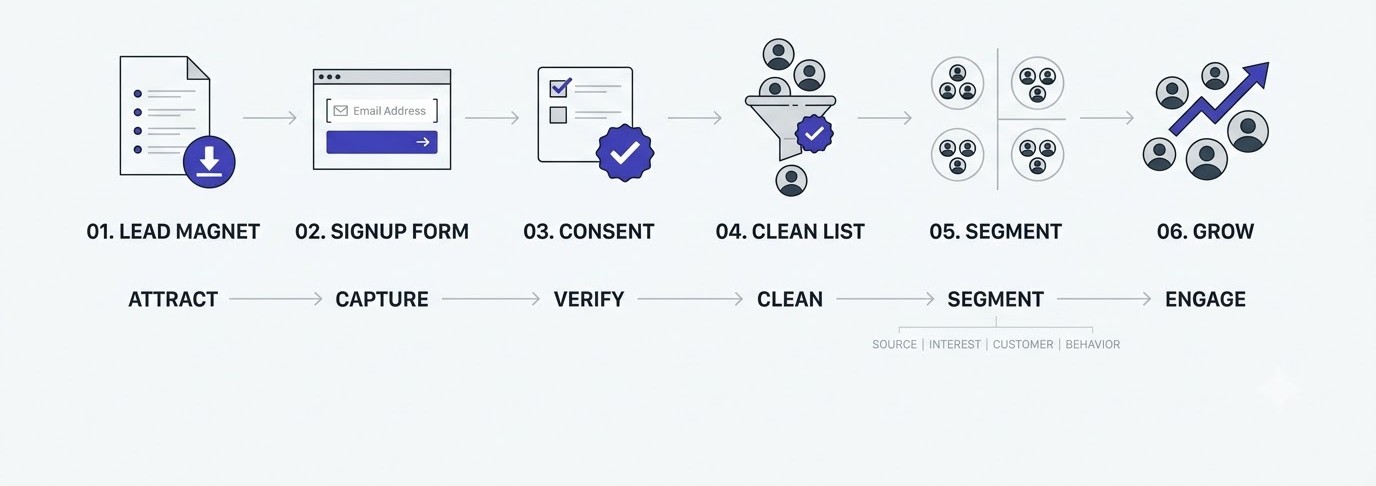
A lead magnet is the free thing you offer in exchange for an email address. A generic “Subscribe to our newsletter” converts at maybe 1%. A specific offer, like a 10-page checklist or a 12% first-order discount, can lift that to 5% or more on the same traffic. Specific wins because it names a result.
Good magnets solve one small, urgent problem. A fitness coach might offer a printable 7-day meal plan. A web agency might give a one-page website launch checklist. A skincare brand could offer a quiz that ends with a routine and a coupon. Notice none of these are “ebooks” in the old sense. Short, usable and fast beats long and impressive.
Build yours in Canva or Google Docs in an afternoon. Don’t spend three weeks on it. Test it with 100 visitors and see whether it converts. If fewer than 2% sign up, change the headline or the offer before you change anything else, because the promise matters more than the design.
Place Signup Forms Where Readers Actually See Them
Forms hide in footers and die there. Put the main signup in at least four spots: a short embedded form above the fold on your homepage, an inline form in the middle of high-traffic blog posts, an exit-intent popup on desktop, and a slide-in or sticky bar on mobile. Each catches a different type of visitor.
Keep the form short. Email address and first name is plenty. Every extra field costs roughly 5 to 10% of signups. If you need more information, collect it later through a preference page or a progressive question inside the welcome series, once trust exists.
Write the button like a promise: “Send me the checklist” beats “Submit”. And add one line of reassurance beneath it, such as “One email a week, unsubscribe anytime.” It sounds minor, yet that small line reduces hesitation more than most design tweaks.
Use Double Opt-In and Respect Consent
Single opt-in adds someone the moment they submit the form. Double opt-in sends a confirmation email they must click first. Yes, double opt-in loses some signups, often 10 to 20%. But those who confirm are real, typos get caught, and bots can’t join. For most businesses, the cleaner list is worth the smaller one.
Consent has to be explicit and recorded. Use an unticked checkbox where the law calls for it, tell people what they’ll receive and how often, and store the date and source of each signup. If a regulator or an angry subscriber ever asks, that record is your proof.
Also honor the unsubscribe request fast. CAN-SPAM allows ten business days, but there’s no reason to wait; modern tools do it instantly. Hiding the link or making people jump through hoops only pushes them to hit the spam button, which hurts you far more than a clean exit would.
Keep the List Clean and Avoid Buying Contacts
Never buy a list. Never. Purchased addresses carry spam traps, dead mailboxes and people who’ve never heard of you. One send to such a list can push your spam complaint rate past 0.3%, the line Gmail and Yahoo flag for bulk senders, and recovery takes months. A smaller list of real subscribers beats a bigger list of strangers every time.
Clean what you do own, every quarter. Remove hard bounces immediately, since those addresses don’t exist. Then look at contacts who haven’t opened or clicked in 180 days. Send them a short win-back series of two or three emails, and if they still don’t respond, stop emailing them. Keeping dead weight lowers your engagement rate, and inbox providers watch engagement closely.
This feels backwards because the list number drops. But a list that shrinks from 10,000 to 7,500 and sees clicks double is healthier. Vanity subscriber counts impress nobody who actually has to hit revenue targets.
Segment Subscribers From the Very First Day
Segmentation means splitting your list into groups so each gets relevant emails. Beginners push it off until they have “enough subscribers”. That’s backwards. Start on day one with simple tags: where the person signed up, which lead magnet they downloaded, and whether they’ve bought.
Even those three tags change results. A subscriber who downloaded a beginner guide shouldn’t get an advanced-user promo. A customer shouldn’t see “get 10% off your first order”. Basic relevance like that routinely lifts click rates by a noticeable margin compared with one-message-for-everyone sends.
As the list grows, add behavior segments: clicked a link about product X, visited the pricing page, hasn’t opened in 60 days, ordered more than twice. Most ESPs let you build these with a few clicks. Don’t overbuild; five good segments you actually use beat twenty you never email.
Step 4: Plan Content, Design and Automation in Your Email Marketing Strategy
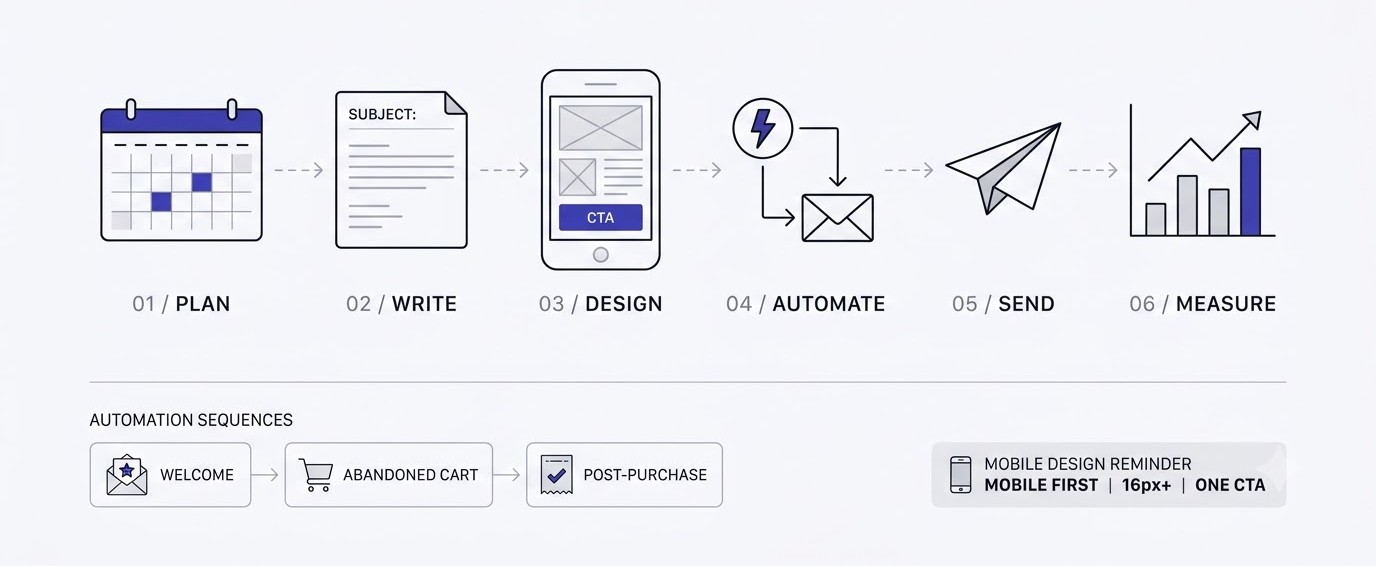
This is the part where the plan turns into actual emails. Below you’ll find how to build a welcome series, set a realistic sending rhythm, write subject lines, structure the body copy, design for phones, and set up the three automations that bring in revenue daily.
Build a Welcome Series That Sets the Tone
A welcome series is the short run of automated emails a new subscriber gets right after joining. It’s the highest-leverage thing in your whole program, because people are most interested in you at the exact moment they sign up. Welcome emails routinely get open rates several times higher than regular campaigns.
A solid five-email setup looks like this. Email one goes out immediately and delivers the promised lead magnet, with a single line about what to expect. Email two, a day later, tells your story in three short paragraphs. Email three, on day three, shares your most useful piece of content. Email four handles objections or shows a customer result. Email five, around day seven, makes a soft offer.
Most people stop at one welcome email and then wonder why subscribers go cold. Don’t. Spread the introduction across a week, ask a question in the second email (“What’s the biggest problem you’re trying to solve?”), and read the replies. Replies also tell Gmail that real people talk to you, which helps your inbox placement.
Create a Realistic Content Calendar
A content calendar is a simple schedule of what you’ll send and when. The mistake beginners make is planning daily emails, burning out by week three, and vanishing for two months. Pick a rhythm you can keep for a year. For most small businesses that’s one email a week, maybe two when there’s a sale.
Mix the types. A healthy month might have one educational email, one story or behind-the-scenes email, one product or offer email, and one customer proof email. The classic rule of thumb is about four useful emails for every one sales pitch, and honestly, that ratio holds up well in practice because it keeps people reading.
Use a plain Google Sheet with columns for send date, segment, goal, subject line, and link. Write emails in batches, say four at a time, on one afternoon each month. Add dates around real events too: Diwali, Black Friday, back-to-school, your own product launches. Plan these six weeks ahead, not six days.
Write Subject Lines and Preview Text That Get Opened
The subject line has one job: get the email opened without lying. Keep it under about 45 characters so it doesn’t get cut off on phones. Be specific. “Our July newsletter” is forgettable. “The 3 emails that made us Rs 40,000 last month” is something a person might actually click.
Preview text is the grey snippet that appears after the subject in the inbox. Ignore it and the app fills it with “View in browser” or a stray footer link, which is wasted space. Write it on purpose as a second line to the subject, adding a detail or a reason to open.
What works: curiosity with a real payoff, a concrete number, a direct question, a personal tone. What fails: ALL CAPS, three exclamation marks, fake “Re:” prefixes, and clickbait the email doesn’t pay off. Write 5 subject lines per email, pick the best two, and A/B test them. Over a few months you’ll see what your own audience responds to.
Write Body Copy That People Read to the End
Most people skim email on a phone in about eight seconds. So write for the skim. Start with one sentence that earns the second sentence. Keep paragraphs to two or three lines. Use one idea per email, because an email with four topics gets four partial reads and no action.
Write like you’d talk to one person. Use “you”. Use contractions. Read it aloud, and if you stumble, rewrite the sentence. A short story, like how a customer in Jaipur fixed a shipping problem, will hold attention better than a feature list ever does.
End with exactly one main call to action (CTA), the thing you want them to do. A single button reading “Get the checklist” or “See the sizes” outperforms five links competing for attention. Repeat the link once in a P.S. if the email is long. P.S. lines get read surprisingly often.
Design Emails for Mobile First
Around half or more of email opens happen on phones for most consumer brands, so design for a thumb, not a mouse. Use a single column, a font size of at least 16 pixels for body text, and buttons at least 44 pixels tall so they’re easy to tap. Wide, multi-column layouts break on small screens.
Keep branding light. A logo at the top, two brand colors and one font are enough. Learning a bit of visual hierarchy and Canva basics helps here, since the eye should land on the headline first, the image second and the button third without any effort.
Watch image weight. Many email apps block images by default, so an email made entirely of one big picture shows a blank box. Mix real text with images, add alt text, and keep total file size small. Always send yourself a test and open it on an actual phone before scheduling.
Set Up the Three Automations That Earn While You Sleep
Automation means emails that send themselves when a subscriber does something. Three are worth building first. The welcome series you’ve already seen. The abandoned cart flow, which emails shoppers who added items but didn’t pay. And the post-purchase flow, which thanks buyers, asks for a review and suggests a next product.
Abandoned cart is usually the biggest earner. A typical sequence has three emails: a reminder after one hour, a social proof email after a day, and a small incentive or deadline after three days. Klaviyo and Shopify Email both include templates, so you can have this live in an afternoon.
Later, add a win-back flow for people who’ve gone quiet for 90 days and a birthday or anniversary email if you collect that data. Check each flow every quarter, since products, prices and links change. A broken automation can keep sending a dead link for months without anyone noticing.
Step 5: Measure, Test and Improve Your Email Marketing Strategy Over Time
A plan without measurement is just a hope. This section covers the metrics worth watching, how to protect deliverability, how to run honest A/B tests, a worked example, and a simple 90-day roadmap you can follow from day one.
Track the Metrics That Actually Matter
Start with the numbers that connect to money. Click-through rate shows how many recipients clicked a link. Conversion rate shows how many of those completed your goal. Revenue per recipient divides total email revenue by emails delivered, and it’s the cleanest way to compare campaigns of different sizes. Unsubscribe rate and spam complaint rate tell you when something is off.
Open rate is the troublemaker. Since Apple launched Mail Privacy Protection in 2021, Apple Mail pre-loads emails in the background, so opens get counted whether anyone looked or not. That inflates the metric. Use opens as a rough directional signal only, never as proof that a campaign worked.
Set simple benchmarks from your own history rather than chasing industry averages. If your click rate is 1.8% this quarter, aim for 2.2% next quarter. Review a one-page dashboard monthly: list growth, click rate, revenue per recipient, unsubscribes, spam complaints. Five numbers, nothing more.
Fix Deliverability Before Anything Else
Deliverability is whether your email actually reaches the inbox instead of spam or never arriving at all. Since early 2024, Gmail and Yahoo require bulk senders (roughly 5,000 or more messages a day) to authenticate email, offer one-click unsubscribe, and keep spam complaints below 0.3%. Smaller senders should follow the same rules anyway.
Authentication has three parts. SPF lists which servers may send for your domain. DKIM adds a digital signature proving the message wasn’t altered. DMARC tells receiving servers what to do when checks fail. Your ESP gives you records to paste into your domain’s DNS settings. Use a branded sending domain, not a free Gmail address.
Watch Google Postmaster Tools for your domain reputation, and keep spam complaints under 0.1% as a safer target. Warm up a new domain slowly, starting with your most engaged contacts, and don’t jump from 500 to 50,000 sends in a week. Good content can’t rescue a damaged sender reputation.
Run A/B Tests Without Fooling Yourself
An A/B test sends two versions of one email to small random slices of your list, then sends the winner to the rest. Test one thing at a time: subject line, send time, CTA wording, or the first sentence. Changing five things at once tells you nothing about which change mattered.
Sample size matters. Testing on 200 subscribers and declaring victory after a 3% difference is basically a coin flip. Aim for at least a few hundred recipients per variant, and judge by clicks or revenue, not opens. Let the test run long enough, usually 24 hours.
Keep a test log in the same Google Sheet as your calendar: what you tested, the result, and what you’ll do differently next time. After six months that log becomes a custom rulebook for your audience, and it’s worth more than any generic list of best practices.
A Worked Example: From 800 Subscribers to a Working System
Here’s a made-up but realistic example to show how the pieces fit. A D2C skincare brand has 800 subscribers, sends a random blast monthly, and earns about Rs 6,000 from email. Goal for 90 days: Rs 60,000 in email revenue. Nothing fancy.
Month one, the brand sets up SPF, DKIM and DMARC, adds a quiz-based lead magnet, builds a five-email welcome series and a three-email abandoned cart flow, and tags subscribers by skin type. Month two, it moves to a weekly send with segmented content and starts A/B testing subject lines. Month three, it adds a post-purchase flow and a win-back series.
No single change does the heavy lifting. The flows quietly handle most of the revenue, the segmentation lifts clicks, and the list grows steadily from the quiz. Real results vary a lot by product and traffic, so treat the Rs 60,000 as a planning number, not a promise. For real-world breakdowns of campaigns like this, the case studies section is worth reading.
Your 90-Day Roadmap and the Mistakes to Avoid
Days 1 to 14: set your goal, define three or four audience groups, choose your ESP, and complete domain authentication. Days 15 to 30: build the lead magnet, put forms on your site, write and launch the welcome series. Days 31 to 60: launch abandoned cart and post-purchase flows, start weekly sends, begin A/B testing subject lines.
Days 61 to 90: clean the list, build a win-back flow, review the dashboard, and write down three changes for the next quarter. Repeat that cycle every quarter. The strategy isn’t a document you finish once; it’s a loop you run.
Keep an eye on the usual traps: sending inconsistently, ignoring mobile, burying the CTA, skipping segmentation, chasing opens, and treating unsubscribes as failures. An unsubscribe is a free list cleanup. The person who leaves would have ignored you anyway, so let them go and focus on those who stay.
Conclusion
The core idea is simple. A good email marketing strategy decides the goal first, builds a list people actually asked to join, sends relevant messages through automations and a steady weekly rhythm, and checks the numbers that connect to revenue. Everything else, from subject line tricks to fancy templates, is secondary.
Your next step is small. Open a blank document today and write three lines: your 90-day goal with a number, your two main audience groups, and the first automation you’ll build.
Frequently Asked Questions
What is an email marketing strategy?
An email marketing strategy is a written plan that links a business goal to the emails you send, the audience you send them to, how subscribers join your list, what content they receive, and how you measure results. It covers goals, segmentation, automation, content, tools and reporting in one document.
How do you create an email marketing strategy step by step?
Start by setting one measurable goal. Then define your audience groups, choose an email service provider, build your list with a lead magnet, set up a welcome series and core automations, write a weekly content calendar, and review click rate, conversions and revenue per recipient every month.
How often should you send marketing emails?
For most small businesses, once a week works well. Ecommerce stores may send two or three times a week during sales. The best frequency is one you can keep up consistently with useful content, so check unsubscribe and complaint rates after any change.
What is a good open rate for email marketing?
Open rates have become unreliable since Apple Mail Privacy Protection began pre-loading emails in 2021. Many programs see 30 to 50% reported opens, but that figure is inflated. Focus on click rate and revenue per recipient, and compare against your own past results.
What is the best email service provider for beginners?
Mailchimp, Brevo and MailerLite are common beginner choices because of easy editors and free or low-cost entry plans. Klaviyo suits online stores, and Kit suits creators. Compare pricing at 5,000 contacts, automation features and list export options before deciding.
How do you grow an email list from scratch?
Offer a specific lead magnet, such as a checklist or discount, and place signup forms on your homepage, blog posts and checkout. Promote it on social media and in your bio link. Use double opt-in, ask for only an email and first name, and never buy contacts.
What is the difference between a newsletter and an email campaign?
A newsletter is a regular scheduled email, often educational, sent to a broad list. A campaign is a targeted send with a specific goal, like a product launch or sale. An email marketing strategy usually includes both, plus automated flows that trigger on subscriber behavior.
What is email segmentation and why does it matter?
Segmentation divides your list into smaller groups based on behavior, interests, location or purchase history. It matters because relevant emails get higher clicks and fewer unsubscribes than one message sent to everyone. Even basic tags like “customer” and “lead” make a measurable difference.
How do you stop emails from going to spam?
Authenticate your domain with SPF, DKIM and DMARC, send only to people who opted in, and keep spam complaints under 0.1%. Use a recognizable sender name, avoid misleading subject lines, include a visible unsubscribe link, and remove inactive contacts regularly.
Is email marketing still worth it?
Yes. You own the list, there are no algorithm changes between you and your subscribers, and cost per send is very low. Litmus has estimated returns around $36 per $1 spent. Results depend on list quality, relevance and consistent execution.
How long does it take to see results from email marketing?
Early signals like list growth and click rates appear within the first 30 days. Meaningful revenue from automations usually shows up between 60 and 90 days, once welcome and abandoned cart flows have collected enough data and the list has grown.
What are the best email marketing automations to start with?
Begin with a welcome series, an abandoned cart flow for online stores, and a post-purchase flow. These three trigger from clear actions, run without extra effort and usually deliver the best return. Add win-back and birthday emails once the basics work.
What metrics should you track in an email marketing strategy?
Track list growth, click-through rate, conversion rate, revenue per recipient, unsubscribe rate and spam complaint rate. Treat open rate as a rough signal only. Review these monthly and compare each against your previous quarter rather than industry averages.