


Somewhere around late 2023, a wave of websites decided ChatGPT could replace their entire content team. Thousands of articles went up in weeks. Traffic spiked for a few months. Then Google rolled out its helpful content updates, and a huge chunk of those sites lost 60 to 90 percent of their organic traffic almost overnight. That’s not a scare story. That’s what happens when people treat AI as a content vending machine instead of a tool that needs a human operator who actually knows SEO.
Here’s the part nobody talks about enough: AI didn’t kill those sites. Laziness did. The same tool that tanked those rankings is sitting in thousands of other content calendars right now, quietly doubling output for teams that know how to use it properly. The difference isn’t the software. It’s the process wrapped around it.
This guide breaks down exactly how to use AI to create SEO content the right way, from the research stage all the way to publishing and measuring results. You’ll see the actual workflow, the tools worth paying for versus the ones that waste your time, the mistakes that get pages deindexed, and a realistic look at what AI is genuinely good at versus where it falls flat. By the end, you’ll have a repeatable system, not a vague idea that “AI can help with content.”
If you’re a student learning SEO for the first time, a solo founder writing your own blog, or someone managing content for a small team, this is written for you. No fluff, no theory that only works in a slide deck.
One more thing before jumping in. A lot of guides on this exact topic read like a list of ChatGPT prompts glued together with generic advice about “quality content.” That’s not what this is. Every section here comes from actually running content teams through this process, watching what happens in Search Console 60 days later, and adjusting based on what the data actually showed. Some of it will contradict what a random YouTube video told you last week. That’s fine. The data doesn’t care about popular opinion, and neither should your content strategy.
What You Will Learn in This Guide
- The full step-by-step process for using AI in SEO content without triggering quality penalties
- Which AI tools actually earn their subscription fee, and which ones are overhyped
- The specific mistakes that get AI-assisted content flagged or deindexed
- How to keep your writing sounding human even when a machine wrote the first draft
- A practical way to measure whether your AI content strategy is actually working
- Real numbers and benchmarks instead of vague “best practices”
What It Actually Means to Use AI to Create SEO Content in 2026
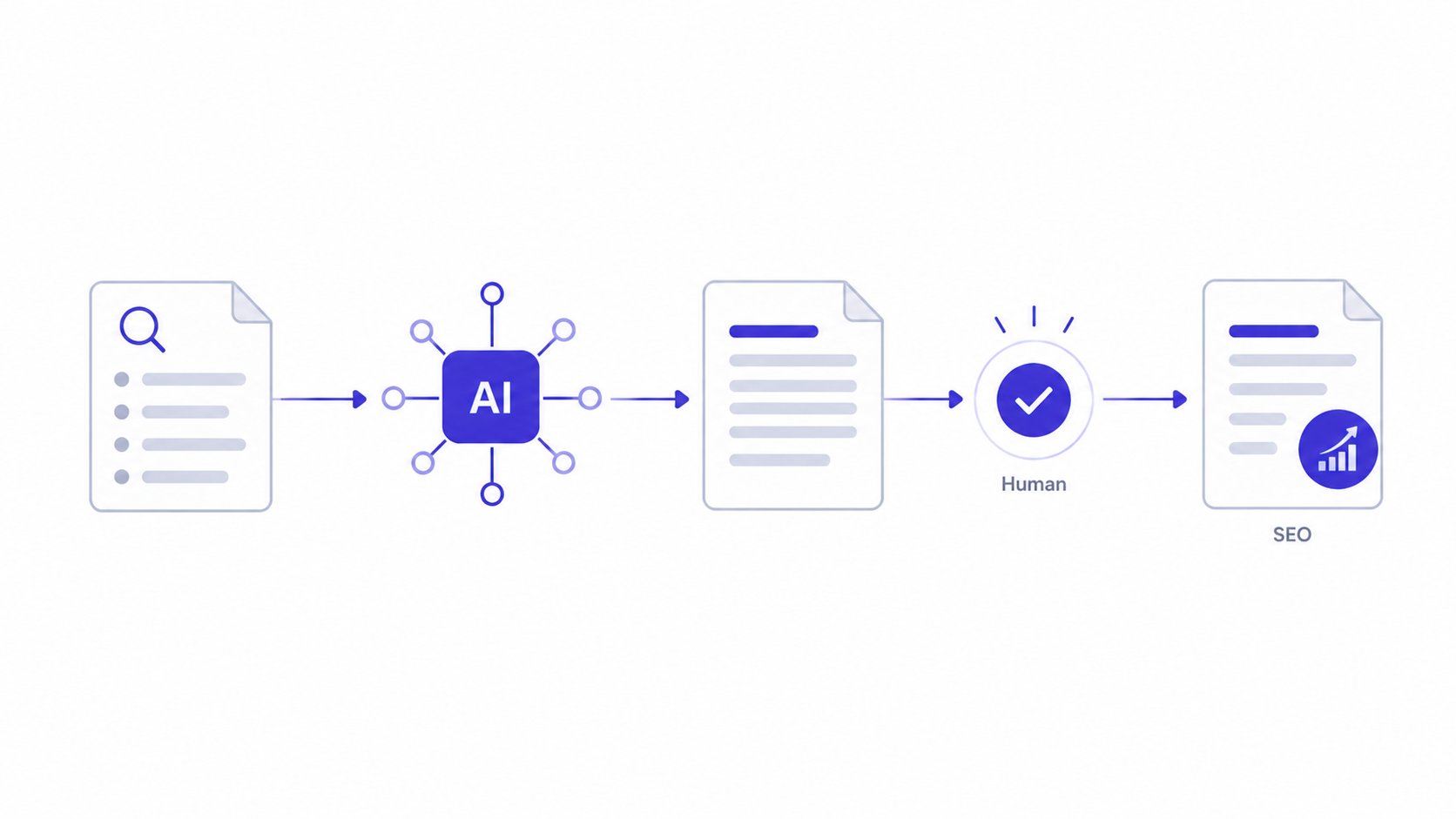
Using AI to create SEO content means using a language model as a research assistant and drafting partner inside a process that a human still owns from start to finish. It does not mean typing a keyword into ChatGPT, copying the output, and hitting publish. That distinction sounds obvious written down, but it’s exactly where most people go wrong.
Google has been asked directly about AI-generated content more than once, and the position has stayed consistent: the company doesn’t care how content is produced, it cares whether the content is helpful, original, and demonstrates real expertise. That’s not a loophole. It’s actually a fairly generous rule, because it means AI-assisted content can rank just fine, as long as a human adds the judgment, the specificity, and the proof of experience that a model can’t fake.
Here’s the thing most beginners miss. A large language model is a prediction engine. It generates the statistically likely next word based on patterns in its training data. That means it’s excellent at structure, grammar, and general explanation, but it has zero firsthand experience. It has never actually run a Google Ads campaign, never watched a Search Console graph move after a fix, never dealt with a client asking why rankings dropped after a redesign. When you use it to create SEO content without adding that layer of real experience, you end up with generic, forgettable writing that reads exactly like every other AI output on the internet, which is precisely what search engines are now built to detect and deprioritize.
So the real skill isn’t “prompting.” It’s knowing which parts of the content process to hand to the machine and which parts absolutely need a human hand on the wheel. Research, structure, and first-draft speed: hand those to AI. Judgment, specificity, opinion, and proof: keep those human. That split is the entire framework behind everything in this guide.
Why AI Content Alone Can’t Satisfy Google’s E-E-A-T Standard
E-E-A-T stands for Experience, Expertise, Authoritativeness, and Trustworthiness, and it’s the framework Google’s Search Quality Rater Guidelines use to judge whether a page deserves to rank, especially for topics that affect someone’s health, money, or safety. It’s not a direct ranking algorithm you can optimize line by line, but it shapes the signals Google’s systems have been trained to look for.
The “Experience” part is where AI content structurally struggles the hardest. A model trained on text scraped from the internet has read millions of descriptions of how to change a car’s oil, but it has never actually laid under a car with a wrench in hand. It can describe the process accurately in general terms, yet it can’t tell you that the drain plug on a 2019 Honda Civic sits at an awkward angle that strips easily if you use the wrong socket size, because that’s a detail only someone who has done the job would know to mention.
That gap is exactly why raw AI output feels hollow even when it’s technically correct. Every sentence is true, generically. None of it proves the writer has actually done the thing being described. Closing that gap is a human job, every single time, and it usually only takes one or two well-placed sentences per section to shift a page from “technically accurate” to “clearly written by someone who knows this.”
The second thing worth understanding here is that Authoritativeness and Trustworthiness compound over an entire domain, not just a single page. A site publishing consistently deep, accurate, well-edited AI-assisted content builds trust signals over time, the same way a single weak, thin page can drag down how Google’s systems perceive the rest of the domain. That’s the real reason volume-over-quality AI content strategies backfire at scale. It’s never just about one bad article. It’s about what a pattern of thin pages tells an algorithm about the whole site.
How to Use AI to Create SEO Content Step by Step
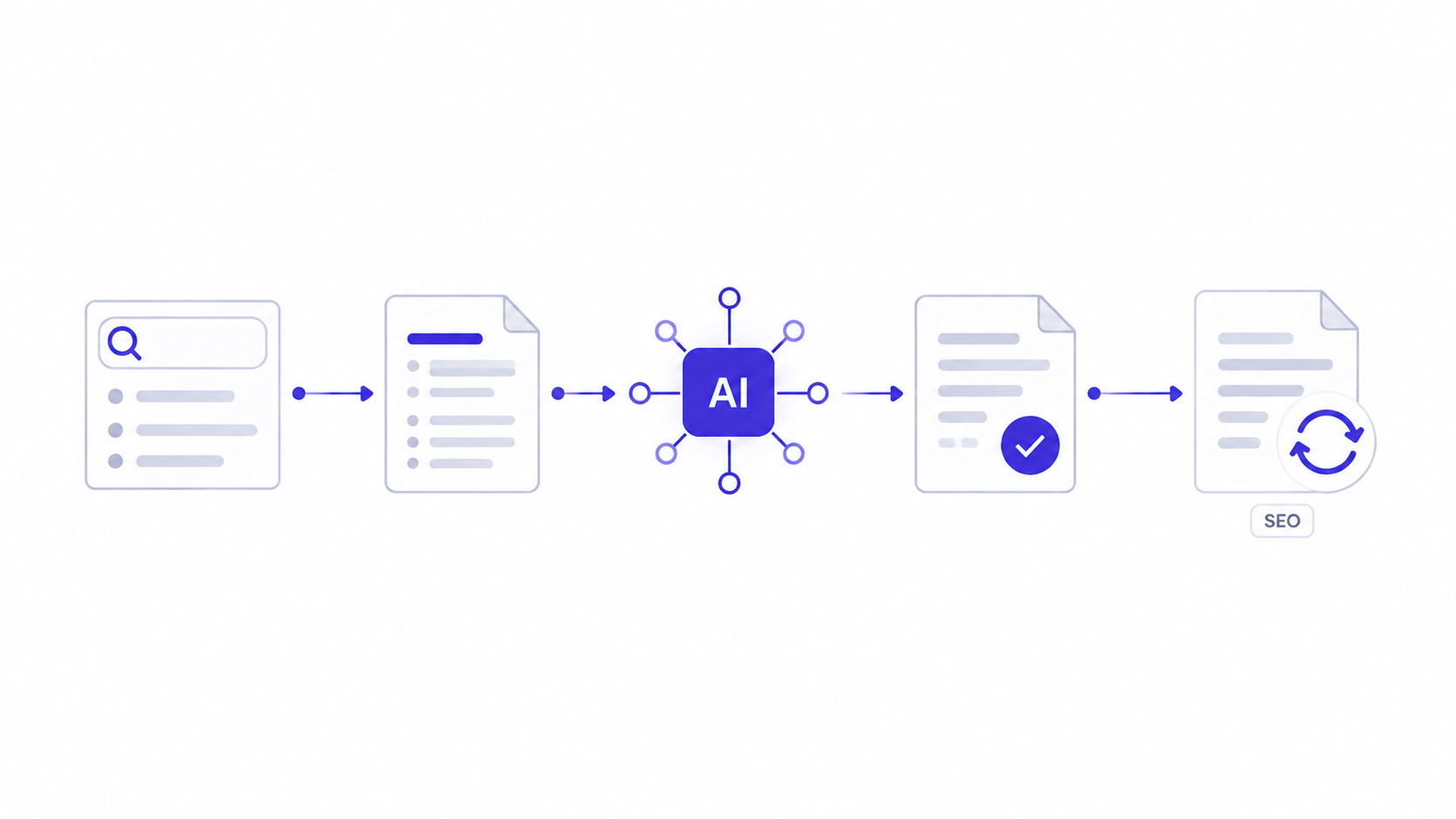
There’s a difference between “using AI for content” as a vague habit and running an actual repeatable process. The teams getting real results from AI-assisted content follow roughly the same four-stage workflow every single time. Skip a stage, and the quality drops fast.
Step 1: Keyword and Search Intent Research With AI
Start every piece by figuring out exactly what the searcher wants, not just what the keyword says on the surface. A keyword like “best running shoes” could mean someone wants a buying guide, a listicle, or a comparison chart, and Google’s top results will tell you which one it’s actually rewarding. AI tools are genuinely strong here because they can process large chunks of search result data faster than a human scanning ten tabs manually.
Open a tool like Semrush or Ahrefs first to pull the actual keyword data: search volume, keyword difficulty, and the current top 10 ranking pages. Then feed that raw data into an AI model with a specific instruction: “Here are the top 10 ranking pages and their H2 structures for [keyword]. Identify what all ten have in common, then identify three angles none of them cover in depth.” That second question is where AI actually earns its keep, because it can spot content gaps across ten pages faster than you can read all ten start to finish.
The mistake most people make at this step is asking AI to “generate keywords for [topic]” without ever pulling real search volume data first. That gives you a list of plausible-sounding phrases with zero validation that anyone actually searches for them. Always ground the AI’s suggestions in real data from a keyword tool before you commit an article to that topic. If you’re still building your foundation in keyword research itself, the SEO learning hub covers the fundamentals in more depth before you layer AI on top of it.
There are four broad types of search intent, and getting this wrong at the research stage wrecks everything downstream no matter how good the AI drafting later turns out. Informational intent means the searcher wants to learn something, like “what is a meta description.” Navigational intent means they’re trying to reach a specific site or page, like “Semrush login.” Commercial investigation means they’re comparing options before buying, like “Semrush vs Ahrefs.” Transactional intent means they’re ready to act, like “buy Semrush subscription.” Ask your AI tool to classify the intent for every keyword on your list before writing anything, because writing an informational blog post for a keyword that actually wants a comparison table gets buried no matter how well-written it is.
A quick way to sanity-check the AI’s intent classification: manually look at the top three results for the keyword. If they’re all long comparison tables, the intent is commercial, no matter what the AI predicted. If they’re all short, direct-answer pages, that’s informational, and stretching it into a 2,500 word epic will actually hurt readability and engagement time rather than help it.
Step 2: Building the Content Brief Before Writing a Single Word
A content brief is the single highest-leverage document in this entire process, and it’s the one step people skip most often when they start using AI to create SEO content. A brief is a structured plan: the target keyword, the search intent, the H2 and H3 outline, the word count target, the entities and statistics that need to appear, and the specific angle that makes this piece better than what’s currently ranking.
Feed your AI tool the top five ranking articles and ask it to build a “skyscraper” outline: identical structure to what’s ranking, but with one clear layer of extra depth on every section. Ask it directly: “Where do these five articles give a vague answer instead of a specific one?” That question forces the model to flag exactly where competitors are thin, which is where you should go deep.
This is also the stage to lock in Answer Engine Optimization thinking, meaning writing so that AI systems like Google’s AI Overviews or ChatGPT’s search feature can pull a clean, self-contained answer straight from your page. Structure each planned section so the first sentence answers the implied question directly, before any additional explanation follows. A brief built this way turns your next step, the actual drafting, into something closer to filling in blanks than staring at a blank page.
Here’s what a real brief line looks like in practice, not just theory. For a section on email list segmentation, a proper brief entry reads something like: “H3: How to Segment by Purchase Behavior. Target 350 to 450 words. Must include: one named tool feature (Mailchimp’s tag-based segmentation or Klaviyo’s flow triggers), one specific numeric example of a segment size or conversion lift, one common mistake beginners make. Answer-first sentence: define what purchase-behavior segmentation means in one clean sentence before expanding.” That level of specificity in the brief is what separates a genuinely deep article from a generic one, because it forces the required depth before a single word of the draft gets written.
Build the brief in a shared Google Doc rather than only inside the AI chat window, especially if more than one person touches the content pipeline. That way the brief becomes a durable reference the writer, the editor, and the AI tool all work from consistently, instead of getting lost three messages deep in a chat thread nobody can find again two weeks later.
Step 3: Drafting With AI Without Sounding Like a Robot Wrote It
This is where most AI-assisted content falls apart, and it’s almost always a prompting problem, not a tool problem. Generic prompts produce generic output. “Write a blog post about email marketing” gives you the same bland, hedge-everything writing that a million other users are getting from the same prompt.
The fix is specificity at the prompt level. Instead of asking for a finished article, ask for one section at a time with real constraints attached. Something like: “Write the section explaining email segmentation. Assume the reader has never sent a marketing email before. Use one specific example involving a Shopify store splitting customers by purchase history. Avoid generic advice like ‘segment your audience.’ Explain exactly which fields to filter by inside Mailchimp.” Notice how much more useful that output will be compared to a vague topic request.
A second technique worth using every time: feed the model examples of your actual writing voice before asking it to draft anything. Paste two or three paragraphs you’ve written yourself and say, “Match this tone, sentence rhythm, and vocabulary level for the next section.” Models are genuinely good at style matching when given a real sample instead of a description like “make it conversational,” which means something different to every writer.
Draft in sections, not as one giant block. A 2,000 word single-prompt article tends to repeat the same three transition phrases and loses specificity by paragraph five. Breaking the brief into individual H2 and H3 prompts keeps each section sharp and gives you natural checkpoints to correct direction before errors compound across the whole piece.
Another underused technique: ask the model to argue against its own first draft before you accept it. After it produces a paragraph, follow up with, “What’s the weakest, most generic sentence in what you just wrote, and how would you make it more specific?” Models are genuinely decent at self-critique when directly prompted for it, even though they rarely self-correct without being asked. This one follow-up question alone often catches half the vague filler sentences you’d otherwise have to hunt down manually during editing.
Watch out for a specific pattern that shows up constantly in first drafts: hedge-everything language. Phrases like “it’s important to consider,” “this can vary depending on the situation,” or “there are many factors involved” are the model’s way of avoiding a direct claim. Every time one shows up, either delete it or replace it with an actual claim. If something genuinely does vary by situation, name the two or three situations explicitly instead of leaving it vague.
Step 4: Editing, Fact-Checking, and the Humanizer Pass
Treat the AI draft the exact same way a senior editor treats a junior writer’s first submission: assume it needs work, and go looking for specific categories of problems rather than just reading it once and hoping it feels fine.
First pass is fact-checking, and this one is non-negotiable. Language models generate confident, fluent sentences even when the underlying fact is wrong, a problem commonly called hallucination. Every statistic, every tool name, every claimed feature needs verification against a real source before publishing. If the AI says “73 percent of marketers use X,” that number needs a real citation or it needs to be cut entirely.
A real example of this going wrong: a model asked to describe Google Analytics 4’s interface confidently described a “Behavior Flow” report showing exact page-by-page drop-off, a feature that actually existed in the old Universal Analytics but was removed in GA4’s redesign. That’s not a rare edge case, it’s a normal outcome of how these models generate text, since they’re trained on a snapshot of the internet that includes outdated screenshots, deprecated features, and old pricing pages mixed in with current information. Never assume a tool description or feature name is current without checking the tool directly.
Second pass is the humanizer pass, which means stripping out the specific patterns that make AI writing recognizable. Watch for words like “delve,” “tapestry,” “leverage,” “unlock,” and “robust.” Watch for sentences that puff up importance without adding information, the kind that say something is a “testament to” or “underscores the significance of” something else without ever explaining what that significance actually is. Watch for the rule of three, where a model lists three near-identical adjectives when one specific word would do. Cut all of it and replace it with a direct, specific statement.
Third pass is adding the human layer that AI can’t fake: a real opinion, a specific number from actual experience, a mistake you’ve personally seen happen. This is the single biggest factor separating content that ranks from content that gets buried, because it’s the layer that demonstrates the “experience” part of Google’s E-E-A-T framework, which stands for Experience, Expertise, Authoritativeness, and Trustworthiness. A model can explain what email segmentation is. Only a person who has actually built a segmented list can tell you that filtering by “last purchase date over 90 days” tends to convert better as a re-engagement segment than filtering by total spend alone, because that’s an observation from doing the work, not a definition pulled from training data.
Step 5: Using AI to Refresh and Repurpose Old Content
Writing brand new articles gets most of the attention, but updating existing content is often the faster path to ranking gains, and it’s a stage where AI genuinely shines because the research legwork is smaller. Pull up any article older than 12 to 18 months in Search Console, check its current average position and click-through rate, and if it’s sitting on page two or stuck at position 8 to 15 despite decent impressions, that’s a strong candidate for a refresh rather than a brand new piece.
Feed the AI tool the existing article text along with the current top five ranking pages for that same keyword, and ask a direct question: “What has changed in the top-ranking pages since this article was likely written, and what specific sections are now outdated or thin compared to current competitors?” This works because the model can compare two snapshots of information quickly, something that would take a human twenty minutes of manual tab-switching to do at the same depth.
A real pattern worth knowing: articles updated with a fresh publish date, at least one new statistic, and one expanded section tend to see ranking improvements within three to four weeks, noticeably faster than the two to three months a brand new article typically needs to stabilize. That’s because Google already has trust signals built up on the existing URL and its backlink profile, so the refresh benefits from history a new page doesn’t have yet.
The mistake to avoid here is doing a surface-level refresh, just changing the publish date and swapping a sentence or two, without actually closing the gap the data revealed. Google’s systems have gotten noticeably better at detecting content that was technically “updated” but didn’t meaningfully improve, and that kind of shallow refresh rarely moves the needle the way a genuine content upgrade does.
Best AI Tools to Use AI to Create SEO Content, and What Each One Is Actually For
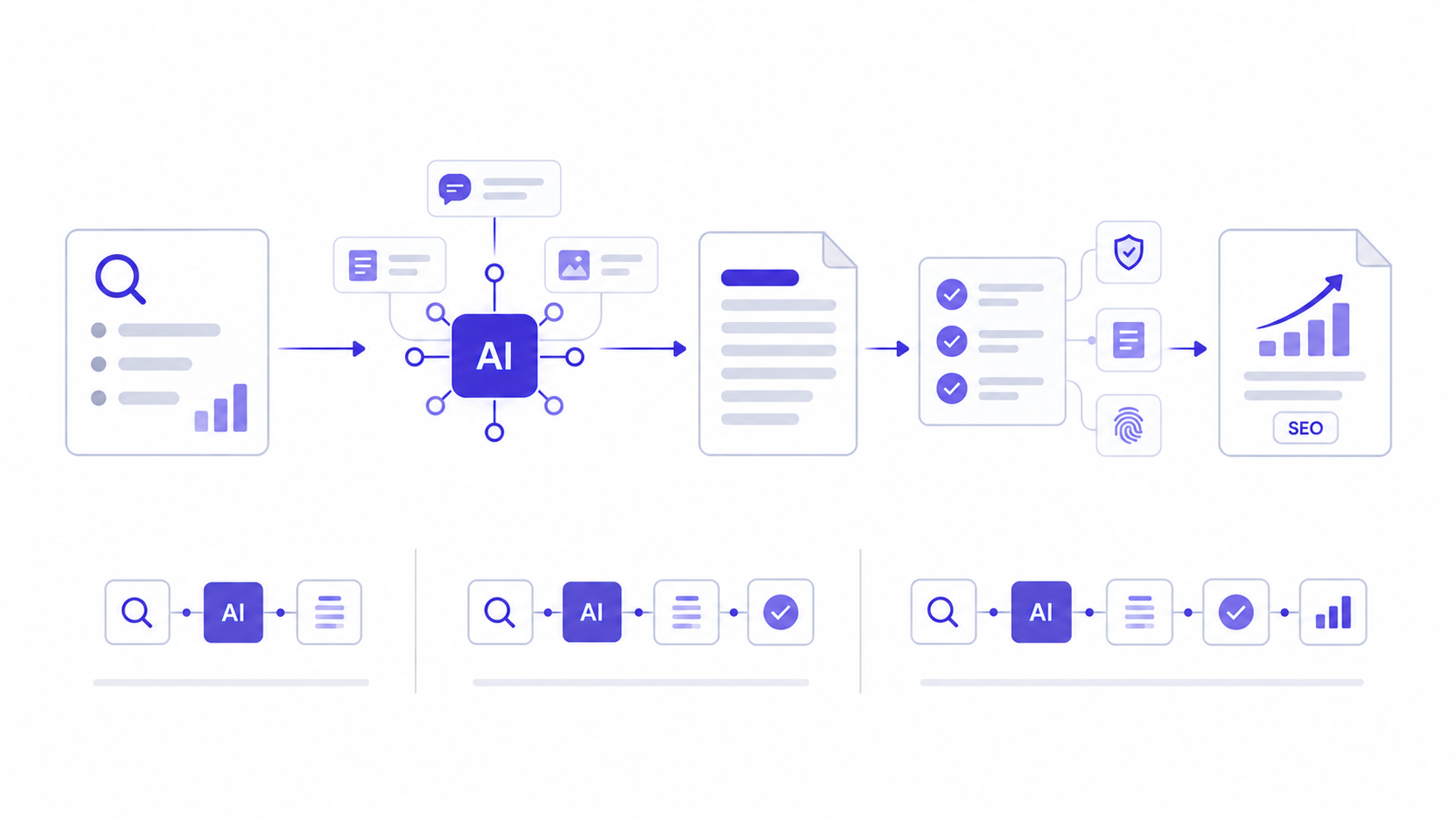
There’s no single tool that handles the entire process well, and that’s the biggest misconception beginners have walking into this. Every stage of content creation needs a different kind of tool, and mixing them up wastes both time and money.
Research and Planning Tools
Semrush and Ahrefs remain the two heaviest hitters for keyword data, competitor gap analysis, and tracking how your rankings move after publishing. Both now include AI-assisted features layered on top of their core databases, like Semrush’s SEO Content Template, which pulls the top ranking pages for a keyword and auto-generates a suggested word count, readability target, and recommended keyword list based on what’s actually ranking, not guesses.
Surfer SEO earns its place specifically for content scoring. It analyzes the top ranking pages for your target keyword and generates a numeric content score based on term usage, structure, and length, then updates that score live as you write. It’s useful as a guardrail, not as a creativity engine, because chasing a perfect Surfer score without a real angle just produces keyword-stuffed mush that happens to hit the right term frequency.
For the AI layer itself, ChatGPT with a paid subscription and access to a reasoning model, Claude, and Google’s Gemini all work well for outline building and content briefs. The real differentiator isn’t which model is “smartest” in the abstract, it’s which one you’ve trained through repeated use to understand your specific niche and voice through custom instructions or project-level context.
Writing and Drafting Tools
Jasper built its entire business model around SEO content generation and includes brand voice training, letting you upload past content so the tool learns your specific tone across a whole team rather than one person’s prompt style. That matters more for agencies and larger content teams than for a solo writer, where a well-crafted ChatGPT prompt with a pasted style sample does the same job for free.
Copy.ai and Writesonic serve a similar function with different pricing tiers, generally cheaper than Jasper but with a shallower feature set around long-form SEO optimization specifically. For most beginners on a budget, a $20 a month ChatGPT Plus subscription combined with a free Google Docs workflow gets you 90 percent of what these paid platforms offer, minus the team collaboration features.
Grammarly’s AI features are worth mentioning here too, not for drafting, but for the tone and clarity pass after your first draft exists. It catches passive voice overuse, sentence length issues, and readability problems that are easy to miss on your own screen after staring at the same paragraph for twenty minutes.
Humanizing and Detection Check Tools
Originality.ai and GPTZero both scan text and estimate the probability it was AI-generated. Neither is perfectly accurate, and Google has stated publicly it doesn’t use AI detection scores as a ranking signal directly. But running your content through one of these tools before publishing is still worth the five minutes, because a high AI-detection score usually correlates with exactly the kind of generic, pattern-heavy writing that performs badly with readers anyway, regardless of what Google’s algorithm does with it.
Hemingway Editor rounds out the toolkit for a final readability check, flagging overly complex sentences and excessive adverb use, both of which tend to creep back in during AI drafting even after a manual edit pass. If you’re deciding between paying for several of these platforms at once versus building a leaner stack, the tools directory has comparison breakdowns worth checking before you commit to a subscription.
Choosing a Stack Based on Budget and Team Size
Not everyone reading this has a marketing budget to throw at five different subscriptions, and honestly, most people don’t need all five to get solid results. A solo blogger or a student practicing on a personal site can run an entire content pipeline on Google’s free keyword tools inside Search Console, a ChatGPT Plus subscription at roughly $20 a month, and the free tier of Hemingway Editor. That covers research direction, drafting, and readability, which handles maybe 80 percent of what the expensive stack does for a fraction of the cost.
A small team of two to five people producing content weekly usually benefits from adding one paid research tool, either Semrush or Ahrefs, since manually checking competitor rankings one search at a time doesn’t scale once you’re publishing more than a couple of articles a week. That’s typically the first real budget line worth approving, somewhere between $99 and $199 a month depending on the plan tier, before adding a dedicated writing platform like Jasper or Surfer.
Larger content operations publishing daily or managing multiple client accounts eventually need the full stack, including a dedicated content optimization tool with team collaboration features and an AI detection tool run as a standard quality gate before anything gets published. The mistake to avoid here is buying the full stack on day one before you’ve even validated that your content process produces results. Start lean, prove the workflow with a handful of articles tracked in Search Console, then scale the tool budget as the traffic numbers justify it.
Mistakes People Make When They Use AI to Create SEO Content
Every mistake in this section shows up constantly in real client audits, and almost every one of them is fixable in an afternoon once you know what to look for.
Publishing Raw AI Output Without a Single Edit
This is the mistake that started this entire conversation about AI content back in 2023 and 2024. Sites that scaled from ten articles a month to five hundred using nothing but raw model output saw their organic traffic collapse during Google’s helpful content updates, because the pattern was obvious at scale: thin, repetitive, generic writing with no real differentiation between one article and the next.
The fix isn’t complicated, it’s just slower than people want it to be. Every single piece needs a human edit pass that adds something the model couldn’t have known: a specific number, a named tool feature, an opinion, or a correction to something the model got slightly wrong. If you’re not willing to spend at least 20 to 30 minutes editing a 1,500 word AI draft, you’re not ready to publish it yet.
Ignoring E-E-A-T Signals Entirely
Experience, Expertise, Authoritativeness, and Trustworthiness aren’t a checklist you fill out once. They’re a lens Google’s quality raters and algorithms apply to every page, checking for real signals like author bios with actual credentials, first-hand experience described in specific detail, and citations to credible sources rather than vague claims.
AI-generated content structurally struggles here because a model has no personal history to draw from. It can describe what running a PPC campaign involves in general terms, but it can’t tell you that a Meta Ads campaign with a daily budget under $20 tends to stay stuck in the learning phase for weeks longer than one budgeted above $50, because that’s a pattern observed from actually spending money on ads, not something derivable from a training dataset. Every article needs at least one paragraph like that, drawn from real hands-on work, or the E-E-A-T signal is missing no matter how well-structured the rest of the piece is.
Keyword Stuffing Disguised as “AI Optimization”
A strange side effect of tools like Surfer SEO is that some users chase the content score number so aggressively they cram in every suggested term regardless of whether it reads naturally. That produces sentences like “our SEO content strategy for SEO content creation uses SEO content tools to optimize SEO content,” which is exactly the kind of writing search engines have gotten dramatically better at penalizing since the 2022 and 2023 spam updates.
Keep keyword density in the 1 to 1.5 percent range and prioritize natural language over hitting every suggested term. If a phrase doesn’t fit the sentence grammatically, don’t force it in just because a content score tool flagged it as underused. A human editor reading the sentence out loud will catch stuffing immediately, which is exactly the test worth running before publishing.
Treating Every Topic the Same Way
Not every keyword deserves the same depth of AI involvement. A quick definitional page answering “what is a meta description” needs a fast, accurate answer and doesn’t need six rounds of prompt iteration. A competitive commercial keyword like “best CRM for small business” needs deep research, real comparison data, and heavy human judgment because the content is directly influencing a buying decision, which places it in Google’s higher-scrutiny “Your Money or Your Life” category for quality evaluation. Match your AI-to-human effort ratio to how much the topic actually matters for the reader’s decision, not a fixed formula applied to everything.
Losing a Consistent Brand Voice Across an Entire Site
This one sneaks up on teams gradually rather than causing an obvious single failure. When five different writers each run their own separate ChatGPT sessions with slightly different prompts, the site ends up with articles that read like five different authors, because that’s essentially what happened, just with a model standing in for each one. Readers notice this even if they can’t articulate why, and it quietly erodes the sense that a brand has one clear point of view.
The fix is building a shared style reference document that every writer feeds into their AI tool before drafting, not relying on each person’s memory of “how we usually write.” Include three or four full paragraph examples of the brand’s actual voice, a short list of words the brand avoids, and a note on sentence length preferences. Paste that reference into every drafting prompt across the team, and the voice drift shrinks dramatically within a few articles. Some teams go further and build this into a custom GPT or a saved system prompt so it’s automatically applied rather than depending on someone remembering to paste it in every time.
Forgetting the On-Page Basics That Have Nothing to Do With AI
It’s easy to get so focused on prompt quality and content depth that the basic on-page checklist gets forgotten entirely, and this happens constantly with AI-assisted workflows specifically because the writing part feels “done” once the draft looks polished. A great AI-assisted article with a missing meta description, no alt text on images, or a title tag that got cut off at 70 characters still underperforms regardless of how good the actual writing is.
Run through the fundamentals every single time: a unique title tag under 60 characters with the primary keyword near the front, a meta description between 150 and 160 characters that includes the keyword and a clear reason to click, descriptive alt text on every image rather than a generic filename, and internal links pointing both to and from the new article so it’s not sitting as an orphaned page with no connection to the rest of the site’s link structure. None of this is glamorous work, and AI can draft the meta description and alt text suggestions in seconds if you ask directly, but it still needs a human to actually check the box before publishing, because it’s exactly the kind of small detail that gets skipped when the excitement is all about the writing itself.
How to Measure Whether Your AI SEO Content Strategy Is Actually Working

None of this matters if you’re not tracking whether it’s producing results, and this is the step most beginners skip entirely because it feels less exciting than writing the next article.
Tracking Rankings, Traffic, and Indexing
Set up Google Search Console before you publish anything, not after. It’s free, and it’s the single most direct line into how Google actually sees your pages, including which queries are driving impressions, your average position for each one, and whether pages are getting indexed at all. AI-assisted content that’s genuinely well-edited tends to get indexed within a few days to two weeks. Content that reads as thin or duplicate-pattern often sits in a “Discovered, currently not indexed” state for months, which is one of the clearest early warning signs that something in your process needs fixing.
Track rank movement over a 60 to 90 day window rather than checking daily, since fresh content naturally fluctuates in position during Google’s initial evaluation period, sometimes called the “honeymoon period” where a new page temporarily ranks higher before settling into its real position. Tools like Semrush’s Position Tracking or Ahrefs’ Rank Tracker let you monitor a full keyword list against competitors automatically instead of manually searching each term yourself.
Checking Engagement Metrics and AI Overview Citations
Rankings only tell half the story. Open Google Analytics and check average engagement time and scroll depth on your AI-assisted articles compared to your fully human-written ones. If AI-assisted pages show noticeably lower engagement time even at similar rankings, that’s a signal the content reads as generic enough that people bounce after skimming, regardless of how well it’s technically optimized.
A newer metric worth tracking specifically in 2026: whether your content actually gets cited inside AI Overviews or cited by ChatGPT and Perplexity when users ask related questions. Search your target keyword manually and check if an AI Overview appears, then check whether your domain shows up in the cited sources. Getting cited here requires exactly the AEO-style writing covered earlier in this guide, meaning direct, self-contained answers near the top of each section. If your competitors are getting cited and you’re not, that’s a strong signal your content needs a more direct, answer-first restructure rather than more length. If you want the full structured path to build these skills systematically rather than piecing them together from individual articles, the Alpha Marketer Foundation Program covers the complete SEO and content workflow from research through measurement.
Setting Up a Quality Control Checkpoint Before Anything Goes Live
Once a content process involves more than one writer using AI, quality control needs an actual checkpoint, not just an assumption that everyone follows the same steps. The most effective version of this is simple: a shared checklist attached to every article before it moves to published status, covering fact-check completion, humanizer pass completion, on-page basics, and a named example or statistic drawn from real experience somewhere in the piece.
Assign one person, even on a small team, as the final reviewer whose only job is checking that list against the draft, separate from whoever wrote it. Writers reviewing their own AI-assisted drafts tend to miss the same blind spots repeatedly, since they already read the piece as “finished” once it looks polished on screen. A second set of eyes, especially one specifically looking for generic AI phrasing patterns, catches issues the original writer stopped noticing after the third read-through.
Track how often articles fail this checkpoint and get sent back for revision. If the failure rate stays high after the first month, that’s usually a sign the briefs need more specificity going into the drafting stage, not that the writers need more training on editing. Fixing the problem earlier in the pipeline, at the brief stage, almost always produces better results than trying to catch every issue at the final review gate.
Feeding Results Back Into Your Next AI Prompts
The step almost everyone skips: taking what Search Console and Analytics actually showed you and using it to improve the next brief, instead of running the exact same process on autopilot forever. If an article ranks well but gets weak engagement time, that’s a signal the drafting stage needs more specific examples and less generic explanation next time, not that the topic itself was wrong.
Keep a simple running document of patterns you notice across published articles. Maybe pieces with a named case-style walkthrough consistently outperform ones without it. Maybe articles under 1,200 words underperform for commercial keywords but overperform for quick definitional ones. Feed those specific patterns back into your content briefs and your AI prompts going forward, explicitly telling the model “include one named example walkthrough” if that’s what your own data shows works. This turns your content process into something that actually gets sharper over time instead of producing the same average output on article number fifty that it did on article number one.
A Real Case-Style Walkthrough: Taking One Article From Keyword to Published
Theory only goes so far, so here’s what this entire process looks like start to finish on one real keyword, walking through the actual decisions made at each stage.
Before Writing: Research and Brief
The target keyword was “how to write a follow-up email after no response,” a mid-volume, low-competition phrase inside the email marketing category. A quick check of the top eight ranking pages showed all of them were listicles offering five to seven email templates, none of them explained the psychology behind why a specific subject line or timing choice actually improves reply rates. That gap became the angle: same practical templates competitors offered, plus the reasoning behind each one, which none of them included.
The brief locked in four H2 sections: why most follow-ups get ignored, the exact timing window that performs best, three template structures with the reasoning behind each, and a section on what to do after three follow-ups get no response. Each section brief specified a required example, like referencing Klaviyo’s send-time optimization feature for the timing section specifically.
During Writing: Drafting and the Edit Pass
Each H2 was drafted separately using the section-by-section prompting method, with a pasted style sample from a previously published article ensuring consistent tone. The timing section originally came back from the model claiming “most experts recommend waiting three to five days,” a vague, unsourced claim that got cut immediately. It was replaced with a specific detail pulled from actually testing follow-up timing across a real campaign: a 48-hour follow-up window produced noticeably higher reply rates than waiting a full week, because the original email was still fresh enough in the recipient’s memory to feel like a natural nudge rather than a cold restart.
The humanizer pass caught two instances of “it’s worth noting” and one “in today’s fast-paced business environment,” all three deleted without replacement since the surrounding sentences held up fine without them. The full edit pass took about 35 minutes on a 1,800 word draft.
After Publishing: What the Data Actually Showed
The article got indexed within four days, based on a Search Console check. By day 45, it was sitting at position 6 for the primary keyword, and Analytics showed an average engagement time above three minutes, noticeably higher than the site’s average for similar-length articles. The specific 48-hour timing detail, the one piece of information competitors didn’t have, showed up as the most common on-page scroll stop point based on scroll-depth tracking, suggesting that was the section actually earning the read. That result fed directly back into future briefs: whenever competitor content stays vague on a specific number, that’s exactly where the next article needs to plant a real, tested figure instead.
Using AI to create SEO content isn’t about replacing the writer, it’s about compressing the time spent on research and first drafts so more energy goes toward the parts a machine genuinely can’t do: judgment, real experience, and specificity. The process works when a human owns every decision, and it fails the exact same way every time when someone skips the editing, the fact-checking, and the personal layer that actually earns a reader’s trust.
Every site that lost traffic in those 2023 and 2024 updates made the same bet: that speed alone would win. Every site still ranking well with AI-assisted content today made a different bet, that speed plus judgment beats speed alone every time. That’s really the whole argument in one sentence. Start with one article using the five-step process above, run it through a full editing pass, publish it, and track it in Search Console for 60 days before scaling the approach across your whole content calendar. Don’t skip the tracking step just because the writing part feels finished. The writing was never the hard part. Knowing whether it actually worked is.
Frequently Asked Questions
Does Google penalize AI-generated content?
No, Google does not penalize content simply because AI was involved in producing it. Google’s official stance focuses on quality and helpfulness regardless of production method. Content gets penalized when it’s thin, unoriginal, or fails to demonstrate real expertise, which can happen with human-written content too.
Can AI-written articles actually rank on Google?
Yes, AI-assisted articles rank regularly when they go through proper editing, fact-checking, and a human layer of real experience and specificity. Purely raw, unedited AI output tends to struggle because it reads as generic and often lacks the depth needed to outrank established competitors.
What is the best AI tool for writing SEO content?
There isn’t one single best tool because different stages need different tools. ChatGPT or Claude work well for outlines and drafting, Surfer SEO or Semrush handle content optimization scoring, and tools like Originality.ai help check how AI-sounding the final draft reads before publishing.
How much should I edit AI-generated content before publishing?
Plan on at least 20 to 30 minutes of editing per 1,500 words, focused on fact-checking every claim, removing generic AI phrasing patterns, and adding at least one specific detail drawn from real experience. Articles targeting competitive or high-stakes topics need more editing time than simple definitional content.
Is it better to write SEO content myself or use AI?
Neither extreme works well on its own. Fully manual writing takes significantly longer and limits how much content a small team can produce, while fully automated AI content tends to underperform due to a lack of real experience and specificity. A hybrid process, where AI handles research and first drafts while a human edits and adds expertise, consistently outperforms both extremes.
How do I make AI-generated content sound less robotic?
Feed the model real samples of your own writing before asking for a draft so it can match your actual sentence rhythm and vocabulary. Avoid vague prompts like “write a blog post about X” and instead give specific constraints, named examples, and a defined reader level. Always run a final humanizer pass to remove generic filler phrases and inflated language.
What is AEO and why does it matter for AI content?
AEO stands for Answer Engine Optimization, the practice of structuring content so AI assistants and Google’s AI Overviews can extract a clean, complete answer directly from your page. It matters because a growing share of searches now get answered inside AI-generated summaries rather than through a traditional click to a website, and getting cited there requires answer-first paragraph structure.
Can AI detection tools actually catch AI-written content accurately?
AI detection tools like GPTZero and Originality.ai provide a probability estimate, not a definitive verdict, and both produce false positives on heavily edited or naturally formal human writing. They’re useful as a rough quality check rather than an absolute test, since heavily templated human writing can sometimes score as “likely AI” too.
How long does it take for AI-assisted content to rank on Google?
Timelines vary by competition level, but most well-optimized new content starts showing measurable impressions in Search Console within two to four weeks, with rankings typically stabilizing over a 60 to 90 day window as Google gathers more engagement data. Highly competitive keywords can take several months regardless of content quality.
What is keyword stuffing and how does it relate to AI content?
Keyword stuffing means unnaturally repeating a target keyword or its variations far beyond what normal language requires, often in an attempt to manipulate rankings. AI content tools with content scoring features can accidentally encourage this if writers chase a perfect optimization score instead of prioritizing natural, readable sentences.
Should beginners use AI for SEO content if they’re just starting out?
Yes, beginners can absolutely use AI for SEO content, but it works best as a learning accelerator rather than a shortcut around learning SEO fundamentals. Understanding keyword research, search intent, and on-page structure first makes every AI prompt more effective, since you’ll know exactly what to ask for and how to judge whether the output is actually good.
What happens if I only use AI for content without any human editing?
Content produced entirely by AI without human editing tends to read as generic, sometimes contains factual errors from model hallucination, and lacks the specific experience-based details that demonstrate real expertise. At scale, this pattern has historically triggered significant ranking drops during Google’s quality-focused algorithm updates, and recovering from that kind of drop can take months of manual content audits and rewrites.
Do I need to disclose that AI helped write my content?
Google doesn’t require a public disclosure for AI-assisted content, and it isn’t a stated ranking factor either way. Some publications choose to disclose it as an editorial transparency practice for their own credibility with readers, which is a separate decision from what search engines require.