

Most social media accounts don’t fail because the content is bad. They fail because nobody decided what to post on Tuesday. Someone opens Instagram at 9 pm, panics, throws a quote graphic together in Canva, and calls it a day. Do that for six weeks and the account goes quiet, usually right when it was about to start working.
That’s the real reason people search for how to create a social media content plan. It isn’t about being fancy. It’s about not starting from zero every single morning. A plan means you already know the goal, the audience, the topics, the formats, and the days you’re posting before the week even begins. Nope, it doesn’t kill creativity. It frees up the energy you’d otherwise waste on “what do I post today?”
Look at what actually happens in small teams. A bakery owner posts a photo when there’s a fresh batch. A freelance designer posts when a client sends feedback. A student running a page for a college club posts when there’s an event. Nothing wrong with any of that, but none of it adds up to growth, because nothing connects one post to the next. People follow accounts that give them a reason to come back, and that reason has to be built on purpose.
This guide walks through the whole process in plain language. You’ll start with goals and audience research, move on to platforms and content pillars, pick formats, build a calendar you can actually stick to, and set up a simple way to measure what’s working. There’s also a worked example for a small business, a list of mistakes that waste months, and answers to the questions people ask most. Grab a notebook or open a blank Google Sheet, because by the end you’ll have a plan sitting in front of you, not just ideas in your head.
TL;DR
- A content plan is a short written document with your goal, audience, platforms, pillars, formats, and posting schedule, not just a calendar full of dates.
- Pick one main goal per quarter, because a page trying to do everything usually does nothing well.
- Build 3 to 5 content pillars so you never run out of ideas and your page stays recognisable.
- Start with two platforms at most, and post at a pace you can hold for 90 days.
- Batch your work: plan monthly, create weekly, schedule in advance, and check numbers every Friday.
- Review the plan every month and cut what isn’t working, since the first draft of any plan is always wrong somewhere.
What You Will Learn in This Guide
This section gives you a quick map of the guide so you know what’s coming and can jump to the part you need most. Everything is ordered the way you’d actually build a plan, from the first decision to the final review, so reading top to bottom works best.
- What a social media content plan is, and how it differs from a content calendar and a full social media strategy
- How to set one clear goal and turn it into numbers you can track
- How to research your audience without paying for expensive tools
- How to choose the right platforms and avoid spreading yourself thin
- How to build content pillars that give you endless post ideas
- How to mix formats like Reels, carousels, stories, and text posts
- How to build a calendar, set up a workflow, and batch your content
- Which free and paid tools make the job easier
- How to measure results and fix a plan that isn’t working
- A 30-day sample plan, common mistakes, and 12 frequently asked questions
What Is a Social Media Content Plan and Why Do You Need One?
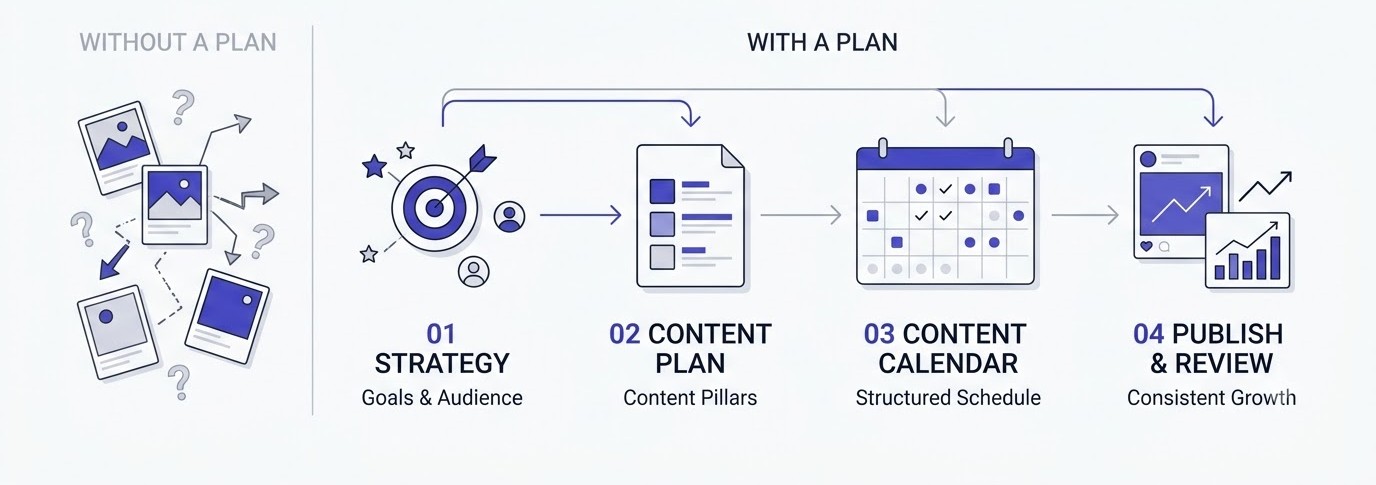
A social media content plan is a written document that decides what you post, where you post it, when you post it, and why. It connects every post to a goal. Without it, you’re guessing. With it, you’re testing ideas on purpose and learning faster than accounts that wing it every day.
Content Plan vs Content Calendar vs Social Media Strategy
People mix these three up constantly, and it causes real confusion. A social media strategy is the big picture: why you’re on social media, who you want to reach, and what success looks like over a year. A content plan sits underneath it and covers the actual themes, formats, and rhythm of posting for the next one to three months. A content calendar is the final piece, the grid showing exactly which post goes live on which date and time.
Think of it like cooking. The strategy is deciding you want to run a restaurant that serves South Indian breakfast. The plan is the menu and the weekly prep schedule. The calendar is the sticky note on the fridge saying idli batter on Sunday night. Skip the plan and you end up with a calendar full of dates and nothing meaningful to put in them.
This is why so many beginners download a pretty calendar template, stare at it, and feel stuck. The template is the last step, not the first. If you want a closer look at how calendars fit into the bigger picture, the content calendar articles on the Social Media hub of Academy Of Digital Marketing go deeper on layouts and examples.
What Happens When You Post Without a Plan
Here’s the pattern that shows up again and again. Week one, you post five times because you’re excited. Week two, you post three times because work got busy. Week three, you post once, and it’s a random festival wish. By week five the page is quiet and you’ve convinced yourself that “social media doesn’t work for my business.”
The damage goes beyond inconsistency. Random posting confuses your audience. If Monday’s post is a product photo, Wednesday’s is a meme, and Friday’s is a long rant about GST, nobody knows what they’ll get by following you. Followers don’t bother sticking around for a surprise box. They want to know the value in advance.
There’s also a quieter cost: time. Without a plan, every post means a fresh round of decisions about topic, caption, design, and timing. That adds up to hours each week. A plan turns those scattered decisions into one focused planning session, and honestly, that alone is worth the effort.
Who Should Make a Content Plan
Short answer: anyone posting for a purpose. A solo creator trying to reach 10,000 followers needs one. A local coaching centre trying to fill its next batch needs one. A student building a personal brand on LinkedIn before campus placements needs one. A freelancer running pages for three clients definitely needs three.
The plan doesn’t have to be big. For a one-person account, a single page in Notion or a tab in Google Sheets is plenty. For an agency handling multiple brands, each client gets its own plan with approvals built in. The size changes. The logic stays the same: goal, audience, pillars, formats, schedule, review.
If you’re thinking about handling social media for clients as a service, learning this process properly is the foundation of the whole job. The SMMA Ignite program covers how agencies build and sell this exact work, which is a good next step once the basics make sense.
How to Create a Social Media Content Plan: Start With Goals and Audience
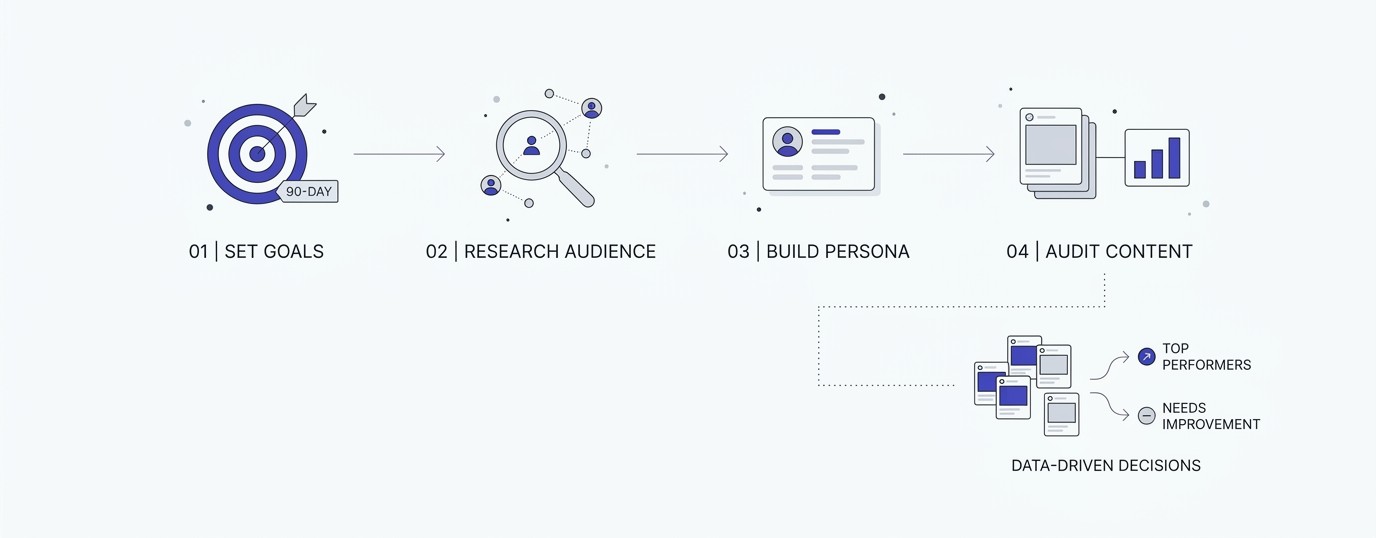
The first real step in how to create a social media content plan is deciding what the plan is for and who it’s for. Skip this and everything after it turns into decoration. A clear goal and a clear audience make every later decision, from platform to format, much easier to make.
Set One Clear Goal for the Next 90 Days
Pick one main goal. Not five. The usual options are brand awareness, website traffic, lead generation, sales, community building, or hiring. Each one changes what you post. Awareness needs reach, so short videos that get shared work well. Leads need a reason to click or message, so offers, free guides, and proof matter more.
Now turn the goal into a number with a deadline. “Grow on Instagram” isn’t a goal. “Get 40 qualified DMs a month from Instagram by the end of December” is. “Reach 5,000 followers by March” works too, although followers alone can be a vanity number if they never buy anything.
A useful trick: write the goal at the top of your document and read it before adding any post idea. If an idea doesn’t move that number, it goes in the parking lot. Most people skip this check and end up with a busy page that does nothing for the business.
Research Your Audience Without Expensive Tools
You don’t need a paid tool to understand your audience. Start with what you already have. Open your Instagram Insights, then go to Audience and look at age range, top cities, and the times your followers are most active. On LinkedIn, the Analytics tab shows job titles and industries. On YouTube Studio, the Audience tab shows what else your viewers watch.
Then go talk to real people. Read the last 30 comments and DMs you’ve received. Check the questions customers ask on WhatsApp. Search your topic on Reddit, Quora, and YouTube comments, and note the exact words people use when they complain or ask for help. Those exact words make the best captions and hooks, because they sound like the audience, not like a brand.
Write down three things for each audience type: what they’re trying to do, what’s getting in their way, and what they’d love to see more of. Keep it short. Half a page is enough. This is a working note, not a college assignment.
Build a Simple Audience Persona
A persona is just a short description of one typical person you want to reach. Give them a name, an age, a job, and one big problem. For example: Neha, 27, works in HR at a Bhubaneswar IT company, wants to start a side income with freelance design, and gets overwhelmed by too many courses. Now every post can be checked against Neha. Would she stop scrolling for this?
Keep the persona realistic, and base it on real data from your comments, DMs, or customer calls. Made-up personas that read like a fantasy novel don’t help anyone. If you have two very different audiences, like students and working professionals, create two short personas and tag each post with the one it’s meant for.
One warning. Don’t treat a persona as a cage. Real audiences surprise you. If your analytics show that a totally different group is engaging, adjust the persona. The document is there to serve you, not the other way around.
Audit What You’ve Already Posted
Before building something new, look at what’s already there. Open your last 30 to 50 posts and sort them by reach, saves, and shares, not just likes. Likes are easy to give and mean the least. Saves and shares tell you people found the post useful enough to keep or pass on.
Create a simple sheet with columns for date, format, topic, reach, saves, shares, and comments. Highlight the top five and bottom five. Look for patterns. Maybe your how-to carousels get three times the saves of your product photos. Maybe Reels filmed with a face in the first second do better than text-only ones.
This audit becomes the seed of your plan. You double down on what worked, stop doing what flopped, and avoid the common mistake of repeating the same experiments you’ve already run. Brand new accounts can skip this and look at three competitors instead, using the same sheet.
How to Create a Social Media Content Plan: Choose Platforms and Content Pillars
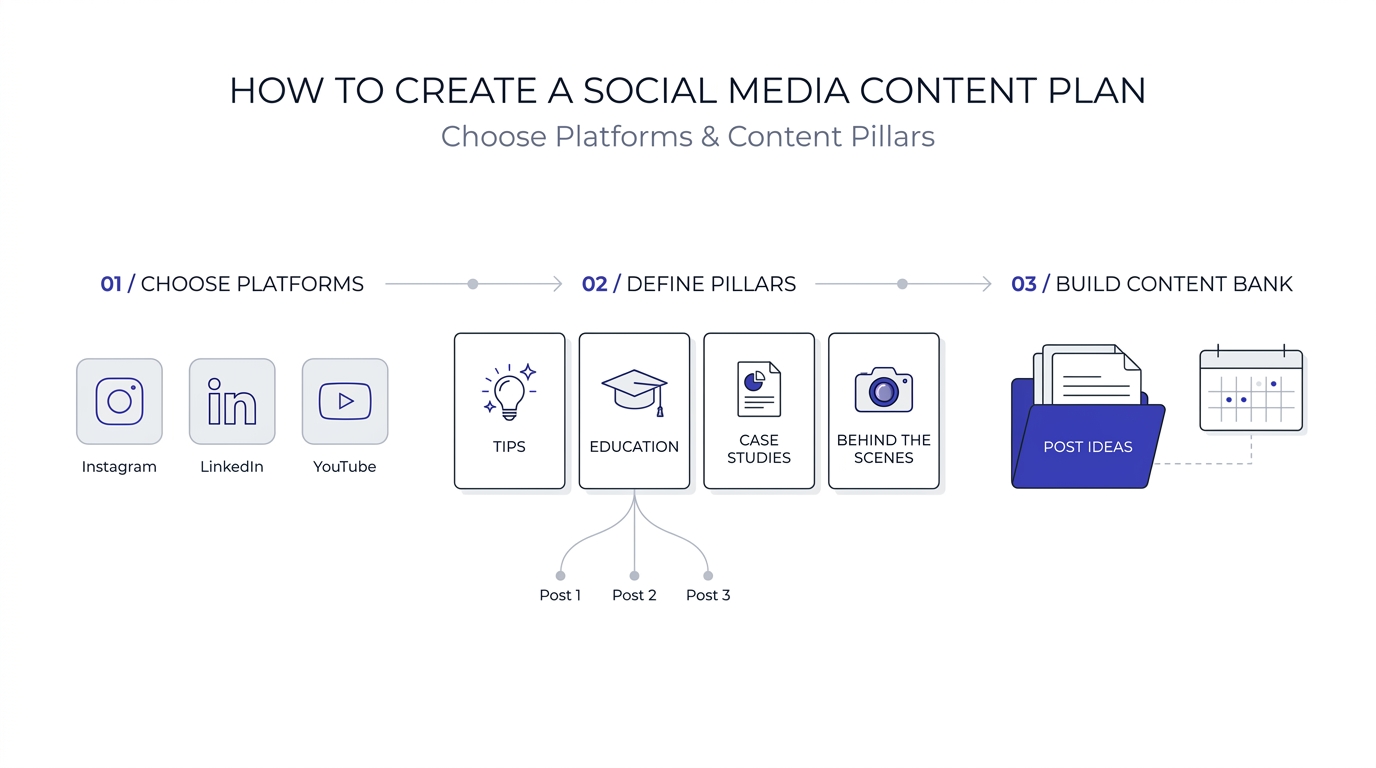
Once goals and audience are clear, the next stage of how to create a social media content plan is choosing where to show up and what to talk about. Two decisions do most of the work here: which platforms deserve your energy, and which themes become your content pillars.
Choose the Right Platforms for Your Audience
You don’t need to be everywhere. Pick the platform where your audience already spends time and where your content format fits naturally. B2B services and job-related content usually do well on LinkedIn. Visual products like food, fashion, and decor fit Instagram and Pinterest. Quick tutorials and long-term search traffic fit YouTube. Local businesses often get surprising results from Facebook groups and Google Business Profile posts.
Start with two platforms at most. One main and one supporting. A beginner trying to post daily on Instagram, LinkedIn, X, YouTube, and Facebook will burn out in a month. Two platforms done well beat five done badly, every time.
Here’s a quick check: can you produce the main content type for this platform at least three times a week for three months without hating it? If you can’t, it’s the wrong platform for now. You can always add another one once the first is running smoothly.
Define 3 to 5 Content Pillars
Content pillars are the main themes your page talks about, over and over. They keep your page recognisable and give you a never-ending supply of ideas. A fitness coach might use pillars like beginner workouts, home-cooked nutrition, client transformations, myths, and behind the scenes. Anyone landing on the profile can tell in five seconds what the page is about.
Pick pillars by overlapping three things: what your audience wants, what you can speak about with real knowledge, and what supports your goal. If your goal is leads, at least one pillar should be proof, such as case studies, testimonials, or results. If it’s awareness, at least one pillar should be easy to share, like quick tips or relatable humour.
Stay between three and five. Fewer than three feels repetitive. More than five becomes a mess, and your audience won’t remember what you stand for. Write each pillar as a short sentence, for example: “Teach beginners one small design skill in under 60 seconds.”
Turn Each Pillar Into Post Ideas
Here’s where the plan starts to feel real. Take each pillar and write 10 post ideas under it. Don’t judge them yet. Just dump. Use real questions from your audience research, common mistakes beginners make, quick how-tos, myth busters, before and after examples, and stories from your own work.
For a pillar like “beginner Canva tips,” ideas might include: three fonts that always look good, why your Instagram posts look messy, how to build a brand kit in ten minutes, five free templates worth saving, and a before and after of a poor poster fixed in two steps. That’s five ideas in two minutes. Do this for every pillar and you’ve got 50 ideas to start with.
If you want to sharpen the visual side of those posts, the graphic design guides on the Academy Of Digital Marketing site cover colours, fonts, and layout basics in plain language.
Create a Content Bank So You Never Run Dry
A content bank is just a running list of ideas, drafts, and reference posts in one place. Use a Notion database, a Google Sheet, or even the Notes app. Every time a customer asks a question, a competitor posts something interesting, or you read a good article, drop it in. Tag each idea with its pillar and format.
The habit matters more than the tool. Set a 10-minute slot every week to add new ideas and clear out old ones. When planning day comes, you aren’t staring at a blank page. You’re choosing from a bank that’s already stocked.
Also save posts that performed well, so you can remake them later in a new format. A carousel that got 800 saves last spring might make a decent Reel today. Reusing proven ideas isn’t lazy. It’s smart, since most of your audience never saw the original anyway.
Pick Formats and Build Your Content Mix
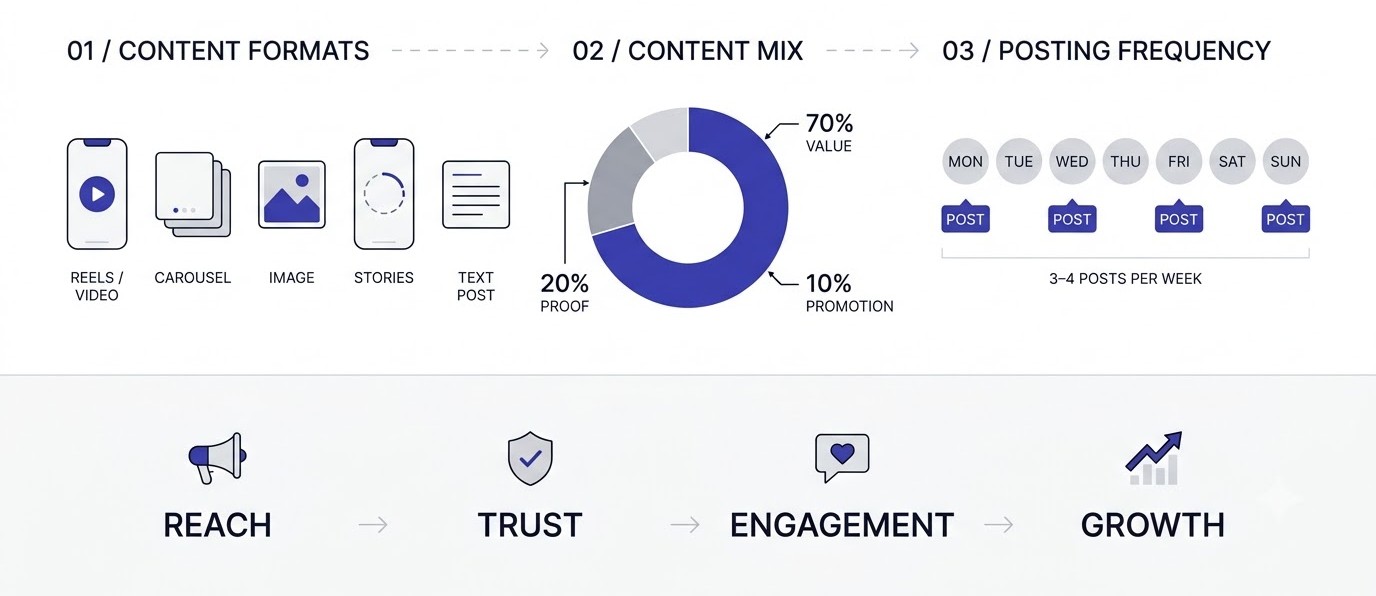
Goals, audience, and pillars tell you what to say. Formats tell you how to say it. This stage of how to create a social media content plan covers the mix of videos, carousels, images, stories, and text that keeps your page interesting while staying realistic to produce.
Understand Which Formats Do What
Different formats do different jobs. Short videos like Instagram Reels, YouTube Shorts, and TikTok are the strongest for reaching people who don’t follow you yet. Carousels are great for saves, because people keep step-by-step content for later. Single images and quote graphics are quick to make but rarely travel far. Stories keep existing followers warm and let you test ideas casually.
LinkedIn works differently. Text posts with a strong first line, document carousels, and short personal stories often perform best there, while polished corporate graphics usually get ignored. Facebook still rewards community posts, local updates, and groups. YouTube long-form content takes time to make, but it keeps bringing in viewers for years.
Match each format to a purpose in your plan. Reels for reach, carousels for authority, stories for relationships, and long posts for trust. Once the purpose is clear, choosing a format stops being a guessing game.
Use the 3-2-1 or 70-20-10 Content Mix
A content mix stops the page from becoming all selling or all entertainment. One simple rule is 70-20-10. Seventy percent of posts educate or entertain, twenty percent are shared content or social proof like reviews and client wins, and ten percent are direct promotion. People tolerate selling if it’s wrapped in plenty of value.
Another easy method is the weekly 3-2-1 pattern: three value posts, two proof or personality posts, and one direct offer. Adjust the ratio to your goal. A new account that needs reach should lean heavier on value content. An established account with a warm audience can promote more often.
Don’t treat the ratio like a law. It’s a starting point. Track results for 60 days, and if your promotional posts are performing well while your audience stays engaged, shift the mix. The point is to have one on purpose instead of drifting into whatever’s easiest.
Decide Your Posting Frequency Honestly
How often should you post? Whatever you can keep up for 90 days without the quality dropping. For most beginners, that’s three to four posts a week on the main platform and daily stories if they’re easy. Posting daily sounds great until week three, when you’re recycling weak ideas.
Consistency beats volume. An account posting three solid Reels every week for six months will usually grow faster than one posting daily for three weeks and then disappearing. Platforms and followers both notice patterns, and a steady rhythm builds a habit for the audience too.
Try this: pick a number that feels slightly too easy. Hit it for a month. Then add one post. Growing your schedule slowly is far safer than starting at full speed and quitting. Write the agreed frequency into your plan, so the decision doesn’t need to be made again.
How to Create a Social Media Content Plan: Build Your Calendar and Workflow
Now the plan turns into dates. This part of how to create a social media content plan is where most beginners either get organised or get overwhelmed. Keep it simple: one calendar, one workflow, and one weekly rhythm that you can repeat without thinking too hard.
Set Up a Calendar You’ll Actually Open
The best calendar is the one you open every day. For most people that’s a Google Sheet or a Notion board, not a fancy tool with twenty tabs. Create columns for date, platform, pillar, format, topic, hook, caption, creative link, status, and result. Colour-code the pillars so you can see at a glance whether one theme is taking over.
Start by marking the fixed dates: festivals, sales, product launches, exam seasons, college events, or anything tied to your business. In India, Diwali, Holi, Eid, Independence Day, and local festivals like Rath Yatra matter a lot for engagement, but only post about the ones that actually fit your brand. Forced festival wishes with a stock image get scrolled past.
Then drop your pillar posts into the open slots, balancing the mix you chose earlier. Leave one or two blank slots a week for trending topics or timely news. A plan with zero flexibility breaks the first time something interesting happens, and a plan with too much flexibility is just wishful thinking. Aim for about 80 percent planned, 20 percent open.
Batch Your Content Creation
Batching means doing the same type of work in one block. Instead of writing one caption, designing one graphic, and filming one Reel every day, you write all captions on Monday, design on Tuesday, and film on Wednesday. Switching between tasks eats time and energy, and batching removes most of that.
A realistic weekly rhythm for a solo creator looks like this: Sunday evening, 30 minutes to review the calendar and pick the next week’s ideas. Monday, two hours to write scripts and captions. Tuesday, two hours to shoot four or five short videos in one outfit and location. Wednesday, one to two hours to design carousels in Canva and edit videos. Thursday, schedule everything.
This sounds rigid, and sure, some weeks fall apart. Still, even when the schedule slips, the batching habit leaves you with a buffer. Try keeping at least three posts ready in advance at all times. When life gets busy, those spare posts keep the page alive while you catch up.
Create a Simple Approval and Publishing Workflow
If you’re the only person on the account, the workflow is short: draft, design, check, schedule, post. If a team or client is involved, add an approval step, and be strict about it. Agree on who approves, how long they have, and what happens if they go silent. Without that, one slow reply from a client can derail a whole week.
Use status labels in your calendar: Idea, Drafting, Design, In Review, Approved, Scheduled, Posted. At any moment, you should be able to filter by status and see what’s stuck. Many agencies lose days simply because nobody knows which post is waiting on whom.
Schedule posts using Meta Business Suite for Instagram and Facebook, LinkedIn’s built-in scheduler, YouTube Studio for videos, or a tool like Buffer or Later if you want everything in one place. One practical tip: still log in manually a few times a day to reply to comments in the first hour after posting, since early engagement tends to help the post travel further.
Tools That Make Your Social Media Content Plan Easier
Tools can’t replace thinking, but the right ones remove a lot of boring work. This section sticks to tools that beginners can use on a small budget, since a plan that depends on five paid subscriptions usually collapses the moment money gets tight.
Free and Low-Cost Planning Tools
For planning, Google Sheets and Notion cover almost everything. Sheets is better if you like simple rows and filters. Notion is better if you want a board view, linked databases, and a space for scripts and notes. Trello also works well for visual people who like dragging cards from Idea to Posted.
For scheduling, Meta Business Suite is free and handles Instagram and Facebook. Buffer and Later have free or low-cost tiers for a small number of channels. Metricool is popular with freelancers because it combines scheduling with analytics. Pick one, learn it properly, and resist the urge to keep switching every month.
For idea generation, don’t overlook free sources: Google Trends, AnswerThePublic’s limited free searches, YouTube search suggestions, and the comment sections of competitors. Real questions from real people beat any generated list of ideas, honestly.
Design and Video Tools for Beginners
Canva is the obvious starting point for graphics. Set up a Brand Kit with two main colours, one accent colour, and two fonts, and stick to them. Make five or six reusable templates for carousels, quote posts, and story covers. That one hour of setup saves hours every month and makes the page look consistent even when you’re rushing.
For video, CapCut is free and handles captions, cuts, and transitions on both phone and desktop. Instagram’s built-in editor works for quick edits. If you’re recording talking-head videos, a basic lavalier mic for a few hundred rupees improves quality more than a better camera does. Bad audio makes people leave faster than bad lighting.
If you’d like to try more options without paying, the free marketing tools collection from Academy Of Digital Marketing is worth a browse before you commit to anything paid.
Analytics and Tracking Tools
Every platform has native analytics, and for beginners they’re enough. Instagram Insights, LinkedIn Analytics, YouTube Studio, and Facebook’s Professional Dashboard show reach, engagement, followers, and audience data. Check them weekly and record the numbers in your calendar sheet instead of relying on memory.
If your goal is website traffic or sales, add UTM tags to every link you share. UTMs are small pieces of text added to a URL, like utm_source=instagram and utm_campaign=october_plan, which let Google Analytics 4 show exactly which post sent a visitor. Without them, social traffic gets lumped into vague buckets and you can’t tell which post actually did the work.
Paid analytics tools like Sprout Social or Hootsuite Analytics are useful for bigger teams and reports, but a one-person page rarely needs them. Start with free data, learn to read it, and only upgrade when you hit a real limit.
How to Create a Social Media Content Plan That You Can Measure and Improve
A plan that never gets reviewed is just a to-do list. The final stage of how to create a social media content plan is deciding how you’ll measure results, when you’ll review them, and how you’ll change course when something isn’t working.
Pick Metrics That Match Your Goal
Choose three to five metrics tied directly to your goal, and ignore the rest. For awareness, track reach, impressions, follower growth, and shares. For engagement and community, track comments, saves, shares, and replies to stories. For leads, track DMs, link clicks, form fills, and demo bookings. For sales, track conversions, revenue from social, and cost per lead if you run ads.
Likes are the weakest signal, because they take one tap and don’t mean much. Saves and shares are much stronger, since people only do those when something is useful or worth showing to a friend. Comments with real sentences are stronger still.
A common beginner trap is staring at follower count every day. It feels good when it goes up and terrible when it dips, but it says very little about whether the plan is working. Watch it monthly, and spend your attention on the numbers that connect to your goal.
Run a Weekly and Monthly Review
A weekly review takes 20 minutes. Every Friday, record each post’s numbers in your sheet, mark the best and worst performers, and write one line on why you think they worked or didn’t. One line is enough. Over a month, those lines turn into real insight about your audience.
A monthly review takes about an hour. Compare this month to last month. Which pillar got the most saves? Which format brought the most new followers? Which posting times did best? Which post types did nothing? Decide what to do more of, what to do less of, and what to test next month.
Keep a short “experiments” list with one or two tests per month. Maybe you’ll try posting Reels at 8 pm instead of noon, or test long captions against short ones. Change one thing at a time, otherwise you won’t know what caused the difference.
Fix a Plan That Isn’t Working
If results are flat after 60 to 90 days, don’t panic and don’t scrap everything. Diagnose it. Low reach usually points to weak hooks, wrong topics, or a format that doesn’t fit. Good reach but low engagement often means the content is interesting but not useful, or there’s no clear call to action. Good engagement but no leads suggests a gap between your content and your offer.
Work backwards through the plan. Is the goal realistic? Is the audience definition accurate? Are the pillars too broad? Are the hooks strong enough in the first two seconds or first line? Fix one layer at a time and test again for four weeks.
Also check the basics honestly: is the profile bio clear, is there a link, does the page show what you do in five seconds, and are you replying to comments? Plenty of plans get blamed when the real issue is a confusing profile.
How to Create a Social Media Content Plan for a Small Business: A 30-Day Example
Theory only goes so far, so here’s a worked example. Take a small home bakery in Pune that sells custom cakes and wants more weekend orders from people within 10 km. This example shows how all the earlier steps fit together in a plan that a real owner could run alone.
The Setup: Goal, Audience, Platforms and Pillars
The goal: 25 custom cake enquiries a month through Instagram DMs by the end of 90 days. The audience: women aged 25 to 40 living nearby, planning birthdays, anniversaries, and baby showers. Main platform: Instagram. Supporting platform: WhatsApp Status and a Google Business Profile, since local searches matter for a bakery.
Four pillars: finished cakes (proof), behind the scenes baking (trust), cake tips and ideas for celebrations (value), and customer stories with reviews (social proof). The baker sets a posting rhythm of four feed posts a week plus daily stories, since photos are easy to take while working.
A 70-20-10 mix applies: seven in ten posts are value or behind the scenes, two in ten are customer stories, and one in ten is a direct ordering reminder with a booking date cutoff. Simple, specific, and doable for one person.
The Weekly Rhythm Inside the Calendar
Monday: a Reel showing a cake decorating process, sped up, with a hook like “Watch this plain cake turn into a Spiderman birthday cake in 20 seconds.” Wednesday: a carousel with five cake ideas for a first birthday. Friday: a customer story, with a review screenshot and a photo of the finished cake. Saturday: a direct reminder about next week’s booking slots, plus a story with a poll about flavours.
Stories run daily: kitchen peeks, packing orders, quick polls, and replies to questions. Once a week, a story highlight gets updated with new reviews and FAQs, like delivery areas and minimum order time. Everything feeds the main goal, which is DMs asking for a cake.
The owner spends Sunday evening on planning, Monday and Tuesday filming in short bursts during baking, Wednesday editing in CapCut, and Thursday scheduling through Meta Business Suite. In total, roughly six hours a week, which is about right for a side-by-side business task.
What the Results Review Looks Like
After 30 days, the owner reviews numbers. Say the process Reels got the highest reach, carousels got the most saves, customer stories produced the most DMs, and the direct reminder posts did well on Saturdays but poorly on weekdays. That’s useful information with clear next steps.
The adjustment: add one more process Reel a week, make carousels more specific to occasions like baby showers and anniversaries, double the number of customer stories, and keep the reminder posts only on Fridays and Saturdays. The plan isn’t thrown away. It’s sharpened.
That’s how the whole thing should work. You don’t need a perfect plan on day one. You need a decent plan, honest numbers, and the willingness to change what isn’t working after a month of real data.
Mistakes When You Create a Social Media Content Plan
Most problems come from a handful of repeated mistakes. Knowing them in advance saves months of frustration, since they look harmless at the start and only show up as stalled growth later.
Planning Too Much and Too Soon
A 12-month calendar sounds impressive and falls apart in three weeks. Trends change, audience reactions surprise you, and your own energy rises and falls. Plan 30 days in detail, outline 90 days loosely, and ignore the rest until you have data.
Beginners also try to launch with every platform, six pillars, daily posting, and a full video schedule. That’s the quickest route to burnout. Start smaller than feels ambitious and build up. A page that survives six months beats one that explodes and vanishes.
Copying Competitors Without Thinking
Studying competitors is smart. Copying them is not. If a competitor’s post goes viral, ask why: the hook, the topic, the format, the timing, or their larger audience? Many posts perform well because of a following built over years, and the same post from a tiny account may do nothing.
Borrow structures and ideas, then add your own examples, your own voice, and your own customers. Audiences can tell when a page has no point of view. The accounts that grow are usually the ones that sound like a specific person, not a template.
Ignoring the Hook and the Call to Action
The first line of a caption, or the first two seconds of a video, decides whether anyone sees the rest. A flat opening like “Hello everyone, today we’re going to talk about” loses people instantly. Open with a problem, a number, a surprising claim, or a question your audience actually has.
The end matters too. Every post should ask for one small action: save this, share with a friend, comment your answer, tap the link, send a DM. Without a clear next step, people enjoy the post and forget it. One action per post is plenty, and pick it based on the goal.
Never Reviewing the Numbers
Posting without checking results is like cooking without tasting. The numbers tell you what the audience wants, and they’re free. Yet a surprising number of people create a plan, follow it for three months, and never look at the data once.
Put the review on your calendar as a recurring task. Friday, 20 minutes. First of the month, one hour. If it isn’t scheduled, it won’t happen. And when it does, be honest about what’s weak. A post you loved making can still be a poor performer.
Conclusion
Learning how to create a social media content plan comes down to a short chain of decisions: one goal, one clear audience, two platforms, three to five pillars, a realistic mix of formats, a calendar you open daily, and a review you never skip. None of it needs fancy software. A Google Sheet and some honesty will carry you a long way.
Here’s your next action: open a blank sheet today, write your 90-day goal at the top, list your pillars, and fill in the next seven days. Don’t wait for the perfect plan. Post, check the numbers, and fix what’s off. For more step-by-step guides on building your skills, browse the free Learn hub at Academy Of Digital Marketing.
Frequently Asked Questions
These are the questions beginners ask most often. Each answer stands on its own, so you can jump straight to the one you need without reading the rest of the guide first.
What is a social media content plan?
A social media content plan is a written document that outlines what you will post, on which platforms, how often, and why. It includes your goals, audience, content pillars, formats, and posting schedule. The plan connects every post to a business or personal goal so your content has direction instead of random timing.
How do I create a social media content plan from scratch?
Start by setting one goal for the next 90 days and defining your audience. Choose one or two platforms, create three to five content pillars, and decide on formats and posting frequency. Then build a calendar, create content in batches, and review the numbers weekly. The whole first version can be done in a single afternoon.
How far ahead should I plan social media content?
Plan 30 days in detail and sketch the next 90 days loosely. Planning further out tends to waste effort because trends, results, and priorities change. Keep two or three posts ready in advance as a buffer, and leave a few open slots each week for timely or trending topics.
What is the difference between a content plan and a content calendar?
A content plan decides what themes, formats, and goals guide your posts. A content calendar is the schedule that shows exactly which post goes live on which day and time. The plan comes first, and the calendar is built from it. Using a calendar without a plan usually leads to filled dates with weak content.
How many platforms should a beginner focus on?
One or two is enough for a beginner. Choose a main platform where your audience already spends time and one supporting platform. Spreading across five or six channels leads to thin content and burnout. Add a new platform only after the first one runs smoothly for at least 90 days.
How often should I post on social media?
Post as often as you can keep up with for three months without quality dropping. For most beginners, that means three to four posts a week on the main platform, plus stories if they’re easy to create. Consistency matters more than volume, so a steady schedule beats short bursts of daily posting.
What are content pillars in a social media plan?
Content pillars are the three to five main themes your account repeatedly talks about. They keep your page recognisable and give you a steady supply of ideas. For example, a fitness coach may use beginner workouts, nutrition, client results, myths, and behind the scenes as pillars.
What is the 70-20-10 rule for social media content?
The 70-20-10 rule suggests that 70 percent of your posts should educate or entertain, 20 percent should be shared content or social proof like reviews, and 10 percent should directly promote your product or service. It stops your page from feeling like constant advertising. Adjust the ratio based on your goal and audience.
Which tools are best for planning social media content?
Google Sheets and Notion are the best free options for planning. Meta Business Suite handles scheduling for Instagram and Facebook at no cost. Buffer, Later, and Metricool offer low-cost scheduling and analytics. For design, Canva works well for most beginners, and CapCut is a popular free option for editing short videos.
How do I know if my social media content plan is working?
Compare your results against the goal you set at the start. Track three to five metrics tied to that goal, like reach and shares for awareness, or DMs and link clicks for leads. Review weekly and monthly. If numbers stay flat after 60 to 90 days, test new hooks, formats, or topics.
How long does it take to see results from a content plan?
Most accounts need at least 60 to 90 days of consistent posting before patterns appear. Small improvements like better saves and shares may show earlier, while follower growth and leads usually take longer. Results depend on niche, audience size, content quality, and how consistently you post and review.
Can I use the same content plan for every platform?
You can reuse the same core ideas, but each platform needs its own format and style. A topic that works as an Instagram carousel may become a LinkedIn text post or a YouTube Short. Copying and pasting the exact same post everywhere usually performs poorly, so adapt length, tone, and visuals for each channel.
Should I hire someone or make the plan myself?
For a small business or personal brand, making the first plan yourself is a good way to learn what works. Hiring help makes sense when you’re short on time or ready to scale. Even then, understanding the process lets you review the work properly and give clear direction to a freelancer or agency.