

Picture a skincare brand in Pune with 8,000 email subscribers. Every Friday, the founder opens Mailchimp, writes a fresh newsletter, picks a subject line, and hits send. Meanwhile, a customer who signed up on Monday gets nothing for four days. Another one left a ₹2,400 cart sitting there on Tuesday and never heard a word. Same list, same tool, two very different ways of using it. That gap is exactly what Email Marketing vs Email Automation is about.
Most beginners treat the two terms like synonyms. They aren’t. Email marketing is the whole practice of using email to reach people, sell, teach, and keep customers around. Email automation is one way of doing that work, where emails go out on their own because of something a person did or a date on the calendar. One is the umbrella. The other is a method that lives under it. Once that clicks, a lot of confusing advice suddenly makes sense.
Here’s why it matters. Pick the wrong approach and you either burn hours sending things by hand that a machine should handle, or you build a maze of automated flows that nobody reads because there’s no real campaign thinking behind them. Both mistakes cost money. Both are common, and honestly, both are easy to avoid once you see the difference.
This guide walks through it in plain language, with real tools like Mailchimp, Klaviyo, ActiveCampaign and Brevo, real scenarios from ecommerce and SaaS, and a clear way to decide what your business needs first. If you’re a student, a freelancer, or a founder doing your own marketing, you’ll finish knowing what to set up this week, not just what the words mean.
What You Will Learn in This Guide
Before we get into the details, here’s what this guide covers so you can jump to the part you care about most. Each point below gets its own section with examples, tool names, and step-by-step explanations.
- What email marketing and email automation each mean, without the jargon
- How manual email campaigns work and where they still beat automation
- How triggers, conditions, and actions power automated emails
- The real differences in timing, personalization, cost, and reporting
- Which approach fits a small list, an online store, or a SaaS product
- Which tools to look at, from Mailchimp to Klaviyo to ActiveCampaign
- The mistakes that quietly wreck both approaches
- Twelve frequently asked questions answered in plain English
TL;DR
If you’re short on time, this is the whole idea boiled down. Read these five points, and then come back for the details whenever you’re ready to set something up.
- Email marketing is the full strategy of emailing people who opted in; automation is one method inside it.
- Manual campaigns (newsletters, sales, announcements) are sent when you decide, to whoever you choose.
- Automated emails fire on their own after a trigger like a signup, a purchase, or an abandoned cart.
- Start with one manual campaign rhythm, then add a welcome email and an abandoned cart flow.
- Judge success by clicks, replies, and revenue per email, not just open rates.
Email Marketing vs Email Automation: The Short Answer
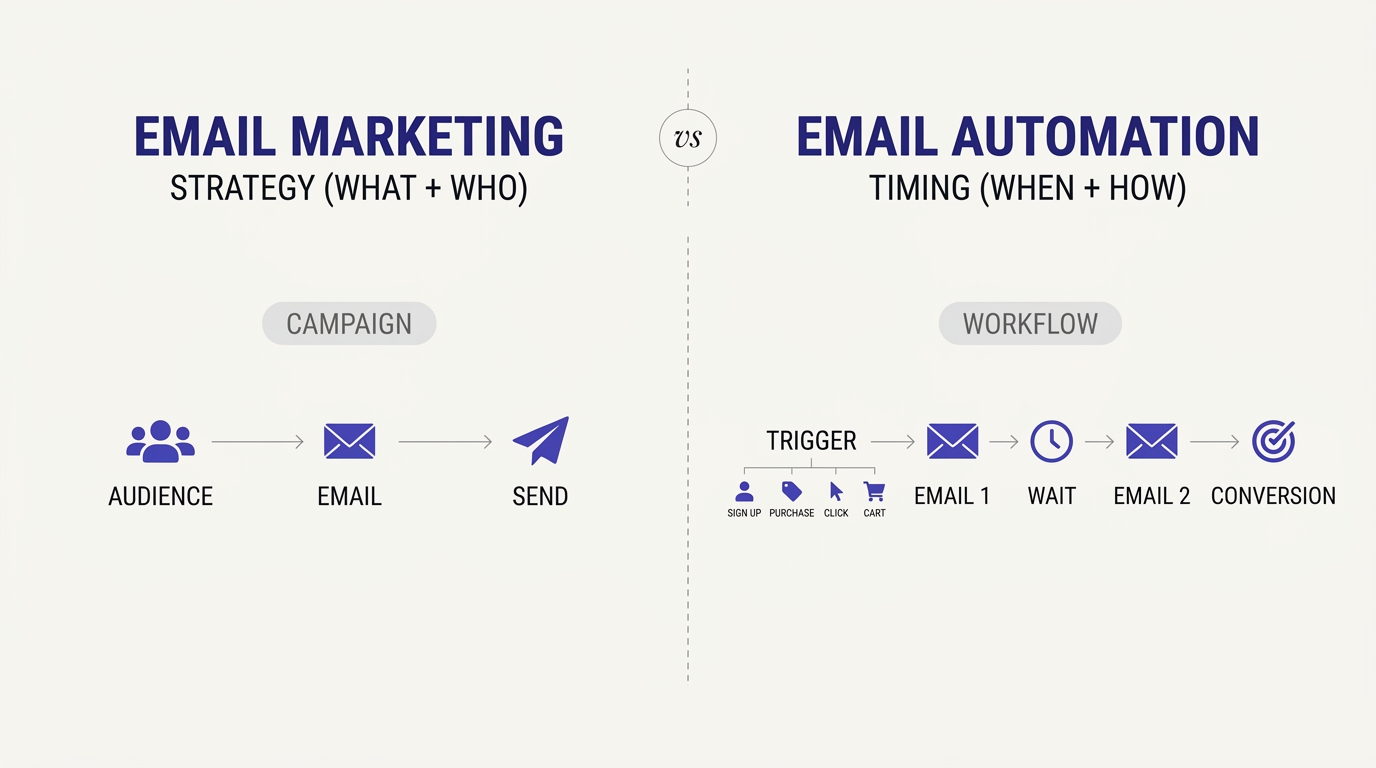
The short answer is simple. Email marketing is the strategy and the emails themselves, sent to people who agreed to hear from you. Email automation is a way of sending some of those emails without pressing send each time. Think of a car and its cruise control. Cruise control only exists inside the car, and nobody buys it instead of the car.
What Email Marketing Actually Means
Email marketing means sending commercial or educational emails to people who gave you their address on purpose. That includes the Friday newsletter, the Diwali sale announcement, the new blog post alert, the webinar invite, and the price-change notice. You write it, you pick the audience, you choose the day and time, and you press send.
The strategy part matters as much as the sending part. Who is on your list, why they joined, what you promised them, and how often you show up all fall under email marketing. A founder with a clear plan and no fancy tools is doing email marketing. A founder with ten automated flows and no plan is mostly just generating noise.
It’s also the oldest channel that still works. People check email daily, they own the address, and no algorithm decides who sees your message the way Instagram or Facebook does.
What Email Automation Actually Means
Email automation means setting up emails that send themselves when a rule is met. The rule is usually called a trigger. Someone joins your list, buys a product, clicks a link, abandons a cart, or hits their birthday, and the system sends the right email without you lifting a finger.
You build the flow once. Say a new subscriber should get a welcome email immediately, a story about your brand two days later, and a first-purchase discount on day five. After you set that up in Mailchimp or Brevo, every new subscriber goes through it automatically, whether they join at 2 pm or 2 am.
That’s the whole appeal. Automation takes the repetitive, time-sensitive emails off your plate and makes sure no customer falls through the cracks just because you were busy.
The One-Line Difference Worth Remembering
Here’s the line to keep in your head: email marketing is what you say and who you say it to, while email automation is when and how it gets sent without you. Marketing is the message and the plan. Automation is the machinery that delivers some of those messages at the right moment.
That means you can never replace one with the other. Automation without a message is an empty machine. Marketing without any automation works for a small list, but it gets painful once you pass a few hundred subscribers and customers start expecting fast replies.
A quick way to test yourself is to ask one question about any email: did a person decide to send this today, or did a rule send it? Person means manual campaign. Rule means automation.
Why People Keep Mixing the Two Up
People mix them up because the tools blur the line. Mailchimp, Brevo, and ActiveCampaign all sell “email marketing platforms,” and automation is a feature tucked inside the same dashboard. You open one login and see campaigns on the left and automations right below them, so it feels like one thing.
Marketing blogs make it worse. Plenty of articles say “email automation” when they mean “any email sent by software,” which is wrong. A newsletter sent through Mailchimp is not automated just because software delivered it. You still wrote it and scheduled it.
There’s also a job-title problem. Agencies advertise “email marketing and automation services” as a bundle, so beginners assume they’re the same skill. They overlap, but strategy and technical flow-building are different muscles.
How Email Marketing Works Without Automation
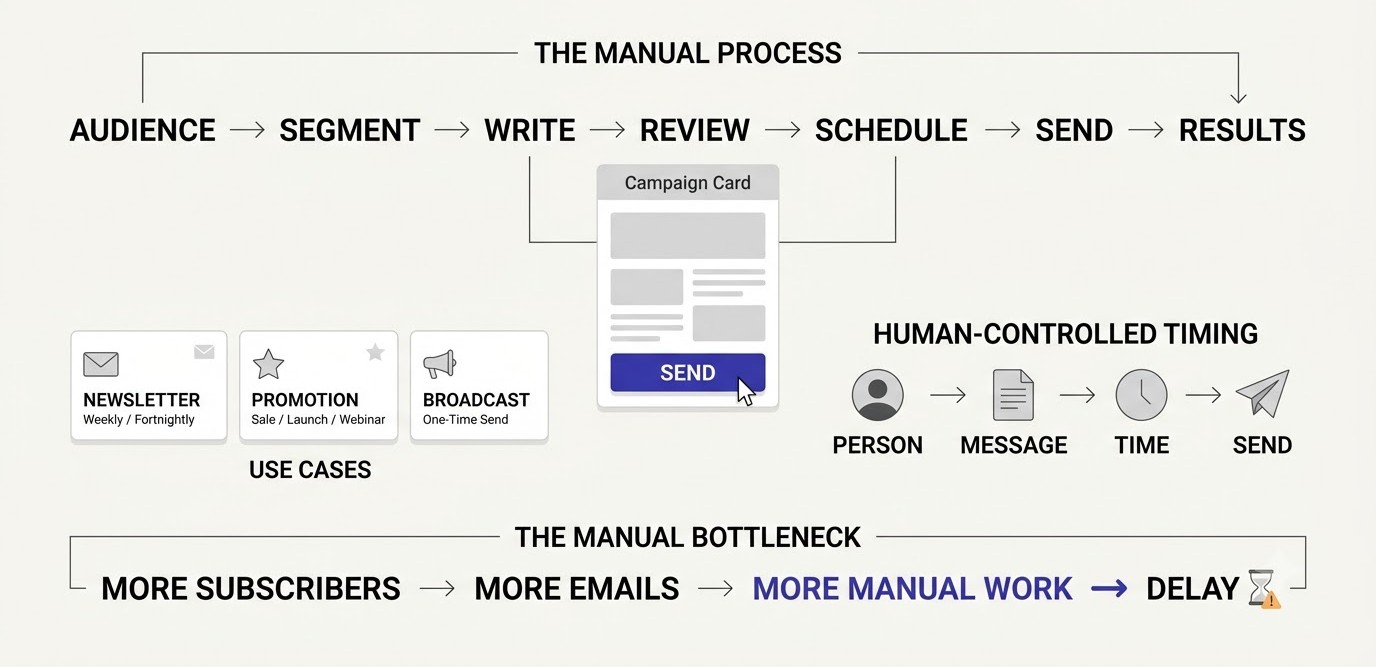
Manual email marketing is every email you write and send on purpose, to a list or segment you pick, at a moment you choose. It’s the foundation of the channel. Before any automation makes sense, you need to know what your audience wants to read, and manual campaigns are where you learn that.
Newsletters and One-Off Broadcasts
A newsletter is the classic manual campaign. You write one email, send it to your full list or a segment, and repeat on a schedule, usually weekly or fortnightly. A broadcast is the same idea without the schedule: a one-time email about something specific, like a new course batch or a product restock.
Take a Bengaluru coffee roaster with 3,000 subscribers. Every second Thursday, they send a short note about a new bean, a brewing tip, and one product link. Nothing automated about it. The owner writes it in Brevo, checks the preview on his phone, and schedules it for 8 am.
What most people get wrong here is making newsletters too long and too salesy. One idea, one link, done. A newsletter people actually open beats a clever one they skip.
Promotions, Launches, and Time-Sensitive Sends
Some emails can’t be automated because the timing depends on your business calendar, not the customer’s behavior. A flash sale ending at midnight, a Diwali offer, a course launch, or a webinar tomorrow at 7 pm are all examples. You decide the moment, so you send by hand.
A launch usually runs as a short sequence of manual emails: an announcement, a reminder, a social proof email, and a last-chance email. Each one is written for the date, which is why it works. Dropping a generic “sale” email into an automated flow would feel off when the offer has already expired.
The mistake is sending these to everyone. Segment first. People who bought last month don’t need the same discount pitch as people who never bought.
Who Controls the Timing and the Message
With manual campaigns, you control everything: the subject line, the copy, the audience, the send time, and the follow-up. That control is a real strength. If a news event, a viral moment, or a supplier delay changes what you need to say, you can send a new email within an hour.
Automation can’t do that. A flow is built in advance, so it reflects what you knew when you built it. If your pricing changes and an old automation still mentions the previous price, it keeps sending wrong information until someone notices.
That’s why manual campaigns carry the voice of the brand. They’re where the personality lives, and customers feel the difference between a note written this week and a flow written last year.
Where Manual Sending Starts to Hurt
Manual sending starts to hurt when your business needs fast, repeated, personal responses. Imagine 40 new subscribers a day. Nobody can write a welcome email for each of them. Even a decent weekly routine breaks when you need to follow up with leads, onboard buyers, and chase cart abandoners.
The cost shows up in lost sales more than lost time. A person who requests a free guide at 11 pm and gets nothing until your Friday newsletter has already forgotten why they signed up. Interest cools fast, often within hours.
That’s the moment automation earns its place. Not because it’s trendy, but because some emails have a short window and a human can’t be awake for all of them.
How Email Automation Works Behind the Scenes
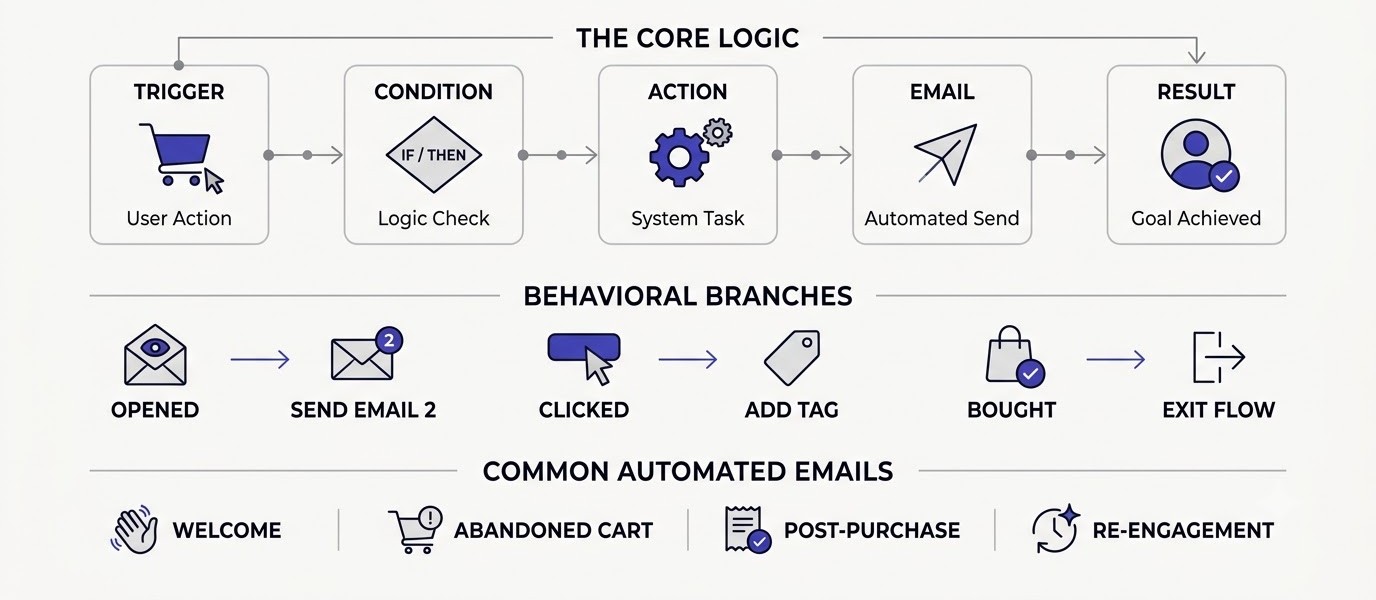
Email automation works through three parts: a trigger that starts the flow, conditions that decide who continues, and actions that send emails or update the contact. Once you see those three pieces, every tool, from Mailchimp to Klaviyo, starts to look familiar because they all use the same logic.
Triggers: The Event That Starts Everything
A trigger is the event that tells the system to begin. Common ones are joining a list, submitting a form, making a purchase, abandoning a cart, clicking a specific link, visiting a pricing page, or reaching a date like a birthday or subscription renewal.
In Klaviyo, for example, “Added to Cart” and “Started Checkout” are built-in triggers pulled straight from Shopify. In Mailchimp, you pick a trigger from a list when you create a Customer Journey. In ActiveCampaign, triggers sit at the very start of the automation map.
The mistake people make is choosing a vague trigger. “Joined the list” is fine, but if your list has five signup sources, each should probably start a different flow. A person who downloaded a checklist and a person who bought a course are not in the same place.
Conditions and Actions: The Logic in the Middle
Conditions are the if-then rules. If the person opened the first email, send the second one. If they clicked the pricing link, tag them as interested. If they bought, remove them from the sales flow. Actions are what happens next: send an email, wait two days, add a tag, change a field, or notify your sales team.
This middle layer is what makes automation feel personal. Two people can enter the same flow and take different paths depending on what they do. Someone who ignores three emails might get a softer re-engagement message, while someone who clicks twice gets a direct offer.
Keep the logic simple at first. Beginners often build flows with eight branches before sending a single email. Start with one trigger, three emails, and one condition. Add branches only after you’ve seen real data.
Common Automated Emails Every Business Should Know
There’s a short list of automated emails that almost every business benefits from. A welcome series introduces new subscribers. An abandoned cart email brings back shoppers who left items behind. A post-purchase email confirms the order and suggests how to use the product. A re-engagement email wakes up people who’ve gone quiet for 60 or 90 days.
Some run on dates. A birthday email with a small offer, a subscription renewal reminder, or a “your trial ends in 3 days” message for a SaaS product all come from calendar triggers. They feel thoughtful because they arrive exactly when the person needs them.
You don’t need all of these at once. Pick the one closest to revenue. For a store, that’s the abandoned cart email. For a course business, it’s the welcome series. For SaaS, it’s trial onboarding.
A Real Walkthrough: Building a Welcome Series in Mailchimp
Let’s make this concrete. In Mailchimp, open Automations, choose Customer Journeys, and set the starting point as “Signs up for audience.” Add Email 1 right away with a short thank-you and what the subscriber will receive. Add a time delay of two days, then Email 2 sharing your best story or most useful tip. Add another delay of three days, then Email 3 with a gentle offer.
Before turning it on, send yourself a test, check it on mobile, and confirm the sender name is a person or brand people recognize. A sender called “noreply” kills replies, and replies help deliverability.
The step most guides skip is checking the journey two weeks later. Look at open rate, click rate, and unsubscribes for each email. If Email 2 has the highest unsubscribes, rewrite that one and leave the rest alone.
Email Marketing vs Email Automation: Side-by-Side Differences
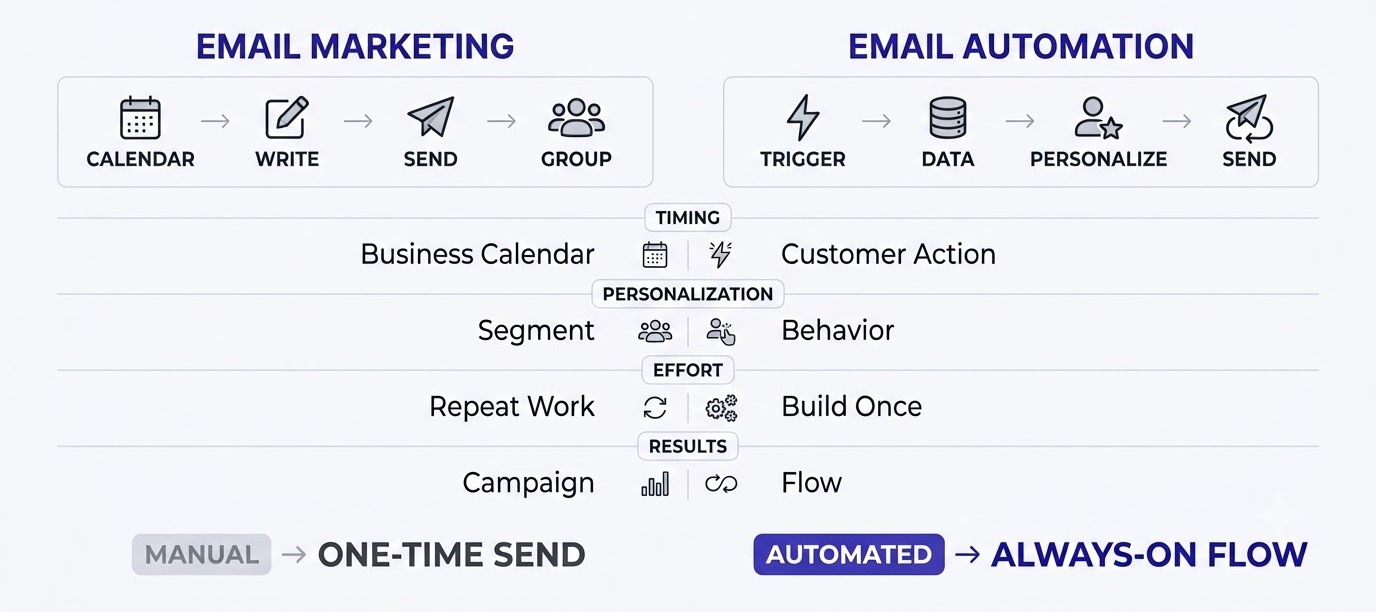
The clearest way to understand Email Marketing vs Email Automation is to compare them on the things that affect your daily work: timing, personalization, effort, and results. They are not rivals. These differences just help you decide which tool to reach for on a given day.
Timing and Control
Manual email marketing runs on your calendar. You choose Tuesday at 9 am, you press send, and everyone on that segment gets it at the same moment. That’s great for announcements, launches, and anything tied to a deadline.
Automation runs on the customer’s calendar. The email goes out when the person does something, whether that’s two minutes after signup or three hours after leaving a cart. Timing matches the person’s interest, which is why automated emails often get strong engagement even with simple copy.
So the real question is whose clock the email follows. If the moment belongs to your business, send manually. If the moment belongs to the customer, automate it.
Personalization and Data
Manual campaigns usually personalize at the segment level. You might send one version to buyers and another to non-buyers, and maybe add the first name in the greeting. That’s useful, but the message is still written once for a group.
Automated emails can use individual behavior. A Klaviyo abandoned cart email can show the exact product, the size, and the image the person left behind. A Mailchimp journey can branch based on which link someone clicked. The email feels written for one person because the data says so.
The catch is that bad data produces awkward emails. If your product feed is messy or your tags are wrong, the personalization backfires. Clean data first, clever flows second.
Effort, Cost, and Maintenance
Manual campaigns cost effort every time. A weekly newsletter might take two to three hours of writing, editing, and testing. The tool itself can be free or cheap, but your time is the real expense.
Automation flips that. Building a flow takes real effort upfront, maybe a full afternoon for a good welcome series, but after that it runs for months. The ongoing cost is review time, because flows go stale when offers, prices, or products change.
Most small teams underestimate maintenance. Put a calendar reminder to review every automation every quarter. Check links, prices, and whether the offer still exists.
Measuring Results for Each
You measure the two a little differently. For manual campaigns, look at click rate, replies, and revenue from that specific send. Compare Friday’s newsletter against last Friday’s and learn what topics pull people in.
For automations, measure the flow as a whole. Revenue per recipient, conversion rate from the trigger, and drop-off between emails tell you where the flow leaks. Klaviyo reports revenue attributed to each flow, which makes it easy to see what’s actually paying for itself.
One warning on open rates. Apple Mail Privacy Protection, introduced in 2021, loads emails in the background, so many opens are counted even when nobody read anything. Treat opens as a rough signal and trust clicks and sales instead.
When to Use Email Marketing vs Email Automation
The right choice depends on your list size, your business model, and how fast your customers decide. There’s no universal winner. A tiny list and a busy online store need different setups, and trying to copy a big brand’s system on day one usually backfires.
If You Have Fewer Than 500 Subscribers
With a small list, focus on manual email marketing first, plus one simple automation: a welcome email. At this size you can still read replies, notice who clicks what, and learn what your audience actually cares about. That learning is worth more than any flow.
Say you run a freelance design newsletter with 300 subscribers. Send one useful email every week for two months. Pay attention to which subject lines get clicks and which topics get replies. Then set up a three-email welcome series using that knowledge.
Don’t build ten automations for 300 people. You’ll spend a week on setup and have almost no data to improve anything. Build the habit of sending first.
If You Run an Online Store
Stores need automation early because purchase behavior is full of obvious triggers. Someone adds a product to the cart and leaves. Someone buys and might want a refill in 45 days. Someone hasn’t ordered in 120 days. Each of those moments is a chance to earn money without writing a fresh email.
Start with an abandoned cart flow, then a post-purchase flow, then a win-back flow. In Klaviyo or Omnisend, these are available as ready-made templates that connect to Shopify or WooCommerce. Keep manual campaigns going alongside them for sales, new arrivals, and festive offers.
A good rule for stores: automation handles the customer’s journey, and campaigns handle your calendar. If you only do one, you’re leaving money on the table either way.
If You Sell Courses, SaaS, or Services
For courses, SaaS, and service businesses, the sale rarely happens in one visit. People read, compare, and wait. Automation fits perfectly here because a nurture sequence can educate the person over two or three weeks while you sleep.
A SaaS company might send a 14-day onboarding sequence the moment a trial starts: day one for setup, day three for the key feature, day ten a reminder that the trial is ending. ActiveCampaign and HubSpot both handle this kind of branching well, especially when you want to alert a salesperson after a pricing page visit.
Manual campaigns still matter for product updates, case studies, and webinars. Those carry your voice and show the company is alive, which automation alone can’t do.
How Both Work Together in One Funnel
In a real funnel, email marketing and email automation work as a pair. A person finds you through search or social, signs up for a lead magnet, and automation takes over with a welcome series. After a week, they move to your regular list and start receiving manual campaigns. If they buy, automation sends the onboarding or thank-you flow.
That handoff is where good systems are built. Automation covers the first days when attention is highest. Manual campaigns keep the relationship alive after that. If you want the bigger picture of how email sits next to ads, content, and social, the digital marketing fundamentals guides on this site lay it out step by step.
Sketch your funnel on paper first. Mark every point where a person might wait for an email and ask whether a rule could send it. Those marks are your first automations.
Email Marketing vs Email Automation Tools and Setup
Most modern platforms handle both manual campaigns and automation, so the tool choice depends on your business type, your budget, and how technical you want to get. Here’s how the popular options compare in practice, without assuming you’ve used any of them before.
Mailchimp and Brevo for Beginners
Mailchimp is the name most beginners know. It has a drag-and-drop campaign builder, a Customer Journey tool for automation, and a free plan with limits that change from time to time, so check the current terms before committing. Brevo, formerly Sendinblue, is a strong alternative that charges by emails sent rather than list size, which can be friendlier for small teams with big lists.
Both are good for a first newsletter and a first welcome series. Neither is the best for deep ecommerce flows, but you can get surprisingly far with them.
Pick one, learn it properly, and resist the urge to switch every month. Tool hopping wastes more time than any feature gap.
Klaviyo and Omnisend for Ecommerce
Klaviyo and Omnisend are built around online stores. They connect to Shopify, WooCommerce, and others, then pull in product, cart, and order data automatically. That means you can build an abandoned cart email showing the exact item, or a browse abandonment email after someone looks at three products and leaves.
Klaviyo’s strength is segmentation and reporting. You can create a segment like “bought twice, spent over ₹5,000, hasn’t opened in 60 days” and send them something specific. Omnisend adds SMS and push into the same flows, which helps if your customers check phones more than inboxes.
The cost goes up as your list grows, so these suit stores with real revenue, not hobby shops testing an idea.
ActiveCampaign, HubSpot, and Kit for Creators and B2B
ActiveCampaign is known for its visual automation builder, where you can map complex paths with conditions and tags. It’s a good fit for service businesses and B2B teams that want lead scoring and follow-up logic. HubSpot combines email with a CRM, so marketing and sales see the same contact history.
Kit, which used to be called ConvertKit, is built for creators, writers, and course sellers. It keeps things simple with tags and sequences, and many solo creators prefer it because there’s less clutter. Pick it if you sell a course or run a paid newsletter.
If you’re comparing options and want a starting point, browse the email and marketing tools collection before you pay for anything.
A Simple Setup Order for the First 30 Days
Here’s a practical order that works for most beginners. In week one, pick a platform, create a signup form, and write your first newsletter. In week two, set up domain authentication (SPF, DKIM, and DMARC) so your emails land in the inbox, then send campaign number two. In week three, build a three-email welcome series.
In week four, review the numbers. Look at clicks, replies, and unsubscribes. Fix the weakest email in your welcome series. If you run a store, add an abandoned cart flow now. If you sell services, add a lead follow-up flow.
That’s it. Four weeks, one tool, one campaign rhythm, and two automations. You’ll know more than most businesses that spend months planning.
Mistakes in Email Marketing vs Email Automation
Most problems in email don’t come from the tools. They come from habits. These are the mistakes that show up again and again, in small shops and large brands alike, and every one of them is avoidable once you know what to look for.
Automating Before There’s Something Worth Automating
The most common mistake is building flows before understanding the audience. A founder reads that abandoned cart emails recover sales, builds a five-email sequence in one night, and never checks whether the copy sounds like the brand. The emails go out and feel generic.
Start with manual campaigns so you learn the voice, the questions, and the objections your customers have. Then turn those learnings into automated emails. The best automated emails often began as manual ones that worked.
If you can’t explain why a flow exists in one sentence, it probably shouldn’t exist yet.
Set It and Forget It
Automation isn’t a one-time job. Flows go stale. A welcome email might still mention a sale that ended last year, or link to a page you deleted. A trial onboarding email might describe a feature you’ve since changed.
Schedule a review every three months. Open each automation, send yourself a test, click every link, and read the copy like a new subscriber would. It takes an hour per flow and prevents embarrassing errors.
Also check your tags and segments. If a person buys but stays in your sales flow, they’ll keep getting “buy now” emails, which feels careless.
Ignoring Deliverability and Consent
None of this works if emails land in spam. Since early 2024, Gmail and Yahoo expect bulk senders to authenticate with SPF, DKIM, and DMARC, offer easy unsubscribe, and keep spam complaint rates low (under 0.3 percent). Miss those and your campaigns and automations both suffer.
Consent matters too. Only email people who signed up or bought from you. Buying lists might look like a shortcut, but it burns your sender reputation and, in India, creates trouble under the Digital Personal Data Protection Act of 2023, which expects clear consent for personal data use.
Clean your list twice a year. Remove people who haven’t opened or clicked in six months, or move them into a final win-back flow first.
Judging Everything by Open Rate
Open rate used to be the headline number. After Apple Mail Privacy Protection arrived, a big share of opens became automatic, so the figure now looks better than reality. A flow that shows a 70 percent open rate may simply have many Apple Mail users.
Use click rate, reply rate, conversion rate, and revenue per recipient instead. For a newsletter, replies are gold because they show real engagement and help inbox placement. For a flow, look at how many people complete the action you wanted.
One more habit worth building: change only one thing at a time. If you edit the subject line, the offer, and the send time together, you’ll never know which change worked.
Conclusion
Email Marketing vs Email Automation is not a choice between two rival strategies. Email marketing is the full practice of talking to your audience by email, and automation is a tool inside it that handles the moments where speed and consistency matter most. Strong programs use both: manual campaigns for voice and timing, automated flows for the customer’s journey.
Here’s your next step. This week, pick one platform, send one real campaign, and build a three-email welcome series. Once that’s running, add one more flow that sits close to revenue. For more guides on lists, campaigns, and deliverability, explore the free email marketing lessons here, and if you’d like a structured path through the whole channel mix, the Alpha Marketer Foundation Program covers it from the ground up. Keep exploring the Learn hub as you go.
Frequently Asked Questions
What is the main difference between email marketing and email automation?
Email marketing is the overall practice of sending emails to subscribers and customers to inform, sell, and build relationships. Email automation is a method inside it where emails send themselves after a trigger, like a signup or purchase. Marketing is the strategy and message, while automation is the delivery system for certain emails.
Is email automation part of email marketing?
Yes. Email automation is one part of email marketing, not a separate channel. You still need a list, a clear message, and a goal. Automation just handles the timing for emails that should go out based on behavior or dates, while manual campaigns cover newsletters, sales, and announcements.
Can I do email marketing without automation?
Yes, and many small businesses start that way. A weekly newsletter or monthly promotion works fine without any automation. The limit shows up as your list grows, because welcome messages, follow-ups, and cart reminders become too frequent to handle by hand.
Can I use email automation without email marketing?
Not really. Automation needs content, a list of opted-in contacts, and a purpose, which are all parts of email marketing. Transactional emails like order receipts and password resets are automated, but they’re a different category and don’t replace a marketing strategy.
What are examples of email automation?
Common examples include a welcome series after signup, an abandoned cart email, an order confirmation with product tips, a re-engagement email for inactive subscribers, a birthday offer, and a trial-ending reminder for software products. Each starts from a trigger and sends without anyone pressing a button.
What are examples of email marketing campaigns?
Examples include a weekly newsletter, a Diwali sale announcement, a product launch sequence, a webinar invitation, a new blog post alert, and a customer survey. You write these for a specific moment and send them manually or schedule them in advance to a chosen audience.
Which is better for a small business, email marketing or email automation?
Start with email marketing so you learn what your audience responds to, then add automation. A small business gets the best result from a regular campaign rhythm plus one welcome series and, for stores, an abandoned cart flow. Neither works well alone for long.
Is a scheduled newsletter considered email automation?
No. A scheduled newsletter is still a manual campaign because you wrote it and chose when it goes out. Automation means the email is sent by a rule triggered by a person’s action or a date tied to that person, not by your content calendar.
What is the best email automation tool for beginners?
Mailchimp and Brevo are common starting points because they combine campaigns and automation in one dashboard and are easy to learn. Online stores often move to Klaviyo or Omnisend, and creators often choose Kit. Pick the one that matches your business type and stay with it long enough to learn it.
How many automated emails should I start with?
Start with two flows: a welcome series of three emails, and one revenue flow such as abandoned cart for a store or lead follow-up for services. More flows can wait until you’ve reviewed results from the first two. Quality and clear purpose matter more than the number.
Does email automation hurt deliverability?
Not by itself. Deliverability depends on authentication, list quality, engagement, and spam complaints. Poorly built automations can hurt if they send too often, ignore unsubscribes, or keep emailing inactive contacts, but well-built flows usually help because they send relevant emails at the right time.
How do I measure success in email marketing and automation?
For campaigns, track click rate, replies, and revenue per send. For automations, track conversion rate, revenue per recipient, and drop-off between steps. Open rates are less reliable since Apple Mail Privacy Protection began auto-loading emails, so treat them as a rough signal only.