

Picture a small business owner who opens a Shopify store on a Monday. By Friday, ₹40,000 is gone on Instagram ads and exactly two orders have come in, both from relatives. This happens all the time. It happens because nobody explained what paid advertising actually is before the credit card went into Meta or Google.
So let’s fix that. What is paid advertising? It’s the practice of paying a platform like Google, Meta, YouTube, or LinkedIn to show your message to a specific group of people, and you’re charged based on what those people do: see it, click it, or buy something. You’re renting attention, and rent is due whether the attention works or not.
That last part is why beginners get burned. Organic marketing is slow, but it costs you time. Paid advertising is fast, but it costs you money every single day the campaign runs. Nobody ever gave anyone a refund for a bad targeting choice.
This guide walks through the whole thing in plain language. You’ll see how the ad auctions work, which types of ads exist, what they cost in real numbers, how to launch a first campaign, and where most beginners quietly lose money. It’s written for students, freelancers, and small business owners who want to understand the game before they play it.
What You Will Learn in This Guide
Before diving in, here’s the road map. Each point below gets its own section, and none of it is theory for the sake of theory. Every part is something you’ll run into the moment you open an ad account.
- What paid advertising means, and how it differs from organic marketing, in simple words
- How ad auctions decide who gets shown, and why a higher bid doesn’t always win
- The main types of paid advertising: search, social, display, video, shopping, and retargeting
- What paid advertising costs, including CPC, CPM, CPA, and how to do the profit math before spending
- A step-by-step process for launching your first campaign
- The beginner mistakes that quietly drain budgets
- Which numbers to watch, and which ones to ignore
- Answers to 12 questions people keep asking about paid ads
TL;DR
- Paid advertising means paying a platform to show your message to chosen people, and you’re billed per click, view, impression, or action.
- Ads run on auctions, and the winner is decided by your bid plus how relevant your ad and landing page are.
- Search ads catch people who already want something, while social ads create interest in people who didn’t know they wanted it.
- Do the profit math first: if you can’t afford to pay for a customer, no amount of optimizing will save the campaign.
- Install tracking before spending a rupee, because an untracked ad is just money leaving your account.
- Start small, change one thing at a time, and give each test enough data before judging it.
What Is Paid Advertising? The Plain-English Answer
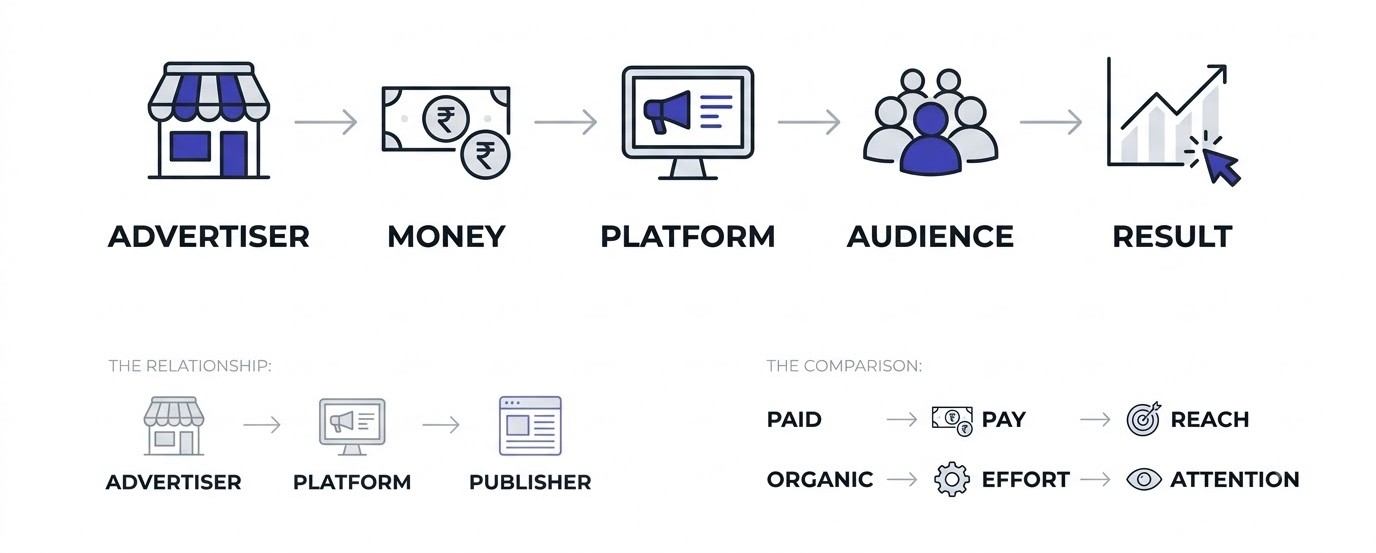
This section answers the basic question first. Paid advertising is any marketing where you pay to put your message in front of people, instead of waiting for them to find you. The sections below cover the definition, how it differs from organic marketing, who gets paid, and why businesses use it.
The Simple Definition
Paid advertising is a deal. You hand money to a platform, and the platform shows your ad to people you choose. That’s all it is.
The platform could be Google, Instagram, YouTube, LinkedIn, Amazon, or even a local newspaper. The ad could be a text link at the top of search results, a video before a cooking tutorial, or a banner on a news site. The format changes, but the deal stays the same.
What makes digital paid advertising different from an old-school billboard is control. A billboard shows your message to everyone driving past. A Google ad shows it only to someone who just typed “best running shoes for flat feet.” That precision is the whole reason this industry is worth hundreds of billions of dollars.
Paid Advertising vs Organic Marketing
Organic marketing means earning attention without paying per view: blog posts that rank on Google, Instagram reels people share, emails your subscribers actually open. You pay with time and effort. Paid advertising means you pay with cash and get results quicker.
Here’s a way to picture it. Organic is planting a mango tree. It takes years, then it gives fruit for decades. Paid is buying mangoes at the market. You eat today, and tomorrow you have to buy again.
Neither one is better. A new shop with no website traffic can’t wait two years for SEO to kick in, so paid ads make sense. A shop that has been running ads for years and has nothing else is stuck paying forever.
Who Pays Whom in the Ad Process
Three parties are involved. The advertiser (you) pays. The platform (Google, Meta) collects and runs the auction. The publisher is the place where the ad actually appears, which could be the platform itself or a website in its network.
On Google Search, the platform and publisher are the same company. On Google’s Display Network, thousands of third-party websites show your ads, and Google splits the revenue with them. That’s how a small recipe blogger in Kerala earns money from AdSense, using ads that someone else paid for.
Knowing this helps you spot where your money goes. Not every ad slot is equal, and some placements are just cheaper because nobody wants to be there.
Why Businesses Use Paid Advertising
Speed is the first reason. A blog post can take six months to rank. An ad can send visitors within an hour of approval.
Control is the second. You pick the audience, the budget, the message, and the landing page. You can switch it off at midnight if it’s not working.
The third reason is learning. Ads give you data fast. Run two headlines for a week and you know which one people prefer, which would take months to figure out any other way. Plenty of businesses test messages with paid ads first, then build their content strategy around what won.
How Paid Advertising Works Behind the Scenes
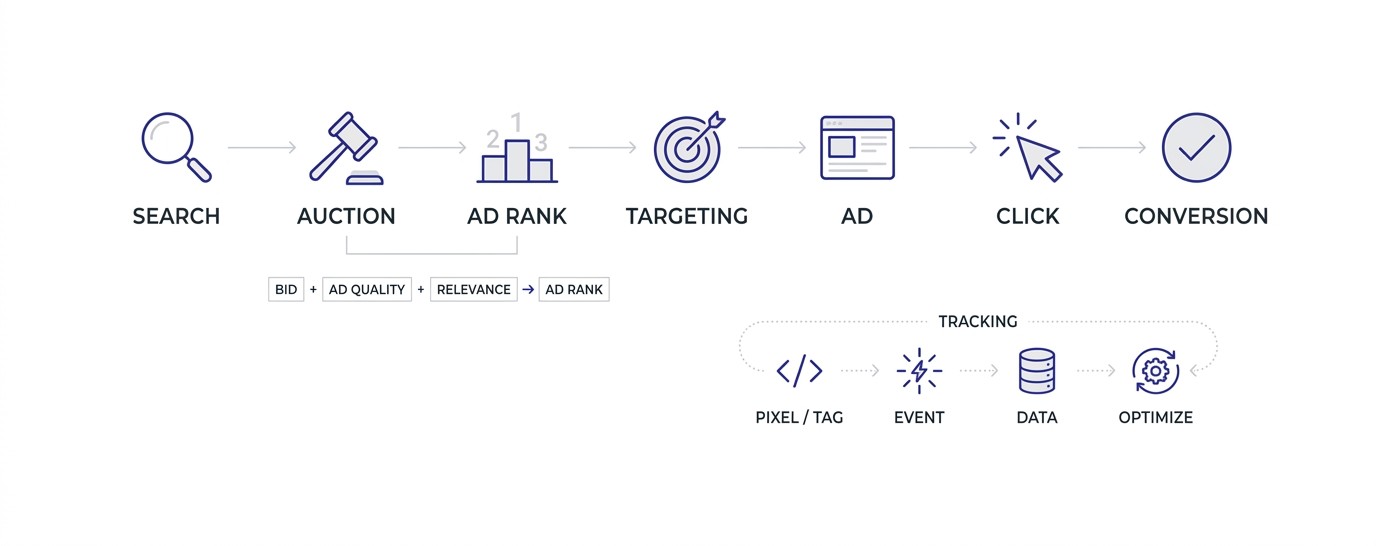
This section explains the machinery under the surface. Every time a page loads, an auction can happen in milliseconds, and your ad either wins a spot or doesn’t. You’ll see how auctions work, what ad quality means, how targeting is done, and how tracking closes the loop.
The Ad Auction in Plain Words
When someone searches on Google, a mini auction runs in a fraction of a second. Every advertiser bidding on that search is entered. Google ranks them, shows the winners, and charges them only if the person clicks.
The ranking isn’t just about the highest bid. Google calls the score Ad Rank, and it combines your bid with the quality of your ad, how well your landing page matches the search, and the expected click rate. Meta works on a similar idea, using what it calls a “total value” score that mixes bid, estimated action rate, and ad quality.
That’s why a small business with a sharp ad can beat a bigger competitor spending more. It’s also why bidding wildly higher doesn’t fix a bad ad.
Quality Score and Relevance
Google gives keywords a Quality Score from 1 to 10. It’s a diagnostic number based on expected click-through rate, ad relevance, and landing page experience. You see it inside Google Ads once you add the column.
A score of 7 or above usually means Google likes what it sees, and you pay less per click. A score of 3 means you’re paying a penalty. Two advertisers can bid the same ₹20, and the one with the better score can pay ₹14 for the same click.
Most beginners ignore this number. Don’t. When a keyword sits at 3 or 4, the fix is nearly always the same: make the ad text match the search more closely, and make the landing page actually talk about what the person searched for.
Targeting: Choosing Who Sees Your Ad
Targeting is how you tell the platform who to show your ad to. On Google Search, you target by keywords, meaning the words people type. On Meta, you target by location, age, interests, behaviors, and lookalike audiences built from your existing customers.
Meta has been moving toward broad targeting with its Advantage+ campaigns, where the algorithm finds buyers itself. That works better than people expect, as long as your creative is good and your tracking sends the right signals back.
For a beginner, here’s a rule that holds up: start narrow enough that your message makes sense to the viewer, then widen once you have conversions. A local gym doesn’t need to reach all of India. People within 5 kilometers who are between 22 and 45 are plenty.
Tracking Pixels and Conversion Data
A pixel is a small piece of code placed on your website that reports back to the ad platform when someone does something: views a product, adds to cart, buys. Meta has the Meta Pixel and the Conversions API. Google has the Google tag, usually managed through Google Tag Manager.
Without that data, the platform is flying blind. It can’t learn who your buyers are, so it can’t find more of them. You also can’t tell which ad produced the sale.
Here’s what actually happens when tracking is missing: the campaign runs, the clicks come in, and you have no idea whether any of it turned into money. That’s not advertising, that’s donating. Setting up tracking is the unglamorous first job, and it decides whether everything after it works.
Types of Paid Advertising You Will Actually Run
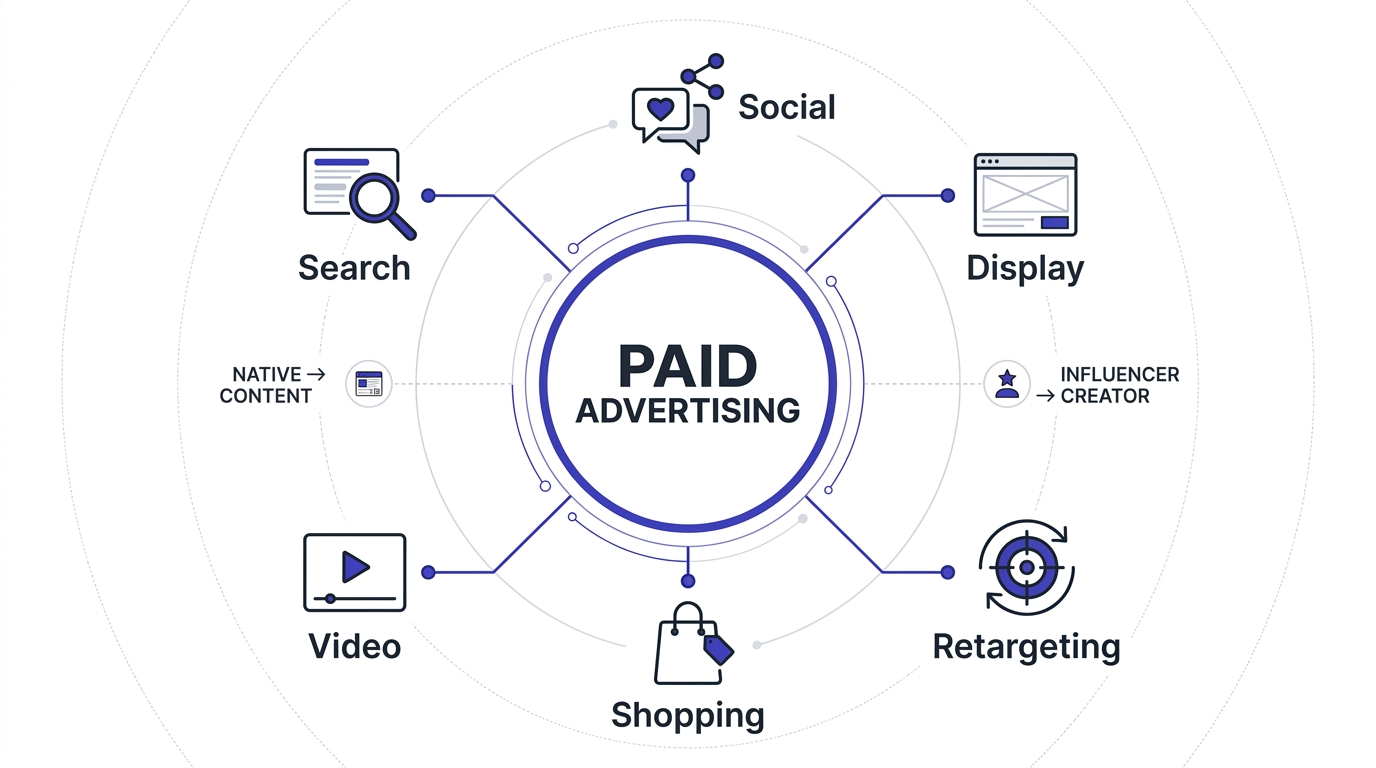
This section covers the main kinds of paid ads. There are dozens of formats, but most beginners work with six or seven. Each one reaches people at a different moment and costs a different amount, so choosing the right type matters more than picking the cheapest.
Search Ads (Google Ads and Microsoft Advertising)
Search ads appear when someone types a query into Google or Bing. They look like regular results with a small “Sponsored” label. You bid on keywords like “wedding photographer Pune” and your ad appears when someone searches that.
These work well because of intent. A person typing a search is already looking for something. You’re not interrupting them, you’re answering them.
The catch is cost. Competitive keywords get expensive fast. “Personal injury lawyer” can cost over $100 per click in the US, while a keyword like “handmade candle gift box” might cost under ₹15 in India. Always check the Keyword Planner before you commit.
Social Media Ads (Meta, LinkedIn, X, Pinterest)
Social ads appear in feeds, stories, and reels. They work the opposite way from search. Nobody was looking for your product, so the ad has to interrupt something and earn attention in about two seconds.
Meta (Facebook and Instagram) is the default for most small businesses because the audience is huge and the targeting is flexible. LinkedIn is better for B2B, where you need to reach, say, HR managers at companies with 200+ employees. But LinkedIn clicks often cost $5 to $12 or more, so the math has to work.
Pinterest is underrated for anything visual and planned: weddings, home decor, recipes. People there are in a planning mindset.
Display Ads and the Google Display Network
Display ads are the banners you see on websites, apps, and blogs. Google’s Display Network reaches a huge share of internet users across millions of sites.
They’re cheap. Clicks can cost a few rupees. They’re also the least likely to convert on a first impression, because nobody on a news site is thinking about buying your product. Display is best for awareness and for retargeting, not for getting cold buyers.
Honestly, most beginners should skip display until search or social is already working. Quality control is weaker, and a lot of clicks come from accidental taps on mobile apps.
Video Ads (YouTube and Short-Form)
YouTube ads include skippable in-stream ads (you pay when someone watches 30 seconds or interacts), non-skippable ads, bumpers of 6 seconds, and ads in Shorts. Video builds trust faster than a banner because people hear a voice and see a face.
The cost per view is low, sometimes ₹1 to ₹3 in India. But a view isn’t a sale, and that gap is where beginners get confused.
Good video ads usually open with the problem in the first five seconds, not the logo. Something like “Your Instagram reach dropped 70%, here’s why” beats a polished brand intro every time.
Shopping and Product Listing Ads
Shopping ads show a product photo, price, and store name right in Google search results. You upload your product catalog through Google Merchant Center, and Google builds the ads from that data.
For e-commerce, these often beat text ads because people see the product and price before clicking. A click from a Shopping ad is closer to buying than a click from a text ad.
Amazon Ads work on the same principle inside Amazon’s marketplace. If you sell on Amazon, Sponsored Products is where most of your ad budget will go, and it’s a different skill from running Google Ads.
Retargeting and Remarketing Ads
Retargeting shows ads to people who already visited your site or interacted with your page. Someone looked at a pair of shoes, left, and then sees those exact shoes on Instagram the next day. Yeah, that’s retargeting.
It works because these people already know you. Conversion rates on retargeting audiences are often several times higher than on cold audiences.
One warning: don’t chase people forever. Showing the same ad to the same person 15 times in a week annoys them. Cap the frequency, and exclude people who already bought.
Native and Influencer-Style Paid Ads
Native ads blend into the content around them, like a “recommended” article on a news site. Platforms like Taboola and Outbrain run these. They’re common for content marketing and lead generation.
Influencer-style paid ads, sometimes called partnership ads on Meta, let you run an ad through a creator’s account. People tend to trust a face they know more than a brand page.
These are worth testing once your basic campaigns work. Indian D2C brands, particularly in skincare and fashion, often get better results from creator-style videos than from studio-shot ads.
What Is Paid Advertising Going to Cost You?
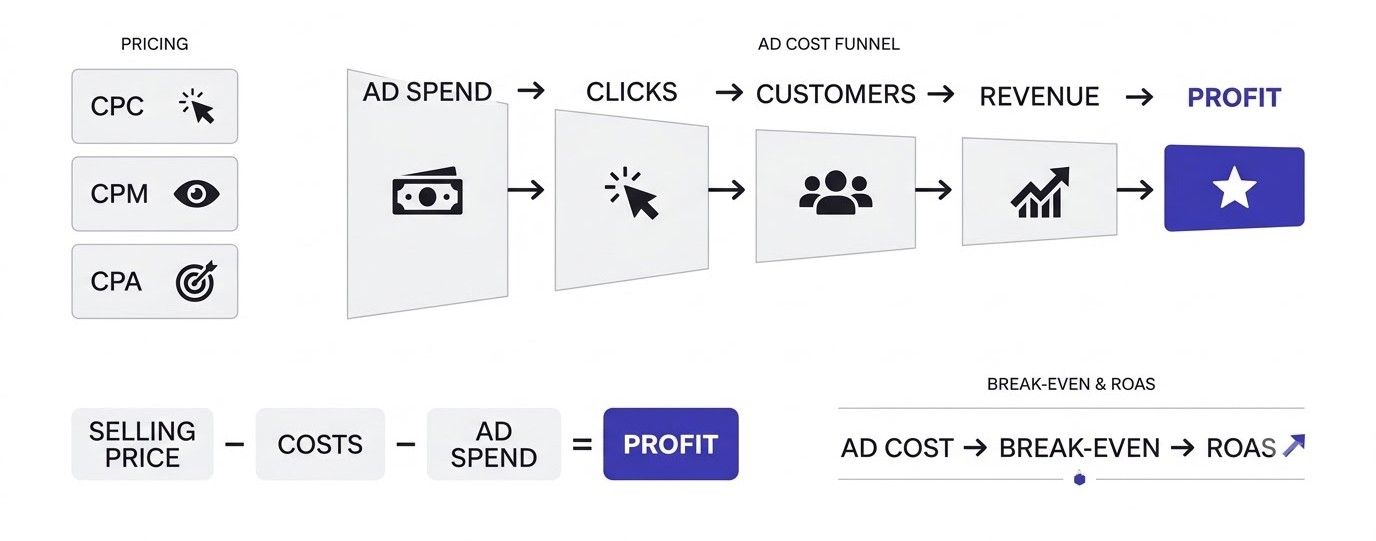
This section covers the money side. Prices vary a lot by country, industry, and platform, but the pricing models are the same everywhere. You’ll learn what CPC, CPM, and CPA mean, what typical costs look like, and how to figure out what you can afford before spending a rupee.
Understanding CPC, CPM, and CPA
CPC means cost per click: you pay each time someone clicks. CPM means cost per thousand impressions: you pay for every 1,000 times the ad is shown, whether anyone clicks or not. CPA means cost per acquisition: what you pay for one result, like a lead or a sale.
Google Search usually charges by click. Meta can charge by impression, though what matters is your cost per result. YouTube charges by view.
Here’s the thing most guides skip. CPC is a number the platform controls. CPA is the number your business actually feels. You can have a cheap ₹5 click and still pay ₹2,000 per customer if nobody buys. Always follow the money to the end of the funnel.
Typical Costs by Platform
These ranges are rough, and they shift constantly, but they give you a sense of scale. Google Search clicks in India run from about ₹5 for low-competition terms to ₹100 or more for finance and education keywords. Meta CPMs in India often sit between ₹80 and ₹250 for general audiences, though they rise sharply during festive sales like Diwali.
LinkedIn is pricey, with CPCs often in the ₹300 to ₹900 range for B2B targeting. YouTube views often cost a few rupees.
In the US, everything costs more. Don’t copy numbers from American blogs and expect them to match your account. Check your own data after the first week.
How Much Budget Do You Really Need?
You need enough budget to get meaningful data. Meta’s algorithm typically needs around 50 conversions in a week to exit its learning phase and stabilize. If one sale costs you ₹500 to get, that’s ₹25,000 a week just to feed the algorithm properly.
That doesn’t mean you can’t start small. A ₹500 per day budget for two weeks (about ₹7,000) can tell you whether people click and whether your landing page makes sense. It just won’t tell you everything.
A common mistake is spending ₹200 a day, seeing no sales after three days, and declaring that ads don’t work. Three days at that budget is noise, not evidence.
The Profit Math Before You Spend
Do this on paper first. Say you sell a skincare kit for ₹1,299. Your product, packaging, and shipping cost ₹600. That leaves ₹699 gross margin. If you spend more than ₹699 to acquire a customer, you lose money on the first sale.
Maybe repeat purchases make up for it. Many brands accept losing money on the first order because customers come back. That’s fine, but only if repeat purchases are real and not hope.
The number to know is your break-even ROAS (return on ad spend). Divide your selling price by your gross margin: ₹1,299 ÷ ₹699 is about 1.86. You need to earn at least ₹1.86 for every ₹1 spent on ads just to break even.
Hidden Costs Beginners Forget
Ad spend isn’t the only bill. Creative costs money: photos, videos, a freelancer’s time, or your own hours. Landing pages need building and fixing. Tools cost money too, like a Shopify plan, an email platform, or a call tracking service.
Then there’s agency or freelancer fees if you hire help, often 10 to 20 percent of ad spend or a flat monthly retainer.
Add these up before deciding what your real cost per customer is. A campaign that looks profitable at the ad level can be losing money once everything is counted.
Paid Advertising vs Organic Marketing: Which One Should You Use?
This section compares the two approaches honestly. Many people pick a side and defend it, but the truth is more practical. Each one works better in certain situations, and the best results usually come from using both in the right order.
When Paid Advertising Makes Sense
Paid ads make sense when you need results fast and have a product that makes money. Launching a new product, running a sale with a deadline, testing a new market, or bringing in leads for a service business are all good fits.
They also make sense when you don’t have an audience yet. A new brand with 200 Instagram followers can’t rely on organic reach. Ads put you in front of strangers on day one.
The one condition: the offer has to be decent. Ads amplify what’s already there. A bad product with great ads just fails faster.
When Organic Marketing Wins
Organic wins on long-term cost. A blog post that ranks for “how to start a vegetable garden” can bring thousands of visitors a month for years with no per-click fee. The cost is upfront (writing, research, links), and then it keeps going.
Organic also builds trust that ads can’t. People who find you through a helpful article often view you as an expert, not a seller. Our guide to SEO fundamentals covers how that side works.
The downside is patience. New websites commonly take four to eight months before search traffic becomes noticeable. Not everyone can wait that long.
Combining Both for Better Results
The smartest approach uses ads to learn and organic to stay. Run paid campaigns to find which messages, offers, and audiences convert. Then use those same winning angles in blog posts, emails, and social content.
Here’s a real pattern. A coaching business runs Google ads for “IELTS coaching Bhubaneswar” and discovers that “score guarantee” in the headline doubles the click rate. They then build a page and a blog series around that exact promise, and over time organic traffic starts catching up while ad spend drops.
Ads give you the data. Organic gives you the staying power. Using only one leaves value on the table.
Common Myths About the Choice
Myth one: ads are only for big companies. Nope. You can start a Meta campaign at around ₹300 to ₹500 a day.
Myth two: organic is free. It isn’t. Writers, designers, tools, and your own hours all cost something.
Myth three: you have to pick one. Most successful businesses run both, with different jobs for each. Ads catch people ready to act now, and organic keeps a steady flow in the background. For a broader view of how these pieces fit, the digital marketing category on this site is a good place to explore.
How to Start Paid Advertising Step by Step
This is the practical section. Following the sequence below keeps beginners from the usual mistakes, mainly spending before tracking works. Each step has a reason, and skipping one usually costs you money somewhere down the line.
Step 1: Set One Clear Goal
Pick a single goal for the campaign. Not three. “More sales” is a goal. “More brand awareness, plus leads, plus app downloads” is a mess.
Make it measurable: “30 leads at under ₹250 each in 30 days.” Now you know what success looks like and when to stop.
Different goals lead to different campaign types. Sales and leads call for conversion-focused campaigns. Awareness calls for reach or video views. Mixing them makes the algorithm confused about what to optimize for.
Step 2: Choose the Right Platform
Match the platform to how your customers behave. If people search for what you sell (“emergency plumber near me”), start with Google Search. If your product is visual and impulse-friendly (clothing, jewelry, snacks), start with Instagram and Facebook.
B2B services usually do better on LinkedIn or Google Search. Visual planning products fit Pinterest. Local services work well on Google Maps ads and Search.
Don’t spread across five platforms with a small budget. Pick one, learn it, and get it working before adding another.
Step 3: Install Tracking Before Spending
Set up Google Tag Manager, GA4, and the Meta Pixel (plus the Conversions API if you’re on Meta). Then fire a test event, like a purchase or form submit, and check that it shows up in each platform.
Use Google Tag Assistant or the Meta Pixel Helper browser extension to confirm tags fire correctly. If you want clean campaign tagging, a UTM builder from the free tools page saves time and prevents naming mistakes.
Most people skip the test step. Then three weeks later they find the purchase event never fired, and they’ve got no data to show for ₹30,000.
Step 4: Define Your Audience
On Google Search, build a tight keyword list. Start with 10 to 20 keywords that show buying intent, like “buy,” “price,” “near me,” or “best.” Add negative keywords for terms you don’t want, such as “free,” “jobs,” or “DIY.”
On Meta, set location, age range, and let Advantage+ audience suggestions work, or add interest layers. If you have a customer list of 1,000 or more emails, upload it and create a lookalike audience.
Keep the audience size workable. A local bakery targeting a 10 km radius makes sense. Targeting all of India for a product that ships only in Odisha doesn’t.
Step 5: Create Ads People Actually Notice
Your ad has about two seconds. Lead with the problem or the result, not the company name. “Back pain after a long workday?” beats “Welcome to ABC Wellness.”
For search ads, write 10 to 15 headlines and 4 descriptions so Google’s responsive ad format can test combinations. Include the keyword, a clear benefit, and a call to action.
For social ads, use real photos or phone-shot videos with a human in them. Over-polished studio visuals often get scrolled past. Test at least three different creatives, because you can’t predict which one wins.
Step 6: Build a Landing Page That Matches the Ad
The click is only half the job. If your ad says “50% off yoga mats” and the landing page opens on a generic homepage, people leave.
The landing page should repeat the ad’s promise in the first headline, show the offer clearly, have one main button, and load fast. Aim for under three seconds on mobile. Use Google PageSpeed Insights to check.
Remove the navigation menu if you can. You don’t want people wandering off. One page, one action.
Step 7: Set Your Budget and Launch
Start with a daily budget you can lose without panic. For most beginners that’s ₹500 to ₹1,500 a day for a test period of 10 to 14 days.
Choose automatic bidding at first, such as “Maximize conversions” on Google or the default lowest cost on Meta, and let the system gather data. Switch to cost caps later, once you know your numbers.
Launch and then leave it alone for at least three to four days. Changing things every few hours resets learning and ruins your data.
Step 8: Review, Learn, and Adjust
After a week, check the numbers that matter: cost per result, conversion rate, and which ad or keyword is bringing the sales. Pause the clear losers. Put more budget behind the winners, in small steps of around 20 percent so the algorithm doesn’t get shocked.
Change one variable at a time: headline, image, audience, or landing page. If you change everything at once, you won’t know what made the difference.
Paid Advertising Mistakes That Waste Your Budget
This section lists the errors that drain accounts most often. Almost everyone makes at least two of these in their first campaign. Seeing them ahead of time can save you thousands, and each one has a simple fix once you know to look for it.
Running Ads Without Tracking
This is number one by a wide margin. People launch, spend, and then try to work out results from gut feel or total sales numbers.
Without conversion tracking, you can’t tell if a click became a customer. You can’t compare ads. The platform can’t optimize either, since optimization needs a signal to chase.
The fix takes an afternoon. Install the tags, test every important event, and verify in the platform’s reports. Do it before launch, every time.
Sending Traffic to the Homepage
Your homepage tries to serve everyone: new visitors, returning customers, job seekers, investors. An ad serves one specific promise to one specific person.
When someone clicks “Buy leather wallets for men” and lands on a homepage with 14 menu items, they have to search for the wallets. Most don’t bother.
Send traffic to the exact product page, collection, or custom landing page. The click-to-purchase rate usually goes up noticeably from this change alone.
Targeting Too Broad or Too Narrow
Too broad means you’re paying for people who’ll never buy. Too narrow means the audience is so small that costs spike and the platform can’t learn anything. Meta audiences under about 50,000 people in a small region can get exhausted quickly.
Look at the platform’s audience size estimate. For Meta, a range of a few hundred thousand up to a few million works for most local and national campaigns.
If results are poor, change the creative and the offer before blaming the audience. The message is usually the problem, not the targeting.
Judging Results Too Early
Day one results lie. The algorithm is still learning, and the sample size is tiny. If 40 people clicked and none bought, that tells you almost nothing.
A rough guide: wait until you have at least 100 clicks per ad variation, or ideally a few conversions, before making a call. For Meta, give a campaign at least three to five days without touching it.
On the flip side, don’t wait forever either. If you’ve spent 3 times your target cost per acquisition with zero conversions, that’s enough to pause and look for problems.
Ignoring Negative Keywords and Placements
On Google Search, broad match keywords can trigger your ad for unrelated searches. A shoe store bidding on “running shoes” might show up for “running shoes repair jobs.” Check the Search Terms report weekly and add irrelevant words as negatives.
On Display and Performance Max, placement reports show where your ads appeared. You may find your ads on kids’ gaming apps or random low-quality sites. Exclude them.
This is slow, boring work. It’s also where a lot of accounts recover 15 to 30 percent of wasted spend.
Copying Competitors Blindly
Looking at competitor ads in the Meta Ad Library or the Google Ads Transparency Center is smart. Copying them is not.
You don’t know their margins, their conversion rate, or whether that ad is even working. Maybe it’s a failing test they forgot to turn off. A brand with a 70 percent margin can afford bids that would bankrupt you.
Use competitors for ideas about angles and formats, then test your own version with your own numbers. Let your data decide, not theirs. Real campaign breakdowns in our case studies section show how this thinking plays out.
How to Measure Whether Paid Advertising Is Working
This section explains the numbers worth watching. Ad platforms throw dozens of metrics at you, and most of them are noise for beginners. Knowing which few matter stops you from celebrating the wrong things or panicking over harmless dips.
Click-Through Rate (CTR)
CTR is clicks divided by impressions. If 1,000 people see your ad and 20 click, your CTR is 2 percent.
On Google Search, a CTR of 3 to 6 percent is common for decent campaigns. On Meta feeds, 0.8 to 1.5 percent is typical. These aren’t rules, just rough reference points.
A low CTR means the ad isn’t interesting to the people seeing it. That points to a creative or targeting problem. A high CTR with no sales means the ad works but something after the click is broken.
Conversion Rate
Conversion rate is the percentage of visitors who take your desired action. If 200 people visit your landing page and 8 buy, your conversion rate is 4 percent.
For e-commerce, 1 to 3 percent is typical. For lead forms on a good landing page, 5 to 15 percent isn’t unusual. Anything much lower deserves a look at the page itself.
This is the number that tells you whether your page, offer, and price work together. Improving it from 2 percent to 3 percent is a 50 percent increase in sales from the same ad spend.
Cost Per Acquisition and ROAS
CPA is how much you pay for one customer or lead. ROAS is revenue divided by ad spend. If you spent ₹10,000 and brought in ₹35,000 in sales, your ROAS is 3.5.
These two are the numbers that decide whether you’re making money. Compare them to your break-even from earlier. If your break-even ROAS is 1.86 and you’re at 3.5, you’re in good shape.
Platform-reported ROAS often overstates results because of attribution overlap. Cross-check with your actual bank and order records at the end of each month.
Attribution: Who Gets the Credit?
Attribution is how a platform decides which ad gets credit for a sale. Someone might see your Instagram ad Monday, click a Google ad Wednesday, and buy Friday. Both platforms may claim the sale.
Meta and Google each use their own attribution windows, such as 7-day click or 1-day view. GA4 uses a different model. That’s why the numbers rarely match across tools.
Don’t obsess over perfect attribution. Look at total revenue versus total ad spend across platforms, and treat individual platform reports as directional hints.
Vanity Metrics to Ignore
Likes, shares, reach, and impressions feel good and rarely pay bills. A post with 5,000 likes and zero sales is a failed ad if sales were the goal.
Video views work the same way. If you’re after revenue, a million views mean little unless they’re from people who might buy.
Stay anchored to the goal you picked in Step 1. If it was leads, track leads and cost per lead. Everything else is background information.
Is Paid Advertising Worth It for Your Business?
This section helps you decide honestly. Paid ads aren’t right for every business at every stage. Some businesses should wait, some should start tomorrow, and some should use a mix. Here’s how to think through it without hype.
Signs You’re Ready to Start
You’re ready when you have a product or service people already buy at least occasionally, a website or landing page that works on mobile, and a clear idea of your profit per sale.
You also need a little patience and some budget set aside that you can afford to lose while learning. Starting with money you need for rent is a bad idea.
If you’ve made even 10 to 20 sales organically, that’s a good sign the offer has some pull. Ads can then scale what’s already working.
Signs You Should Wait
Wait if your product isn’t tested, your website is slow or broken, or your margins are so thin that no ad cost could work. Wait if you don’t have tracking and can’t set it up yet.
Also wait if you expect ads to fix a weak offer. They won’t. If nobody wants what you sell at the price you charge, ads simply show you that faster and more expensively.
In those cases, spend time improving the product page, talking to customers, and building an email list. Then come back to ads with a stronger base.
Starting Small as a Freelancer or Student
If you’re learning paid advertising as a skill, you don’t need a client or a big budget to practice. Run a ₹3,000 test for a friend’s business, or promote a simple lead magnet like a free PDF.
Use Google Skillshop for free certifications and Meta Blueprint for training. Both give you real exposure to the interface.
Document every campaign you run. A small portfolio with real numbers beats a certificate. Freelancers looking at this as a career can also read about making money online through client work.
How Paid Advertising Fits Into the Bigger Picture
Ads are one part of a funnel: people see something, visit a page, maybe leave, maybe come back, maybe buy. Email, SEO, social posts, and word of mouth all play parts.
Treat ads as a way to put people in the funnel, then make sure the rest of the funnel keeps them. Collect emails on the landing page. Send follow-ups. Retarget visitors.
Businesses that treat ads as the whole strategy usually struggle when costs rise. Those with a few channels working together handle price changes much better.
Conclusion
What is paid advertising? Paying for attention, then earning your money back through the people who respond. That sounds simple, and the basics are. The difficulty is in doing the math, setting up tracking, and having the patience to test properly before changing everything.
Start with one platform, one goal, and a budget you can afford to lose. Check your numbers weekly, and let data decide what to scale. If you want a structured way to learn it with real accounts and guidance, the next step is picking a platform this week and running a small ₹3,000 test. Then you’ll have your own numbers to learn from, which beats any article.
Frequently Asked Questions
What is paid advertising in simple words?
Paid advertising means paying a platform like Google, Instagram, or YouTube to show your message to chosen people. You pick the audience and budget, and you’re charged when people see, click, or act on the ad. It’s the fastest way to get visitors to a new website, though the traffic stops once you stop paying.
How does paid advertising work?
Platforms run auctions each time an ad slot opens. Your bid, ad quality, and expected engagement decide whether you win the slot. If your ad is shown and someone clicks or converts, you pay according to your bidding model, such as cost per click or cost per thousand impressions.
What are the main types of paid advertising?
The main types are search ads, social media ads, display ads, video ads, shopping ads, and retargeting. Search ads catch people who are actively looking for something. Social and video ads build interest in people who weren’t searching. Retargeting brings back past visitors who didn’t buy the first time.
How much does paid advertising cost?
It depends on platform, country, and industry. In India, Google Search clicks can range from about ₹5 to ₹100 or more, and Meta CPMs often fall between ₹80 and ₹250. A practical test budget is ₹500 to ₹1,500 per day for two weeks. Costs rise during sale seasons like Diwali.
Is paid advertising better than SEO?
Neither is better in every case. Paid advertising gives fast traffic but stops when the budget stops. SEO takes months to build but keeps working without per-click fees. Most businesses do best by using paid ads for quick results and testing, while building organic traffic for long-term growth.
Can beginners do paid advertising on their own?
Yes. Platforms like Google Ads and Meta Ads Manager are built for self-service, and Google Skillshop and Meta Blueprint offer free training. Beginners should start with small budgets, install tracking first, and change one thing at a time. Expect a learning curve and a few wasted rupees early on.
How long does it take to see results from paid ads?
Clicks and impressions start within hours of approval. Meaningful conversion data usually takes one to two weeks. Meta’s learning phase typically needs around 50 conversions in a week to stabilize. Judging a campaign after two or three days rarely gives reliable information.
What is a good ROAS for paid advertising?
A good ROAS depends on your margins. Divide your selling price by gross profit to find your break-even ROAS. If that number is 2, anything above 2 is profit on the first sale. Many e-commerce brands aim for 3 to 4, though that varies by industry and repeat purchase rates.
What is the difference between paid ads and boosted posts?
A boosted post is a simplified ad created from an existing Instagram or Facebook post with a few clicks. It offers limited targeting and objectives. Ads created in Meta Ads Manager give full control over goals, audiences, placements, and bidding. Serious campaigns should use Ads Manager.
Why are my paid ads not getting sales?
Common reasons include missing tracking, a weak landing page, a poor offer, wrong audience, or judging too early. Check whether your click-through rate is healthy first. If clicks are fine but sales are low, the problem is likely the landing page, price, or trust signals like reviews and return policies.
Which platform is best for paid advertising?
It depends on your customer. Google Search works best when people actively search for what you sell. Instagram and Facebook suit visual, impulse-friendly products. LinkedIn fits B2B services, though clicks cost more. YouTube is useful for trust-building through video. Start with the one where your customers already spend time.
Do paid ads work for small businesses?
Yes, if the numbers work. Local businesses can target a small radius with modest budgets, and clicks for local services are often cheaper than national terms. The key is having a clear offer, a mobile-friendly landing page, and tracking so you know which rupees bring customers and which don’t.
Is paid advertising worth it in 2026?
For businesses with a tested offer and healthy margins, yes. Costs on major platforms have risen over the years, so profit math matters more than ever. Ads work best when paired with organic channels like email and SEO, so you aren’t fully dependent on rising ad prices.