

Picture a small business owner who spends ₹30,000 on Google Ads in one month. The ads run, the impressions climb, and the phone stays quiet. Same budget, same keywords, same landing page, and a different ad from a competitor two spots below is pulling in three times the clicks. Nobody hacked anything. Their ad just said the right thing in the right 30 characters.
That gap is what this guide is about. How to write Google ads copy is not a talent thing and it is not a secret formula. It is a skill with rules, limits, and habits you can learn in an afternoon and keep sharpening for years. Most weak ads fail for boring reasons: they talk about the company instead of the searcher, they repeat the same point in all fifteen headlines, or they promise something the landing page never delivers.
Here is the thing nobody tells beginners. Google gives you almost no room. A headline gets 30 characters, a description gets 90, and the person reading it is half-distracted, thumbing through results on a phone. So every word has to fight for its seat. This guide walks through the whole process, from reading what people actually type into Google, to building responsive search ads, to testing variations without fooling yourself with bad data. Real examples, real limits, and the mistakes that quietly burn money.
What You Will Learn in This Guide
This section gives you a quick map of what is coming, so you can jump to the part you need or read straight through. Each topic below gets its own section with examples, character counts, and the mistakes most people make while practicing it.
- How to read search intent before writing a single headline, and why that step decides everything else
- The exact character limits and ad formats inside Google Ads, including responsive search ads, pinning, and ad strength
- How to write Google ads copy headlines that earn clicks, with numbers, offers, and keyword placement
- How to write descriptions that answer doubts and push people toward one clear action
- How sitelinks, callouts, and other assets make your ad physically bigger and more believable
- Four full ad examples for a plumber, a shoe store, a software tool, and a course
- How to match your ad to your landing page so Quality Score and conversions both improve
- How to test ad copy properly, read asset reports, and know when to stop waiting
- The common mistakes that make good budgets produce bad results
TL;DR
- Start with the search term, not the ad: the searcher’s words and intent should shape every headline.
- A responsive search ad takes up to 15 headlines (30 characters each) and 4 descriptions (90 characters each), so write fifteen different angles, not one idea reworded.
- Specific beats clever: a price, a number, a time frame, or a named guarantee out-clicks a vague slogan almost every time.
- Assets like sitelinks and callouts are free real estate that make your ad bigger and your promise more believable.
- The landing page has to repeat the ad’s promise within the first screen, or clicks turn into expensive bounces.
- Test one idea at a time, give each test enough clicks to mean something, and keep what wins.
How to Write Google Ads Copy Starting With the Search, Not the Ad
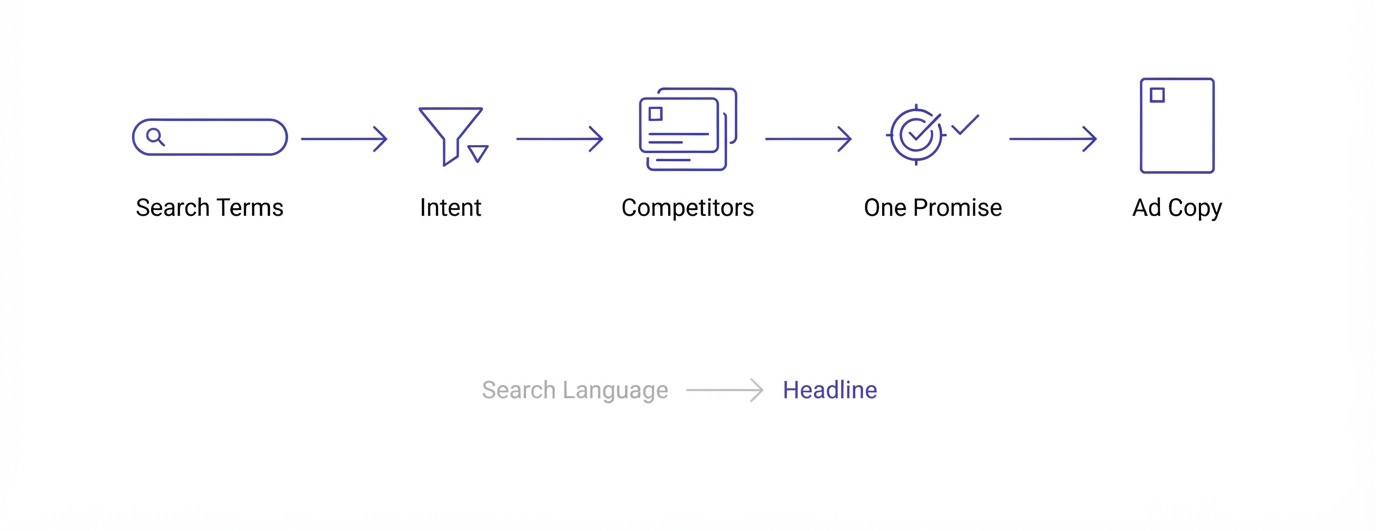
Great ad copy starts before you open the Google Ads editor. It starts with understanding who typed the query, what they wanted, and what they are comparing. This section covers the research that makes the writing easy, because when you know the searcher well, the headlines almost write themselves.
Read the Search Terms Report First
Open your Google Ads account, go to Insights and reports, then Search terms. This report lists the exact phrases real people typed before they saw and clicked your ad. It is the closest thing to listening in on your customers, and most beginners skip it completely.
Look for patterns. If you sell running shoes and the report is full of “running shoes for flat feet” and “best shoes for marathon under 5000”, those phrases are headline material. People use words you might never choose yourself. Copy their language. Copy the price anchors. Copy the problems. Then notice which terms are junk, like “free” or “jobs”, and add them as negative keywords so your copy stops talking to the wrong crowd.
If you have no account history yet, use Keyword Planner and the “People also ask” box on Google instead. A bit of keyword research done properly beforehand saves weeks of guessing later.
Match the Ad to the Intent Stage
Not every searcher is ready to buy. Someone typing “what is a CRM” wants an explanation. Someone typing “HubSpot vs Zoho pricing” is comparing. Someone typing “buy CRM software India” is ready. One ad cannot talk to all three, and trying to makes it weak for each.
Sort your keywords into those stages and give each group its own ad group with its own copy. For the ready-to-buy crowd, use pricing, free trials, and fast delivery. For the comparing crowd, lean on reviews and differences. For the learning crowd, offer a guide or a demo instead of a hard sell.
This sounds like extra work, and honestly it is. It is also the single biggest reason one account pulls a 7% click-through rate while another sits at 2% on the same keywords.
Study the Ads You Are Up Against
Google your own keyword in an incognito window. Read every ad above and below the organic results. Screenshot them. Now ask a simple question: what is everyone saying, and what is nobody saying?
If all five competitors write “Best Quality, Best Price, Trusted Brand”, that language is invisible. Your job is to say something different. Maybe nobody mentions delivery time. Maybe nobody names a price. Maybe nobody offers a guarantee. That empty space is your headline.
You can also check Auction Insights inside Google Ads to see which competitors show up most against you. Then search those brands’ names and read their ads too. Do this once a quarter. Their offers change, and yours should respond.
Pick One Promise Before You Write
Before drafting anything, finish this sentence: “Click my ad because ____.” Only one thing goes in that blank. Fastest delivery. Lowest price in the city. A free first consultation. A 30-day refund.
You will still write fifteen headlines later, and they can circle different angles, but they all support that one core promise. Ads that try to promise speed, quality, price, and friendliness at once end up promising nothing. When the promise is clear, you can judge every draft line by a simple test: does this make the promise easier to believe or easier to ignore?
If you cannot finish the sentence, stop writing and go back to the research. The ad is not the problem yet.
How to Write Google Ads Copy Inside Responsive Search Ad Limits
Google has rules about how much you can write and how the pieces get assembled. Break them, and your ad either will not run or will be mixed together in ways that sound strange. This section explains the format itself so you stop fighting the editor and start using it.
Understand How Responsive Search Ads Work
Since June 30, 2022, you can no longer create or edit the old expanded text ads. Responsive search ads, usually called RSAs, are the standard now. You give Google a pile of headlines and descriptions, and its system mixes and matches them to show each person the combination most likely to work.
That means you are not writing one ad. You are writing a set of building blocks that must make sense in almost any order. A headline that only works as the first line, or a description that depends on the headline beside it, will occasionally appear in the wrong spot and read like nonsense.
Think of it like Lego. Every brick should snap onto every other brick without looking broken.
Know the Character Limits Cold
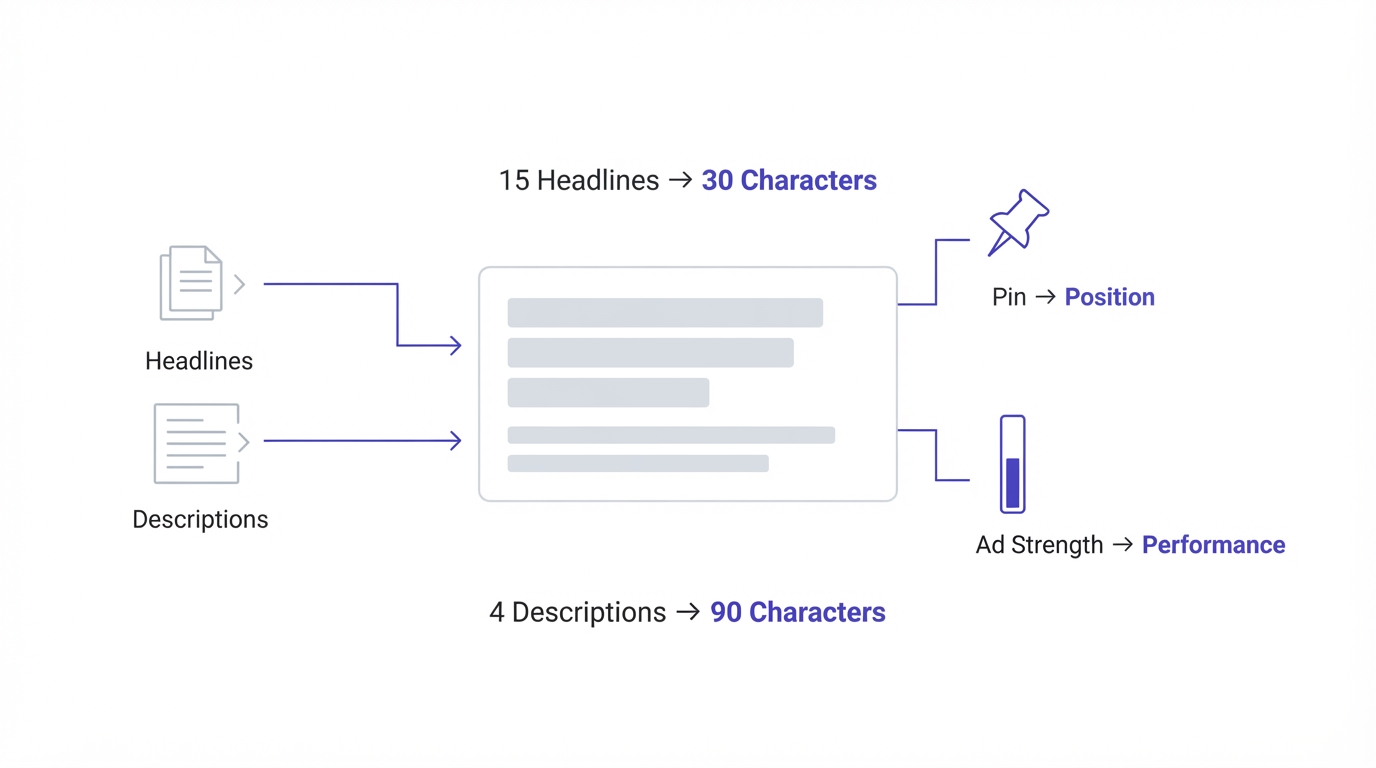
You get up to 15 headlines, each with a maximum of 30 characters. You get up to 4 descriptions, each with a maximum of 90 characters. Google shows up to three headlines and two descriptions at once, though what actually appears varies by device and auction.
Spaces and punctuation count. “Emergency Plumber in Pune” is 25 characters. “Emergency Plumber in Pune, 24/7 Service” is far over the limit and gets rejected. You also get two display path fields of 15 characters each, which add friendly text to the URL, like yoursite.com/plumber/pune.
Beginners often write in a Word document, paste in, and discover half their lines are too long. Write inside the Google Ads editor, where the counter is visible, or use a character counter. The limit is not a punishment. It forces the one skill this whole job depends on: cutting.
Use Pinning Carefully
Pinning lets you lock a headline or description into a specific position. Pin a headline to position 1 and it always appears first. Pin to position 2 and it always appears second. You can pin several headlines to the same position, and Google rotates among those.
Why would you pin? Legal disclaimers, brand names, or a must-show offer. A financial advertiser, for instance, might need a risk statement to always appear.
The mistake most people make is pinning too much. Every pinned line reduces Google’s ability to test combinations, and ad strength usually drops. A decent rule: pin the minimum you are required to, and let everything else rotate. If you find yourself pinning five headlines, your copy is probably too dependent on order and needs rewriting.
Treat Ad Strength as a Hint, Not a Goal
Google rates each RSA as Poor, Average, Good, or Excellent. The score looks at how many headlines you wrote, how different they are, whether they include your keywords, and how many characters you use. It is a decent checklist and a terrible boss.
An Excellent rating does not guarantee more conversions. Some accounts get better results from a Good ad with sharper, more specific copy than from an Excellent one stuffed with filler to please the meter. Use the score to catch obvious gaps, like having only four headlines or repeating the same phrase, and then trust your own judgment and your data.
Check the actual performance after two or three weeks. If an Average ad out-converts an Excellent one, believe the conversions.
How to Write Google Ads Copy Headlines That Earn the Click
The headline is the part people actually read. Descriptions get skimmed, assets get glanced at, but the headline decides whether the thumb stops. Here is how to write headlines that do real work in 30 characters, including the formulas that hold up across industries.
Put the Searcher’s Words in the Headline
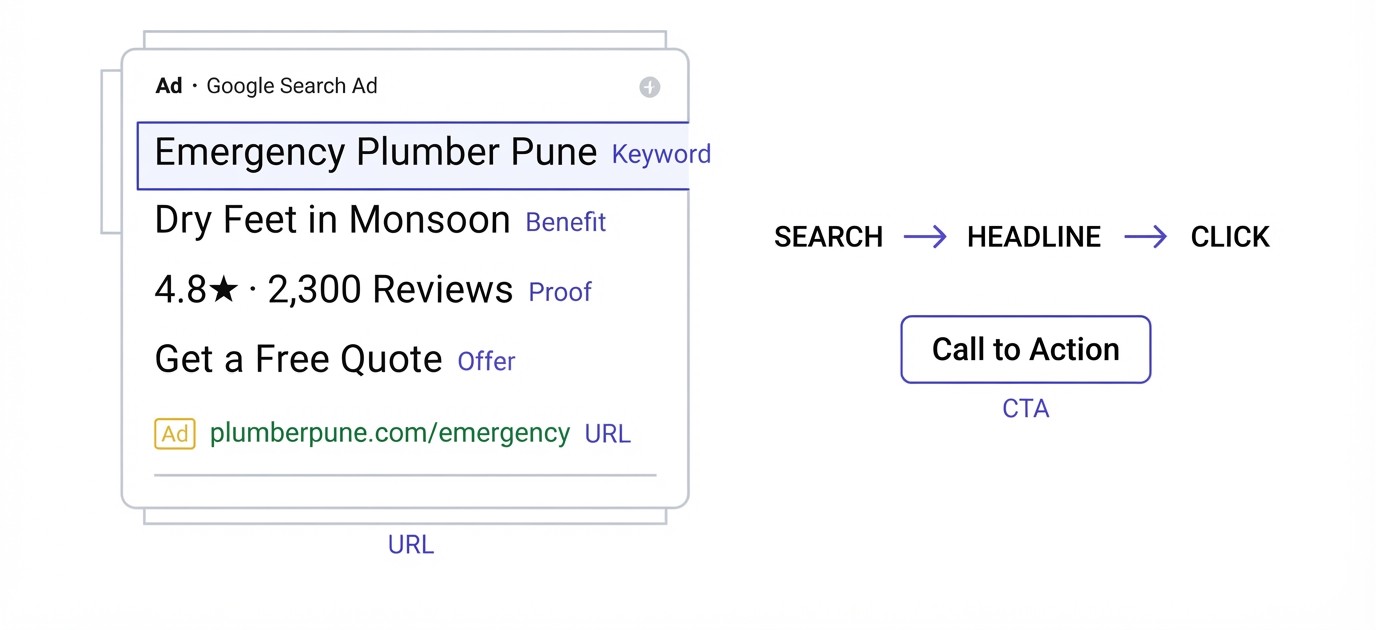
When someone types “emergency plumber Pune” and your headline says “Emergency Plumber in Pune”, their eyes lock on. Google also bolds the words that match the search, which makes your ad stand out visually. This is the oldest trick in paid search and it still works because it is just relevance.
Do not go overboard. Putting the keyword in headline one is smart. Putting it in all fifteen is lazy and makes the ad read like a robot wrote it.
Write at least three headlines that include the core keyword in slightly different shapes: the exact phrase, a close variation, and one with the location or product type added. Google will serve the closest fit. Then use the remaining headlines for benefits, proof, and calls to action, which is where the click is actually won.
Lead With a Specific Benefit
Features describe the product. Benefits describe what changes for the buyer. “Waterproof Material” is a feature. “Dry Feet in Monsoon” is a benefit. Searchers care about the second one far more.
Make benefits specific. “Fast Delivery” is something everyone says. “Delivered in 2 Days” is a claim with edges. “Save Time on Invoices” is fine. “Send Invoices in 30 Seconds” is better because the reader can picture it.
A quick exercise: write ten benefit headlines, then cross out any that a competitor could copy word for word. What is left is your real advantage. If nothing is left, that tells you something about your offer, not your writing. Sometimes the fix is a better deal, not a better headline.
Use Numbers, Prices, and Proof
Numbers catch the eye in a block of words. “4.8 Stars from 2,300 Reviews” gives a reader a reason to trust you without a paragraph of persuasion. “Plans From ₹499/month” filters out people who cannot afford you and attracts those who can, which is exactly what a paid click should do.
Proof can also be a client count, years in business, a certification, or a known partner. “Google Partner Agency” or “ISO 9001 Certified” works if it is true and matches your landing page.
Be honest with numbers. If you say “Trusted by 10,000 Customers” and the site shows 400, you will hit disapprovals, lose trust, and eventually lose the account. Real, modest numbers beat inflated ones, and they hold up when people check.
Write Offers, Urgency, and Questions Without Sounding Pushy
Offers pull clicks: “Free Shipping Over ₹999”, “First Class Free”, “20% Off This Week”. Urgency can help when it is real: “Sale Ends Sunday” works because Sunday is an actual deadline. Fake countdowns that reset every day are easy to spot and annoy people.
Questions can work as one or two of your fifteen headlines, because they echo what the searcher is thinking. “Burst Pipe at Night?” speaks straight to a panicked person. But a whole ad full of questions feels like a quiz.
Note the rule about exclamation marks: Google does not allow them in headlines, and allows one at most in a description. Skip the shouting anyway. Calm, specific confidence reads as more trustworthy than caps lock and punctuation pileups.
Add a Call-to-Action Headline
Every set of headlines needs a few that tell people what to do. “Get a Free Quote”, “Book Your Demo Today”, “Shop the New Range”, “Call for Same-Day Service”. Use plain verbs and make the next step feel small.
Match the verb to the commitment. “Buy Now” on a ₹80,000 product asks for a lot. “See Pricing” or “Book a Call” is gentler and often gets more clicks from serious buyers. Low-risk calls to action help most when the thing you sell is expensive or complicated.
Also, avoid vague ones like “Learn More” when you can be specific. “See 2026 Pricing” or “Compare Plans” tells the person what they will find, which makes the click feel safer.
How to Write Google Ads Copy Descriptions That Close the Deal
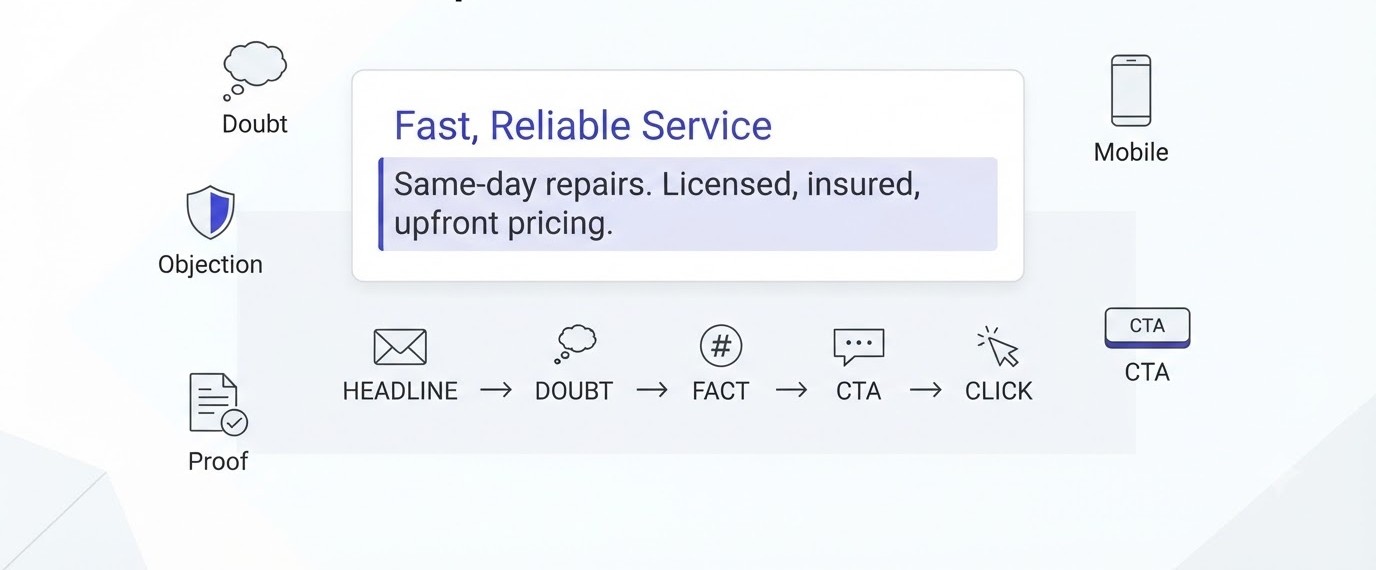
If the headline gets the click, the description gets the right click. It is your 90 characters to answer the quiet question in the reader’s head: is this really for me, and can I trust it? Here is how to use that space instead of wasting it.
Answer the Doubt the Headline Raises
Read your headline as a stranger. If it says “Plumber in 45 Minutes”, the stranger thinks: really, and what will it cost? Your description should answer that exact thought. “Licensed team, upfront price told before work starts” does the job.
Every strong headline creates a small doubt. A cheap price makes people wonder about quality. A fast promise makes people wonder about reliability. A big claim makes people look for proof. Use the description to settle that doubt with a fact.
Beginners tend to restate the headline in different words, which wastes half the space. Treat the description as the second sentence of a conversation, not a repeat of the first.
Handle Objections With Facts
People hesitate for predictable reasons: price, risk, time, and trust. Write a description for each. One about risk: “30-day refund, no questions asked.” One about time: “Set up in 10 minutes, no developer needed.” One about trust: “Rated 4.8 by 2,300 customers on Google.”
These short facts do more than adjectives ever could. Words like “premium”, “trusted”, and “best” are claims. A refund policy, a time frame, and a rating are evidence.
If you are not sure which objection matters most, look at your sales calls, support emails, and reviews. The questions customers ask before buying are your description lines, almost word for word.
Finish With One Clear Next Step
End at least two of your four descriptions with an action: “Book a free demo today.” “Get your quote in 2 minutes.” “Order before 4 PM for same-day dispatch.” The ad should leave no doubt about what happens after the click.
Keep the step small and specific. “Contact us” is shapeless. “Get a quote in 2 minutes” tells the reader how long it takes. People click when the effort feels low and the reward feels clear.
Make sure the landing page keeps the same promise. If the ad says “get a quote in 2 minutes” and the page opens a 12-field form, the ad has lied. That mismatch kills conversions and damages your Quality Score.
Write Descriptions That Read Well on a Phone
Most searches now happen on mobile, and on a small screen the description often gets cut or pushed down. That means your first 40 or so characters in each description carry the most weight. Put the strongest fact first.
Compare two versions. Weak: “We are a company that offers many services to customers across the city.” Strong: “Same-day repairs across Pune. Licensed, insured, upfront pricing.” The second one gives the reader everything even if it gets trimmed.
Read your ads on your own phone before you launch. Look at how they truncate. Keep sentences short, avoid stacked punctuation, and check that each description still makes sense if the reader only sees the opening phrase.
How to Write Google Ads Copy That Uses Assets and Extensions
Assets, which used to be called extensions, are extra pieces of information attached to your ad. They make it bigger, give people more ways to click, and add proof. The cost of adding them is nearly nothing, and yet plenty of accounts run with half of them empty.
Sitelinks That Send People to the Right Page
Sitelinks are extra links under your main ad, each with a short title (up to 25 characters) and two optional description lines. They let a searcher jump straight to pricing, reviews, or a specific product instead of landing on a general page.
Write them like mini headlines. “Pricing and Plans”, “Free Demo”, “Customer Reviews”, “Emergency Callout”. Each should lead to a page that matches its label. If a sitelink says “Free Demo” and opens the home page, people leave.
Add at least four, ideally six. Google chooses which to show, and on desktop more of them appear. Check performance monthly and replace the ones that nobody clicks. A sitelink that gets 0.2% of clicks is dead weight.
Callouts and Structured Snippets
Callouts are short phrases up to 25 characters that sit beneath your ad: “24/7 Support”, “Free Delivery”, “No Setup Fees”, “Since 2011”. They are not clickable. They add small, scannable facts that make your offer feel more complete.
Structured snippets list categories under a header, like “Services: Leak repair, Drain cleaning, Geyser fitting” or “Brands: Nike, Adidas, Puma”. They help a searcher see the range of what you sell at a glance.
Do not repeat what is already in the headlines. If your headline says free shipping, your callout should say something else, like “30-Day Returns”. The point is to add new information, not echo old information.
Call, Price, Promotion, and Image Assets
A call asset puts your phone number on the ad, which is ideal for plumbers, clinics, and lawyers. Mobile users can tap and dial directly. Set a schedule so the number only appears when someone can answer, because a missed call is a wasted click.
Price assets show product or service tiers with real prices, so people know the cost before they click. That filters out the wrong audience. Promotion assets highlight sales and discount codes with dates.
Image assets add pictures to your search ad on supported placements. Use clear, honest photos, not stock images of people shaking hands. A real photo of your shop, product, or team often beats a polished fake one. These assets take twenty minutes to add and can lift click-through rate noticeably.
Dynamic Keyword Insertion and Ad Customizers
Dynamic keyword insertion, or DKI, automatically swaps in the searcher’s keyword. The syntax is {KeyWord:Default Text}. If someone searches “red running shoes” and your headline is “{KeyWord:Running Shoes}”, Google may show “Red Running Shoes”.
DKI is a double-edged tool. It saves time on large accounts, but it can produce embarrassing ads when keywords are misspelled, too long, or include a competitor’s brand. Always set a decent default and monitor search terms.
Ad customizers are safer for many cases. They pull in live data like prices, stock levels, or countdowns, so your ad always shows the current offer. A countdown that says “Sale ends in 2 days” and updates itself is honest urgency. Use these when your offers change often and manual editing would fall behind.
How to Write Google Ads Copy by Organizing Keywords and Ad Groups First
Your ad copy can only be as sharp as the group of keywords it sits on top of. Messy groups force you to write vague ads that fit everything and excite nobody. This section covers how to structure keywords so each ad can be specific, and what match types change about your writing.
Keep Each Ad Group Tight and Themed
An ad group is a bundle of closely related keywords that share one set of ads. The tighter the bundle, the easier it is to write copy that mirrors what people typed. A running shoe store might have one group for “flat feet running shoes”, another for “trail running shoes”, and a third for “marathon shoes”.
Stuffing forty unrelated keywords into one group is the classic beginner move. The ad then has to talk about flat feet, trails, and marathons all at once, and ends up saying “Running Shoes Online” and nothing else. Relevance drops and so does click-through rate.
A decent guideline is five to twenty closely related keywords per group. If you cannot describe the group’s theme in one short phrase, split it. More groups mean more ads to write, but each one performs better, and you will see clearly which themes make money.
Know What Match Types Mean for Your Copy
Google Ads has three keyword match types. Exact match shows your ad for searches with the same meaning as your keyword. Phrase match shows it when the search includes the meaning of your phrase, with other words around it. Broad match shows it for related searches, which gives Google the most freedom.
Why does this matter for writing? With exact match, you know very well what people are typing, so you can mirror it closely in the headline. With broad match, the actual searches wander, so your headlines need to be flexible enough to still make sense. A headline too tied to one phrase can look off when the search is only loosely related.
Check the search terms report regularly. If broad match is bringing in odd queries, either tighten the match type or add negative keywords. Never let copy and traffic drift apart quietly.
Write Different Copy for Brand and Non-Brand Searches
Brand searches are people typing your company name. Non-brand searches are people typing the product or problem with no loyalty to anyone yet. They need completely different ads.
For brand searches, the person already knows you. Your ad should make the next step easy: show your official site, your best-known offer, and useful sitelinks like login, pricing, or contact. Keep the copy short and confident.
For non-brand searches, you are a stranger. The ad must earn attention with a clear benefit, proof, and a reason to choose you over the other four ads on the page. Mixing brand and non-brand keywords in the same group muddies the data and the message, so keep them in separate campaigns. Brand clicks are cheap and convert well, which can hide poor performance in your non-brand work if you blend the numbers.
Use Negative Keywords to Protect Your Message
Negative keywords tell Google which searches should never trigger your ad. If you sell premium running shoes, add “free”, “cheap”, “used”, and “jobs” as negatives. Otherwise your carefully written ad about quality shows up for someone looking for a secondhand pair, and you pay for a click that was never going to buy.
Think of negatives as part of your copywriting. A clear, specific ad attracts the right people, and negatives remove the wrong ones. Together they raise click-through rate and cut wasted spend.
Review the search terms report weekly during the first month. Every time an irrelevant phrase appears, add it as a negative at the campaign or ad group level. Keep a shared negative keyword list for words that apply to all your campaigns, like “free” or “download”. It is dull work, and it often saves more money than any clever headline.
A Simple Five-Step Process for Your First Ad Set
When you sit down to write a new ad, a repeatable process keeps you from staring at a blank screen. Here is one that works for almost any account.
- Pull five to ten real search terms from the search terms report or Keyword Planner for the ad group.
- Write down the one promise the ad will make, and the main doubt a skeptical buyer would have.
- Draft 20 headlines in a plain document without worrying about length, covering keyword, benefit, number, proof, offer, and action.
- Cut and reshape them to fit 30 characters, drop the weakest five, and pick the best 15.
- Write four descriptions: one for the main benefit, one for an objection, one for proof, and one for the next step.
Writing more than you need and cutting is faster than trying to write each line perfectly. The cutting forces clarity, and the leftover lines often become your first round of test variations.
Google Ads Copy Examples for Different Businesses You Can Rework
Reading rules is one thing. Seeing them applied is what makes them stick. Below are four sample ad sets for very different businesses. The brands are made up, but the structure is real, and you can borrow the thinking for your own account.
Example One: A Local Plumber in Pune
Local service ads win on speed, trust, and a clear price. Someone searching “emergency plumber Pune” is stressed and wants a name they can call right now. Fancy wording gets ignored.
Sample headlines: “Emergency Plumber in Pune”, “At Your Door in 45 Minutes”, “Price Told Before We Start”, “Licensed and Insured Team”, “No Night Surcharge”, “Call Now for Same-Day Fix”.
Sample description: “Burst pipe? Licensed plumber in 45 minutes. Price told upfront, no night surcharge.”
Notice what is missing: no “best plumber in town”, no “quality service”. Every line is a fact the reader can act on. The call asset sits beneath it with the phone number, scheduled for hours someone actually picks up. Add a callout like “Open 24 Hours” and a location extension, and the ad answers nearly every question before the click.
Example Two: An Online Running Shoe Store
Ecommerce ads fight on product fit, price, and risk. A shopper typing “running shoes for flat feet” has a specific problem, and a store that names that problem gets the click over a store that just says “Shoes Sale”.
Sample headlines: “Running Shoes for Flat Feet”, “Arch Support Built In”, “Free 30-Day Wear Test”, “From ₹2,499, Free Delivery”, “Easy Returns, No Questions”.
Sample description: “Podiatrist-designed shoes for flat feet. Wear them 30 days, return if they hurt.”
The wear test is the trick here. Buying shoes online feels risky because you cannot try them. A trial period removes that fear in four words. Pair this with price assets showing three popular models, plus a sitelink to a size guide, and you cut the hesitation that usually sends shoppers back to Amazon.
Example Three: A Software Tool for Small Business Invoicing
Software ads have to explain something intangible fast. People searching “invoicing software for GST” know their pain: late payments, messy spreadsheets, tax rules. Your copy should show you understand it.
Sample headlines: “Invoicing Software for GST”, “Send an Invoice in 30 Sec”, “Free for Your First 5 Clients”, “No Credit Card Needed”, “Auto Payment Reminders”.
Sample description: “GST-ready invoices, payment reminders, and reports. Start free, upgrade when you grow.”
The offer is low-risk, the speed claim is concrete, and the local tax reference signals that this tool was built for Indian businesses, not translated from somewhere else. A free trial is the single strongest call to action in software, because it turns a purchase decision into a try-it decision. Link the ad straight to a signup page, not a homepage with six other options.
Example Four: A Training Institute Selling a Course
Education ads are tricky because the purchase is large and emotional. A person searching “digital marketing course” is thinking about a career, a salary, or a change of direction. Trust matters more than urgency here.
Sample headlines: “Digital Marketing Course”, “Learn Ads on Live Budgets”, “Weekend Batches in Pune”, “Free Demo Class, Book Now”, “Small Batch, Real Projects”.
Sample description: “Run real Google Ads campaigns during the course. Small batches, weekly mentor feedback.”
The hook is doing something real, not reading a theory textbook. Pair this with a sitelink to student results and a structured snippet listing topics like SEO, Google Ads, and Email. The demo class is a small first step, which suits a decision that people often take weeks to make. Check real case studies of before-and-after campaigns to see how results get framed in proof-heavy industries.
How to Write Google Ads Copy That Matches Your Landing Page
An ad promises something. The landing page either delivers it or breaks it. Google measures this match, and so do people. This section covers how to connect the two so the click you paid for turns into an enquiry or sale instead of a bounce.
Keep the Message Consistent From Ad to Page
Message match means the headline on your landing page echoes the promise in your ad. If the ad says “Free 30-Day Wear Test”, the page should show that phrase near the top, without making the visitor hunt.
Why does it matter? People decide within seconds whether they are in the right place. A mismatch makes them feel tricked, and they leave. That raises your bounce rate and lowers your conversion rate, and the money you spent on the click is gone.
Build a dedicated landing page for each major ad group when you can. A plumber advertising “blocked drain repair” should send people to a blocked drain page, not a general services page with fourteen options. The more specific the ad, the more specific the page should be.
Understand Quality Score and Why It Affects Cost
Quality Score is a 1 to 10 rating Google gives each keyword. It is built from three parts: expected click-through rate, ad relevance, and landing page experience. Each part is rated Below average, Average, or Above average inside your account.
A higher Quality Score usually means a lower cost per click and better ad position. Two advertisers can bid the same amount, and the one with better copy and a better page pays less for the same spot. That is the real financial reason to learn how to write Google ads copy well.
To see yours, add the Quality Score columns in your keyword view. Anything under 5 deserves attention. Check which of the three parts is weak, then fix that part first, not all three at once.
Make the Page Fast and Mobile Friendly
A great ad pointing at a slow page wastes money. If the page takes more than three seconds to load on a phone, many visitors leave before they see anything. Test yours with Google PageSpeed Insights and look at the mobile score, not the desktop one.
Common culprits are huge images, too many plugins, and cheap hosting. Compressing images, using a cache plugin, and removing unused scripts often cut load time in half. If the technical side feels out of reach, the web development basics covered on this site can help you understand what to fix and what to ask a developer for.
Also check the page on an actual phone. Buttons should be easy to tap, forms short, and the phone number clickable. A page that looks fine on a laptop can be a mess on a small screen.
Give the Page One Job
A landing page works best when it asks for one thing: a call, a form, a purchase. Menus, social icons, and links to your blog give people ways to wander off. Strip them out or shrink them.
Put the main action above the fold, meaning visible without scrolling. Repeat it again lower on the page. Add the proof that matches your ad: reviews, a guarantee, logos of known clients. Then keep the form short. Each extra field cuts the number of people who finish it.
If the ad is promising a quote in two minutes, ask for name, phone number, and the type of job, and nothing more. You can collect the details later on the call. The goal of the page is to start the conversation, not finish it.
How to Write Google Ads Copy Variations and Test Them Properly
Nobody writes the perfect ad on the first try. The people who get great results are the ones who test steadily and learn from the numbers. This section shows you how to run tests that give real answers instead of random noise.
Test One Idea at a Time
If you change the headline, the offer, the description, and the landing page all at once, you will never know which change helped. Pick one variable per test. Price in the headline versus no price. Free trial versus free demo. Question headline versus statement headline.
Write two versions that differ only in that one thing and run them side by side. This is slower than changing everything, but it gives you answers you can reuse across campaigns. A learning like “price in the headline lifts CTR for our service ads” is worth far more than a lucky winner you cannot explain.
Keep a simple spreadsheet. Note the date, what you changed, what you expected, and what happened. After six months it becomes your own playbook, and it is better than any generic advice.
Read the Asset Performance Report
In Google Ads, go to Ads and assets, then Assets, and look at your headlines and descriptions. Each asset gets a performance label: Learning, Low, Good, or Best. These labels compare assets against others in the same ad.
Use them as a guide. If a headline stays at Low after plenty of impressions, replace it. If several headlines are labeled Best, study what they have in common. Maybe they all mention price, or all name a location. That pattern tells you what your audience responds to.
Be patient with new assets. Learning means Google has not collected enough data yet. Do not swap things in and out every two days, because you reset the learning each time. Give each change a couple of weeks.
Use Experiments and Ad Variations
Google Ads has an Experiments section where you can split traffic between your current setup and a new one. Ad variations let you test a text change, such as swapping one headline across multiple campaigns, and see whether it wins statistically.
This is better than just editing the ad and comparing this week to last week. Seasons change, competitors change, and budgets change, so before-and-after comparisons are muddy. A split test runs both versions at the same time under the same conditions.
Set the test to run for at least four weeks if your traffic allows. Choose a clear goal, like conversions or conversion rate, before you start. Deciding after you see the numbers is how people fool themselves into picking whatever looks nice.
Know When You Have Enough Data
A test with 20 clicks proves nothing. A rough rule of thumb is to wait for at least a few hundred clicks per version before judging click-through rate, and 30 to 50 conversions per version before judging conversion rate. Smaller accounts will take longer, and that is normal.
Look at conversions and cost per conversion, not just clicks. An ad with a high click-through rate and no sales is just an expensive entertainment act. Clicks are a means, and the goal is the enquiry or sale.
When a winner emerges, keep it, then test a new challenger against it. This steady loop is what separates stable accounts from ones that swing wildly. If you want to build this skill into a wider digital marketing toolkit, practicing on small budgets first is smart.
Mistakes to Avoid When You Write Google Ads Copy
Most bad ads fail in the same handful of ways. Knowing them in advance saves you real money and a few awkward emails from Google. Here are the four that show up again and again, and how to dodge each.
Writing About Yourself Instead of the Customer
“We are a leading provider of quality solutions” is the most common sentence in paid search and nobody cares. The searcher is not curious about your company. They want their problem solved.
Flip every line. Instead of “We offer plumbing services”, write “Fix That Leak Today”. Instead of “Our team has 20 years of experience”, write “20 Years Fixing Pune Plumbing”. The facts can stay, but the viewpoint moves to the customer’s benefit.
A quick test is to count how many times your ad says “we” or “our” versus “you” or “your”. If the first number is higher, rewrite. The reader should feel the ad is about them within the first headline.
Stuffing Keywords and Repeating Headlines
Some beginners think more keywords equals better ads, so they write fifteen versions of “Buy Running Shoes Online”. Google needs variety to test combinations, and searchers find repetition boring. Ad strength will flag it, but even without the flag, it is weak copy.
Each headline should add something: a benefit, a number, a proof point, a call to action, a location. When you read all fifteen aloud, they should sound like fifteen different reasons to click, not one reason repeated.
Keep two or three headlines for the keyword. Spend the rest on things that actually differentiate you from the ad right above yours.
Ignoring Google Ads Policies
Google rejects ads for things people do without thinking. Excessive capitalization like “BEST PRICE EVER”. Repeated punctuation like “!!!” or “???”. Exclamation marks in headlines. Symbols used as decoration. Claims like “Number 1 in India” with no proof on the page. Using another brand’s trademark without permission.
Disapprovals slow you down, and repeated violations can put your account under review. Read the Editorial policies and Advertising policies pages in Google’s Ads Help before launch, especially if you work in healthcare, finance, or gambling, where rules are stricter.
When an ad gets disapproved, read the reason in the Policy manager, fix the exact issue, and resubmit. Do not just rewrite randomly and hope.
Setting It and Forgetting It
An ad that worked in March can stop working in June. Competitors change offers, seasons shift, and people get tired of seeing the same lines. Accounts that are never touched slowly decay.
Put a monthly review on your calendar. Check search terms, asset labels, Quality Scores, and conversion costs. Replace the weakest headline, add one new test, and pause what clearly is not working.
Fifteen minutes a week beats three hours twice a year. Small, regular tweaks keep an account healthy, and they teach you the market faster than any course can.
Conclusion
How to write Google ads copy comes down to a few habits you can start today. Listen to what people really search for. Say one specific thing in 30 characters. Back it up with a fact in 90 more. Make sure the page behind the ad keeps the promise. Then test, keep the winner, and test again.
Pick one live campaign this week. Open the search terms report, rewrite five headlines using real customer language, and add a missing sitelink. If you want a structured path to go deeper into paid search and the rest of the craft, the Alpha Marketer Foundation Program covers it with hands-on practice.
Frequently Asked Questions
These are the questions beginners and small business owners ask most often when they start writing search ads. Each answer stands on its own, so you can jump to the one you need.
How long should Google Ads headlines and descriptions be?
Each headline can be up to 30 characters and each description up to 90 characters. Responsive search ads accept up to 15 headlines and 4 descriptions. You do not have to use every character, but short lines that say something specific usually beat long lines that wander. Use the character counter in the editor to stay inside the limits.
What makes Google Ads copy get more clicks?
Ads get more clicks when they match what the person searched, make one specific promise, and give a reason to trust it. Numbers, prices, time frames, and guarantees usually work better than general claims. Clear calls to action and relevant assets like sitelinks also raise click-through rate.
How many headlines should I write for a responsive search ad?
Write all 15 whenever you can. More headlines give Google more combinations to test, and ad strength tends to improve. Make sure they are genuinely different from each other, covering your keyword, benefits, proof, offers, and calls to action, rather than the same idea reworded.
Should I use the keyword in my ad copy?
Yes, in at least a few headlines. Matching the searcher’s words makes the ad look relevant and Google bolds the matching text. Do not put the keyword in every headline, because that creates repetition and leaves less room for benefits and proof. Use it where it feels natural.
Are exclamation marks allowed in Google Ads?
Exclamation marks are not allowed in headlines. One exclamation mark is allowed in a description line. Even then, use it sparingly. Calm, specific wording usually earns more trust than heavy punctuation, and policy reviewers are strict about excessive or repeated symbols.
What is the difference between responsive search ads and expanded text ads?
Expanded text ads had fixed headlines and descriptions that you wrote in a set order. Responsive search ads let you submit many headlines and descriptions, and Google combines them automatically. Since June 30, 2022, you can no longer create or edit expanded text ads, so responsive search ads are the standard format.
What is a good click-through rate for Google Ads?
It depends on the industry, keywords, and position. Benchmarks published by WordStream put the average search ad click-through rate somewhere around 6%, though some industries sit well above or below that. Compare your numbers against your own past results first, and treat benchmarks as a rough guide.
Does ad copy affect Quality Score?
Yes. Quality Score includes expected click-through rate and ad relevance, and both depend heavily on your copy. Ads that match the keyword and attract clicks tend to earn higher scores, which can lower your cost per click and improve your position. Landing page experience is the third factor.
How often should I change my Google Ads copy?
Review ads monthly, and test one new variation at a time. Do not change things every few days, because assets need time to collect data. If an ad is performing well, leave it running and test a challenger against it rather than replacing it.
What is dynamic keyword insertion and should beginners use it?
Dynamic keyword insertion automatically places the searcher’s keyword into your ad using the syntax {KeyWord:Default Text}. It can save time, but it can also create awkward or off-brand ads if keywords are long or misspelled. Beginners should start with manual headlines and add it later with careful monitoring.
Can I use competitor names in my Google Ads copy?
You can bid on competitor names as keywords in most cases, but using another company’s trademark inside your ad text is restricted if the owner files a complaint. It also tends to attract low-quality clicks. Focus on describing your own advantage instead.
What should I do if my Google ad gets disapproved?
Open the Policy manager in Google Ads and read the exact reason given. Fix that specific issue, such as excessive capitalization, an unverifiable claim, or a mismatch with the landing page, and then resubmit the ad. If you believe the decision is wrong, you can appeal from the same screen.
How do I write Google Ads copy for a brand new business with no data?
Start with competitor research and keyword tools like Keyword Planner. Write about the customer’s problem in their own words, add your clearest offer, and launch with at least two ad variations. After a few weeks, use the search terms and asset reports to replace guesses with real language.