

Most people running ads right now are doing one of two things. Either they’re letting Google’s and Meta’s AI run completely on autopilot and hoping for the best, or they’re fighting the algorithm at every turn because they don’t trust it, and their cost per result is climbing while their competitor’s isn’t. Both of these are mistakes. The account managers pulling real numbers this year, the ones getting a 3x return where everyone else is stuck at 1.5x, aren’t the ones who fully surrendered to the machine or the ones who refuse to touch it. They’re the ones who figured out exactly where AI is good and exactly where a human still needs to step in and correct it.
That’s really what this guide is about. Not “AI is the future of advertising,” because you already know that. What actually matters is knowing which button to press inside Google Ads and Meta Ads Manager, what data to feed the system before you press it, and what to do when the results start drifting in the wrong direction. A lot of that comes down to habits nobody talks about on LinkedIn, like checking your conversion tracking before you ever touch Performance Max, or knowing exactly when Advantage+ Shopping campaigns need a manual override because the algorithm found a shortcut that tanks your margin instead of protecting it.
Look at what actually happens inside a typical account. Someone launches Performance Max with default settings, dumps their whole product catalog into one asset group, sets an aggressive target ROAS because a case study online said it worked, and then panics three days later when spend is high and conversions are low. That’s not a failure of AI. That’s a setup failure. The algorithm did exactly what it was told to do, it just wasn’t told the right things. Same story on Meta. Someone turns on Advantage+ Shopping on a pixel that’s two weeks old, expects it to behave like a five-year-old account with thousands of purchase events behind it, and then blames the platform when results are inconsistent for the first ten days.
Nobody’s saying you need to become a data scientist to run ads well anymore. Honestly, that’s the opposite of what’s happening. The technical bidding math is handled for you now. What’s left is the part that was always the hardest anyway: understanding your customer, structuring your account so the AI has something useful to learn from, and knowing when a weird result is a real problem versus just the algorithm exploring. That’s the skill this guide is trying to hand over.
What You Will Learn in This Guide
- How Google Ads and Meta Ads actually use AI behind the scenes, not the marketing brochure version
- Step by step, how to set up and manage AI-driven campaigns like Performance Max and Advantage+ without losing control of your budget
- Which parts of ad creation, from copy to images, are worth handing to AI tools like ChatGPT, Midjourney, and Meta’s own generative features
- How to build a repeatable workflow that uses AI for reporting and anomaly detection so you’re not staring at spreadsheets every Monday
- The specific mistakes that quietly burn budget, and the myths about “set it and forget it” AI campaigns that need to die
Why How to Use AI for Google Ads and Meta Ads Actually Matters Right Now
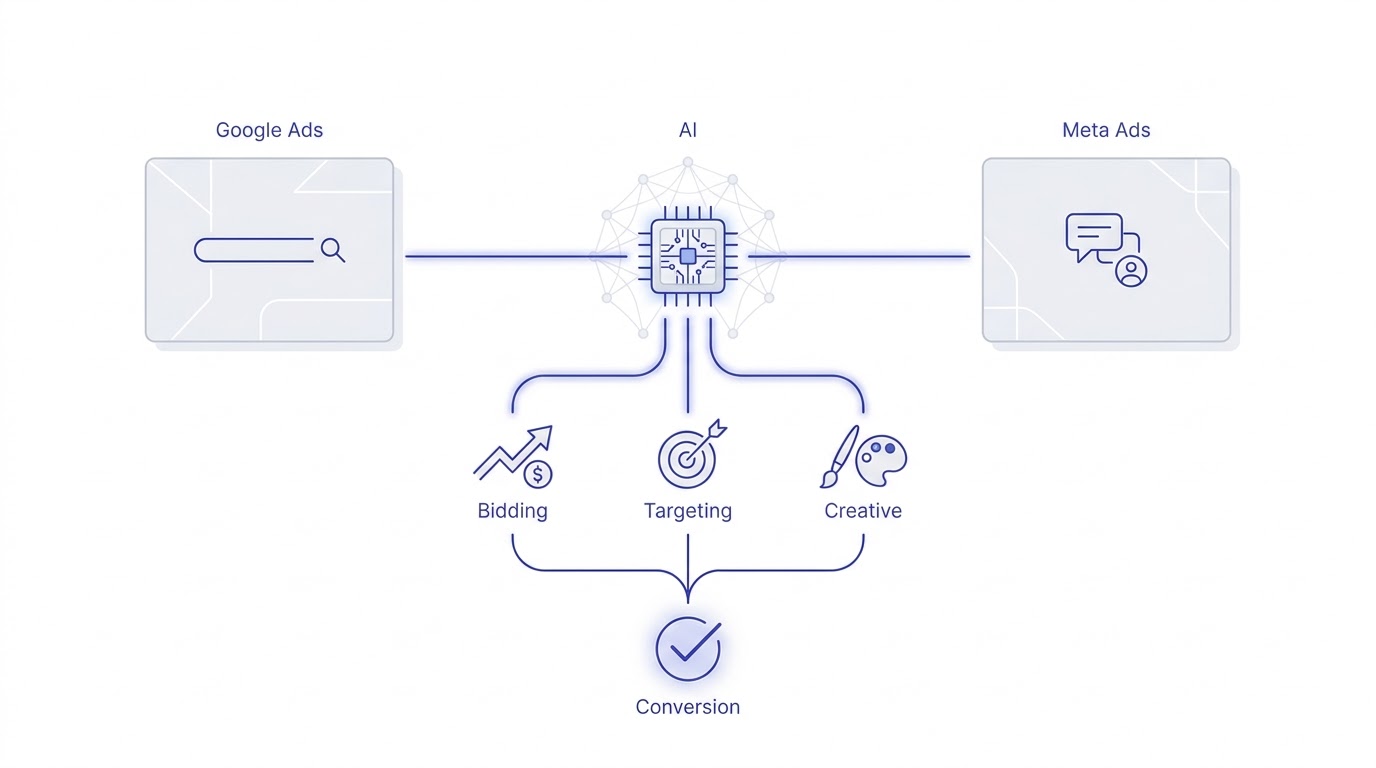
Ad platforms didn’t add AI as a nice extra feature. They rebuilt the entire bidding and targeting engine around it, and if you’re still running campaigns the way you did in 2019, you’re competing with one hand tied behind your back. Google’s Performance Max now handles the majority of new ecommerce ad spend on the platform, and Meta pushes Advantage+ campaigns as the default recommendation the moment you open Ads Manager. This isn’t a trend that’s going to reverse. Understanding how to use AI for Google Ads and Meta Ads is no longer a specialization, it’s the baseline skill every media buyer needs.
Here’s the thing most people miss: the AI inside these platforms isn’t one single system. Google Ads AI is actually several separate models working together, one predicting who’s likely to convert, another deciding how much to bid in a live auction that happens in milliseconds, and another generating or selecting creative assets to show. Meta runs a similar stack, but its model is trained heavily on engagement signals across the entire Meta family of apps, which is why an account with strong Instagram engagement often sees Advantage+ perform noticeably better than an account that’s brand new with a thin pixel.
None of this works well without the right inputs. That’s the part that gets skipped in most “AI ads” content. People treat these tools like magic buttons instead of systems that need to be fed. A Performance Max campaign launched on a website with broken conversion tracking will absolutely spend your budget, it just won’t spend it well. The AI doesn’t know your tracking is broken. It just sees signals and optimizes toward whatever it’s told to optimize toward, even if that signal is garbage.
There’s also a shift happening in what “skill” even means in this industry right now, and it’s worth naming directly. Five years ago, being good at Google Ads meant knowing how to build a tight keyword match type structure, writing exact match negatives at the ad group level, and manually adjusting bids by device and time of day. That skill set is mostly obsolete now, not because it’s wrong, but because the platform took most of those levers away or automated them by default. What replaced it is a different kind of skill: reading signals, spotting when a model is optimizing toward the wrong thing, and structuring an account so the machine learning has clean, well-labeled data to chew on. It’s less mechanical and more diagnostic, closer to being a doctor reading test results than a mechanic tightening bolts.
How Google and Meta’s AI Models Actually Get Trained
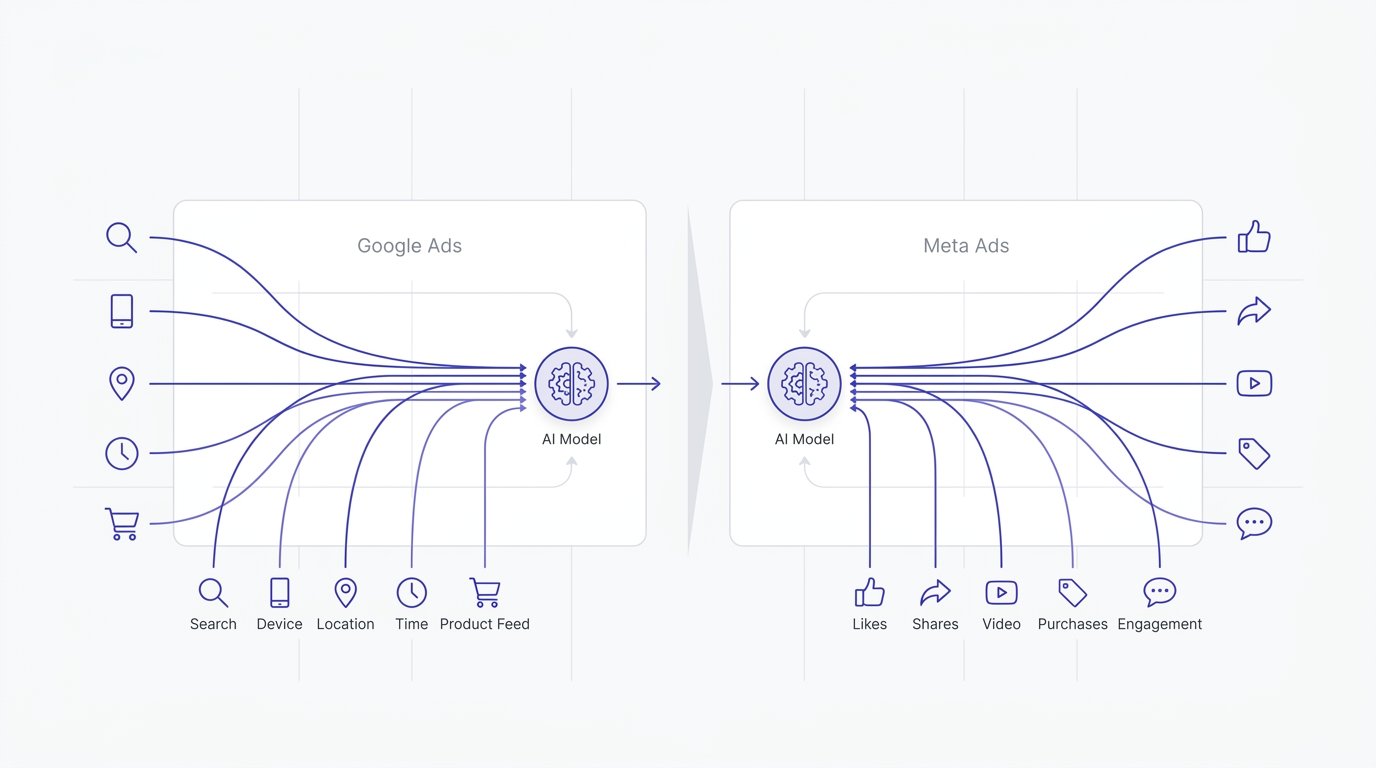
Both platforms train their bidding and targeting models on aggregated data across millions of advertisers, not just your individual account, which is why a brand new campaign can sometimes perform reasonably well even before it has much history of its own. Google’s models lean on decades of search behavior data plus real-time signals like device, location, time, and even the specific device model someone’s using. Meta leans more on behavioral and social signals: what someone likes, shares, watches to completion, or purchases across the entire Meta ecosystem including Instagram Reels and Messenger.
This matters practically because it explains why the two platforms respond differently to the same kind of input. Feed Google a strong, keyword-relevant landing page and detailed product feed, and the Search and Shopping signals sharpen quickly. Feed Meta strong creative with real engagement, comments, shares, video completions, and its targeting sharpens quickly. Optimizing for the wrong signal type on the wrong platform is a subtle mistake a lot of advertisers make without realizing it, treating Meta like a search engine or treating Google like a social feed.
What AI Actually Does Inside These Platforms
Inside Google Ads, the AI is running real-time auctions using something called Smart Bidding, which predicts the probability of a conversion for every single auction it enters and adjusts your bid accordingly, sometimes bidding higher for a 45-year-old searching at 11pm on a Tuesday than for the exact same search from someone else, because the model has learned that specific pattern converts better for your account. This happens thousands of times a second across the network, and no human could replicate that speed or that pattern recognition manually.
Meta’s system works a bit differently because it’s not reacting to a search query, it’s predicting who’s likely to take an action based on behavioral signals: what someone clicked, watched, paused on, or purchased recently across Facebook and Instagram. Advantage+ campaigns take this further by letting the algorithm choose placements, audiences, and even creative combinations automatically, testing dozens of variations of your ad copy and images against different segments without you lifting a finger. That sounds great until you realize the algorithm has no idea which version actually represents your brand well, it just knows which one gets clicked.
Where Human Judgment Still Beats the Algorithm
AI is excellent at pattern recognition across huge datasets, but it’s genuinely bad at understanding context outside the data it was trained on. If your business just launched a new product line, has a seasonal spike coming, or needs to avoid showing certain creative in specific regions for legal reasons, the algorithm won’t know that unless you tell it explicitly through exclusions and campaign structure. This is exactly why account managers who blend AI automation with manual oversight consistently outperform the ones who go fully hands-off.
A good example: an ecommerce brand selling winter coats can let Performance Max optimize bidding all day long, but if nobody tells the system to pull back spend in July when the product genuinely doesn’t sell, the AI will keep testing and wasting budget trying to find converters that don’t exist that month. It takes a human to recognize that pattern and adjust the campaign structure, pause certain asset groups, or shift budget toward accessories that do sell year-round.
How to Use AI for Google Ads: Turning Automation Into an Advantage
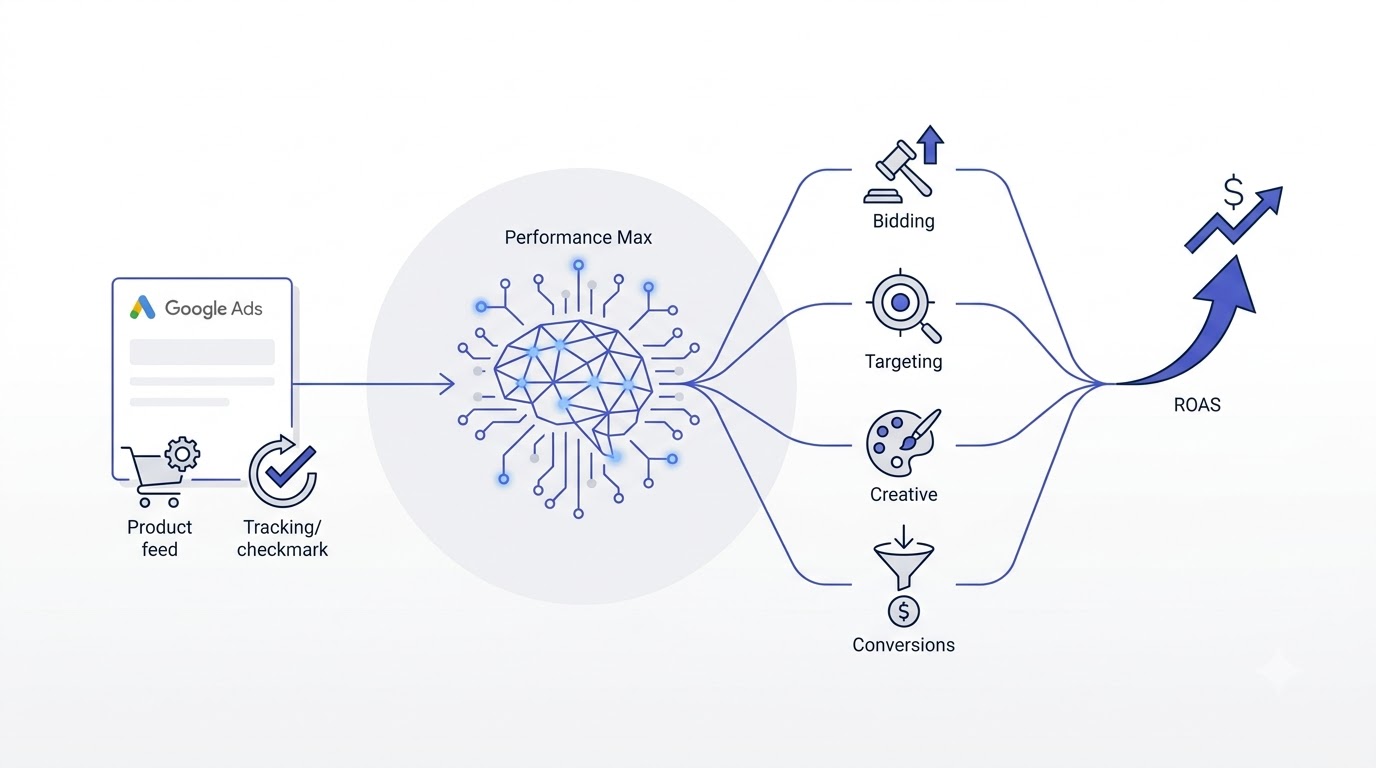
Google Ads has quietly become an AI-first platform, and Performance Max is the clearest example of that shift. It combines Search, Display, YouTube, Gmail, Discover, and Maps into a single campaign type, and the AI decides where to spend your budget based on where it predicts conversions will happen. That’s a huge amount of trust to hand over, and a lot of advertisers get burned because they treat it like a regular Search campaign with extra channels bolted on. It isn’t. It behaves completely differently, and it needs to be fed differently too.
Setting Up Performance Max the Right Way
The single biggest factor in Performance Max success is conversion data quality, not creative, not budget, not audience signals. Before launching, confirm that your Google Tag is firing correctly on every conversion event you care about, and if you’re running ecommerce, make sure the value being passed back matches your actual order value, not just a flat “purchase” event with no dollar figure attached. Campaigns optimizing toward value-based bidding with accurate revenue data consistently beat campaigns optimizing toward raw conversion count, because the AI learns which customers are worth more, not just which ones convert.
Once tracking is solid, build out asset groups around actual product categories or customer segments rather than dumping every product into one giant group. A skincare brand selling both a $15 cleanser and a $120 serum set should split these into separate asset groups with separate creative, because mixing them confuses the signal the AI is trying to learn from. Add audience signals as a starting point, not a restriction, things like customer match lists from past buyers or website visitors, since Performance Max treats these as suggestions rather than hard targeting rules.
Budget matters more here than most advertisers assume. Google’s own guidance suggests a daily budget of at least 15 times your target cost per action just to give the algorithm enough room to run auctions and gather data, and accounts that launch with a budget below that threshold tend to see erratic, stop-start performance because the system keeps hitting spend caps mid-auction. If the math doesn’t work for a full Performance Max rollout yet, it’s often better to start with a narrower product range or a single high-margin category, prove the tracking and structure out at a smaller scale, then expand once the target ROAS is actually being hit consistently over a two to three week window.
Feeding the Algorithm Better Signals Over Time
Performance Max doesn’t stay static once it launches. It keeps learning from every new conversion, which means the quality of your feed and your audience signals compounds over months, not days. Uploading a customer list segmented by lifetime value, rather than just a flat list of everyone who’s ever purchased, gives the algorithm a much sharper picture of what a high-value customer actually looks like versus someone who bought once during a discount and never came back.
The product feed itself deserves more attention than it usually gets too. Titles that include specific attributes, material, size, color, use case, tend to match better against relevant search queries than generic titles like “Women’s Top – Blue.” Google’s Merchant Center diagnostics page flags feed issues like missing GTINs or disapproved items, and cleaning these up regularly, not just once at launch, keeps the shopping signal strong instead of slowly degrading as the catalog changes.
AI-Generated Ad Copy and Assets Inside Google Ads
Google’s Asset Studio now generates headlines, descriptions, and even image variations automatically using generative AI trained on your existing assets and landing page content. It’s genuinely useful for volume, spitting out ten headline variations in the time it would take a copywriter to write two. But the quality is inconsistent. It tends to produce generic, benefit-stacked copy that sounds fine but rarely sounds like your brand specifically. Use it to generate a rough set of options, then rewrite the top three or four to match your actual tone before letting them run.
A mistake seen constantly in accounts: advertisers accept every AI-suggested headline without reading them closely, and Google ends up combining a serious, professional headline with a casual, joke-heavy description in the same ad because the system doesn’t understand tone consistency the way a human editor does. Always review the combinations in the ad preview tool before assuming the automation got it right.
Search Term Insights and the Broad Match Question
Broad match combined with Smart Bidding is one of the more controversial pairings in Google Ads right now, and honestly, the fear around it is a bit outdated. Modern broad match, when paired with strong conversion tracking and value-based bidding, tends to find search terms a human wouldn’t have thought to target, sometimes ones with better intent than the exact match keywords the account was originally built on. The catch is that you need to actually check the Search Terms report weekly, because broad match will occasionally pull in genuinely irrelevant queries, and letting that run unchecked for a month can quietly burn through hundreds of dollars.
Set up negative keyword lists proactively based on categories you know are irrelevant to your business, and review search term insights inside Performance Max specifically, since it groups queries into themes that make it easier to spot when the algorithm is drifting toward something off-brand.
Yeah, there’s a legitimate debate in the industry about whether broad match has gone too far, and honestly the answer depends heavily on the account. A B2B company selling a $40,000 software contract has almost no room for error, and a handful of irrelevant clicks from broad match can eat a meaningful chunk of a small monthly budget before anyone notices. An ecommerce brand selling a $25 product with thousands of monthly conversions has a lot more room to let the algorithm explore, because the cost of a few bad clicks is trivial against the volume of good ones it finds. Match the aggressiveness of your match type strategy to how much room for error your budget and margin actually allow.
Smart Bidding Strategies and Choosing the Right One
Google offers several Smart Bidding strategies, and picking the wrong one for your business stage is a quiet killer of otherwise decent campaigns. Maximize Conversions works reasonably well for accounts still gathering initial data since it just chases volume without a strict cost constraint, but it can spend aggressively without regard for efficiency once the budget allows it. Target CPA and Target ROAS add a constraint on top, but they need historical conversion data to calibrate against, generally at least 30 conversions in the past 30 days, or the algorithm ends up guessing.
Maximize Conversion Value, often paired with a target ROAS once there’s enough history, tends to be the strongest long-term strategy for ecommerce accounts because it explicitly optimizes toward revenue rather than just conversion count, which matters a lot when order values vary widely across a catalog. Switching bidding strategies too often resets learning each time, so pick one that fits the account’s current conversion volume and stick with it for at least three to four weeks before reassessing.
Mistakes People Make With Google’s AI Tools
The most common mistake is impatience. Performance Max and Smart Bidding strategies need a learning period, usually two to four weeks, where performance can actually get worse before it improves, because the algorithm is testing and gathering data. Advertisers panic during this window, pause the campaign, relaunch it, and reset the learning phase over and over, which guarantees they never see the campaign perform well. The second most common mistake is setting a target ROAS or target CPA that’s unrealistic based on account history, which forces the algorithm to either underspend dramatically or ignore the target entirely because it can’t find enough conversions at that price point.
A third mistake, less talked about, is ignoring the asset-level reporting Google provides and just looking at campaign-level numbers. Performance Max shows which individual headlines, images, and videos are rated “Low,” “Good,” or “Best” for engagement, and accounts that never check this end up running weak creative for months without knowing it’s dragging the whole campaign down. Swapping out “Low” rated assets every couple of weeks, based on this feedback, is one of the simplest habits that consistently improves results without touching bidding or budget at all.
How to Use AI for Meta Ads: Advantage+ Without Losing the Plot
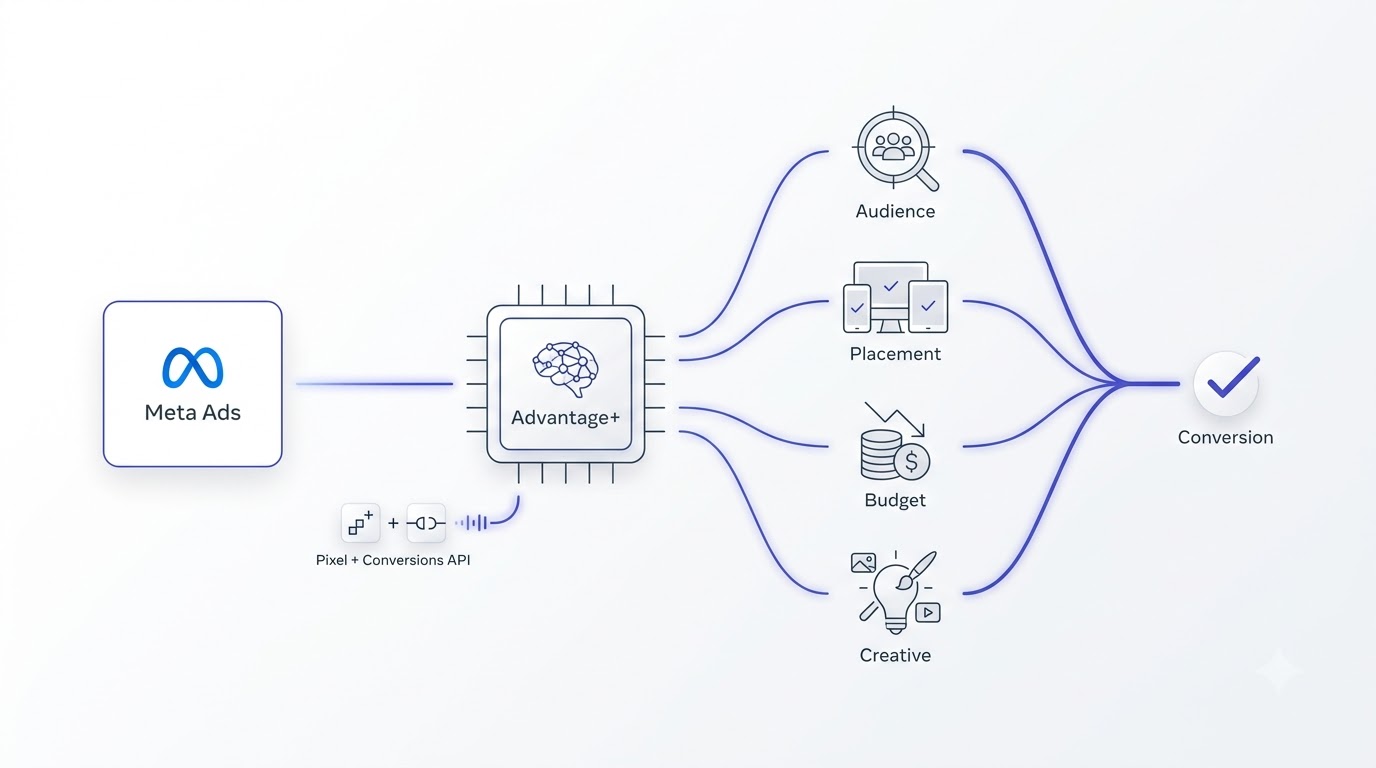
Meta took a slightly more aggressive approach than Google, pushing almost every advertiser toward Advantage+ Shopping and Advantage+ App campaigns as the default recommendation the moment you create a new campaign. These campaigns hand over audience targeting, placement, and budget allocation almost entirely to the algorithm, and for accounts with a healthy pixel and consistent order volume, they genuinely outperform manually built campaigns. For newer accounts or ones with thin data, they can be a disaster if launched without preparation.
Advantage+ Shopping and App Campaigns Explained
Advantage+ Shopping campaigns use Meta’s machine learning to automatically test audiences, placements across Facebook, Instagram, Messenger, and the Audience Network, and creative combinations, then shift spend toward whatever combination is converting. The system needs roughly 50 purchase events within a 7-day window to properly exit the learning phase, and accounts that don’t hit that threshold often see wildly inconsistent daily results, cheap one day and expensive the next, simply because the algorithm hasn’t gathered enough data to stabilize.
For app campaigns, Advantage+ works similarly but optimizes toward in-app events like registrations or purchases rather than website conversions, and it leans heavily on Meta’s Conversions API data rather than just the browser pixel, since iOS privacy changes made browser-based tracking far less reliable. Setting up server-side event tracking through the Conversions API isn’t optional anymore if you’re running app or ecommerce campaigns seriously, it’s the difference between the algorithm seeing 60% of your real conversions versus 95% of them.
Budget Structure Inside Advantage+ Shopping
Advantage+ Shopping campaigns work with a single campaign-level budget rather than the ad-set-level budgets older Meta campaign structures used, which confuses people who learned Meta ads before this shift. The system decides how to split that budget across the audience segments and creative it’s testing internally, and you don’t get granular control over that split the way you used to. What you do get is a minimum spend recommendation, and going below it, roughly the same 50-purchase-per-week threshold mentioned earlier translated into a dollar minimum, usually results in a campaign that never really exits its early testing phase.
For accounts with multiple product categories that have very different price points or margins, running separate Advantage+ Shopping campaigns per category, rather than one giant campaign for the whole catalog, tends to produce cleaner results, because it stops the algorithm from lumping a $200 product and a $20 product into the same value-optimization pool where the signal gets muddy.
AI-Powered Creative Variations and Dynamic Ads
Meta’s Advantage+ creative features can automatically generate variations of an ad, cropping images differently for each placement, adding AI-generated backgrounds, translating text for different regions, or even testing multiple call-to-action buttons against the same creative. This is genuinely one of the stronger AI features on the platform because it removes a huge amount of manual resizing and adapting work that used to eat hours of a designer’s week.
The risk is sameness. Because the AI is pulling from the same limited pool of source assets and applying similar generative treatments, accounts that lean too hard on automated creative variation start to look identical to every other account using the same feature. The brands still winning with Meta ads right now are the ones feeding the system genuinely different source creative, real customer footage, founder-led videos, unpolished behind-the-scenes content, rather than five studio product shots and hoping the AI makes them feel fresh through cropping alone.
Testing Creative Formats the Right Way
A mistake seen often is uploading five creative variations that are basically the same idea with slightly different colors, calling it a “test,” and then being confused when Advantage+ doesn’t find a clear winner. The algorithm needs genuinely distinct hypotheses to test against each other, not minor visual tweaks. A real test might pit a static product image against a 15-second UGC-style video against a carousel showing the product in three different use cases, since these represent actually different bets about what will resonate, not the same bet dressed up three ways.
Once a clear winner emerges from testing, resist the urge to immediately kill every other variation. Meta’s algorithm sometimes rotates in a “losing” creative during specific times of day or to specific audience segments where it actually performs better than the overall winner, and pulling it too early based on aggregate numbers alone can quietly remove a creative that was working well for a valuable subset of the audience.
Audience Expansion vs Manual Targeting on Meta
Manual interest-based targeting, the kind built around stacking interests like “yoga” plus “organic food” plus “sustainable fashion,” has become noticeably less effective over the past couple of years, and Meta’s own data supports pushing toward broader, AI-driven audience expansion instead. The algorithm, when given a strong pixel and enough conversion volume, tends to find pockets of buyers a manually built interest stack would never have reached, because it’s working off actual behavioral and purchase signal rather than self-reported interests people list on their profile.
That said, broad targeting without a value-based optimization event is a recipe for the algorithm optimizing toward the cheapest possible action, which is often a low-value purchase or a junk lead. Always pair audience expansion with value-based Advantage+ Shopping campaigns rather than raw conversion optimization if margin protection matters for the business, since this tells the algorithm to chase profitable customers specifically, not just any customer.
Exclusion audiences still matter even inside a broad, AI-driven setup. Excluding recent purchasers from prospecting campaigns, or excluding people who applied and got rejected for a service business, stops the algorithm from wasting spend chasing people who are technically “engaged” but will never convert again in the way you need. Advantage+ still respects hard exclusions even while it expands everything else, so this is one manual lever worth keeping even in an otherwise automated setup.
Mistakes People Make With Meta’s AI Tools
The biggest one, by far, is launching Advantage+ campaigns with a brand new pixel and expecting immediate performance. The algorithm has nothing to learn from yet, and results in the first week or two will almost always look worse than a comparable manual campaign built on an account with years of pixel history. The second mistake is editing campaigns too frequently, changing budget, creative, or targeting daily because the results look shaky, which resets the learning phase constantly and guarantees the algorithm never stabilizes. Give a new Advantage+ campaign at least 5 to 7 days and a minimum spend threshold, usually around 3 to 5 times your target cost per result, before making any real judgment call.
A third mistake worth naming directly: treating frequency as irrelevant because “the algorithm handles it.” Advantage+ campaigns can still hit creative fatigue, where the same audience sees the same ad too many times and click-through rate quietly declines even while the algorithm keeps spending. Checking frequency metrics weekly, and refreshing creative once frequency climbs past 3 or 4 within a single week, prevents a slow performance decay that’s easy to miss if you’re only watching cost per result.
Budget Allocation When Running AI Campaigns on Both Platforms
Splitting budget between Google Ads and Meta Ads used to be a fairly manual guessing game, but AI-driven bidding on both platforms actually makes this decision easier to reason about, because both systems will tell you, through their own reporting, exactly how efficiently they’re using the budget they’re given. The mistake a lot of businesses make is picking a 50/50 or 60/40 split up front based on gut feeling and never revisiting it, when the smarter approach is letting each platform prove its efficiency at a smaller budget first, then shifting spend toward whichever one is producing a lower cost per acquisition at a comparable volume.
How Much Budget Each Platform’s AI Needs to Work Properly
Google’s Smart Bidding strategies generally need a minimum of 30 conversions in a rolling 30-day window per campaign to calibrate properly, and Meta’s Advantage+ campaigns need roughly 50 purchase events in a 7-day window. Translating that into dollars depends entirely on your average cost per conversion, but as a rough rule, if your typical order is converting at $30 cost per acquisition, Google needs roughly $900 a month minimum per campaign to hit that data threshold, and Meta needs something in a similar range concentrated within each week rather than spread thin. Splitting a small budget across too many campaigns on either platform is one of the fastest ways to keep every single one stuck in a permanent learning phase.
A Simple Framework for Testing Budget Splits
Run both platforms at a modest, roughly equal budget for two to three weeks first, long enough for each to exit its learning phase, then compare cost per acquisition and return on ad spend side by side using the same attribution window for fairness, generally a 7-day click model works reasonably well for both. Whichever platform is producing a lower cost per acquisition at similar volume earns a larger share of the next month’s budget, typically shifting in increments of 20 to 30% rather than moving the entire budget at once, since a sudden large shift can destabilize the learning phase on the platform receiving the increase.
It’s worth remembering these platforms often play different roles in the same customer journey rather than competing head to head. Google frequently captures demand that already exists, someone actively searching for a solution, while Meta is often better at creating awareness and demand that didn’t exist yet. Judging both purely on last-click cost per acquisition can undervalue Meta’s role in the funnel, so pairing this budget framework with a broader look at assisted conversions or a proper multi-touch view avoids cutting a channel that’s actually contributing more than the last-click number suggests.
Building an AI Workflow That Actually Works Across Both Platforms
Running Google Ads and Meta Ads well isn’t about picking one AI feature and turning it on. It’s about building a workflow where AI tools handle the repetitive, data-heavy parts of the job, freeing up time for the strategic decisions that still need a human brain. Most accounts that scale past six figures a month in spend have a fairly similar workflow underneath, even if the specific tools differ.
Using ChatGPT or Claude for Ad Copy Drafts
Large language models like ChatGPT and Claude are genuinely good at generating first-draft ad copy fast, especially when given a clear prompt that includes the product, the audience, the offer, and a few examples of past copy that performed well. The trick most people get wrong is asking for finished copy in one shot. A better approach is asking for 15 to 20 rough headline and description variations, then manually selecting and refining the strongest 4 or 5 before uploading them into the platform. Treat the AI output as raw material, not a finished product, because it tends to default to generic phrasing unless you push it hard with specific brand voice examples and constraints.
A workflow that works well: feed the model your top 5 historically best-performing ads as examples, ask it to identify the pattern in what makes them work, then generate new variations following that same pattern for a new product or offer. This produces noticeably better output than a cold prompt with no examples attached.
Writing Prompts That Actually Produce Usable Ad Copy
Vague prompts produce vague copy. Asking an AI tool to “write a Facebook ad for my skincare brand” produces the same generic output thousands of other people asking the same vague prompt get. A stronger prompt names the specific product, the specific pain point it solves, the specific objection customers usually raise before buying, and asks for copy written in a specific tone, casual and direct rather than corporate, for example. Including a real customer review or a common piece of feedback from support tickets as reference material inside the prompt tends to produce copy that sounds like it understands the actual customer, not just the product description.
It also helps to ask the model to write in the voice of a specific type of person rather than a generic brand voice, something like “write like a friend recommending this to another friend over text” produces noticeably different, more natural copy than “write a professional advertisement.” Running the same prompt twice and picking the better of two outputs, rather than accepting the first response every time, costs nothing extra and usually surfaces a stronger variation.
Feeding Performance Data Back Into Your Campaigns
The advertisers getting the most out of AI tools aren’t just using them to create things, they’re using them to analyze things. Exporting weekly performance data and running it through a tool that can spot patterns across dozens of campaigns at once catches things a human scanning a dashboard for ten minutes would miss, like a specific age group underperforming across three different campaigns simultaneously, or a creative format that’s fatiguing faster than usual based on frequency data.
This doesn’t require anything exotic. Pulling a CSV export from Google Ads or Meta Ads Manager and asking an AI tool to identify the top three things worth investigating that week is a habit that takes five minutes and regularly surfaces something a manual review would have missed until the following month.
Building a Weekly Review Habit Around AI Output
Consistency matters more here than sophistication. A simple weekly routine, exporting campaign-level data every Monday morning, running it through a summarization prompt that flags the biggest cost per acquisition changes and the biggest spend shifts week over week, catches drift early instead of discovering it a month later when the damage is already done. This is the kind of task AI genuinely excels at, since spotting a 15% shift buried in a spreadsheet with forty rows is tedious for a human and instant for a model built to compare numbers.
The habit only works if someone actually acts on what the summary flags. Generating an insight and then filing it away without adjusting budget, pausing a fatigued creative, or investigating a tracking discrepancy defeats the entire point. Treat the weekly AI summary as the start of a conversation with the account, not the end of one.
Reporting and Anomaly Detection With AI
Both platforms now offer built-in AI-driven alerts, Google’s “Insights” tab flagging unusual spend or performance shifts, and Meta’s recommendations engine flagging budget or delivery issues automatically. These are worth checking, but they’re not a substitute for a real anomaly detection habit. Setting up automated rules, for example a rule that emails you if cost per result jumps more than 40% day over day, catches problems faster than waiting for the platform’s own suggestion to surface, which sometimes takes a few days to trigger.
For accounts managing multiple clients or multiple brands, tools built specifically for cross-platform reporting can pull Google Ads and Meta Ads data into a single dashboard and use AI to flag which account needs attention first, which matters a lot once you’re managing more than 3 or 4 accounts at once and can’t manually check every single one daily.
AI Tools Actually Worth Paying For
Not every AI ad tool on the market earns its subscription fee. The ones that consistently prove their worth fall into a few categories: creative generation tools that speed up variation testing, reporting tools that catch anomalies across accounts automatically, and copywriting assistants trained specifically on ad copy rather than general writing. Before paying for a specialized tool, it’s worth testing whether the native AI features already inside Google Ads and Meta Ads Manager solve 80% of the problem for free, because a lot of paid tools are essentially wrappers around the same underlying platform APIs.
If you’re serious about building this as a repeatable skill rather than a one-off campaign, working through a structured digital marketing course that actually covers paid ads alongside SEO and analytics tends to save far more time than piecing together fragmented advice from different blog posts and YouTube videos.
Mistakes, Myths, and What Actually Moves the Needle
There’s a lot of noise around AI advertising right now, and some of it is genuinely harmful advice dressed up as insight. Before wrapping up, it’s worth clearing up a few of the myths that keep costing advertisers money.
The “Set It and Forget It” Myth
This is the most damaging idea floating around right now. Nobody who’s actually managing serious ad spend treats these campaigns as fully hands-off. The AI handles execution, the bidding decisions, the placement choices, the creative testing, but it doesn’t handle strategy. It doesn’t know your business is launching a new product next month, that a competitor just dropped prices, or that a piece of creative just got flagged in a customer complaint. Checking in on active campaigns every 2 to 3 days minimum, even if it’s just a five-minute glance at spend trends and top creative, catches problems before they become expensive.
Data Quality Problems That Quietly Break AI Bidding
AI bidding strategies are only as good as the data feeding them, and this is where most accounts actually fail, not in strategy or creative. Duplicate conversion tracking, missing purchase values, or a Conversions API setup that’s dropping 30% of events silently will make even a well-built campaign look like it’s underperforming, when really the algorithm is just working with bad information. Running a tracking audit before scaling spend, checking that Google Tag Manager and Meta’s Events Manager both show consistent event counts matching your actual order volume, catches this before it becomes a bigger problem.
Duplicate conversions deserve special attention because they’re sneaky. A common setup mistake fires both a global site tag and a Google Tag Manager tag for the same purchase event, which can inflate reported conversions by nearly double and cause Smart Bidding to think a campaign is performing far better than it actually is, right up until budget gets scaled aggressively into a campaign that was never really that efficient. Checking the “all conversions” versus “conversions” columns in Google Ads, and cross-referencing actual order counts from the store’s backend, usually surfaces this kind of discrepancy within a few minutes.
When to Turn AI Off and Go Manual
There are real situations where manual control beats automation, and pretending otherwise isn’t honest. Brand-new accounts with no conversion history, extremely low daily budgets under $20 to $30 a day where the algorithm simply doesn’t have enough auctions to learn from, and highly regulated industries where legal review of every single ad variation is mandatory, these are all cases where manual campaigns with tighter control make more sense than fully automated ones. The skill isn’t blindly trusting AI or blindly rejecting it, it’s recognizing which situation you’re actually in.
There’s also a middle ground worth mentioning: partial automation. Running Smart Bidding for the bid management piece while keeping manual control over keyword match types and negative lists, or running Advantage+ Creative features while keeping manual control over which audiences see which budget, lets a business benefit from the parts of AI that genuinely save time and improve efficiency without handing over every single decision at once. Full automation and full manual control aren’t the only two options, and most experienced media buyers land somewhere in between depending on the account’s size and risk tolerance.
[Screenshot: Meta Events Manager diagnostics view comparing browser pixel events against Conversions API events for the same date range]
Where to Go From Here
The honest takeaway here is that how to use AI for Google Ads and Meta Ads isn’t really a technical question anymore, both platforms make the technical setup fairly straightforward. It’s a judgment question. Knowing when to trust the algorithm, when to feed it better data, and when to step in and override it manually is what separates accounts that scale profitably from accounts that burn budget chasing whatever the AI decided to optimize toward that week.
Start small if this feels overwhelming. Pick one campaign, clean up its conversion tracking first, let the AI run with a realistic learning period, and check in every few days instead of every few hours. That single habit, patience paired with regular oversight, fixes more underperforming AI campaigns than any advanced targeting trick ever will. For a broader look at where paid ads fit alongside the rest of a growth strategy, the Learn hub has more breakdowns worth working through, and comparing platform-specific AI tools side by side is easier using a resource like the tools directory before committing budget to a new subscription.
Frequently Asked Questions
What does AI actually do in Google Ads and Meta Ads?
AI inside these platforms predicts which users are likely to convert and automatically adjusts bidding, targeting, and creative delivery in real time based on that prediction. It replaces a lot of manual keyword and audience selection with machine learning models trained on billions of data points across the platform, though it still needs accurate conversion data to work correctly.
Is Performance Max better than manual Search campaigns?
For accounts with strong conversion tracking and decent order volume, Performance Max often outperforms manual Search campaigns because it can access more inventory across YouTube, Display, and Discover simultaneously. For very niche B2B products or accounts with thin conversion data, manual Search campaigns can still offer more precise control and better short-term results.
How long does it take for Advantage+ campaigns to start working well?
Meta recommends allowing roughly 50 purchase events within a 7-day window before judging performance, which usually takes 5 to 10 days for most ecommerce accounts. Judging results before hitting that threshold usually leads to premature and inaccurate conclusions about whether the campaign is working.
Can AI write ad copy that’s good enough to use directly?
AI tools like ChatGPT and Google’s Asset Studio can generate usable draft copy quickly, but the output tends to sound generic without editing. The most effective approach is generating multiple variations with AI, then manually refining the strongest ones to match actual brand voice before publishing.
Should small businesses with limited budgets use AI-driven campaigns?
Small budgets under $20 to $30 a day often struggle with AI-driven campaigns because the algorithm doesn’t get enough auction volume to learn effectively. In these cases, a tighter manual campaign with fewer variables usually performs more predictably than a fully automated one.
What is the Conversions API and why does it matter for Meta Ads?
The Conversions API sends conversion data directly from a business’s server to Meta, bypassing browser-based tracking limitations caused by iOS privacy updates and ad blockers. Accounts using both the browser pixel and Conversions API together typically see more complete and accurate conversion data feeding the AI bidding system.
Why did my Performance Max campaign perform worse right after launch?
This is usually the learning phase, a period lasting roughly 2 to 4 weeks where the algorithm is actively testing and gathering data before performance stabilizes. Pausing or heavily editing the campaign during this window resets the learning phase and often makes the problem worse rather than better.
Is broad match keyword targeting safe to use with Smart Bidding?
Broad match paired with Smart Bidding and strong conversion tracking can uncover profitable search terms a manual keyword list would miss, but it requires regular monitoring of the Search Terms report. Without weekly checks and proactive negative keywords, broad match can also pull in irrelevant traffic that wastes budget.
How is Meta’s AI different from Google’s AI in advertising?
Google’s AI primarily reacts to real-time search intent and predicts conversion likelihood within an auction, while Meta’s AI predicts likelihood of action based on behavioral and engagement signals across its app family. This difference is why keyword-based thinking works better on Google, while creative and audience signal quality matter more on Meta.
Do AI ad tools replace the need for a human media buyer?
No, AI tools handle execution tasks like bid adjustments and creative testing at a speed and scale humans can’t match, but they don’t handle strategy, brand judgment, or recognizing external factors like seasonality or a competitor’s price change. The most successful accounts combine AI-driven execution with regular human oversight and strategic decisions.
What’s the biggest mistake people make when first using AI ad tools?
Impatience is the most common mistake, either judging performance too early during the learning phase or editing campaigns too frequently, which resets the algorithm’s progress repeatedly. The second most common mistake is launching AI-driven campaigns on top of broken or incomplete conversion tracking, which feeds the algorithm bad data from day one.
Can I use AI to manage both Google Ads and Meta Ads at the same time?
Yes, several reporting and analytics tools can pull data from both platforms into a single dashboard and flag anomalies or opportunities across accounts automatically. However, campaign setup and creative strategy still need to be built separately for each platform since their AI models rely on different signals and targeting mechanics.
How much budget should I split between Google Ads and Meta Ads when using AI bidding?
There’s no universal split, since it depends on average cost per acquisition and how quickly each platform’s data threshold gets met. A practical approach is running both at a similar budget for two to three weeks first, then shifting more spend toward whichever platform shows a lower cost per acquisition at comparable volume.
Will using AI tools make my ads look the same as every other advertiser?
It can, if the creative fed into the AI tools is generic to begin with, since the automation is only as distinctive as its source material. Feeding the system genuinely different creative, real customer footage or founder-led content rather than stock imagery, keeps the output from blending in with every other automated ad on the platform.
What’s a realistic timeline before I can trust AI campaign results?
Most AI-driven campaigns on both platforms need two to four weeks of consistent spend before performance data becomes reliable enough to make real decisions from. Judging results within the first few days, before the algorithm has gathered enough conversion data, usually leads to premature and often wrong conclusions about whether a campaign is working.