

A junior marketer once spent three weeks building a content calendar around keywords she picked out of thin air. Guesses based on what “sounded right.” Zero data behind any of it. When the traffic report came in at the end of the month, exactly one article had moved the needle, and even that one ranked for a phrase nobody had actually planned for. That is what marketing without a proper research tool looks like, and it is the exact problem Semrush was built to fix.
Semrush is not just another SEO tool sitting in a crowded market next to Ahrefs and Moz. It is closer to a full marketing command center: keyword research, competitor spying, technical audits, backlink tracking, paid ad research, and content planning, all connected to the same database of over 26 billion keywords across more than 140 countries. For someone learning digital marketing for the first time, that scale can feel overwhelming. This guide breaks it down piece by piece so none of it feels like a mystery by the time you finish reading.
What You Will Learn in This Guide:
- What Semrush actually is and why marketers rely on it over free alternatives
- How to set up your first project and read the dashboard without getting lost
- The core features you will use every single week: Keyword Magic Tool, Site Audit, Position Tracking, and Backlink Analytics
- How to research competitors and steal their best-performing content ideas legally
- The mistakes almost every beginner makes in their first month, and how to skip them entirely
By the end, you should be able to open Semrush cold and know exactly where to click first, whether the goal is fixing a broken site, planning next month’s blog calendar, or figuring out why a competitor is outranking you for a keyword you thought you owned.
Quick Summary
- Semrush pulls data from a database of 26+ billion keywords and 43 trillion backlinks, which is why its keyword and competitor numbers tend to be more reliable than free tools.
- The Keyword Magic Tool is the fastest way to go from one seed keyword to hundreds of realistic, ranked content ideas in under five minutes.
- Site Audit scores your website out of 100 and sorts every technical issue by priority, so you fix what actually moves rankings first instead of chasing everything at once.
- Position Tracking shows daily rank movement for your target keywords, split by desktop and mobile, which most beginners forget to check separately.
- Domain Overview and Keyword Gap let you compare your site against up to four competitors at once and instantly spot keywords they rank for that you do not.
- The biggest beginner mistake is chasing high search volume keywords with zero commercial intent instead of picking keywords that actually convert.
What Is Semrush and Why Digital Marketers Actually Use It
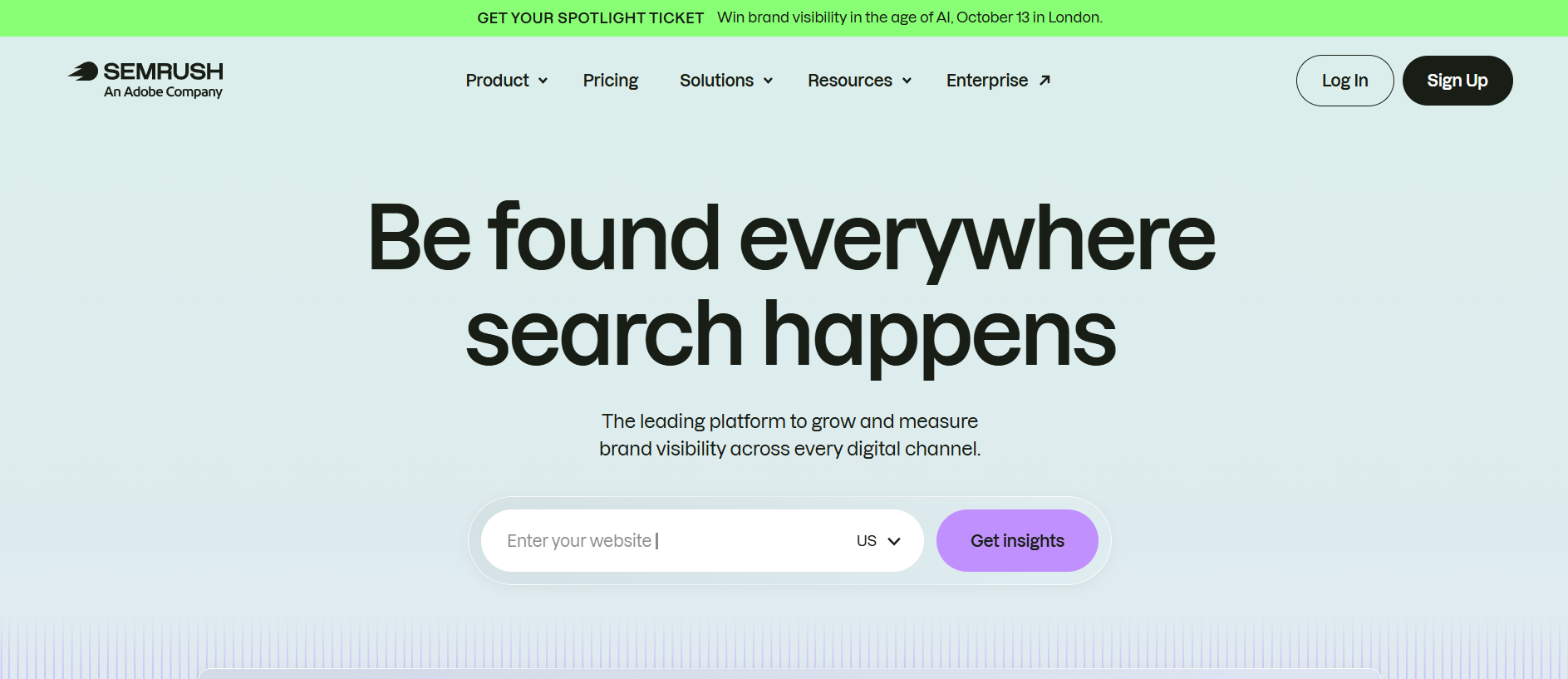
Semrush is an all-in-one digital marketing platform that combines SEO, content marketing, competitor research, PPC, and social media tools into a single dashboard. Marketers use it because it replaces what would otherwise be five or six separate subscriptions, and because its data comes from an enormous crawl of the live web rather than estimates pulled from a handful of sources.
Here is the thing most beginners get wrong: they think Semrush is just a “keyword tool.” It is not. Type any domain into the search bar and Semrush will hand you that site’s estimated organic traffic, its top-performing pages, every keyword it ranks for, its backlink profile, and even the ad copy it is running on Google. That single search bar is doing the job of four or five separate research tasks that used to take an entire afternoon to piece together manually.
The Problem Semrush Solves for Marketers
Before tools like this existed, marketers guessed. They picked keywords based on gut feeling, checked rankings by manually searching Google every few days, and had no real way to know what competitors were doing until a rival’s blog post suddenly outranked their own. That approach does not scale past a handful of pages, and it definitely does not scale across a content calendar with fifty or a hundred articles planned for the year.
Semrush solves this by centralizing data that used to live in scattered places: Google’s own (limited) Search Console, manual rank checks, backlink spreadsheets, and competitor screenshots. Instead of stitching together five browser tabs, everything lives inside one project. That matters more than it sounds, because switching context between tools is where most research time actually gets wasted, not in the analysis itself.
Semrush vs Free Tools Like Google Keyword Planner
Google Keyword Planner is free and it is genuinely useful for paid ad campaigns, but it was built for advertisers buying keywords, not for organic content strategy. It groups search volumes into broad ranges instead of exact numbers unless you are actively spending money on Google Ads, and it gives almost nothing on keyword difficulty, competitor rankings, or content gaps.
Semrush shows exact monthly search volume, a Keyword Difficulty score out of 100, the top ten ranking pages for that term, related questions people are asking, and seasonal trend data going back years. For a beginner trying to build a content strategy that actually ranks, that difference is not small. It is the difference between guessing which topic might work and knowing, before writing a single word, roughly how hard it will be to rank and what the competition already covers.
[Screenshot: Semrush Keyword Overview report showing exact search volume, Keyword Difficulty score, and SERP features for a single keyword]
Getting Started With Semrush: Setting Up Your First Project
Getting Semrush set up correctly in the first ten minutes saves hours of confusion later. Most beginners skip the project setup step and jump straight into random searches, which means their data never gets organized around an actual website or goal. Setting up a project first turns Semrush from a search bar into an actual tracking system tied to your domain.
The setup process has three parts that matter: picking the right plan for where you actually are in your career or business, creating a project and linking it to your domain, and understanding what each tab in the dashboard actually does before touching any of them. Skip any of these three and the tool feels a lot more confusing than it needs to be.
Choosing the Right Semrush Plan for Your Stage
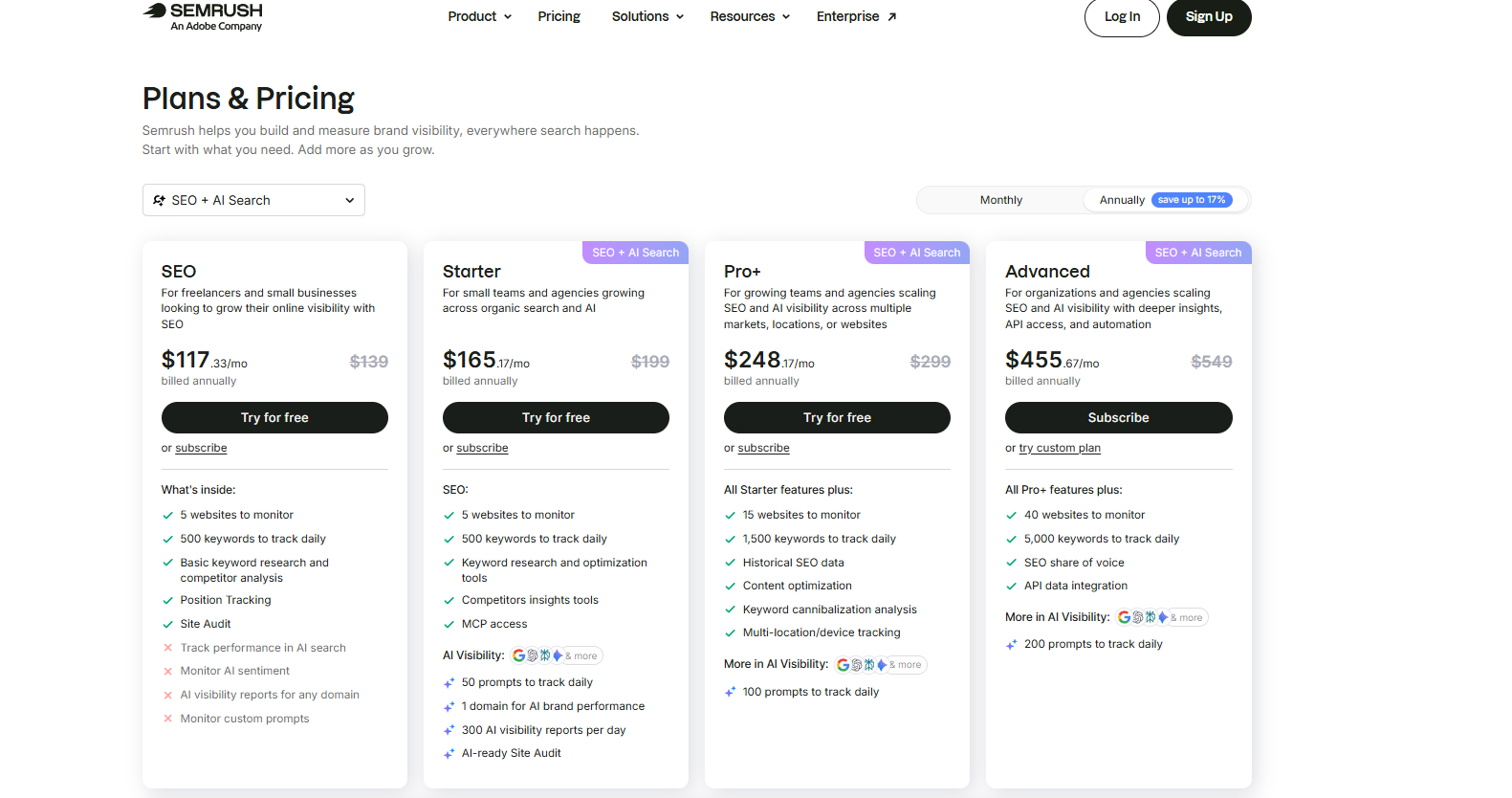
Semrush runs three main paid tiers: Pro, Guru, and Business, alongside a limited free account that caps you at ten searches a day. Pro starts around 139.95 dollars a month and covers the essentials: keyword research, site audits up to 100,000 pages, position tracking for 500 keywords, and five projects. That is genuinely enough for a freelancer, a student, or someone managing one or two client sites.
Guru adds historical data, content marketing tools like the SEO Content Template, and a Google Data Studio integration, and it is where most agencies and serious solo marketers land. Business exists mostly for large teams managing dozens of domains who need API access and extended limits. If you are just learning the platform, do not overthink this: start with Pro, or use the free 7-day trial to get comfortable with the interface before committing a card number to anything. The free account works fine purely for exploring the interface, but ten searches a day disappears fast once you start actually researching.
Setting Up a Project and Connecting Your Domain
Inside Semrush, click “Projects” in the left sidebar, then “Add New Project,” and type in your domain. This single step unlocks tools that only work at the project level: Site Audit, Position Tracking, and On Page SEO Checker all require a project to function, unlike Keyword Overview or Domain Overview, which work on any domain you type in without setup.
Once the project exists, Semrush asks you to connect Google Analytics and Google Search Console. Do this immediately, even if it feels like an extra step you want to skip. Without that connection, Semrush cannot cross-reference your actual traffic data against its own crawl data, which means several reports, especially Organic Traffic Insights, simply will not populate with real numbers. This is the single most skipped step in the entire setup process, and it is the reason a lot of beginners think Semrush’s data “doesn’t match” what they see in Search Console. It is not a mismatch. It is a tool sitting there waiting for permission it was never granted.
Understanding the Semrush Dashboard Layout
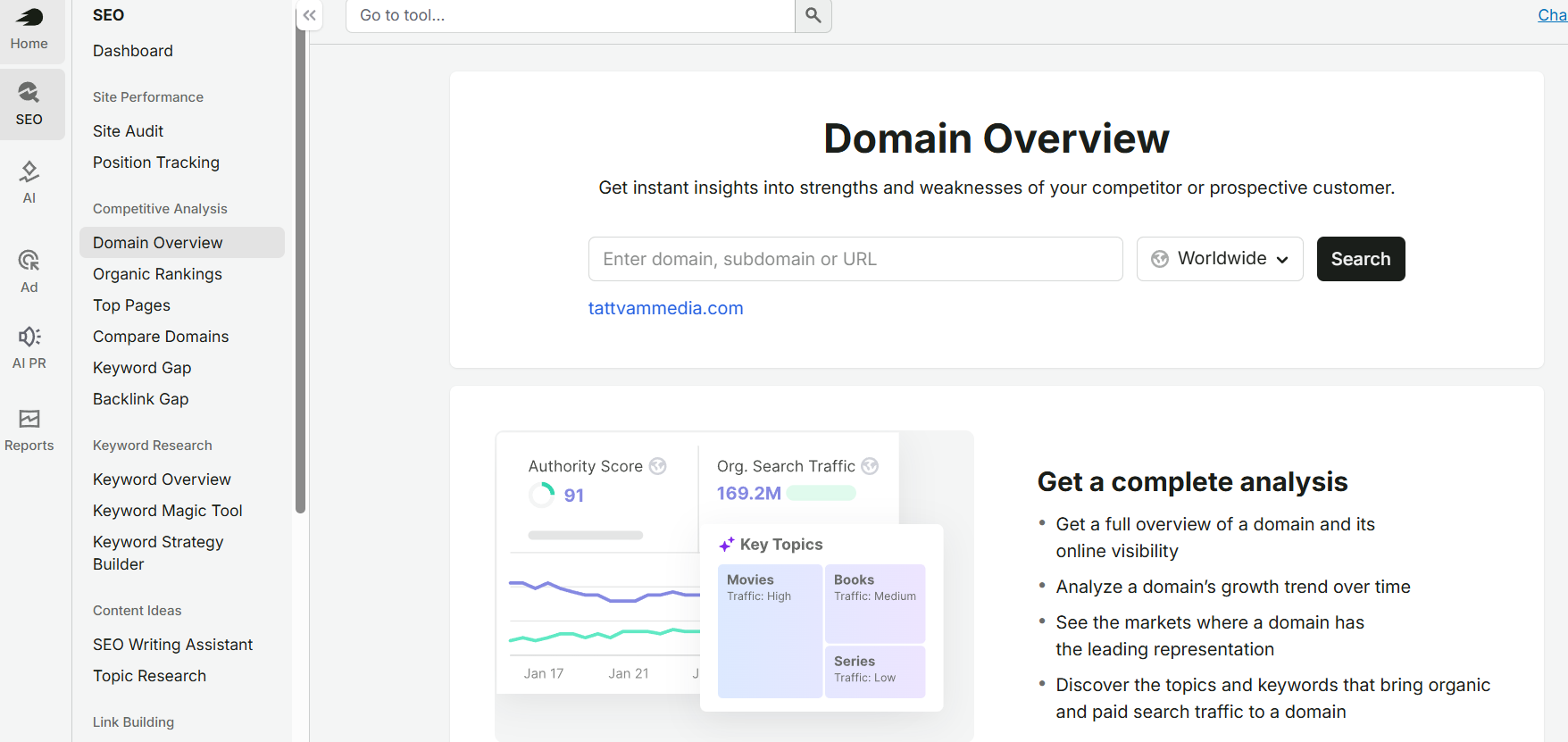
The left sidebar is organized into five main sections: SEO, Local, Advertising, Social Media, and Content Marketing. Under SEO alone there are more than fifteen individual tools, which is exactly where most beginners freeze up on day one. The trick is not memorizing all fifteen. It is knowing that four tools cover 80 percent of what a beginner will use in any given week: Keyword Overview, Site Audit, Position Tracking, and Domain Overview.
Everything else, things like the Backlink Gap tool, the SEO Content Template, or the Listing Management tool for local businesses, becomes relevant later, once the fundamentals are second nature. Trying to learn all fifteen tools in one sitting is how people quit halfway through week one. Learn the four core tools properly first. If keyword research and content planning feel like the right starting point for you specifically, the SEO learning hub has a broader breakdown of how these fundamentals connect to a real strategy, not just a single tool.
Core Semrush Features Every Beginner Should Master
This is the part of the guide that actually matters day to day. Knowing what Semrush is capable of in theory does not help if you cannot open the tool and get a usable answer in under two minutes. These five features cover roughly everything a beginner marketer will touch in a normal working week, and each one has a specific job it does better than the others.
Keyword Magic Tool for Keyword Research
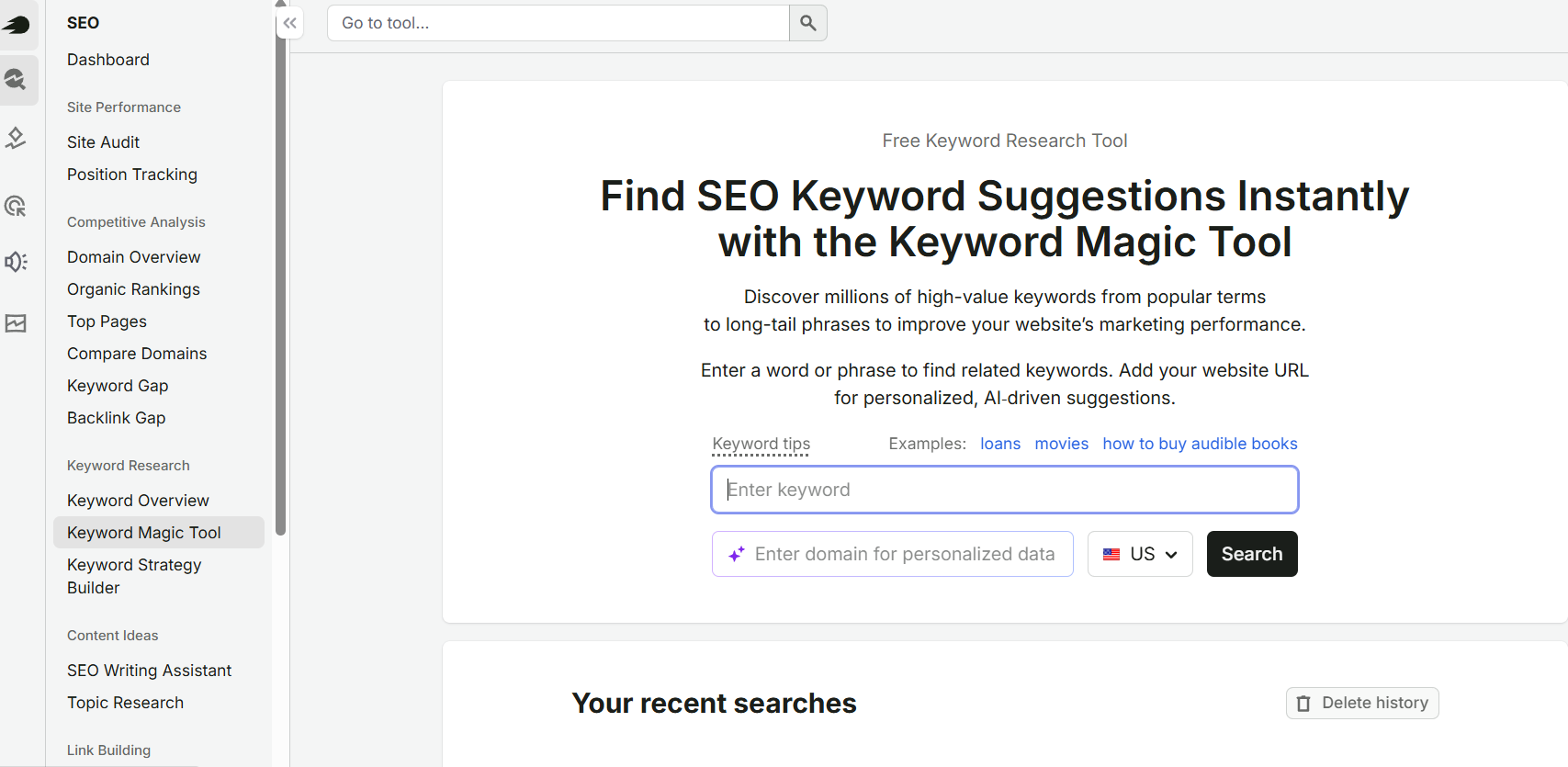
The Keyword Magic Tool is where almost every content project should start. Type in one broad “seed” keyword, something like “email marketing,” and it returns thousands of related keywords sorted into topic clusters: questions, broad match, phrase match, and related terms. Each keyword comes with search volume, Keyword Difficulty, CPC (what advertisers pay per click, useful for gauging commercial value even for organic content), and a small icon showing which SERP features appear, like featured snippets or People Also Ask boxes.
The mistake beginners make here is grabbing the keyword with the highest search volume and stopping. A keyword showing 40,000 monthly searches with a Keyword Difficulty of 85 is a losing battle for a brand-new site with no backlinks. A keyword showing 800 searches with a Difficulty of 22 and clear commercial intent, something like “best email marketing tool for small business,” is winnable within a few months and will actually convert visitors once it ranks. Filter by Keyword Difficulty under 40 for new sites, and by search intent (Semrush tags each keyword as informational, commercial, transactional, or navigational) to make sure you are not writing content nobody with buying intent will ever read.
[Screenshot: Semrush Keyword Magic Tool results page filtered by Keyword Difficulty under 40, showing intent tags for each keyword]
Site Audit for Technical SEO
Site Audit crawls your entire website, up to whatever page limit your plan allows, and returns a Site Health score out of 100 alongside a categorized list of every issue found: errors, warnings, and notices. The errors category is where the real problems live, things like broken internal links, missing title tags, duplicate content, or pages blocked by robots.txt that shouldn’t be.
What separates Site Audit from just running a generic checklist is the “Top Issues” tab, which ranks problems by how many pages they affect and how much crawl budget they are likely wasting. A beginner running their first audit will often see forty or fifty issues and panic. The fix is simple: sort by “Errors” first, ignore “Notices” entirely until the errors and warnings are cleared, and work through issues in the order Semrush lists them, because that order already reflects impact. A site with 4xx errors on twenty pages linked from the homepage is bleeding far more ranking potential than one with a slightly long meta description on a blog post nobody links to.
Position Tracking for Rank Monitoring
Position Tracking monitors where your target keywords rank in Google, updated daily, split by device (desktop versus mobile) and by location, down to the city level if needed. This is the tool that tells you whether the work you’re doing is actually working, rather than relying on manually searching Google every few days and hoping you’re not seeing personalized results skewing what you see.
Set this up by adding your target keyword list, usually 10 to 50 keywords for a beginner project, and choosing your tracked location. The report that matters most here is “Visibility,” a single trendline showing your overall ranking movement across every tracked keyword combined, not just one at a time. A common beginner mistake is only tracking desktop rankings, when Google has used mobile-first indexing since 2019, meaning your mobile rankings are frequently what actually determines your organic traffic, especially in markets like India where mobile search dominates. Always track both.
On Page SEO Checker
The On Page SEO Checker analyzes a specific page against the top-ranking competitors for its target keyword and returns a prioritized checklist: add this keyword to your H2, your competitors’ average word count is 2,400 and yours is 900, add three more backlinks pointing to this page, improve your Flesch reading ease score. It is essentially a personalized to-do list generated by comparing your page directly against what is already working in Google’s top results.
This tool earns its place because it removes the guesswork from optimization. Instead of wondering whether a page needs more internal links or a longer word count, it tells you exactly what the top-ranking pages are doing that yours isn’t, based on real, current SERP data rather than generic SEO advice that may be outdated by the time you read it.
Backlink Analytics
Backlink Analytics shows every backlink pointing to a domain, including the referring domain’s Authority Score (Semrush’s 0-100 metric estimating a site’s overall strength and trustworthiness), the anchor text used, and whether the link is follow or nofollow. For beginners, the real value here is not building your own backlink list yet. It’s studying competitors first.
Type a competitor’s domain into Backlink Analytics and you’ll see exactly which sites link to them and why: guest posts, resource page mentions, broken link opportunities, or press coverage. That list becomes a direct outreach target list for your own link building, because if a site already linked to a competitor covering the same topic, there’s a reasonable chance they’d link to a better piece of content on the same subject too. Toxic Score, a separate metric inside this report, flags spammy backlinks that might be hurting a site rather than helping it, which matters if you’re ever auditing an existing site with an unclear SEO history.
Using Semrush for Competitor Research and Content Strategy
This is where Semrush stops being a keyword tool and starts functioning as a genuine competitive intelligence platform. Most beginners never get past keyword research, which is a shame, because the competitor research tools are arguably where Semrush earns its subscription price the fastest. Instead of guessing what a rival is doing, you can see it directly.
Domain Overview to Size Up Competitors
Type any competitor’s domain into Domain Overview and Semrush returns their estimated organic traffic, paid traffic, total number of ranking keywords, top organic competitors, and a traffic trend graph going back months. This single report answers the question every marketer eventually asks: “Is this competitor actually bigger than us, or does it just feel that way?”
The “Top Organic Keywords” table inside this report is the fastest way to understand a competitor’s content strategy at a glance. If a rival’s top three keywords by traffic are all product comparison terms, that tells you their strategy leans heavily on commercial intent content rather than top-of-funnel blog posts, which is a completely different playbook than a competitor whose top traffic driver is a single viral “how to” guide.
Keyword Gap Analysis
Keyword Gap lets you compare your domain against up to four competitors simultaneously and instantly shows keywords they rank for that you don’t, keywords you both rank for (with a side-by-side position comparison), and keywords only you rank for. The “Missing” segment is the one worth staring at longest, because it’s a literal list of proven, ranking content opportunities. If three competitors all rank for a keyword and you don’t, that’s not a guess about what might work. It’s already validated demand sitting there.
The mistake to avoid here is treating every gap keyword as equally worth pursuing. Cross-reference the gap list against Keyword Difficulty and search intent before committing content resources to any of it. A missing keyword with commercial intent and moderate difficulty is worth ten missing keywords that are purely informational with no realistic path to ranking for a newer site.
Content Marketing Toolkit
The Content Marketing section includes the SEO Content Template and Topic Research tool, both designed to speed up the actual content creation step once keyword research is done. Topic Research takes a seed topic and returns subtopics, headline ideas ranked by their “Freshness” and social share potential, and common questions people ask, pulled from real search data rather than brainstorming.
SEO Content Template goes one step further: feed it a target keyword, and it generates a brief covering recommended word count based on top competitors, target keywords and semantic terms to include, readability targets, and even recommended backlinks. For someone writing content at scale, whether that’s a solo creator publishing twice a week or a small team managing a client’s blog calendar, this cuts brief-writing time down dramatically compared to building one from scratch every time. If content planning and calendars are the part of this that feels most relevant to your situation right now, the digital marketing fundamentals hub covers how content strategy fits into a broader marketing plan, not just the SEO piece of it.
[Screenshot: Semrush Keyword Gap tool showing the “Missing” keyword segment across four competitor domains]
Semrush Mistakes Beginners Make (and How to Fix Them)
Nearly every beginner who picks up Semrush makes the same handful of mistakes in their first month. None of them are complicated to fix once you know they exist, but they quietly waste the tool’s biggest advantage, which is accurate, actionable data, by misreading or ignoring parts of what it’s showing you.
Chasing High Volume Keywords With No Intent
Search volume is the first number everyone looks at, and it’s also the least useful one on its own. A keyword with 90,000 monthly searches sounds exciting until you check the intent and realize it’s a broad, purely informational query with a featured snippet already sitting at the top, meaning most of that search volume never even clicks through to a website. Meanwhile a keyword with 500 searches and clear buying intent might convert at ten times the rate.
Fix this by always checking the Intent column in Keyword Overview before committing to a topic, and by asking a simple question: if someone typed this exact phrase into Google, are they ready to take action, or just browsing? Content built around the second type of keyword rarely moves a business forward, no matter how much traffic it eventually pulls in.
Ignoring the Site Audit Priority Tab
Beginners tend to treat the full list of Site Audit issues as one giant undifferentiated to-do list, working top to bottom in whatever order the report happens to load them. This wastes time on low-impact notices while high-impact errors, the ones actually suppressing rankings, sit unresolved for weeks.
The fix is straightforward: always start with “Errors,” then “Warnings,” and treat “Notices” as genuinely optional cleanup. Within Errors, prioritize anything affecting a large number of pages or anything touching pages that already rank or already receive real traffic, since fixing those has the fastest, most measurable impact on the site’s overall performance.
Not Setting Up Position Tracking for Mobile
This one is almost invisible until it isn’t. A site can look like it’s performing well on desktop rankings while quietly losing ground on mobile, and since mobile-first indexing means Google largely uses the mobile version of a page to determine rankings for everyone, a mobile-only ranking drop still affects overall traffic even if desktop numbers look fine.
Fix this during initial project setup by explicitly adding both a desktop and a mobile tracking campaign inside Position Tracking, rather than accepting whatever the default happens to be. Check both reports weekly, not just one.
Treating Semrush Score as Gospel
Site Health Score, Keyword Difficulty, and Authority Score are all useful directional metrics, but they’re modeled estimates, not guaranteed outcomes. A Keyword Difficulty of 35 doesn’t mean ranking is guaranteed within a set timeframe. It means, based on the current top-ranking pages’ backlink profiles and content depth, that keyword sits in a moderate difficulty range compared to others.
The fix is using these scores as a starting filter, not a final answer. Always click into the actual top-ranking pages for a target keyword and manually check what they’re doing, their content depth, their backlink count, how recently they were updated, before assuming a Difficulty score alone tells the full story. Numbers narrow down where to look. They don’t replace looking.
If any of this is starting to feel like a lot to manage manually across dozens of client sites or a growing content calendar, that’s usually the point where a structured course, like the Alpha Marketer Foundation Program, makes more sense than piecing strategy together from scattered blog posts. It’s not a requirement to get started, just worth knowing it exists once the fundamentals click.
Conclusion
Semrush stops being intimidating the moment you stop trying to learn all fifteen tools at once. Start with the four that matter most: Keyword Magic Tool, Site Audit, Position Tracking, and Domain Overview. Get comfortable pulling real answers out of each one before touching anything else in the sidebar. That alone covers most of what a working digital marketer does in a normal week.
The bigger shift Semrush creates isn’t access to more data. It’s the move away from guessing. Every keyword choice, every content topic, every technical fix becomes something you can point to a number for, instead of a hunch you’re hoping pays off three months later. Open a free trial, connect it to one real domain, whether that’s a personal blog, a small business site, or a client’s, and spend a week just clicking through the four core reports covered here. That’s genuinely enough to stop feeling lost inside Semrush for good.
Frequently Asked Questions
What is Semrush used for?
Semrush is used for keyword research, competitor analysis, technical SEO audits, rank tracking, backlink analysis, and content planning. Marketers use it to find profitable keywords, monitor Google rankings, diagnose technical issues on a website, and study what’s already working for competitors before building their own strategy.
Is Semrush free to use?
Semrush offers a limited free account capped at ten searches per day, which is enough to explore the interface but not enough for real ongoing research. Full access requires a paid plan, though Semrush regularly offers a 7-day free trial on its paid tiers for new accounts.
How much does Semrush cost per month?
Semrush’s Pro plan starts around 139.95 dollars a month, Guru sits around 249.95 dollars a month, and Business runs roughly 499.95 dollars a month. Pricing occasionally shifts with promotions, so checking Semrush’s official pricing page before purchasing is worth doing.
Is Semrush better than Ahrefs?
Neither tool is objectively better across the board. Semrush tends to have a broader feature set covering PPC, social media, and content tools alongside SEO, while Ahrefs is often considered stronger specifically for backlink data depth and its Content Explorer tool. The right choice depends on whether you need an all-in-one platform or a tool focused tightly on SEO and backlinks.
Can beginners use Semrush without any SEO experience?
Yes, though there’s a learning curve in the first week simply because of how many tools exist inside the platform. Focusing only on Keyword Overview, Site Audit, and Position Tracking during the first month is enough to get real value without feeling overwhelmed by the full toolset.
How accurate is Semrush’s keyword search volume?
Semrush’s search volume data is generally considered reliable and is sourced from a mix of clickstream data and search engine data, but like every keyword tool, it’s an estimate, not a guaranteed exact figure. Volumes are most useful as a relative comparison between keywords rather than an exact traffic prediction.
What is a good Keyword Difficulty score for a new website?
For a brand-new website with little to no backlink history, targeting keywords with a Keyword Difficulty under 30 to 40 gives the most realistic path to ranking within the first several months. Established sites with strong domain authority can reasonably target higher difficulty scores.
Does Semrush track mobile rankings separately from desktop?
Yes, Position Tracking allows setting up separate tracking campaigns for desktop and mobile devices, and both should be monitored since Google primarily uses the mobile version of a site for indexing and ranking under mobile-first indexing.
Can Semrush be used for paid advertising research, not just SEO?
Yes, Semrush’s Advertising Research tool shows a competitor’s active and historical Google Ads, including ad copy, target keywords, and estimated ad spend, which is useful for PPC marketers researching competitor campaigns before launching their own.
What is Semrush Authority Score?
Authority Score is Semrush’s proprietary 0-100 metric estimating a domain’s overall strength and trustworthiness, calculated using backlink data, organic traffic estimates, and other ranking factors. It’s a directional indicator for comparing domains, not a metric Google itself uses or recognizes.
How long does it take to see ranking results after using Semrush’s recommendations?
Ranking improvements typically show up anywhere from 6 to 12 weeks after implementing changes, depending on the site’s existing authority, the competitiveness of the target keyword, and how consistently the recommendations are applied. Semrush’s Position Tracking makes this measurable on a weekly basis rather than requiring a manual guess.
Is Semrush suitable for local businesses, or only large websites?
Semrush includes a dedicated Local SEO toolkit for managing business listings, tracking local map pack rankings, and auditing citation consistency across directories, which makes it genuinely useful for small, local businesses and not just large e-commerce or SaaS sites.