

So here’s a scene that plays out in almost every marketing team, every single week. Someone opens a blank document on Monday morning and asks, “What are we posting today?” Nobody has a real answer. Someone scrambles through old drafts. Someone else pings the designer asking for a graphic in the next hour. By Wednesday, the blog has nothing new, the newsletter goes out late, and the social calendar is basically three memes and a repost from last month. This isn’t a hypothetical. This is what happens in businesses that don’t have a content calendar, and honestly, it happens more often than most people admit.
Random publishing used to work, sort of, back when there was less competition and algorithms weren’t this picky. That era is gone. Google wants consistency and topical depth. Social platforms reward accounts that show up on a rhythm, not ones that post seven times one week and go silent for a month. Audiences remember who shows up reliably and who doesn’t. If your content output looks like a heartbeat monitor gone wrong, spikes and flatlines, you’re already losing ground to competitors who planned ahead.
That’s exactly why a content calendar isn’t some nice-to-have spreadsheet you build once and forget. It’s the backbone of a strategy that actually compounds over time. When you plan weeks or months in advance, you stop reacting and start building. You know what topic goes live next Tuesday. You know which keyword you’re targeting in March. You know who’s writing what and when it’s due. Nobody is guessing, and nothing falls through the cracks because there was no plan to fall through.
This guide walks through the entire process of building a content calendar from scratch, whether you’re a solo blogger juggling everything yourself or a marketing lead running a team of writers, designers, and SEOs. We’ll cover what a content calendar actually is, why it matters, what fields it should include, and a full step by step process for building one that fits your business. There’s also a free downloadable template included further down, so you don’t have to build the structure from zero.
What You Will Learn in This Guide
- What a content calendar is and how it’s different from an editorial calendar
- Why businesses that plan content outperform ones that publish randomly
- The exact fields every content calendar should track
- A 12 step process for building a calendar from the ground up
- The best tools for building and managing a calendar, including free options
- How AI tools fit into content planning without replacing human judgment
- Common mistakes that quietly wreck content calendars
- SEO practices that make your calendar actually drive rankings
- How to measure whether your content calendar is working
- A full FAQ section answering the questions people search for most
What Is a Content Calendar?
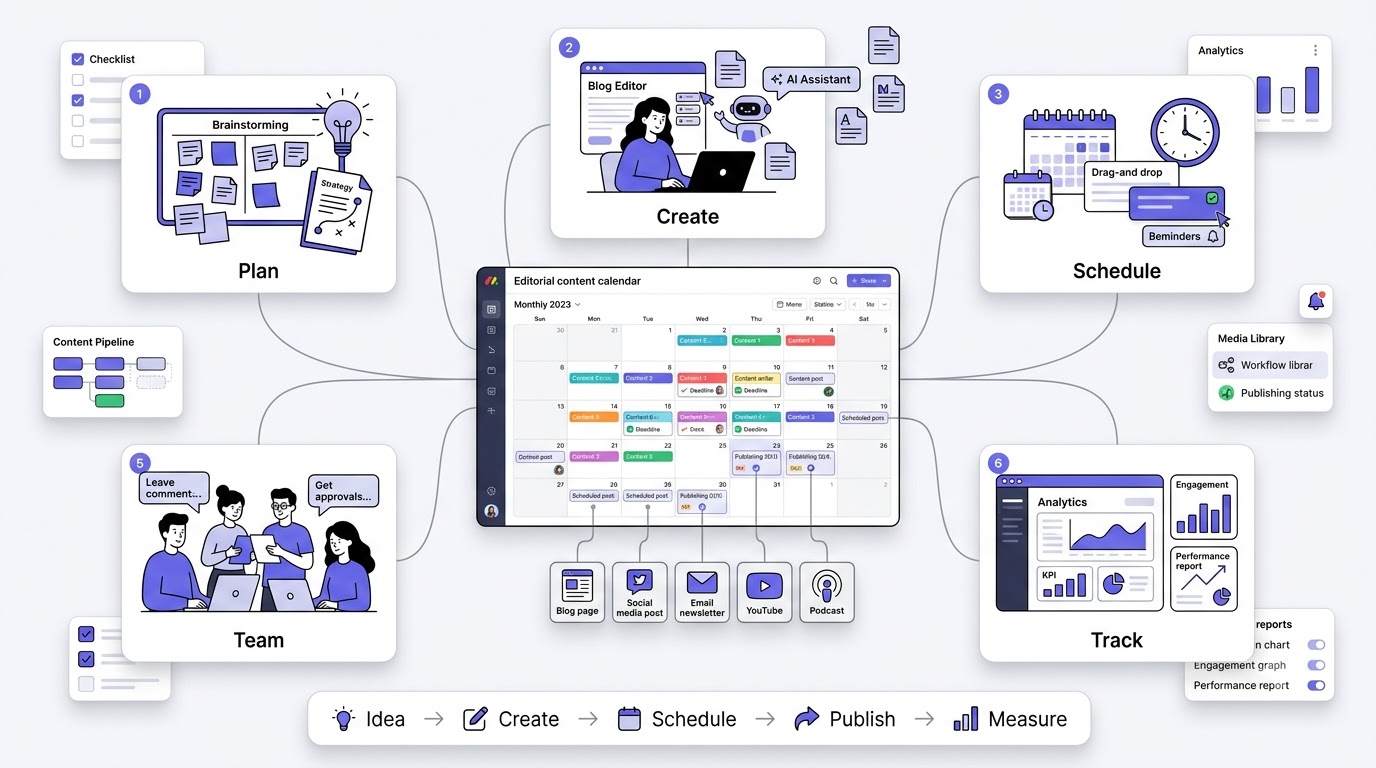
A content calendar is a planning document, usually a spreadsheet, board, or specialized tool, that lays out what content you’re publishing, when you’re publishing it, where it’s going, and who’s responsible for it. Think of it as the master schedule for everything your brand puts out into the world. Blog posts, social captions, email newsletters, videos, podcast episodes, all of it lives in one place instead of scattered across sticky notes and someone’s memory.
At its core, a content calendar answers four questions for every piece of content you plan to publish: what is it, when does it go live, who’s making it, and where is it being distributed. That sounds simple, and honestly it is simple in concept. The hard part isn’t understanding what a content calendar is. The hard part is actually building one and sticking to it long enough to see results, which usually takes a few months of consistent output before you notice real traction.
Content Calendar vs Editorial Calendar
People throw these two terms around like they mean the same thing, and technically they overlap a lot, but there’s a subtle difference worth knowing. An editorial calendar tends to focus specifically on written content, blog posts, articles, guest posts, basically anything tied to editorial planning and publication schedules. A content calendar is broader. It covers everything, blogs, videos, social posts, email campaigns, podcasts, webinars, the whole mix of formats a modern brand puts out.
Key differences: An editorial calendar is usually owned by writers and editors. A content calendar is usually owned by the whole marketing team since it spans multiple channels and formats. Editorial calendars go deep on topics and keywords. Content calendars go wide on channels and formats.
Which one businesses actually need: Most businesses need a content calendar, not just an editorial calendar, because content marketing today isn’t just blogging anymore. You’ve got Instagram, LinkedIn, YouTube, email, maybe a podcast. If you’re only tracking blog posts, you’re missing half the picture. Start with a content calendar and let the editorial details live inside it as one layer.
What Information Does a Content Calendar Include?
A calendar that actually works isn’t just a list of dates and titles. It needs enough detail that anyone on the team can look at it and know exactly what’s happening without asking five follow up questions. Here’s what a solid one tracks, at minimum.
Publish date tells everyone exactly when a piece goes live, which matters for coordinating launches, seasonal content, and campaigns that need to hit a specific window. Topic is the working title or subject of the piece, the thing people scan first. Primary keyword is the main search term you’re targeting, which drives the whole SEO angle of the piece. Search intent clarifies whether someone searching that keyword wants information, wants to compare options, or is ready to buy, because that changes how you write it.
Content format specifies whether it’s a blog, a video, a carousel, an email, whatever. Target audience narrows down who this piece is actually for, because “everyone” is not an audience. Funnel stage marks whether this is top of funnel awareness content or bottom of funnel conversion content. CTA is the specific action you want the reader to take after consuming it. Status tracks where the piece is in production, like drafting, editing, or scheduled. Author and Designer assign ownership so nobody wonders who’s supposed to be working on what. Distribution channels list everywhere the content will be shared. Performance metrics get filled in after publishing so you can actually learn something from what you put out.
Why Every Business Needs a Content Calendar
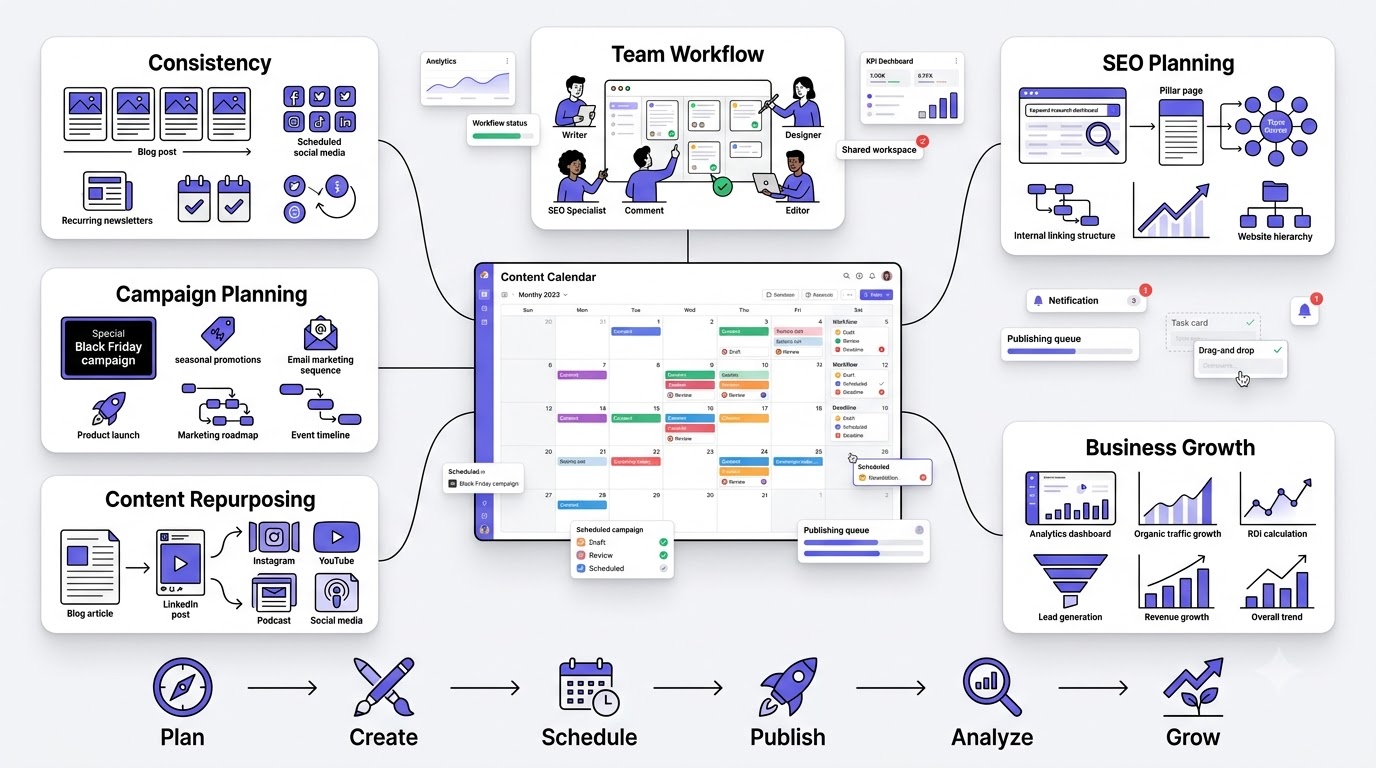
Look, you can run a business without a content calendar. Plenty of people do. But you’ll be leaving traffic, leads, and revenue on the table because you’re constantly playing catch up instead of building momentum. Here’s what actually changes when a business adopts one seriously.
Improves Content Consistency
Consistency is the single biggest thing search engines and audiences reward, and it’s also the thing most businesses fail at. A calendar forces you to commit to a rhythm, whether that’s two blog posts a week or one newsletter every Friday. Once that rhythm is visible on a shared document, it stops being optional. People show up because the plan says they need to.
Keeps Teams Organized
When five people are touching one piece of content, writer, editor, SEO, designer, publisher, chaos is the default state unless something ties it together. A calendar becomes that shared source of truth. Everyone can see the status of every piece at a glance instead of pinging each other on Slack asking “hey is this done yet.”
Prevents Last-Minute Content Creation
Nothing kills quality faster than writing something at 11pm because it’s supposed to go live tomorrow morning. Planning weeks ahead means research gets proper time, drafts get properly reviewed, and nobody is rushing graphics five minutes before a scheduled post. Rushed content reads rushed, and readers can tell.
Aligns Content With Marketing Goals
A calendar isn’t just a to-do list, it’s where strategy actually gets executed. If your goal this quarter is lead generation, your calendar should be packed with bottom of funnel content, not just awareness pieces. Without a calendar, content tends to drift toward whatever’s easy to write instead of what actually moves the business forward.
Improves SEO Planning
SEO takes months to show results, so it demands planning months ahead. A calendar lets you map out pillar pages, cluster content, and internal linking structures before you start writing, instead of realizing three months later that you never built the supporting content your pillar page needed to rank.
Supports Seasonal Campaigns
Black Friday content written the week of Black Friday is too late. Holiday, seasonal, and event based content needs lead time, sometimes two or three months depending on how competitive the keywords are. A calendar is where you pencil in these dates early enough to actually capitalize on them.
Makes Content Repurposing Easier
When you can see your whole content output laid out, patterns jump out. That blog post from four months ago could become a LinkedIn carousel. That webinar could get chopped into five short videos. A calendar makes repurposing an intentional process instead of something you occasionally remember to do.
Improves ROI Tracking
Tracking performance metrics inside the calendar means you’re not digging through analytics tools trying to remember which post drove which spike in traffic. Over time, this builds a clear picture of what content actually works for your business, so you can do more of that and less of what’s not pulling weight.
Helps Scale Content Production
Going from publishing two posts a month to twenty requires structure, because more volume without process just means more chaos. A calendar with clear roles, deadlines, and workflows is what lets a team scale output without everything falling apart at the seams.
Key Statistics: Businesses that maintain a documented content strategy consistently report stronger results than those working without one, and teams that plan content in advance tend to publish more reliably and see steadier growth in organic traffic over time. The pattern shows up again and again: planning beats winging it.
Benefits of Using a Content Calendar
Beyond the “why every business needs one” argument, there are day to day, practical benefits that show up almost immediately once a calendar is in place.
Better Workflow
Everyone knows what’s due, when, and what happens after their part is finished. A piece moves from draft to edit to design to publish without anyone having to manually chase the next person in line.
Higher Publishing Frequency
Teams that plan ahead simply publish more, because they’re not spending half their week trying to figure out what to write about. The thinking work happens in batches during planning sessions, freeing up execution time.
Stronger Brand Voice
When content is planned with intention instead of thrown together last minute, tone and voice stay more consistent. You’re not switching gears from panic mode to relaxed mode depending on how much time you had that day.
Easier Collaboration
A shared calendar means writers, designers, and marketers aren’t operating in silos. Everyone can see the full picture, which cuts down on duplicate work and miscommunication about deadlines or deliverables.
Improved Keyword Planning
Instead of picking keywords one article at a time, a calendar lets you plan clusters of related keywords together, building topical authority instead of a scattered pile of unrelated posts that don’t reinforce each other.
Balanced Content Mix
Without a calendar, businesses tend to overproduce one type of content, usually whatever’s easiest, and neglect everything else. A calendar makes it obvious when you’ve published five blog posts and zero videos this month, so you can course correct.
Better Audience Engagement
Predictable publishing builds habits in your audience. People start expecting your newsletter every Thursday or your YouTube video every Monday, and that expectation itself drives engagement because they show up looking for it.
Easier Reporting
When leadership asks “what did content produce this quarter,” a filled out calendar with performance metrics attached gives you an instant answer instead of a scramble to piece together what happened and when.
Types of Content Calendars
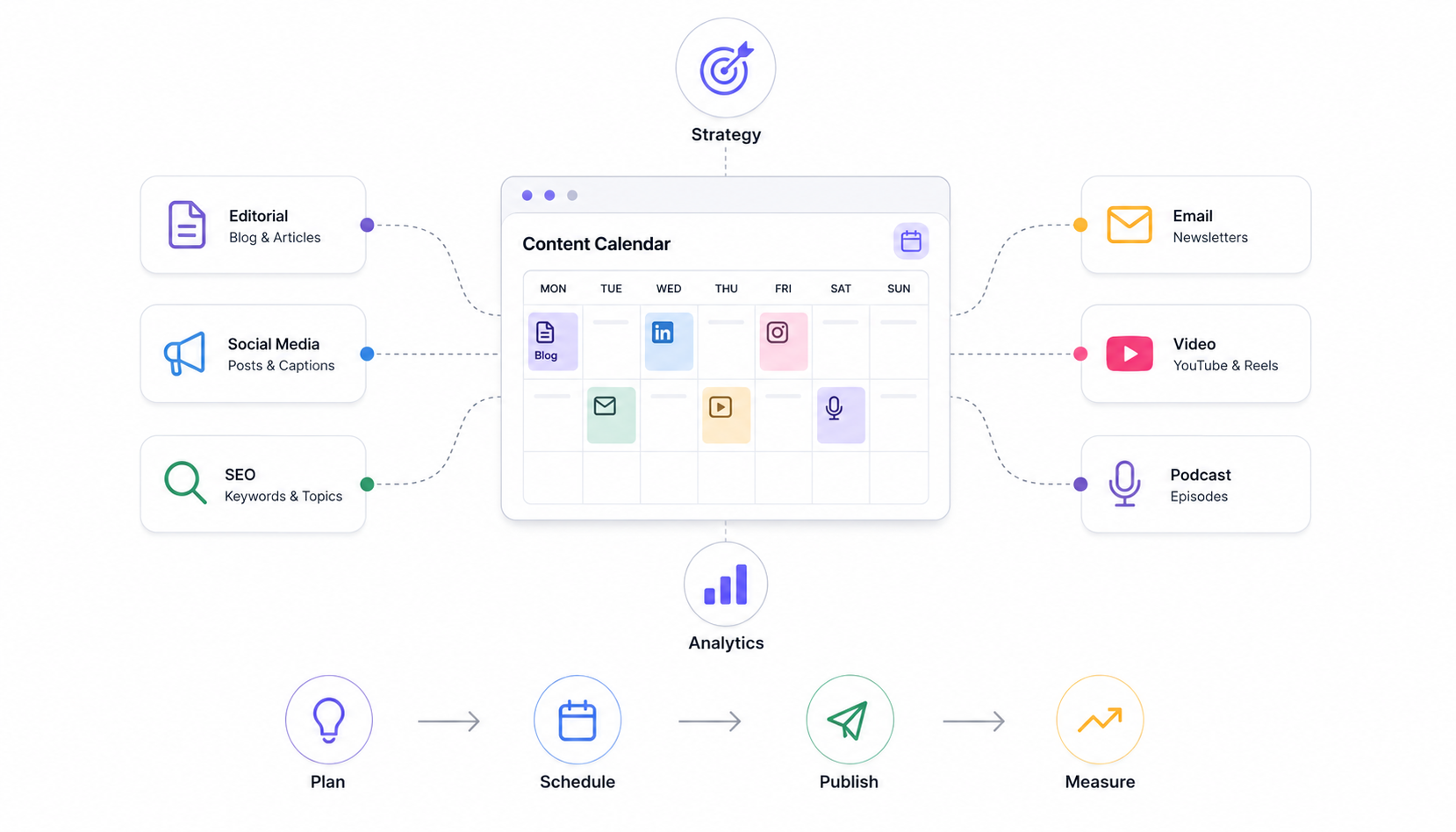
Not every business needs the same kind of calendar. What you’re planning for changes what the calendar should look like, so it helps to know the different flavors before you pick one.
Editorial Calendar
This is the classic version, focused mainly on blog posts and written content. It tracks topics, keywords, deadlines, and publish dates for your blog specifically. If content marketing for you basically means blogging, this might be all you need, though most businesses eventually outgrow it.
Social Media Content Calendar
This one plans out posts across Instagram, LinkedIn, Facebook, X, and wherever else your audience hangs out. It usually needs a tighter, more frequent schedule than a blog calendar since social platforms expect daily or near daily activity to stay relevant in the algorithm.
SEO Content Calendar
Built specifically around keyword targets, search intent, and topic clusters, this type of calendar is less about hitting a publishing rhythm and more about systematically covering a topic area so you build authority in search results over time. Every entry ties back to a specific keyword goal.
Email Marketing Calendar
This tracks your newsletter schedule, drip campaigns, promotional sends, and automated sequences. Email has its own rhythm and its own rules around frequency, so it usually deserves its own tracking even if it lives inside the same master document as everything else.
Video Content Calendar
YouTube, Reels, TikTok, whatever your video platform is, video production takes longer than a blog post usually, filming, editing, thumbnails, so this calendar needs more lead time built into its deadlines compared to written content.
Podcast Calendar
Episode topics, guest bookings, recording dates, and release schedules all live here. Podcasts have a unique wrinkle, guest availability, which means this calendar often needs to be planned further in advance than most other formats.
Product Launch Calendar
Built around a specific launch, this calendar coordinates every piece of content needed before, during, and after a product goes live, from teaser posts to launch day announcements to follow up case studies weeks later.
Campaign Calendar
Similar to a product launch calendar but broader, this tracks content tied to a specific marketing campaign, like a seasonal sale or a rebrand, pulling together every channel’s output into one coordinated push.
Comparison Table
| Type | Purpose | Best For | Planning Period | Tools | Complexity |
|---|---|---|---|---|---|
| Editorial Calendar | Blog planning | Content teams, bloggers | 1-3 months | Sheets, Notion | Low |
| Social Media Calendar | Daily/weekly posts | Social managers | 2-4 weeks | Buffer, Hootsuite | Medium |
| SEO Content Calendar | Keyword targeting | SEO teams | 3-6 months | Ahrefs, Semrush | High |
| Email Calendar | Newsletters, campaigns | Email marketers | 1-2 months | Mailchimp, HubSpot | Medium |
| Video Calendar | YouTube, Reels | Video teams | 1-3 months | Trello, Airtable | Medium |
| Podcast Calendar | Episode planning | Podcast hosts | 2-3 months | Notion, Sheets | Medium |
| Product Launch Calendar | Launch coordination | Product marketers | 1-4 months | Asana, ClickUp | High |
| Campaign Calendar | Multi-channel pushes | Marketing leads | 1-3 months | Monday.com | High |
What Should Be Included in a Content Calendar?
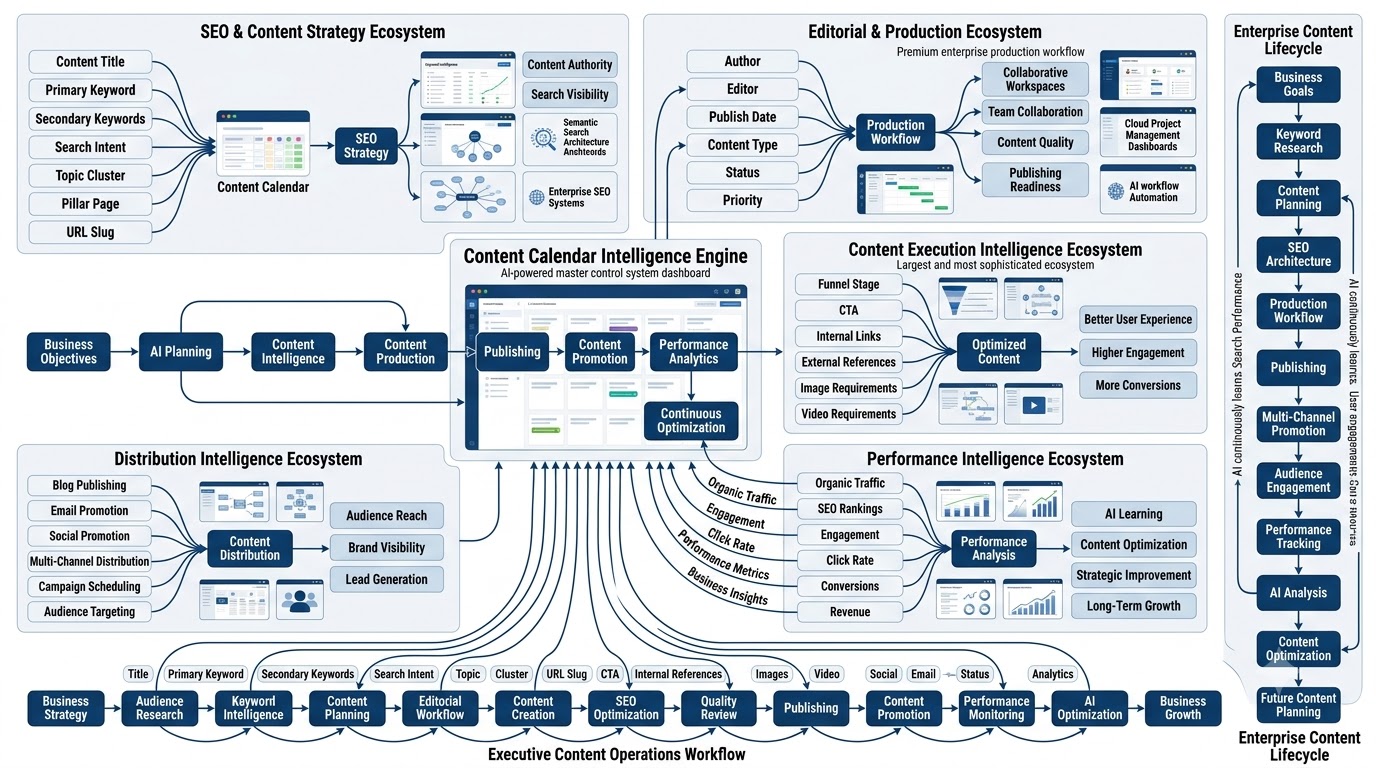
We touched on the basics earlier, but there’s a deeper layer worth breaking down field by field, because a lot of calendars fail simply because they’re missing one of these details and it causes friction later.
Content Title
This is the working title, not necessarily the final published headline. It gives everyone a quick way to identify the piece in conversation without needing to reference a URL or a document link every time.
Primary Keyword
The main term you’re optimizing for. This drives your headline structure, your subheadings, and a good chunk of your content strategy for that piece. Get this wrong and the whole piece can end up targeting the wrong audience.
Secondary Keywords
Related terms you’ll naturally weave into the piece to broaden its reach in search results. These usually come from the same keyword research pass as your primary keyword but represent slightly different angles or phrasings people search for.
Search Intent
Is the person searching this term trying to learn something, compare options, or ready to buy? Matching your content format and tone to intent is one of the most overlooked parts of SEO content planning, and getting it wrong tanks rankings no matter how well written the piece is.
Topic Cluster
Which broader subject area does this piece belong to? Grouping content into clusters helps you build depth around a topic instead of publishing scattered, disconnected pieces that never reinforce each other in search engines’ eyes.
Pillar Page
The main comprehensive page this piece supports through internal linking. Cluster content should always point back to its pillar page, and the pillar page should link out to its cluster pieces, creating a web of relevance search engines pick up on.
URL Slug
Deciding this early avoids awkward last minute changes after a piece is already indexed. A clean, keyword relevant slug also helps both search engines and readers understand what the page is about before they even click.
Author
Simple, but necessary. Knowing who’s writing avoids confusion when multiple writers are working across the calendar simultaneously, and it matters for accountability when deadlines slip.
Editor
Whoever reviews the piece before it goes live. Having this assigned in advance means editing doesn’t become a bottleneck where drafts sit untouched because nobody officially owns the review step.
Publish Date
The date the piece actually goes live, which should be locked in early enough that writing, editing, and design all have realistic timelines leading up to it.
Content Type
Blog post, guide, listicle, case study, whatever format this piece takes. This affects length, structure, and how much design work it needs.
Funnel Stage
Top, middle, or bottom of funnel. This shapes tone, depth, and what CTA makes sense at the end of the piece.
CTA
The specific action you want readers to take. “Download the template,” “book a call,” “subscribe to the newsletter,” whatever fits the piece and its funnel stage.
Internal Links
Planning which existing pages this piece should link to, and which future pages should link back to it, strengthens your site’s overall structure and helps search engines understand relationships between your content.
External References
Any outside sources, statistics, or studies you’ll cite. Having this planned avoids scrambling for citations during the editing phase.
Image Requirements
What visuals does this piece need? Featured image, infographics, screenshots, charts. Flagging this early gives designers enough lead time instead of a same-day request.
Video Requirements
If the piece includes or accompanies video content, noting the requirements here keeps video production in sync with the written content’s timeline.
Social Promotion
How will this piece be promoted on social channels once it’s live? Planning this alongside the content itself, not as an afterthought, means promotion actually happens instead of getting forgotten.
Email Promotion
Will this piece be featured in a newsletter? If so, which send date, and how will it be framed for an email audience versus a search audience?
Status
Idea, outline, drafting, editing, scheduled, published. A clear status field is what makes a calendar actually functional day to day instead of just a static list.
Priority
Not every piece matters equally. Flagging high priority content helps the team focus energy where it counts most, especially when deadlines start competing with each other.
Performance Metrics
Traffic, rankings, conversions, whatever KPIs matter for that piece, tracked after publishing so the calendar becomes a record of what worked, not just a plan for what’s coming.
Step-by-Step Guide to Building a Content Calendar
Alright, this is the part everyone actually came here for. Knowing what a content calendar is doesn’t help much if you don’t know how to actually build one from scratch. Here’s the process, broken into twelve steps, that takes you from a blank spreadsheet to a functioning calendar your whole team can actually use.
Step 1: Define Your Business Goals
Before picking a single topic, get clear on what content is supposed to achieve for the business. Traffic, leads, sales, brand awareness, and customer education are all valid goals, but they lead to very different calendars. A business chasing traffic writes broad, high search volume topics. A business chasing sales writes comparison and bottom of funnel content. Know which one you’re building for, because trying to do all of them equally usually means doing none of them well.
Step 2: Understand Your Audience
Content that doesn’t connect with a real person’s problems just doesn’t perform, no matter how well it’s optimized. This step means building out buyer personas that go beyond generic demographics.
Pain Points are the actual frustrations your audience deals with day to day, the stuff that keeps them up at night or makes them search for a solution at 11pm. Goals are what they’re trying to achieve, which content should help them move toward. Search Behavior covers how they actually phrase queries, casual language versus formal terms, which shapes your keyword choices. Questions are the specific things they ask, which map directly to blog topics and FAQ sections. Buying Stage tells you whether they’re just researching or ready to compare vendors, which again shapes tone and CTA.
Step 3: Identify Content Pillars
Content pillars are the broad subject areas your brand consistently covers. Think of them as buckets everything else falls into. For a marketing agency, this might look like SEO, Digital Marketing, AI, Content Marketing, Social Media, Analytics, Automation, and Case Studies. Having defined pillars keeps your content from drifting off into random unrelated topics that don’t build any authority for your brand over time.
Step 4: Perform Keyword Research
This is where the actual topics get generated. Start broad and narrow down using a mix of tools. Google Search itself, just typing in queries and seeing what autocompletes and what shows up in related searches, is honestly underrated. Google Trends shows you whether interest in a topic is rising or falling. Search Console reveals what you’re already ranking for, sometimes on page two, which is often the easiest content to improve. Ahrefs, Semrush, and Keyword Planner give you search volume and competition data. AnswerThePublic and AlsoAsked map out the actual questions people type into search engines. People Also Ask boxes on Google are a goldmine for subtopics to cover inside a piece. A Competitor Gap analysis shows you what your competitors rank for that you don’t, which is often low hanging fruit. Finally, Keyword Clustering groups similar terms together so you’re not writing five separate articles that all target basically the same intent.
Step 5: Group Keywords Into Topic Clusters
Once you’ve got a big list of keywords, the next move is organizing them into clusters instead of treating each one as a standalone article idea. Pillar Pages are comprehensive, broad pages covering a topic at a high level. Cluster Pages are narrower articles that dig into specific subtopics and link back to the pillar. Internal Linking between these pieces is what tells search engines these pages are related and reinforces your site’s structure. Done consistently, this builds Topical Authority, meaning search engines start trusting your site as a genuine source on that subject, not just one random post that happened to rank.
An example cluster for “content marketing” might have a pillar page on content marketing strategy, with cluster pages on content calendars, content repurposing, content audits, and content distribution, all linking back and forth to reinforce the topic.
Step 6: Decide Content Formats
Not every topic fits the same format. A Blog post works for most general topics. A Guide goes deeper, often serving as a pillar page. A Checklist is quick and actionable, great for readers who want a fast reference. A Case Study shows real results and builds trust. A Comparison piece works well for bottom of funnel searches where people are weighing options. A Tutorial walks through a process step by step. A Template, like the one this guide includes, gives readers something tangible to use immediately. Infographics, Video, Podcast, Webinar, and Newsletter round out the format options, each suited to different audience preferences and content goals.
Step 7: Map Content to Marketing Funnel
Every piece of content should have a clear job in the funnel. TOFU (top of funnel) content is broad, educational, awareness building stuff, think “what is a content calendar” style articles. MOFU (middle of funnel) content goes deeper, comparing solutions or explaining specific problems in more detail, the reader already knows they have a problem. BOFU (bottom of funnel) content is where you make the direct case for your product or service, comparisons, case studies, pricing pages. Retention content serves existing customers, helping them get more value and stick around longer.
For example, a TOFU piece might be “What Is Content Marketing.” A MOFU piece might be “Content Marketing vs Paid Advertising.” A BOFU piece might be “Why [Your Tool] Is the Best Content Calendar Software.” Retention content might be an advanced tips guide for existing users.
Step 8: Choose Publishing Frequency
There’s no universal right answer here, it depends on your resources and goals. Weekly works for most small teams trying to build consistency without burning out. Biweekly suits teams with limited bandwidth who’d rather publish less but with more depth. Daily is aggressive and usually reserved for social media or news heavy niches, rarely sustainable for long form blog content unless you’ve got a dedicated team. Monthly works for niche B2B businesses where search volume is lower and depth matters more than frequency.
How to determine ideal schedule: honestly, look at your capacity first. It’s better to commit to one solid post a week and actually deliver it every single week than to plan for five and consistently fall short. Consistency beats volume every time, and search engines and audiences both notice when you can’t keep a promise.
Step 9: Assign Responsibilities
A calendar without clear ownership just becomes a document nobody’s accountable to. The Writer drafts the content. The Editor reviews for clarity, grammar, and tone. SEO handles keyword optimization, meta descriptions, and internal linking. The Designer creates graphics and visuals. The Developer handles anything technical, like publishing to the CMS or building interactive elements. The Publisher hits go live, which sometimes is the same person as the writer, sometimes not depending on team size. The Social Media Manager handles promotion across channels once it’s live. Smaller teams will have people wearing multiple hats, but even then, write down who’s responsible for what so nothing gets assumed and dropped.
Step 10: Add Important Dates
This step gets skipped constantly and it shouldn’t. Festivals, Industry Events, Product Launches, Sales, Seasonal Trends, National Days, and Company Events all present content opportunities, but only if you plan for them ahead of time. Black Friday content needs to start weeks before Black Friday. A product launch needs supporting content ready before, during, and after. Mark these dates on your calendar first, then build the rest of your content plan around them so nothing gets missed.
Step 11: Schedule Content Distribution
Publishing something isn’t the same as promoting it. Map out where each piece will be shared, Website, LinkedIn, Facebook, Instagram, Threads, X, Pinterest, YouTube, Email, relevant Communities, and WhatsApp groups if that’s where your audience is. Different content works differently on different platforms, so this step isn’t just copy pasting the same link everywhere, it’s thinking through how to reformat and reframe each piece for the channel it’s landing on.
Step 12: Review and Optimize Every Month
A content calendar isn’t a set-it-and-forget-it document. Every month, sit down and do a Performance Review, checking what actually drove traffic and conversions versus what flopped. Use that data to Update Topics for the upcoming month. Refresh Old Content that’s slipping in rankings with new stats and updated information. Republish anything that got a meaningful update so it shows a fresh date. And keep working on Internal Linking, connecting new content back to older pieces to strengthen the whole site’s structure over time.
Content Calendar Workflow (From Idea to Publishing)
Every piece of content, no matter how small, moves through roughly the same pipeline before it goes live. Knowing this flow helps you spot where bottlenecks usually happen so you can fix them before they slow down your whole calendar.
It starts with Idea Generation, pulling from keyword research, audience questions, and content pillars. That flows into Keyword Research, nailing down the specific term and search intent for the piece. Next comes Topic Approval, where someone, usually a content lead, signs off that this topic is worth the team’s time. Then an Outline gets built, mapping out headings and structure before any actual writing starts. Writing happens next, followed by Editing, where a second set of eyes catches errors and tightens the piece up. Then SEO Optimization, adding meta descriptions, internal links, and making sure keyword placement is natural. Graphics get created to match the piece. A final Review happens before Publishing, and once it’s live, Promotion kicks in across social and email. Finally, Performance Analysis closes the loop, feeding insights back into the next round of idea generation.
This whole pipeline is why a calendar needs a status field. Without one, pieces get stuck at random stages and nobody notices until someone asks “hey, wasn’t that supposed to publish two weeks ago?”
Best Content Calendar Framework
A useful way to lay out your workflow is a simple stage-based table that anyone on the team can glance at and instantly understand where things stand. Something like this works for most teams:
| Stage | Task | Owner | Deadline | Tool |
|---|---|---|---|---|
| Ideation | Brainstorm topics | Content Lead | 1st of month | Notion |
| Research | Keyword & competitor research | SEO | 3rd of month | Ahrefs |
| Outline | Structure the piece | Writer | 5th of month | Google Docs |
| Draft | Write the content | Writer | 10th of month | Google Docs |
| Edit | Review and polish | Editor | 13th of month | Google Docs |
| Design | Create visuals | Designer | 15th of month | Canva |
| Publish | Push live | Publisher | 17th of month | CMS |
| Promote | Share across channels | Social Manager | 17th-20th | Buffer |
This kind of framework doesn’t need to be complicated. It just needs to make ownership and timing obvious at a glance, so nothing sits in limbo waiting for someone to remember it exists.
Free Content Calendar Template
Building a calendar from a completely blank sheet is harder than it needs to be, which is why a template helps so much when you’re getting started. The template included with this guide is set up as a simple spreadsheet you can copy into Google Sheets, Excel, or Notion, whichever your team already uses.
It includes columns for Month, Week, Publish Date, Topic, Keyword, Intent, Content Type, Author, Status, CTA, Promotion, and Performance. That’s enough detail to run a real content operation without becoming so complicated that nobody wants to update it. Fill in a month’s worth of rows, assign owners, and you’ve got a working calendar by the end of the day.
Grab your free copy of the content calendar template here and start planning your next 90 days of content instead of guessing week to week what you’re publishing next.
Content Calendar Example (Real Sample)
Seeing an actual filled out example makes this whole thing click faster than reading about it in the abstract. Here’s what a month might look like for a digital marketing agency running 10 to 15 planned posts.
| Month | Topic | Keyword | Intent | Publish Date | Channel | Status |
|---|---|---|---|---|---|---|
| March | How to Build a Content Calendar | content calendar | Informational | March 3 | Blog | Published |
| March | SEO vs Content Marketing | seo vs content marketing | Informational | March 6 | Blog | Scheduled |
| March | Best Content Calendar Tools | content calendar tools | Commercial | March 10 | Blog | Drafting |
| March | 5 Content Repurposing Ideas | content repurposing | Informational | March 13 | Idea | |
| March | Client Case Study: 3x Traffic Growth | content marketing case study | Commercial | March 17 | Blog | Outline |
| March | Content Calendar Template Walkthrough | content calendar template | Transactional | March 20 | YouTube | Idea |
| March | Email Roundup: March Content Wins | – | – | March 24 | Scheduled | |
| March | How Often Should You Post on LinkedIn | linkedin posting frequency | Informational | March 27 | Blog | Drafting |
A layout like this makes it obvious at a glance what’s happening across the whole month, which channel is getting attention, and where the gaps are. If you notice March has zero video content planned, that’s your calendar doing its job, flagging the imbalance before the month is over instead of after.
Best Tools to Create a Content Calendar
The right tool depends heavily on team size, budget, and how complex your content operation is. Here’s a rundown of the most common options.
Google Sheets is free, flexible, and works for basically any team size, especially small ones. Pros include zero cost and total customization. Cons are it lacks built in automation and can get messy as your team grows. Best for solo creators and small teams just getting started.
Microsoft Excel works similarly to Sheets but tends to suit teams already inside the Microsoft ecosystem, especially larger corporate environments with existing licenses.
Notion blends databases with documents, letting you build a calendar view alongside actual content drafts in the same workspace. It’s popular with startups and small marketing teams that want flexibility without a steep learning curve.
Trello uses a board and card system, which works well for visual thinkers who like moving cards through stages like “idea,” “drafting,” and “published.”
Asana is built more for project management broadly but works fine as a content calendar too, especially for teams that already use it for other workflows and don’t want a separate tool just for content.
ClickUp offers a lot of customization and views, calendar, list, board, gantt chart, which suits teams with more complex workflows involving multiple content types and dependencies.
Airtable combines spreadsheet flexibility with database power, letting you filter, sort, and link records in ways a plain spreadsheet can’t. Great for teams tracking a lot of metadata per piece of content.
Monday.com is polished, visual, and good for cross functional teams where content, design, and marketing need to see the same board from different angles.
CoSchedule is built specifically for marketing calendars, with social media scheduling baked in, which cuts down on needing separate tools for planning and publishing.
HubSpot works well if you’re already using it for CRM and marketing automation, since your content calendar can live right alongside your email and lead data.
Jira is more of a developer tool but some larger content teams use it, especially ones embedded inside product organizations that already run everything through Jira.
Comparison Table
| Tool | Pricing | Free Plan | Automation | Collaboration | Best For |
|---|---|---|---|---|---|
| Google Sheets | Free | Yes | Low | Good | Solo/small teams |
| Excel | Paid (Office 365) | Limited | Low | Moderate | Corporate teams |
| Notion | Freemium | Yes | Medium | Good | Startups |
| Trello | Freemium | Yes | Medium | Good | Visual planners |
| Asana | Freemium | Yes | Medium | Good | Cross-functional teams |
| ClickUp | Freemium | Yes | High | Good | Complex workflows |
| Airtable | Freemium | Yes | High | Good | Data-heavy calendars |
| Monday.com | Paid | Limited trial | High | Excellent | Larger teams |
| CoSchedule | Paid | No | High | Good | Marketing-specific |
| HubSpot | Freemium | Yes | High | Excellent | CRM-integrated teams |
| Jira | Freemium | Yes | Medium | Good | Dev-adjacent content teams |
AI Tools That Help Build Content Calendars
AI has changed how fast the ideation and research phase of content planning happens, but it hasn’t replaced the judgment part, not even close. ChatGPT, Claude, Gemini, and Perplexity are all useful for brainstorming topic ideas, drafting outlines, and even generating first pass content that a human then edits and shapes. Surfer SEO, Frase, Semrush AI, Ahrefs AI, MarketMuse, and NeuronWriter lean more toward optimization, helping you figure out what topics and subtopics competitors are covering so your content can match or beat their depth.
Where AI genuinely helps is speed. Generating twenty topic ideas around a keyword cluster used to take an hour of brainstorming, now it takes a few minutes. Where AI falls short is judgment, knowing which of those twenty ideas actually fits your brand voice, your audience’s real problems, and your business goals right now. That part still needs a human sitting there thinking it through, and honestly, that’s probably not changing anytime soon no matter how good these tools get.
SEO Best Practices for Content Calendars
A content calendar that isn’t built with SEO in mind is basically just a scheduling tool. Here’s how to make sure yours actually drives rankings, not just publishing dates.
Start by planning pillar pages first, the big comprehensive pieces that anchor a topic area, before filling in the smaller supporting pieces. Then create supporting clusters, narrower articles that dig into specific subtopics and link back to that pillar. Keyword mapping ensures every piece targets a distinct term instead of accidentally competing with your own content for the same search.
Content freshness matters more than people think, search engines notice when a page hasn’t been touched in two years while a competitor updated theirs last month. Schema planning, things like FAQ schema or HowTo schema, helps your content show up with rich results in search, which tends to boost click through rates. Internal linking, mentioned already but worth repeating, is one of the most underused SEO levers available, and it costs nothing but a little planning.
Building topical authority takes patience, it’s the result of consistently covering a subject area in depth over months, not a single article doing all the work. E-E-A-T considerations, meaning experience, expertise, authoritativeness, and trustworthiness, matter more now than they used to, so include author bios, cite credible sources, and show real experience where you can. Finally, content decay monitoring and content pruning are the maintenance side of SEO, regularly checking which pages are losing traffic and either updating them or removing genuinely outdated pages that are dragging down your site’s overall quality signals.
Content Calendar for Different Business Types
The exact shape of a content calendar shifts depending on the kind of business running it, since the content that works for one industry doesn’t necessarily work for another.
A SaaS company usually needs a mix of educational blog content, comparison pages against competitors, and product update announcements, all tied closely to the sales funnel. An eCommerce business leans heavier on seasonal content, product guides, and gift guides tied to shopping events throughout the year.
A Digital Marketing Agency typically builds authority through case studies, how-to guides, and thought leadership content that demonstrates expertise to prospective clients. A Local Business benefits most from location specific content, community involvement posts, and reviews, since their audience is searching with local intent.
Healthcare content demands accuracy above everything, medically reviewed articles, patient education, and trust building content, since this space has higher stakes and stricter standards. Real Estate does well with market updates, neighborhood guides, and buyer or seller education content that helps people through a long, high stakes decision.
Finance businesses need to balance educational content with strict compliance requirements, so calendars here often include a compliance review step that other industries skip. Education companies thrive on how-to content, course previews, and student success stories that show real outcomes.
B2B companies generally need longer, more detailed content that speaks to multiple decision makers within a buying committee, while Personal Brand calendars tend to be more personality driven, mixing personal stories with expertise content to build a following around an individual rather than a company.
How to Measure Content Calendar Success
Building the calendar is only half the job, the other half is knowing whether it’s actually working. Track these metrics regularly, not just once a quarter when someone asks for a report.
Traffic is the baseline metric, are more people finding your content over time. Organic Keywords tracks how many search terms you’re ranking for, which tends to grow steadily if your topic clusters are working. CTR, click through rate, shows whether your titles and meta descriptions are actually compelling enough to get clicks once you show up in search results.
Engagement, things like time on page, comments, and shares, shows whether people are actually reading and connecting with the content, not just bouncing off immediately. Conversions and Leads tie content directly back to business impact, which is ultimately what most stakeholders care about most. Sales closes the loop entirely, showing revenue attributable to content, even if that attribution is messy and imperfect, which it usually is.
Backlinks indicate whether other sites see your content as valuable enough to reference and link to. Time on Page and Bounce Rate together tell you whether people are sticking around or leaving immediately, a signal search engines pay attention to as well. Returning Visitors shows whether you’re building a loyal audience or just capturing one-time searchers. And Revenue, when you can trace it, is the ultimate proof that your content calendar is doing more than just filling up a schedule.
A simple dashboard pulling these numbers together, even something basic in Google Sheets connected to Google Analytics, gives you a monthly snapshot that makes reporting and decision making far easier than digging through raw analytics every time someone asks how content is performing.
How Often Should You Update Your Content Calendar?
A calendar isn’t static, it needs regular touchpoints to stay useful. Do a Weekly review, checking status on everything in progress and catching anything that’s falling behind schedule. Do Monthly planning, mapping out the next month’s topics based on performance data and upcoming dates that need coverage. A Quarterly strategy review is where you step back and ask whether your content pillars and funnel balance still make sense given how the business has evolved. And an Annual content audit looks at everything you’ve published over the year, deciding what to refresh, what to prune, and what topics are still missing from your coverage.
Advanced Tips for Scaling Your Content Calendar
Once the basics are running smoothly, here’s how teams push their content operation further.
Content batching means writing multiple pieces in one focused session instead of switching context daily, which tends to boost both speed and quality. Topic clustering, covered earlier, becomes even more important as volume grows, keeping everything organized around clear pillars instead of turning into a random pile of posts. Evergreen content should make up a solid chunk of your calendar since it keeps driving traffic long after publishing, unlike trend pieces that fade fast.
Content repurposing turns one piece of content into five or six formats, a blog becomes a LinkedIn post, a few tweets, a short video script, and an email newsletter feature. AI-assisted drafting speeds up the first pass of writing, though it still needs a human editing pass to sound like your actual brand voice instead of generic AI output. Editorial SOPs, documented standard operating procedures, mean new team members can get up to speed fast without needing someone to explain the whole process from scratch every time.
Content scorecards rate pieces against your quality standards before they go live, catching issues before publishing instead of after. Automation with Zapier or n8n connects your calendar to other tools, automatically notifying teams when statuses change or content goes live. Strong Team workflows keep everyone moving in sync even as headcount grows. And Multi-channel publishing, distributing one core piece of content across blog, social, email, and video, maximizes the return on the effort that went into creating it in the first place.
Conclusion
Planning beats publishing randomly, every single time, and honestly the businesses that figure this out early just pull ahead of everyone still winging it week to week. A content calendar isn’t about adding bureaucracy to your marketing, it’s about making sure the effort you’re already putting into content actually adds up to something instead of scattering in a dozen directions with nothing to show for it months later.
Consistency, SEO planning, team collaboration, and long-term growth all trace back to whether a business has a working content calendar or not. It’s the difference between guessing what to post next and knowing exactly what’s coming, who’s responsible, and why it matters to the business.
Start simple. Don’t try to build the perfect twenty-column calendar on day one, that’s a great way to abandon it within a week. Pick a basic framework, get it running for a month, and refine it as you learn what your team actually needs based on real performance data, not assumptions.
Download the free content calendar template today and start planning your next 90 days of content, instead of staring at a blank page wondering what to post tomorrow.
Frequently Asked Questions
What is a content calendar?
A content calendar is a planning document that lays out what content you’re publishing, when, on which channel, and who’s responsible for it. It covers blogs, social posts, emails, videos, and any other format your brand puts out, giving your whole team one shared view of what’s happening and when.
Why is a content calendar important?
Without one, teams end up publishing randomly, missing deadlines, and losing track of what’s already been covered. A calendar brings consistency, aligns content with actual business goals, and makes it possible to plan SEO and seasonal campaigns far enough in advance for them to actually work.
What is the difference between a content calendar and an editorial calendar?
An editorial calendar focuses mainly on written content like blog posts and articles. A content calendar is broader, covering every format and channel a business uses, blogs, social, email, video, and more. Most businesses today need the broader content calendar since their content mix goes well beyond just blogging.
How far ahead should I plan content?
Most teams do well planning one to three months ahead for regular content, and two to four months ahead for seasonal or campaign specific content that needs extra lead time. Planning too far ahead can make your content feel out of touch if trends shift, so a rolling monthly planning rhythm tends to work best.
How often should I update a content calendar?
Review it weekly to track progress on in-flight content, plan monthly for upcoming topics, and do a deeper strategy review quarterly. An annual audit of everything you’ve published rounds out the cycle, helping you decide what to refresh, prune, or expand on.
What should a content calendar include?
At minimum, publish date, topic, keyword, search intent, content format, funnel stage, CTA, status, author, and distribution channels. More advanced calendars also track internal links, image requirements, and performance metrics for each piece.
Which tool is best for creating a content calendar?
It depends on your team size and budget. Google Sheets works great for solo creators and small teams since it’s free and flexible. Larger teams with more complex workflows often prefer Notion, ClickUp, or Airtable for the added automation and views.
Can I create a content calendar in Google Sheets?
Absolutely, and honestly it’s where most people should start. It’s free, easy to share, and flexible enough to handle everything from a simple blog schedule to a multi-channel content operation, at least until your team outgrows a spreadsheet’s limitations.
Is Notion better than Excel?
Notion tends to work better for teams that want databases, calendar views, and content drafts living in one connected workspace. Excel is more familiar to corporate teams already using Microsoft tools and works fine for straightforward calendar tracking without the extra features Notion offers.
How many blogs should I publish each month?
There’s no universal number, it depends on your resources and goals. A small team might sustainably publish four solid posts a month, while a larger content operation with dedicated writers might push toward twenty or more. What matters more than the exact number is picking a frequency you can actually maintain consistently.
Should small businesses use a content calendar?
Yes, arguably even more than large businesses, since small teams have less room for wasted effort. A calendar keeps limited resources focused on content that actually supports business goals instead of getting spread thin across random, disconnected topics.
How do I manage multiple writers?
Clear ownership fields in the calendar, assigned deadlines, and a documented editorial process go a long way. Weekly check-ins help catch anything falling behind schedule before it becomes a bigger problem close to the publish date.
How do I plan SEO content?
Start with keyword research, group related terms into topic clusters, build a pillar page for each cluster, and plan supporting articles that link back to it. Map search intent carefully for each keyword so the content format actually matches what searchers are looking for.
Can AI create a content calendar?
AI tools can help generate topic ideas and speed up keyword research, but building a calendar that actually reflects your business goals and audience still needs human judgment. Think of AI as a research assistant, not the strategist making the final calls.
How do I prioritize content ideas?
Weigh search volume, competition, funnel stage relevance, and how directly the topic ties back to current business goals. High-impact, lower-competition topics that support active goals should usually jump ahead of interesting but tangential ideas.
How do I track content performance?
Add a performance metrics column to your calendar and update it after publishing, tracking traffic, rankings, conversions, and whatever else matters for that piece. Reviewing this monthly helps you spot patterns in what’s actually working for your business.
What is the best content calendar template?
The best one is whichever template your team will actually keep updated. A simple spreadsheet with clear columns for date, topic, keyword, status, and owner beats a complicated system that looks impressive but nobody bothers filling out consistently.